![Setting up RPCS3 emulator for NieR Replicant [plus 60 FPS Patch]](/_next/image?url=https%3A%2F%2Fumtale-media.s3.eu-central-1.amazonaws.com%2Fimages%2Fcontent%2Fa61b59ef-ae6f-4e18-bcb7-6c5b25e2d27c.webp&w=3840&q=75)
BLOGS · GAME BLOGS
PUBLISHED
READING4 min
Setting up RPCS3 emulator for NieR Replicant [plus 60 FPS Patch]
Learn how to set up the RPCS3 emulator for NieR Replicant, achieve stable 30/60 FPS and 4K resolution. Tips for comfortable gameplay.
The NieR Replicant remaster is set to launch very soon, most likely by the end of this year. Developers have stated that the new version will feature an expanded story and gameplay re-tuned to match the recently acclaimed NieR Automata. This makes it a perfect time to familiarize yourself with the original game before the remaster arrives.
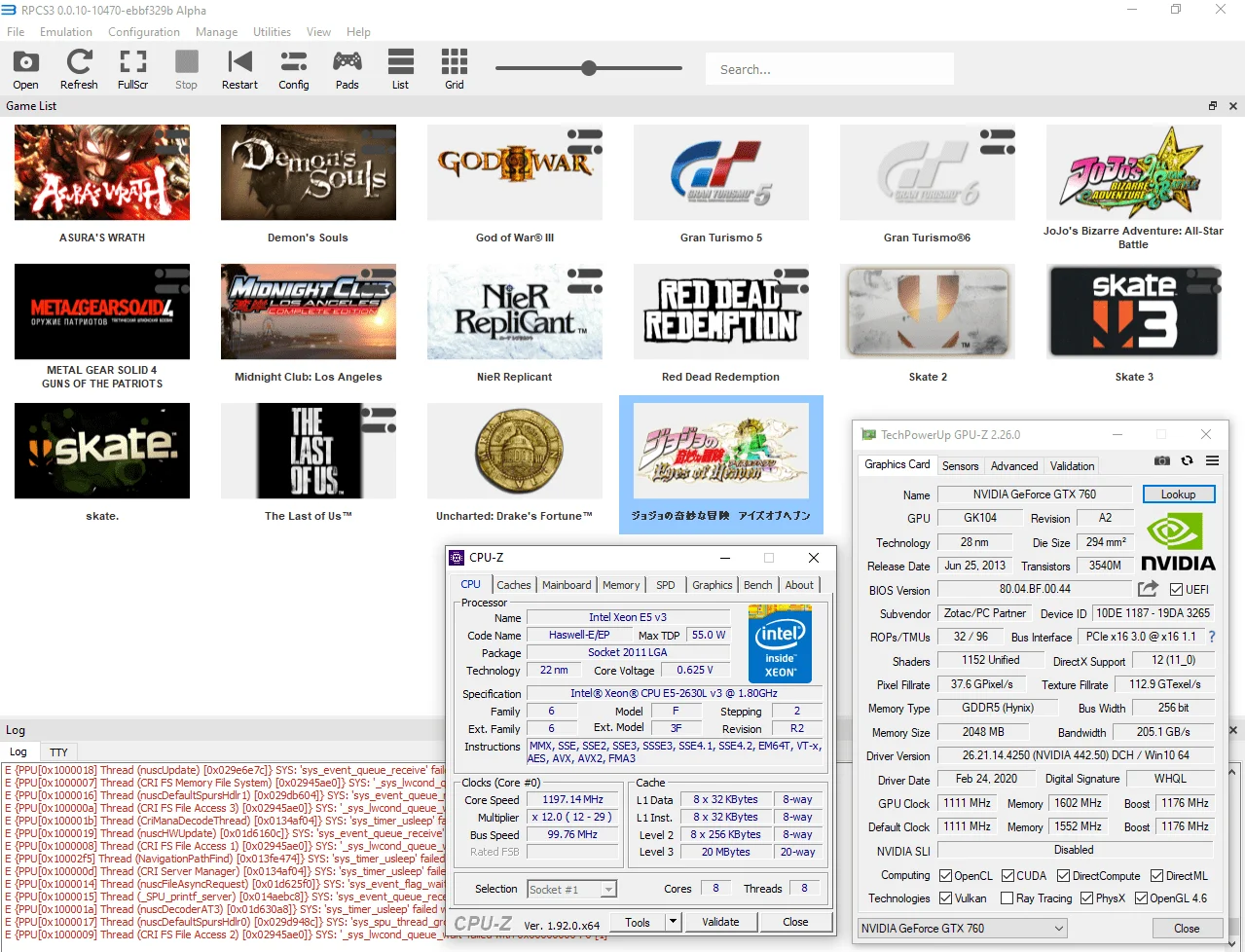
Currently, NieR Replicant emulation is accessible to almost anyone with a modern CPU and graphics card. For instance, on a test system with a Xeon E5-2630L v3, the game ran stably at 30 frames per second. After unlocking the frame rate, FPS hovered between 37-55, which isn't bad overall. If your CPU is more recent (Ryzen 1000, Core 8000, or higher-clocked Xeon E5), you can easily expect a stable 60 FPS.
 ⤢ ВІДКРИТИ
Setup
First, I'll show you how to set up the game for stable performance at the standard 30 frames per second.
First and foremost, make sure your emulator version is at least RPCS3 v0.0.10-10477-b75af69c Alpha. Update if necessary. If you're running a significantly newer version, some settings might already be optimized, so try playing the game without additional changes first.
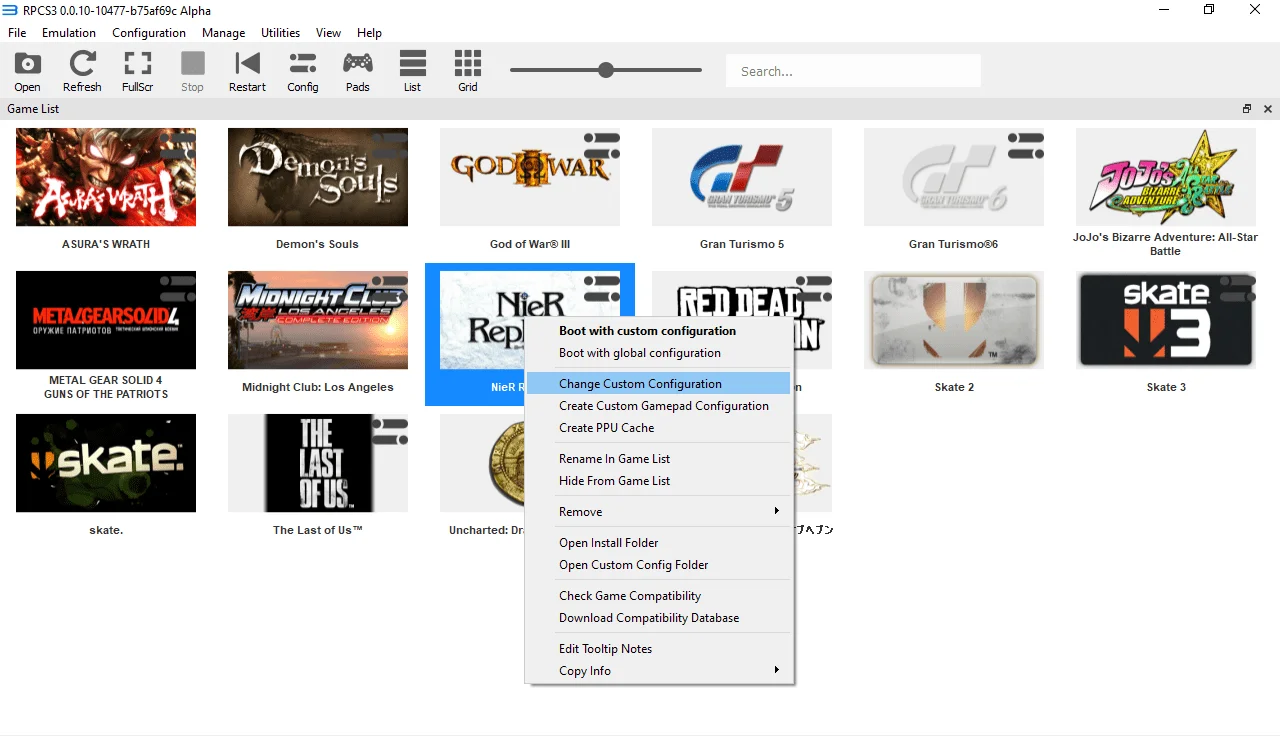
Launch the emulator, right-click on the NieR Replicant icon, then select "Change Custom Configuration":
 ⤢ ВІДКРИТИ
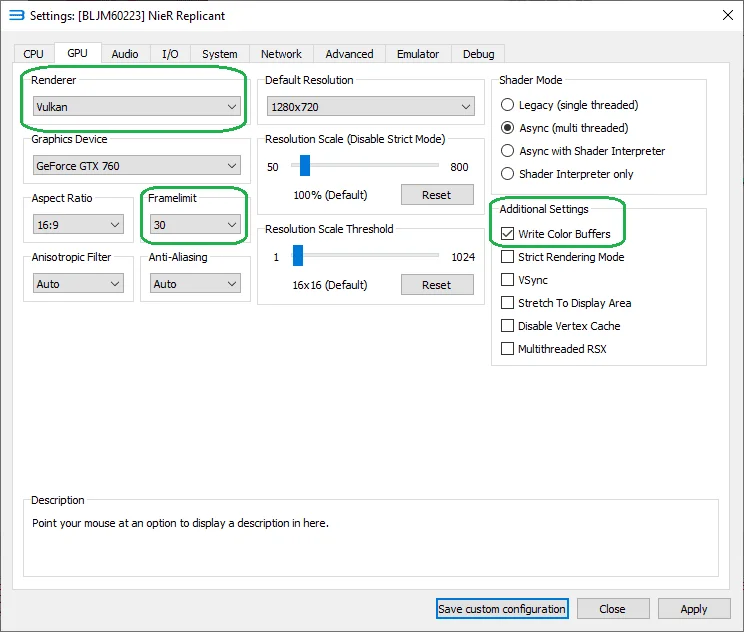
Next, go to the "GPU" tab and change the "Renderer" parameter from "OpenGL" to "Vulkan". Additionally, make sure to change the "Framelimit" parameter from "Auto" to "30" and check the box next to "Write Color Buffers".
 ⤢ ВІДКРИТИ
Here's why these changes matter: Vulkan provides significantly higher performance; setting "Framelimit" to "30" ensures stable visuals and proper game menu interaction; and enabling "Write Color Buffers" eliminates black screens and artifacts in NieR Replicant.
That's it; no further adjustments are needed. Hopefully, I've explained everything clearly. If anything is unclear, feel free to ask in the comments.
Patch to remove the 30 frames per second limit [60 FPS Patch]
This patch works with the following game versions: BLUS30481, BLES00826, BLJM60223. It removes NieR Replicant's 30 FPS cap without speeding up gameplay. In other words, you shouldn't encounter any issues playing the game at 60 FPS.
Let's get started!
Update 21.11.2020:
The guide for installing patches has moved to a separate article. Download and install the latest version of the fixes, then return to this guide and proceed to the "Patch setup" section, located further below.
Patch setup:
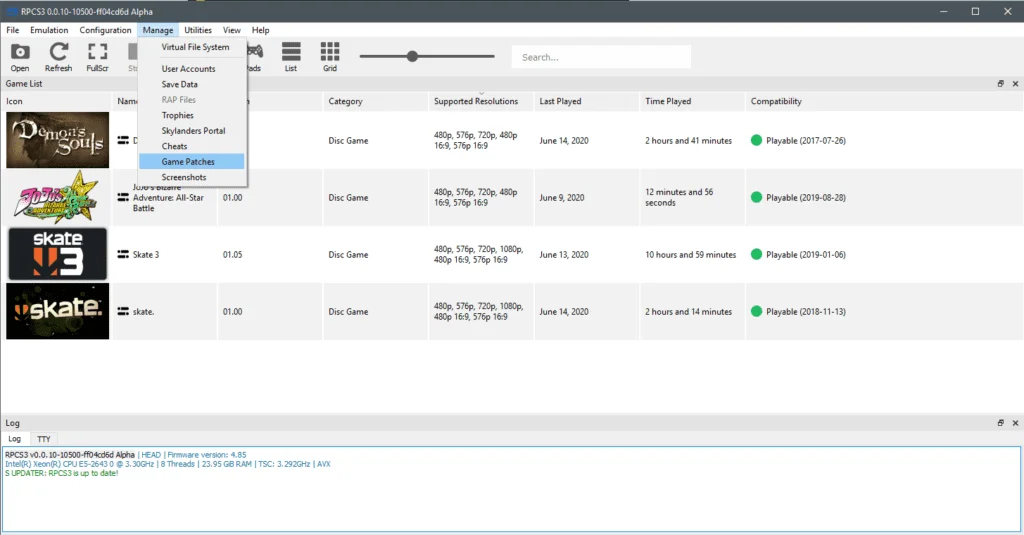
Next, launch the emulator and navigate to "Manage" => "Game Patches":
 ⤢ ВІДКРИТИ
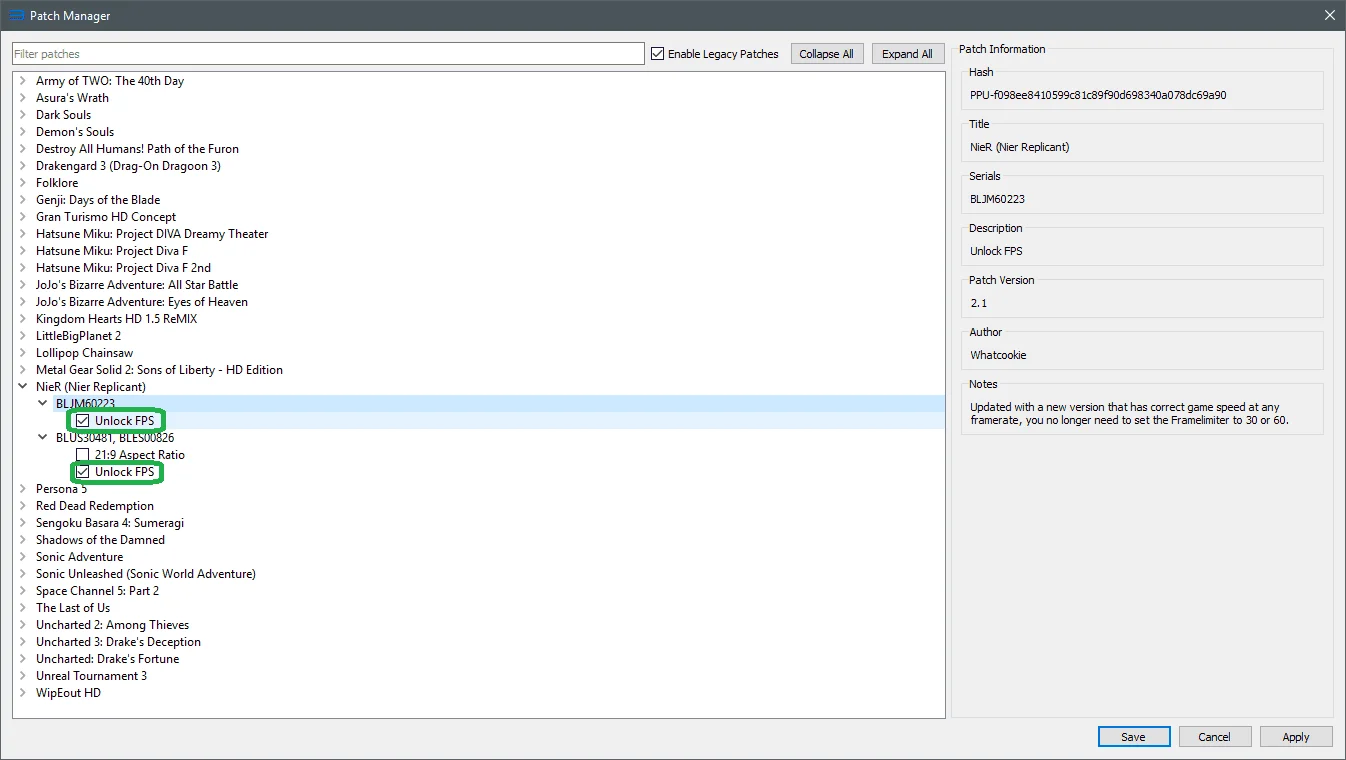
Then, expand your NieR release and set the flags as shown in the image below:
 ⤢ ВІДКРИТИ
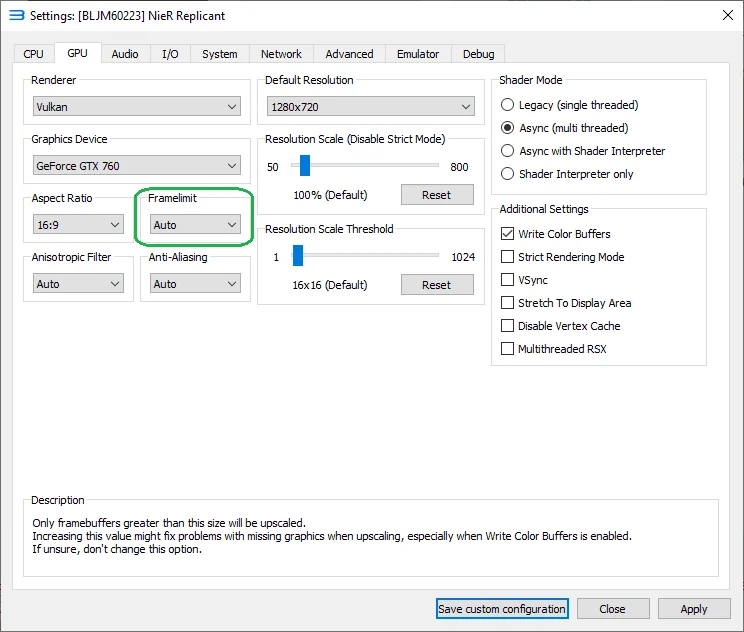
Finally, to remove the game's 30 FPS limit, you must set the "Framelimit" parameter in the "GPU" tab to "Auto":
 ⤢ ВІДКРИТИ
That's it! Your 60 FPS is ready!
Bonus: 4K resolution.
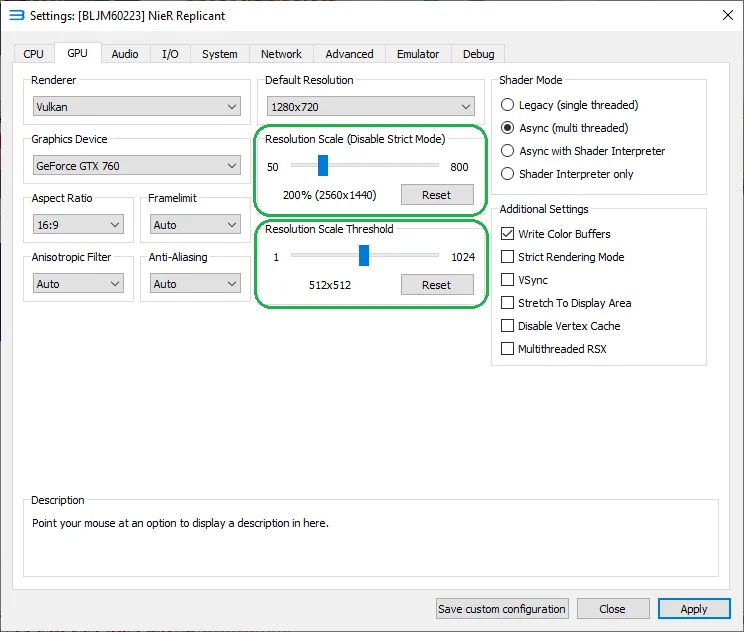
Beyond removing the 30 FPS limit, you can also run the game at 4K resolution (3840x2160). To do this, move the "Resolution Scale (Disable Strict Mode)" slider to 200%. And I must emphasize, absolutely move the "Resolution Scale Threshold" slider to 512x512!
 ⤢ ВІДКРИТИ
All done! The game is configured for comfortable 60 FPS gameplay at 4K resolution.
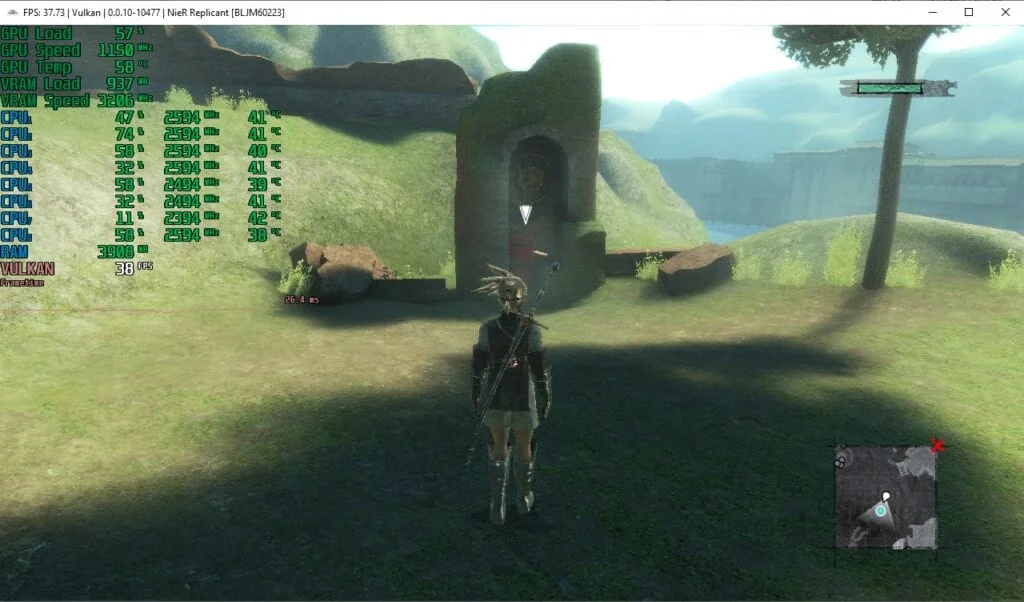
Below are screenshots of gameplay at standard resolution, but with an unlocked frame rate:
As I mentioned, the Xeon E5-2630L v3 chip can't stably hit 60 FPS. That's not surprising, given it's a relatively old and, unfortunately, low-frequency CPU. Still, it manages to keep the frame rate from dropping below 30 FPS.
Test the settings above and share your results in the comments, and ask any questions you have.
I also plan to test various hardware in RPCS3. If you're interested in detailed CPU benchmark results for this game's emulation, please let me know in the comments below.
Thanks for reading.
P.S.: You can save your game here (at least in the very beginning):
 ⤢ ВІДКРИТИ