![Retro overclocking: pushing the AMD Phenom II X4 955 BE [C3, Deneb]](/_next/image?url=https%3A%2F%2Fumtale-media.s3.eu-central-1.amazonaws.com%2Fimages%2Fcontent%2F3e163818-e420-4344-b078-ff45db867125.webp&w=3840&q=75)
BLOGS · OVERCLOCKING
PUBLISHED
READING9 min
Retro overclocking: pushing the AMD Phenom II X4 955 BE [C3, Deneb]
A deep dive into overclocking the legendary AMD Phenom II X4 955 BE (Deneb, C3) by raising the system bus and CPU-NB frequencies.
Most AMD Phenom II owners with unlocked multipliers overclock their chips using only the multiplier, bypassing the system bus. This ignores the speed of the L3 cache and the integrated memory controller (IMC). Since these components run at a fixed 2000 MHz on these CPUs, overclocking just the CPU cores won't yield much of a performance boost.
In this guide, we will properly test the overclocking potential of the aging quad-core AMD Phenom II X4 955 Black Edition.
Welcome to part six of our Retro Overclocking series.
The processor
Our test sample is marked HDZ955FBK4DGM CACAC; the silicon was fabricated in Germany and packaged in Malaysia.
Codenamed Deneb, the AMD Phenom II X4 955 Black Edition is based on the K10.5 architecture. Under the hood, this CPU features a single 45nm quad-core monolithic Deneb die (the 6M revision). Fortunately, our sample is the C3 stepping—the best revision available for this chip. It offers superior overclocking headroom and lower power draw compared to the older C2 stepping, which was known for being power-hungry and hot.
The Phenom II X4 955 features four cores clocked at 3200 MHz (16x multiplier, 200 MHz bus speed, and a 2000 MHz HT bus and IMC/L3 cache speed). The chip has 512 KB of L2 cache per core and a shared 6 MB L3 cache. Stock core voltage is set at 1.40V, and this Phenom’s TDP sits at 125W.
Thanks to AMD's consumer-friendly approach at the time, the Phenom II X4 955 supports both DDR2 and DDR3. Designed to fit older AM2 motherboards as well as newer AM3/AM3+ sockets, the integrated memory controller has to handle both memory types. And it does so flawlessly.
 ⤢ ВІДКРИТИ
For our testing, we paired the Phenom II X4 955 with DDR3 memory on an AM3+ motherboard.
On the downside, the X4 955 lacks support for the SSE4.1 and SSE4.2 instruction sets, which are now mandatory for many modern applications. This is a massive drawback, as it means some games and apps simply won't launch at all. It's a real shame, because the chip still has enough muscle to be useful today.
Test bench
CPU — Phenom II X4 955;
Cooler — Cooler Master Hyper 212 Black Edition (RR-212S-20PK-R1);
RAM for AM3+ — two 8GB sticks of HyperX Genesis Na’Vi Edition (KHX16C9C2K2/8) for a total of 16GB (used for the final overclock with voltage bumps), and two 2GB Hynix HMT325U7EFR8C-RD sticks for the rest of the testing;
AM3+ motherboard — ASUS M5A97 LE R2.0;
Graphics card — KFA2 GeForce RTX 2060 SUPER 8GB (~1950/14000 MHz, Power Limit 112%);
SSD — Kingston A400 120GB (SA400S37120G) (Windows 10/apps);
HDD — Seagate BarraCuda 2TB (ST2000DM008-2FR102) (games);
Power supply — Chieftec GPS-1250C.
Overclocking the Phenom II X4 955 Black Edition
First, let's see what our Phenom II X4 955 can do at stock voltages for the cores, RAM, memory controller, and L3 cache.
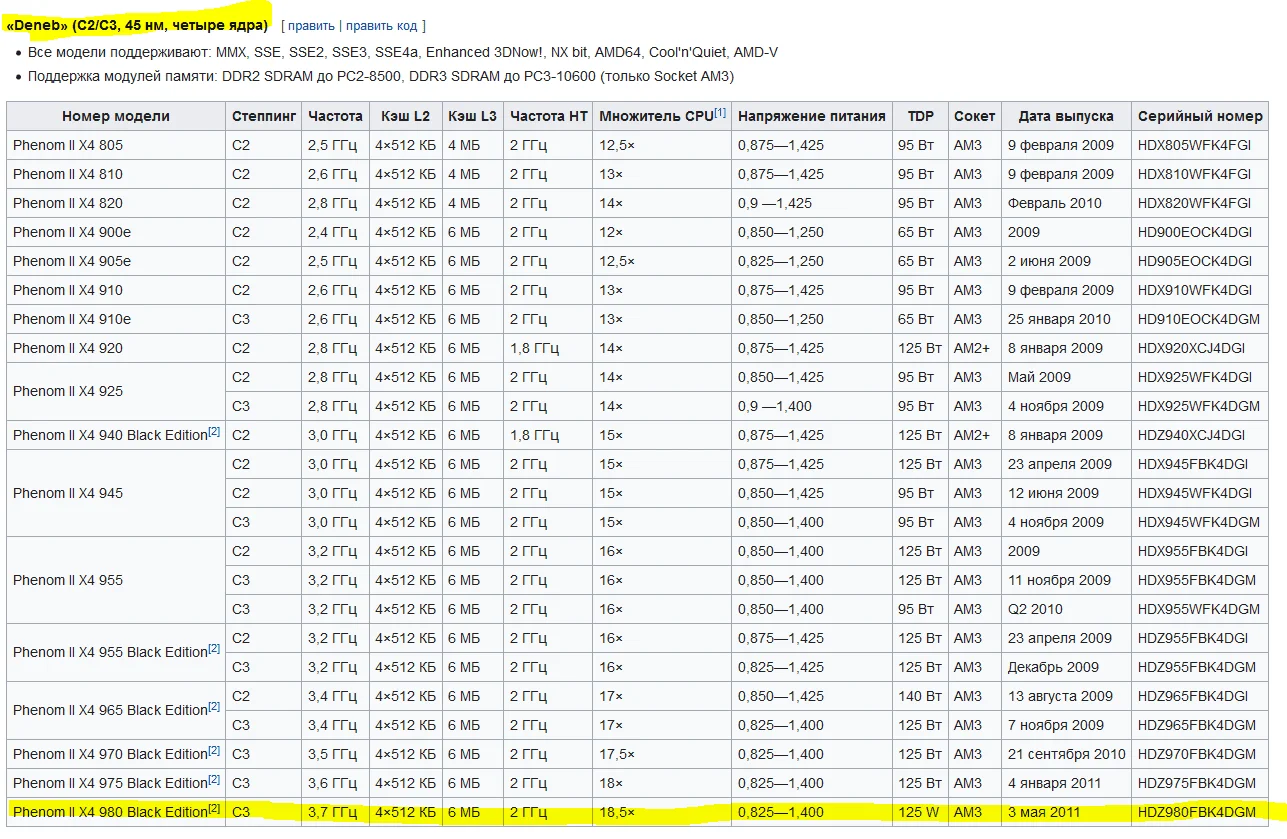
If you're not an expert on fabrication nodes or CPU generations, don't worry. To estimate what your processor is theoretically capable of, just find its core codename (Deneb, in our case) and look up the top-tier model based on that exact same core.
 ⤢ ВІДКРИТИ
The fastest Deneb-based chip is the Phenom II X4 980. It runs at 3700 MHz, meaning our chip should theoretically be stable at 3.7 GHz as well. Let's test this theory. Instead of taking the easy route of just raising the multiplier, we'll overclock using the system bus.
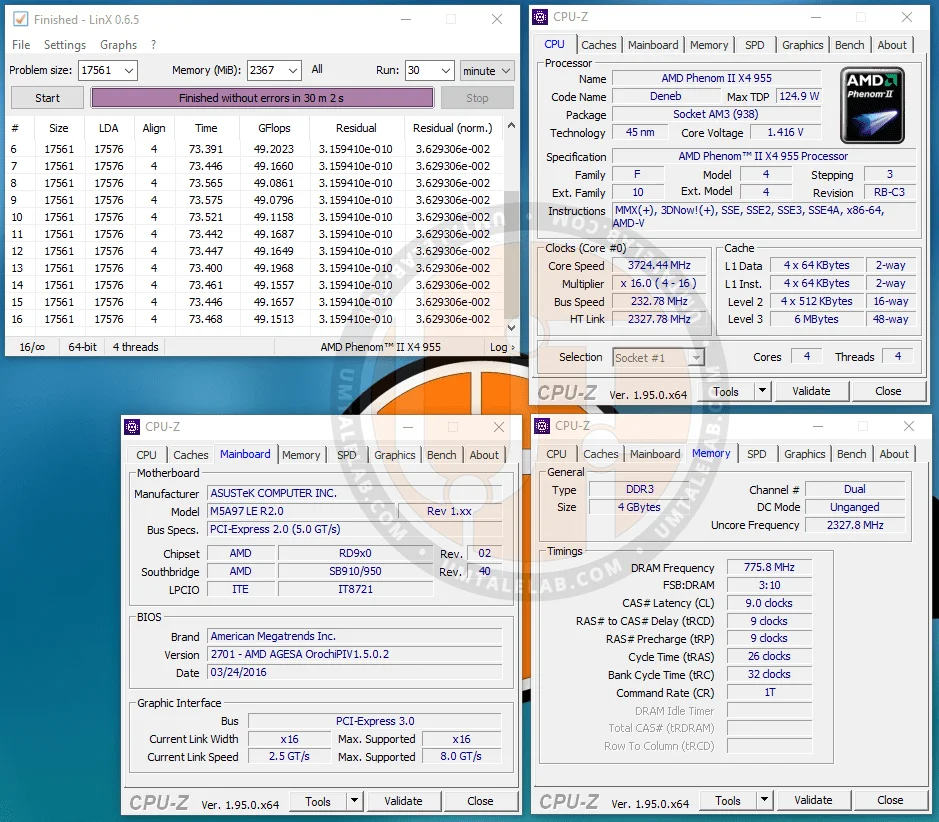
To push our Phenom to 3700 MHz, we need to set the bus speed to 232 MHz and ensure the RAM can handle 1600 MHz. If it can't, don't sweat it—just drop the RAM multiplier to 1066 MHz to end up with roughly 1333 MHz.
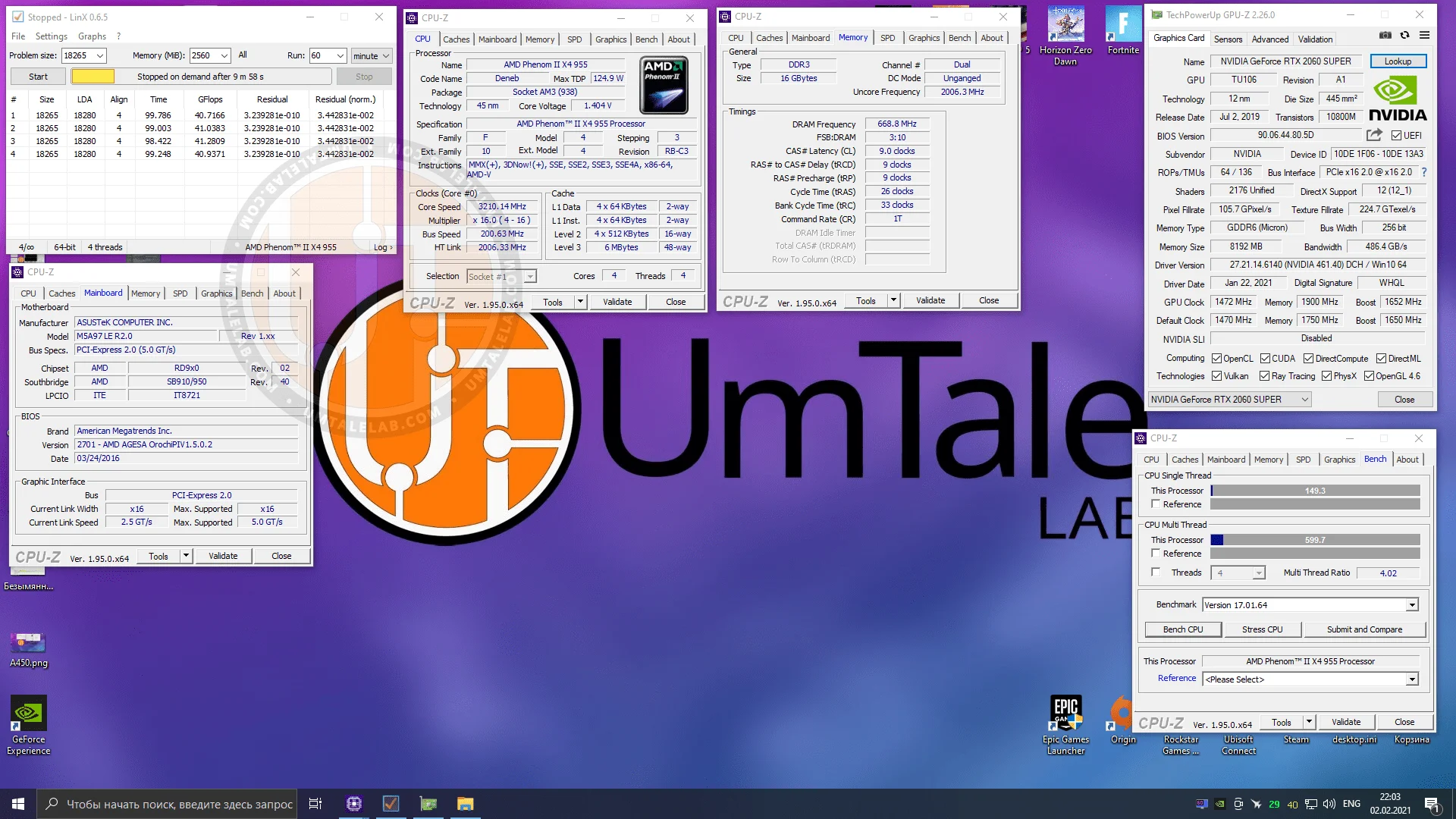
After a reboot and a quick run of LinX, the processor is perfectly stable at 3724 MHz.
 ⤢ ВІДКРИТИ
As a reminder, I didn't raise any of the supply voltages—they were locked manually in the BIOS to prevent the motherboard from auto-boosting them. Technically, this kind of overclocking shouldn't harm the CPU, motherboard, or RAM, even in the long run. Still, keep in mind that any overclocking voids your warranty. Therefore, any hardware modifications you make are entirely at your own risk!
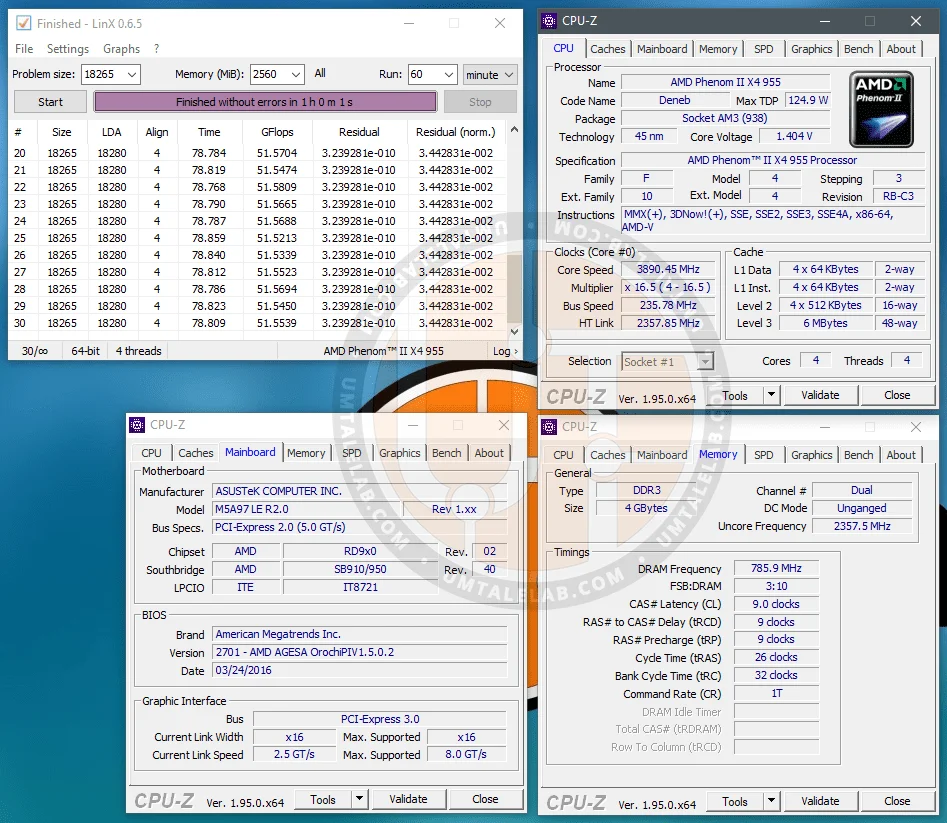
Next, without touching the voltages, increase the system bus frequency by 5 MHz, reboot, and run a stability test in LinX. If the test passes, add another 5 MHz to the bus frequency and test again.
Ultimately, our Phenom II X4 955 sample hit a stable 3890 MHz at stock voltages:
 ⤢ ВІДКРИТИ
BIOS settings for the AMD Phenom II X4 955 overclock to 3890 MHz:
CPU Core voltage: 1.400 V (+0.000 over stock);
System bus (BCLK): 235 MHz;
CPU-NB voltage (L3 cache/memory controller): 1.000 V (+0.000 over stock);
RAM multiplier in BIOS: 1333 MHz (resulting in an effective memory frequency of 1570 MHz after overclocking);
DDR3 voltage: 1.500 V (+0.000 over stock).
While this is far from a record—some enthusiasts have pushed core frequencies close to 4000 MHz without raising voltages—there's not much you can do. Overclocking is, after all, a silicon lottery.
Now, let's get to the most interesting part: overclocking with voltage bumps.
The process here is similar: keep raising the system bus by 5 MHz, rebooting, and testing for stability in LinX. If it passes, add another 5 MHz and test again. If the program errors out or the system crashes, start by bumping the core voltage by 0.05 V and rebooting. If it's still unstable, the memory controller and L3 cache (CPU-NB) probably need more juice. Raise the CPU-NB voltage by 0.05 V, reboot, and test once more.
However, for obvious reasons, this is not the most efficient way to find the maximum stable frequency.
Once your processor becomes unstable at a certain frequency without a voltage bump, drop the core multiplier by 2 or 3 steps. This isolates the CPU cores from the equation so you can check stability. It allows you to dial in the stable frequency of the AM3 platform's most critical component: the CPU-NB.
In my case, dropping the multiplier by 2 steps resulted in a core frequency of 3400 MHz. Since this is significantly lower than what I achieved at stock voltage, core speed won't act as a bottleneck going forward.
Next, to push the CPU-NB frequency to around 2500 MHz, I set the BCLK to 250 MHz. This brought the core clock to 3625 MHz, meaning I still had some headroom without increasing core voltage. Predictably, however, the system refused to boot with these settings.
I then bumped the CPU-NB voltage to 1.200 V. The system booted but crashed to a BSOD within minutes. Only after raising the CPU-NB voltage to 1.350 V did I manage to successfully pass a one-hour LinX benchmark.
Now that the memory controller and L3 cache clocks are sorted, it's time to focus on overclocking the cores.
Once the CPU-NB is overclocked, headroom for other processor blocks shrinks significantly. Essentially, all that's left is to raise the previously lowered CPU Core multiplier step-by-step, bumping the vCore voltage after each failed LinX run.
The first stable milestone was 4000 MHz at a core voltage of 1.475 V, which is quite respectable. Still, I pushed further and decided to increase the core voltage to AMD's maximum recommended 1.550 V.
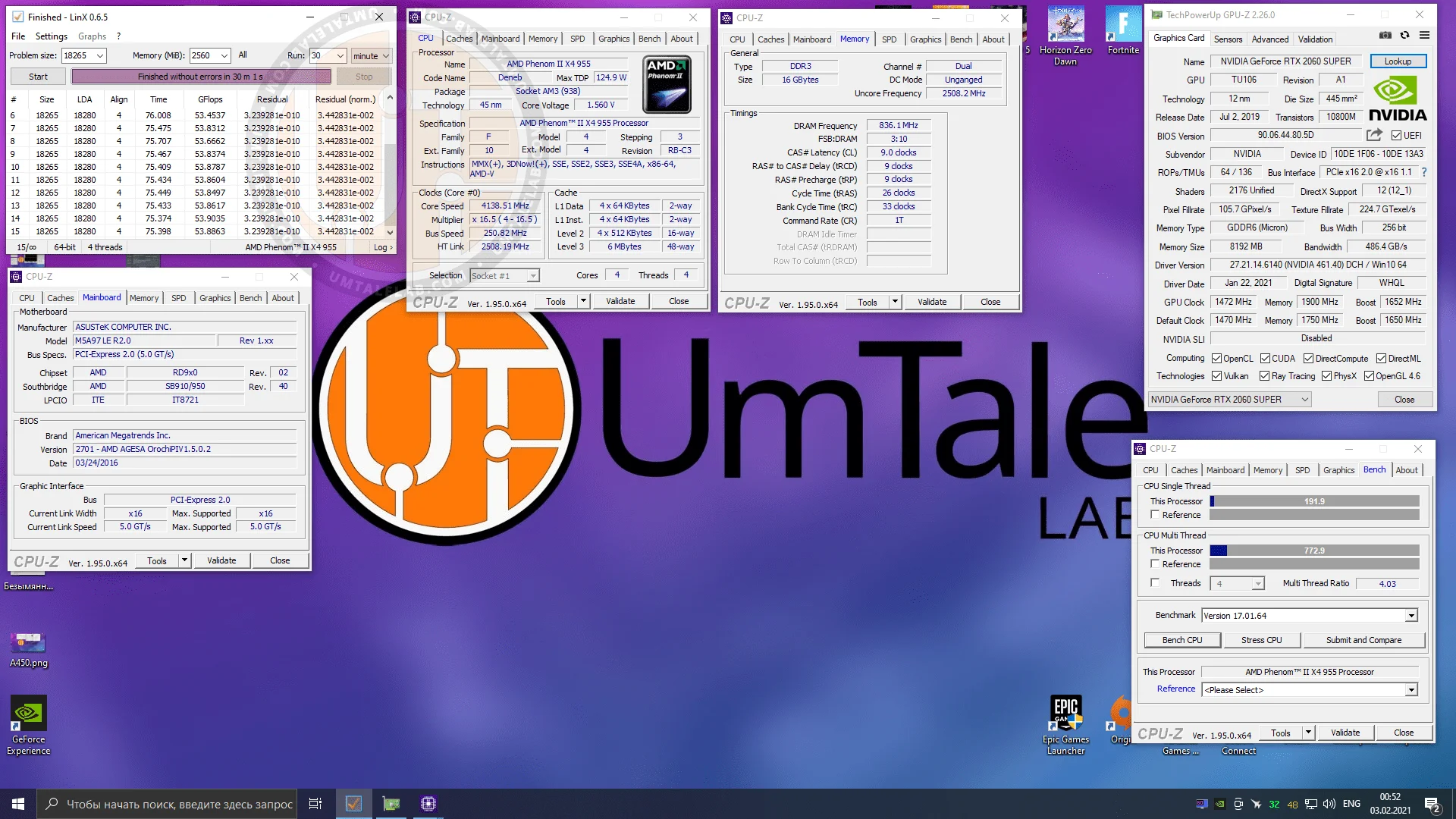
With increased voltages, the AMD Phenom II X4 955 topped out at 4138 MHz:
 ⤢ ВІДКРИТИ
BIOS settings for the AMD Phenom II X4 955 overclock to 4138 MHz:
CPU Core voltage: 1.550 V (+0.150 over stock);
System bus (BCLK): 250 MHz;
CPU multiplier: 16.5;
CPU-NB voltage (L3 cache/memory controller): 1.350 V (+0.350 over stock);
RAM multiplier in BIOS: 1333 MHz (resulting in an effective memory frequency of 1672 MHz after overclocking);
DDR3 voltage: 1.600 V (+0.100 over stock).
HT link voltage (NB HT voltage): 1.250 V (+0.150 over stock)
Keep in mind that with these core and CPU-NB voltages, power consumption spiked past 200 W. If you decide to replicate this, you should definitely invest in decent cooling for both the CPU and the VRM area. And remember: any hardware modifications you make are entirely at your own risk!
P.S.:
A full performance review of the AMD Phenom II X4 955 processor should be out by late spring (barring any changes to my plans). However, you can already check out the performance gains from overclocking this chip in our article "Testing 16 budget CPUs in The Witcher 3: Wild Hunt [February 2021]", which features benchmarks for the Phenom II X4 955 at 3200 MHz and 4138 MHz.
Thanks for reading, and stay tuned!
If you found this article helpful and want to see more benchmarks like this on UmTale Lab, please support us on Patreon! Our main goal is to expand our hardware library and improve testing quality (such as upgrading our test bench storage to a larger SSD, buying a capture card to prevent ShadowPlay recording from impacting benchmark results, and more).