![Overclocking the Intel Xeon W3520 (i7-920) [D0, Bloomfield]](/_next/image?url=https%3A%2F%2Fumtale-media.s3.eu-central-1.amazonaws.com%2Fimages%2Fcontent%2F2074b7c7-58e8-4dad-b0f6-691ad9326282.webp&w=3840&q=75)
BLOGS · OVERCLOCKING
PUBLISHED
READING7 min
Overclocking the Intel Xeon W3520 (i7-920) [D0, Bloomfield]
A detailed guide to overclocking the Intel Xeon W3520 (LGA 1366) to 4200 MHz. We compare its performance and ask: is it still worth overclocking old CPUs today?
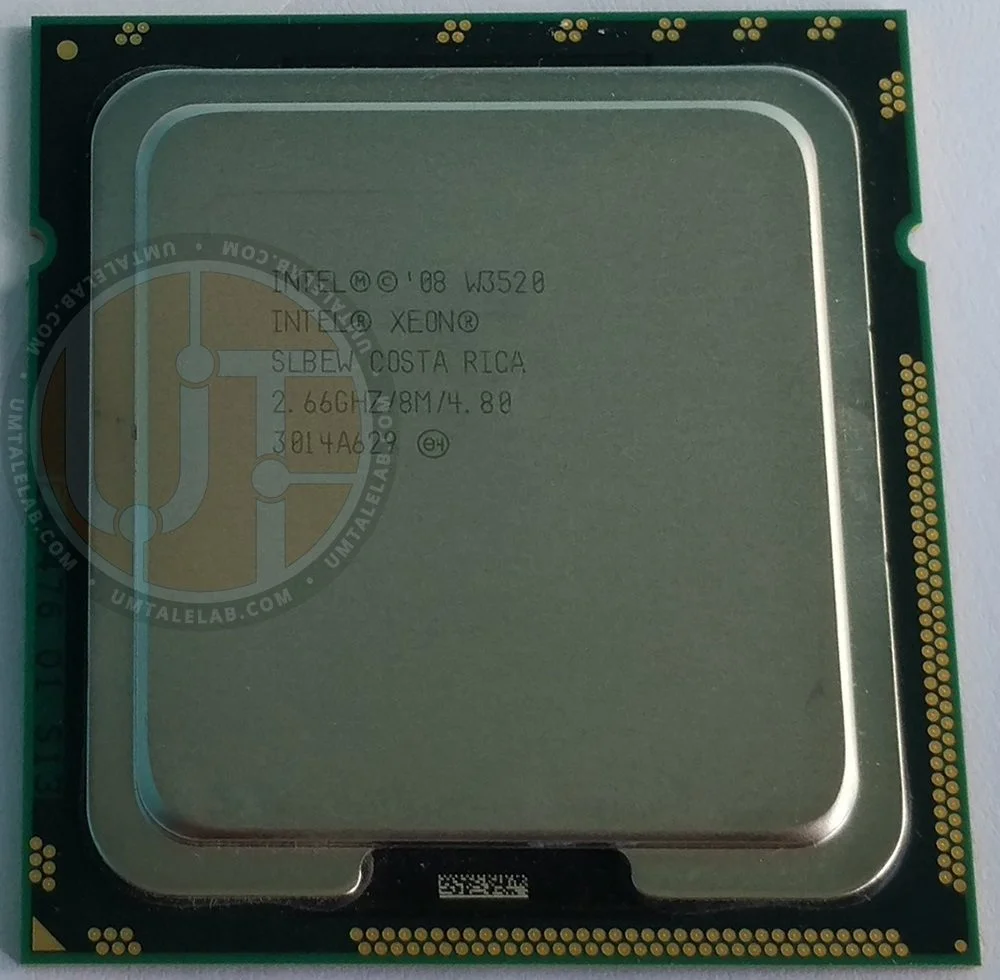
The Intel Xeon W3520 is the cheapest 4-core, 8-thread processor for the LGA 1366 platform. It's also a complete analogue to the desktop Core i7-920 chip. Priced at just $0.70-1.4 at the time of writing, it's an extremely appealing option for an overclocking build.
In this article, we'll continue exploring the overclocking potential of LGA 1366 platform processors. Next up is the 4-core, 8-thread Xeon W3520 chip.
Processor
 ⤢ ВІДКРИТИ
W3520 specifications
So, what we have here is a complete analogue to the Core i7-920 chip. The only exception is the Xeon W3520's full support for error-correcting memory (DDR3 ECC, not to be confused with DDR3 ECC REG).
 ⤢ ВІДКРИТИ
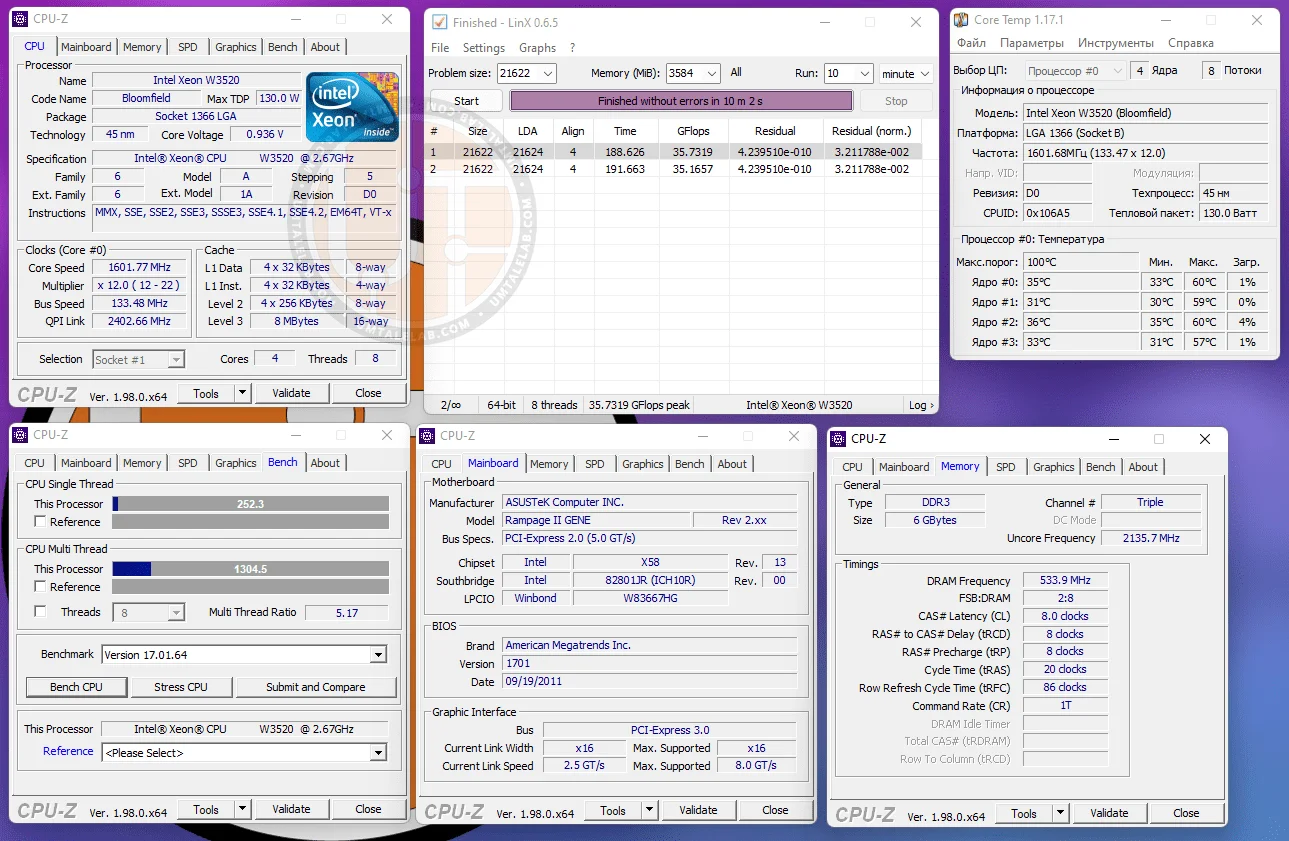
The Xeon W3520 is based on the 45nm Bloomfield D0 stepping core (Nehalem architecture). It features 4 cores and 8 threads, operating at a base frequency of 2667MHz. Thanks to Turbo Boost, the maximum all-core frequency is a modest 2800MHz. The chip also includes 8MB of L3 cache and a triple-channel RAM controller. The controller's frequency is linked and caps out at just 2133MHz (compared to 2667MHz on higher-end chips).
The W3520 only supports a maximum RAM speed of 1066MHz. This is an important consideration, as higher-end processors (like the X5550/X5570/X5660) support faster 1333MHz memory.
Test setup
Processors — Xeon W3520 and Xeon E5-2620v3;
Cooling — Cooler Master Hyper 212 Black Edition (RR-212S-20PK-R1);
RAM for LGA 1366 overclocking — 2x 4GB Kingston HyperX Savage HX316C9SRK2/8, 8GB total;
RAM for LGA 2011 v3 — 4x 4GB G.SKILL DDR4@1866MHz F4-2400C15S-4GNT, 16GB total (timings 10-10-10-24);
Motherboard for LGA 1366 overclocking — ASUS Rampage II Gene Rev 2 (Bios 1701);
Motherboard for LGA 2011 v3 — Kllisre X99-D8 (AD12) with modified BIOS (Turbo Boost Unlocked, timings control enabled);
Graphics card — XFX R9-270X-CDFC@1150/1500MHz;
Solid-state drive — KINGSTON 120GB SA400S37120G (Windows 11), KINGSTON 480GB SA400S37/480G (Storage-demanding games);
Hard drive — Seagate 2TB ST2000DM008-2FR102 (Other games);
Power supply — Chieftec GPS-1250C.
Xeon W3520 overclocking
First, let's determine what our Xeon W3520 sample can achieve at nominal voltages for the cores, RAM, and memory controller.
If you're not familiar with process nodes or CPU generations, don't worry. To find out what your CPU model is theoretically capable of, simply identify its core's codename (in our case, Westmere-EP), then 'Google' the top-end model based on that same core.
 ⤢ ВІДКРИТИ
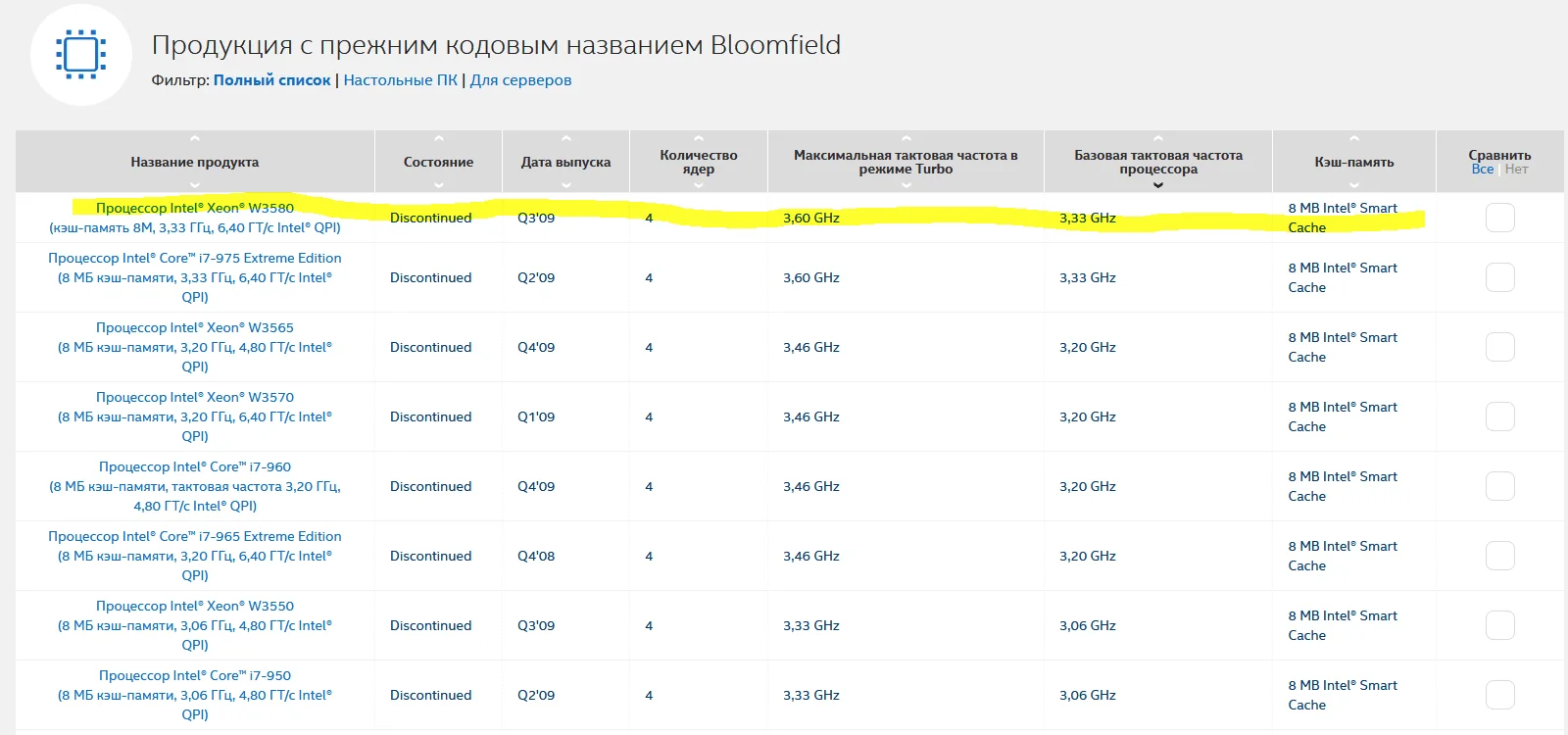
The fastest 6-core Bloomfield processor is the Xeon W3580. It has a base frequency of 3333 MHz and a significant Turbo Boost up to 3600 MHz. Therefore, our chip should theoretically (and I stress, *theoretically*) be able to stably operate at 3.3-3.6 GHz with stock voltages.
Overclocking without voltage increase
First, we tested our sample's overclocking potential at 1.1V for all internal CPU nodes. It turned out this particular W3520 could stably run at 3500 MHz for the cores and 2800 MHz for the UnCore section without significant issues. This is a very respectable result, hinting at good overclocking potential – and, spoiler alert, it delivered.
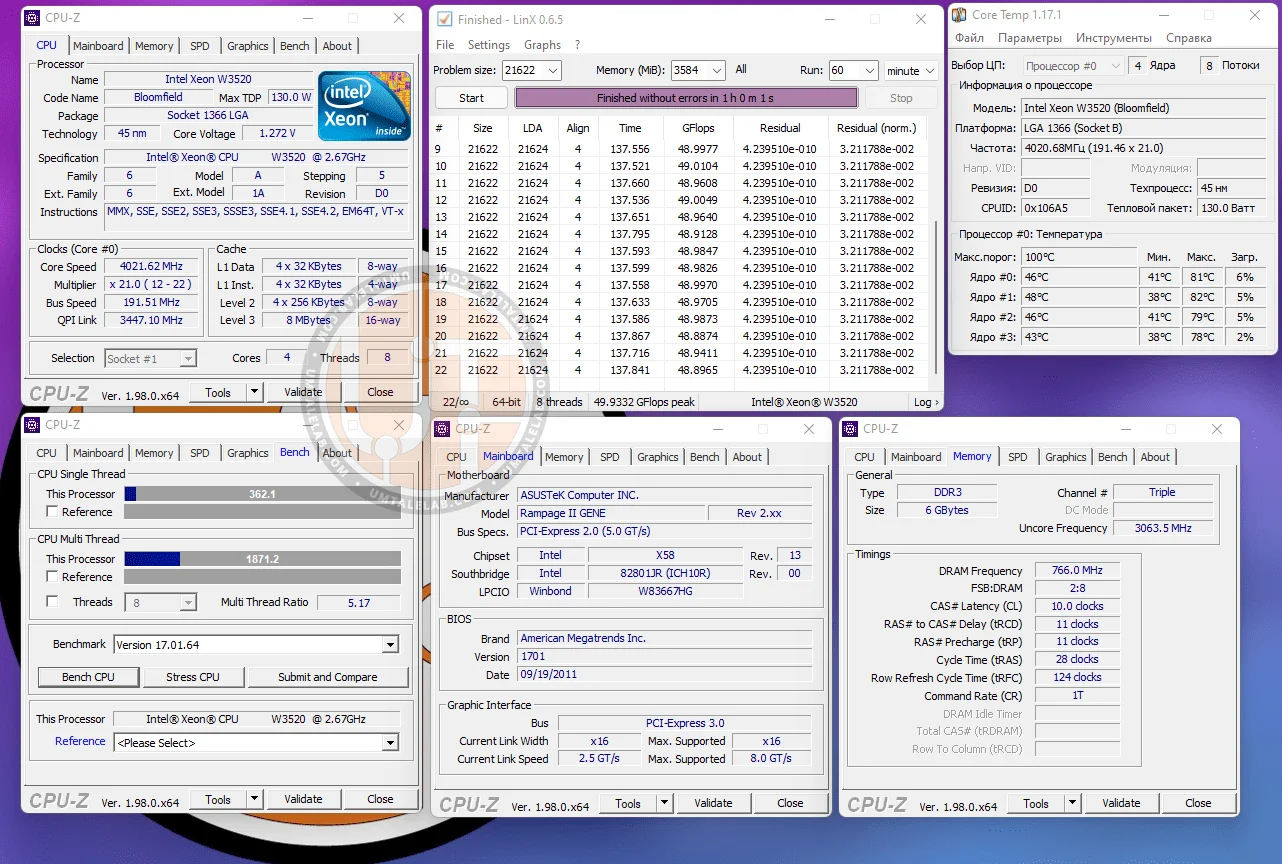
Next, we consulted Intel's official specifications and set the CPU Core and Uncore voltages to 1.272V. With these settings, the W3520 managed to stably operate at 4000 MHz, which is also a very good result:
 ⤢ ВІДКРИТИ
This frequency-to-voltage ratio should be sustainable for 24/7 operation on 99% of existing branded motherboards. Of course, this overclock's stability relies on having a well-ventilated case or an open test bench.
Overclocking with voltage increase
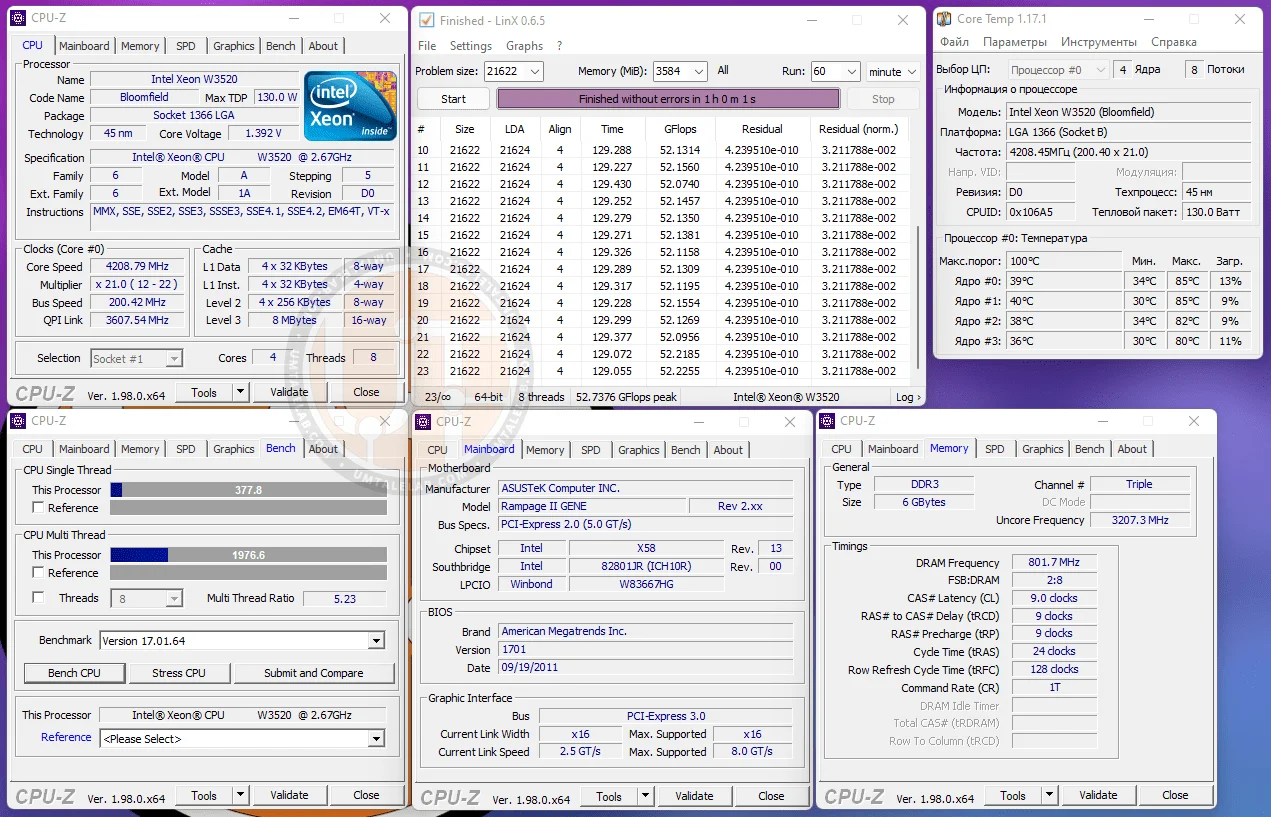
We achieved a maximum stable overclock of 4200/3200 MHz (Core/UnCore), which is quite significant for a 45nm die. We didn't need to drastically increase the voltage to hit these speeds: the core voltage was set at 1.400 V, and the UnCore received 1.325 V. While these are acceptable voltage levels, air cooling couldn't keep up, forcing us to use a liquid cooling system. Yet, as the screenshot below shows, even LCS wasn't enough to maintain acceptable temperatures.
 ⤢ ВІДКРИТИ
Meanwhile, the RAM ran at 1600 MHz with 9-9-9-24-128 1T timings and 1.58 V. We should point out that the 1900 MHz RAM overclock we achieved with the 32nm die proved unattainable here, no matter what voltage, multipliers, or BCLK frequencies we tried.
Xeon W3520: Stock vs. overclocked frequencies and Xeon E5-2620 v3
Here, we're doing a quick test of the W3520 chip at 2800 MHz and 4200 MHz across several games, benchmarks, and applications. We'll also compare it against the most affordable CPU in the current budget LGA 2011v3 platform, the Xeon E5-2620v3.
Applications and benchmarks
AIDA64 v6.50.5800
W3520@2667-2800MHz | W3520@4200MHz | E5-2620v3@3200MHz | |
Memory Read | 17818 | 25279 | 45365 |
Memory Write | 13612 | 20029 | 45215 |
Memory Copy | 16673 | 23689 | 45439 |
Memory Latency | 72.9 | 52.8 | 68.6 |
CPU Queen | 32141 | 48284 | 56119 |
CPU PhotoWorxx | 8460 | 11667 | 26937 |
CPU ZLib | 188.1 | 283 | 409.3 |
CPU AES | 605 | 908 | 21707 |
CPU SHA3 | 438 | 658 | 1765 |
FPU Julia | 9334 | 14012 | 37758 |
FPU Mandel | 4526 | 6798 | 19242 |
FPU SinJulia | 3849 | 5781 | 6088 |
FP32 Ray-Trace | 1341 | 2055 | 6655 |
FP64 Ray-Trace | 735 | 1129 | 3484 |
Cinebench R15, Cinebench R20, Cinebench R23, V-Ray 4, V-Ray 5, LinX 0.6.5, 7-Zip
Benchmark | W3520@2667-2800MHz | W3520@4208MHz | E5-2620v3@3200MHz | Overclocking Gain |
Cinebench R15 | 422 | 635 | 963 | 50.47% |
Cinebench R20 | 879 | 1326 | 2221 | 50.85% |
Cinebench R23 | 2255 | 3366 | 5658 | 49.26% |
V-Ray 4 | 2428 | 3600 | 6579 | 48.27% |
V-Ray 5 | 1531 | 2256 | 4285 | 47.35% |
LinX 0.6.5 | 35 | 51 | 182 | 45.71% |
7-Zip | 19494 | 29296 | 38768 | 51.83% |
The average performance increase across applications and benchmarks was about 48%. This isn't the best result, especially since the chip's clock speed was boosted by exactly 50%.
Games
Far Cry 5
Far Cry 5 | Average FPS | Minimum FPS |
W3520@2667-2800MHz | 59 | 46 |
W3520@4209MHz | 82 | 67 |
E5-2620v3@3200MHz | 102 | 82 |
Overclocking Gain | 38.98% | 45.65% |
Watch Dogs Legion
Watch Dogs Legion | Average FPS | Minimum FPS |
W3520@2667-2800MHz | 37 | 12 |
W3520@4209MHz | 50 | 18 |
E5-2620v3@3200MHz | 60 | 26 |
Overclocking Gain | 35.13% | 50% |
Gaming performance follows a similar trend. The most significant performance boost comes in minimum frame rates, which is excellent news, as this metric critically impacts gameplay fluidity. However, the average FPS only saw a rather dismal 38% increase from overclocking.
Conclusion
First, let's talk about overclocking. Hitting 4200MHz is an impressive feat. Roughly 50% of all existing 4-core Bloomfield processors, excluding very low-frequency CPUs, should be able to reach this clock speed.
Even with such a significant overclock, the Xeon W3520 still struggles to deliver acceptable performance in Watch Dogs Legion, falling short of even the cheapest LGA 2011 v3 CPUs.
Simply put, overclocking old LGA 1366 processors isn't a financially sound move in 2021-2022. However, if you already own all the necessary components and are simply asking, "is it worth it?" then the answer is yes. If overclocking won't cost you any extra money, go for it. Just remember: any modifications to your hardware are at your own risk.
If you found this article helpful and want to see more tests like it on UmTale Lab, please consider supporting us on Patreon! Our primary fundraising goal is to expand our component library and enhance testing quality. This includes upgrading our test bench SSD to a larger capacity, purchasing a capture card to minimize the impact of ShadowPlay gameplay recording on benchmark results, and more.