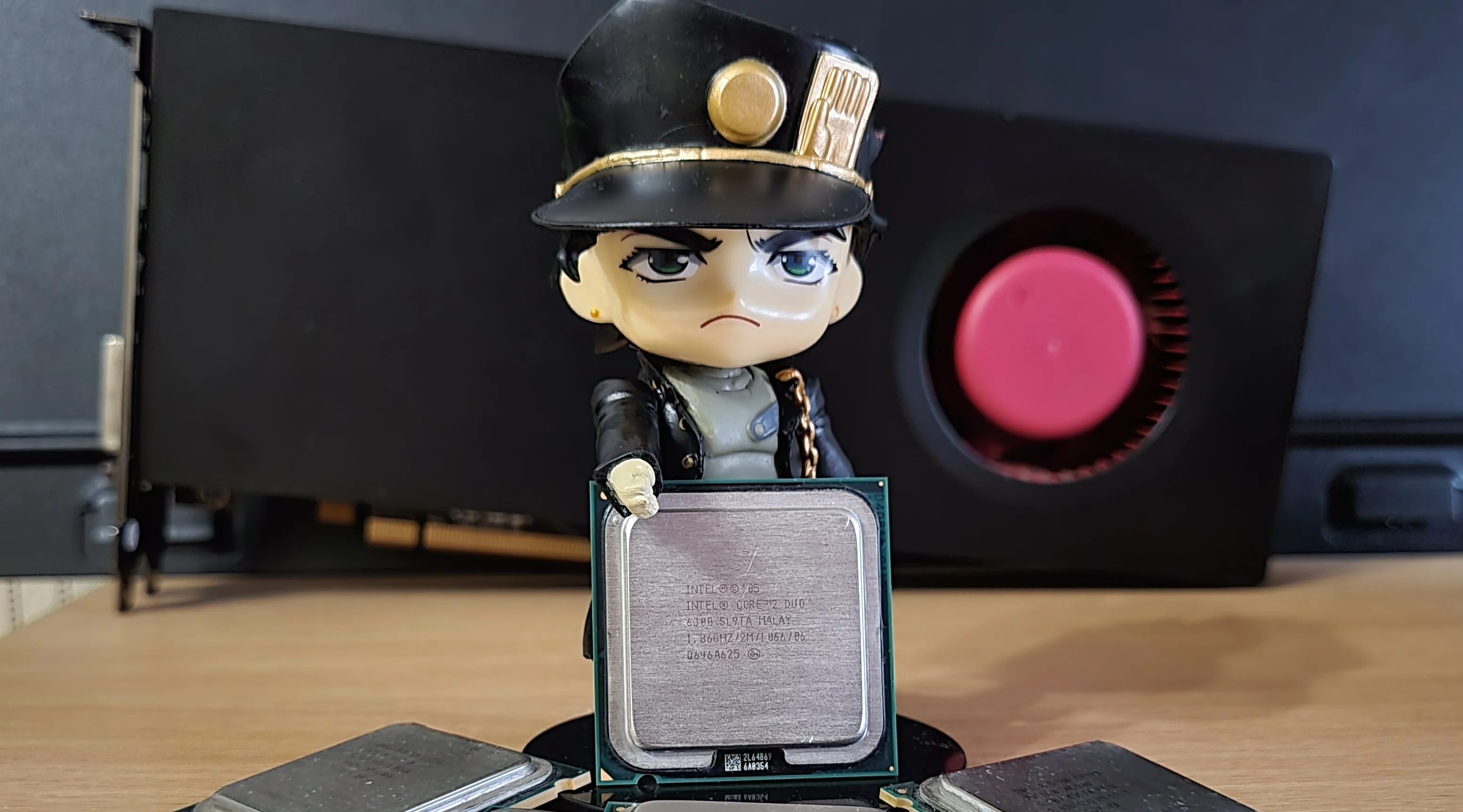
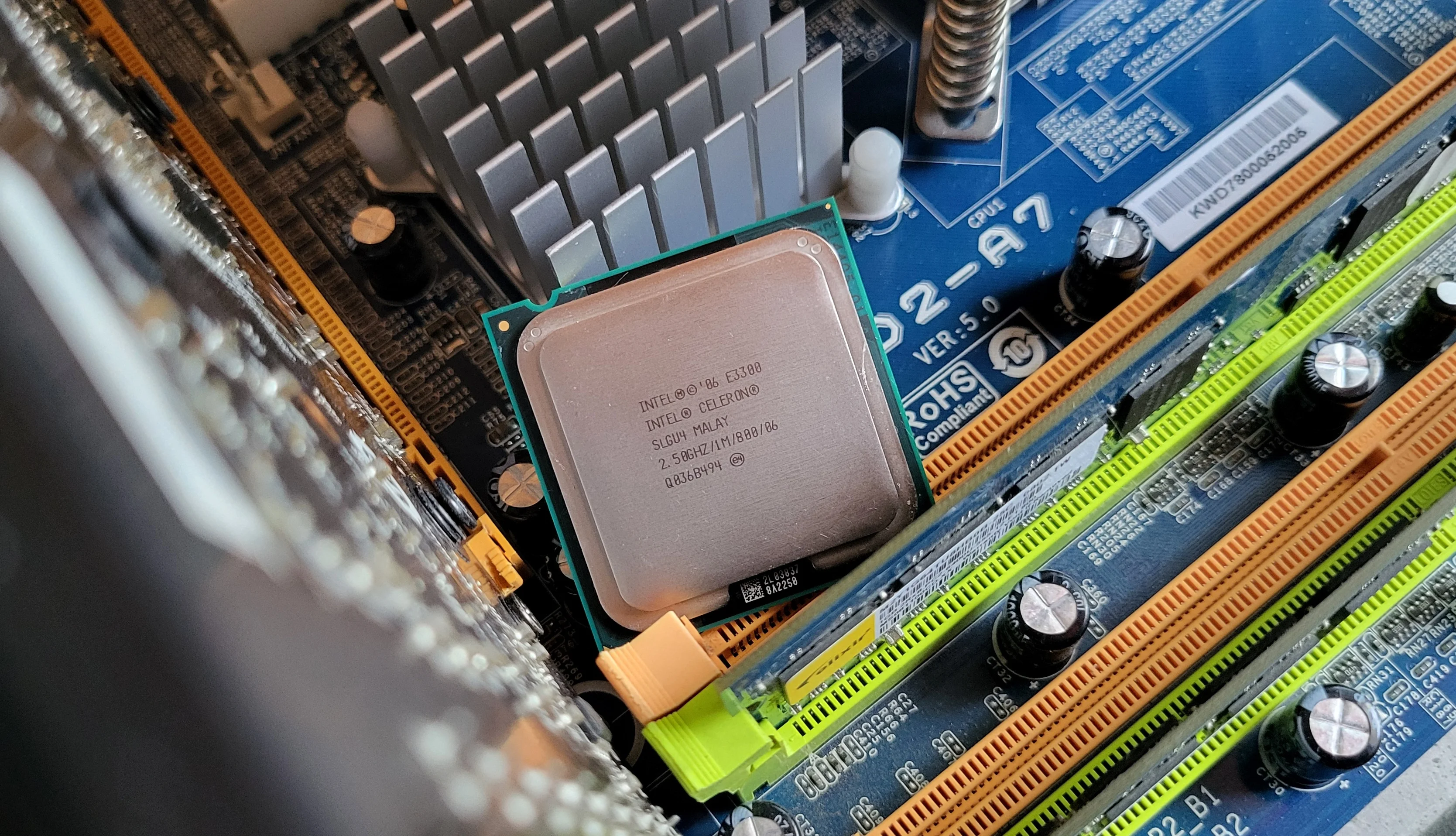
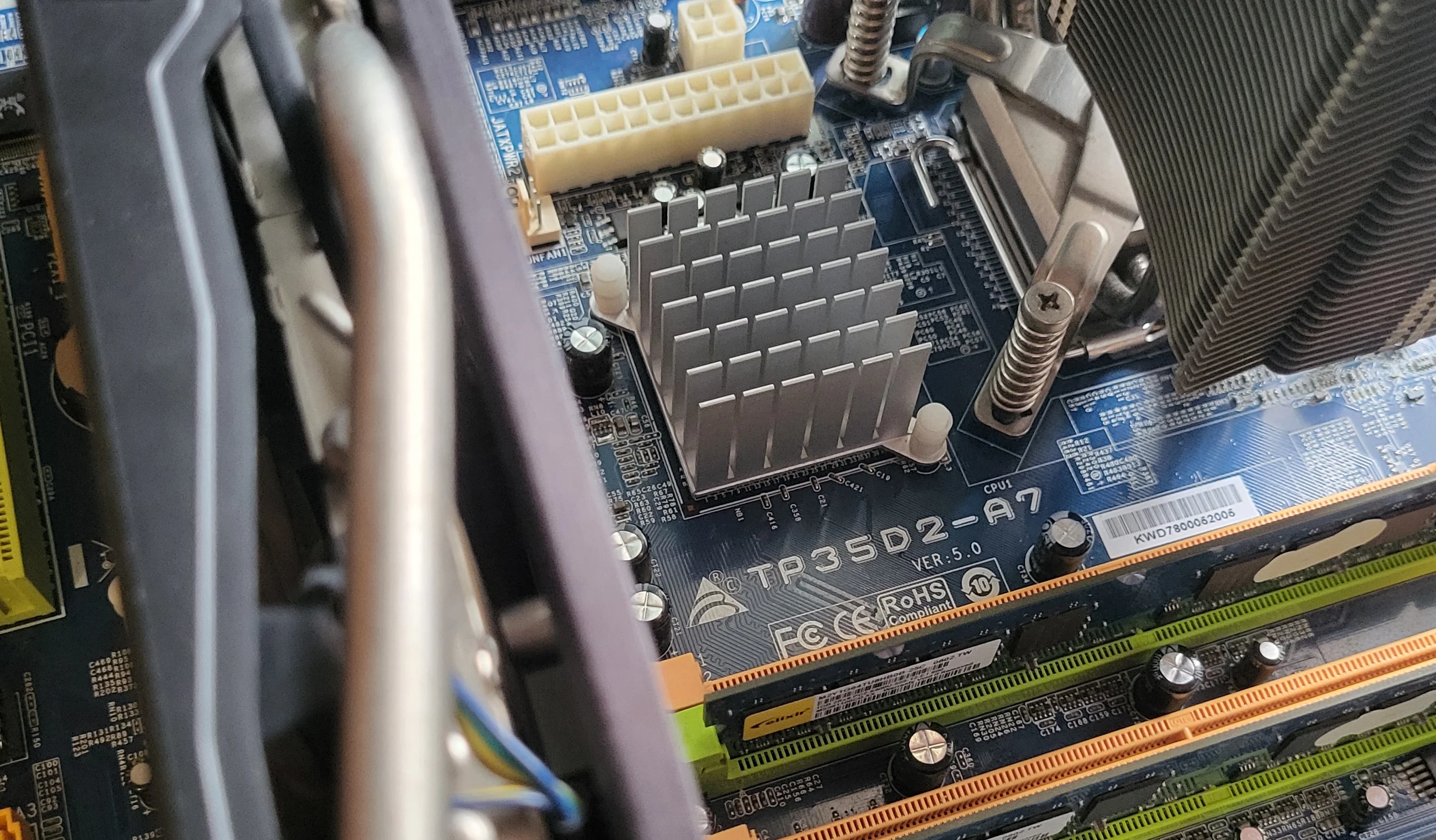
![Retro overclocking: overclocking and quick-testing the Intel Core 2 Duo E6550 [G0, Conroe]](/_next/image?url=https%3A%2F%2Fumtale-media.s3.eu-central-1.amazonaws.com%2Fimages%2Fcontent%2F81eff54d-a7a4-4528-89fe-9f2a16f3c308.webp&w=3840&q=75)
BLOGS · OVERCLOCKING
PUBLISHED
READING10 min
Retro overclocking: overclocking and quick-testing the Intel Core 2 Duo E6550 [G0, Conroe]
We test the overclocking potential of the classic Intel Core 2 Duo E6550 to see if pushing this aging CPU actually makes practical sense today.
In this article, we'll explore the overclocking potential of the aging dual-core Intel Core 2 Duo E6550, testing whether overclocking this obsolete CPU is actually worth it beyond just competitive fun.
Welcome to the fifth installment of our Retro Overclocking series.
The processor
Our review sample is marked SLA9X and was manufactured in Costa Rica. Production of SLA9X chips started in early 2007, and the final batch was shipped in 2010.
The Core 2 Duo E6550 is code-named Conroe (Penryn architecture). Under the integrated heat spreader lies a single dual-core 65nm Conroe die in the 4M configuration. Fortunately, our sample features the G0 stepping, which is the best possible revision for overclocking and power efficiency. (Aside from G0, there is also the terrible B0 stepping and the mediocre B1 revision).
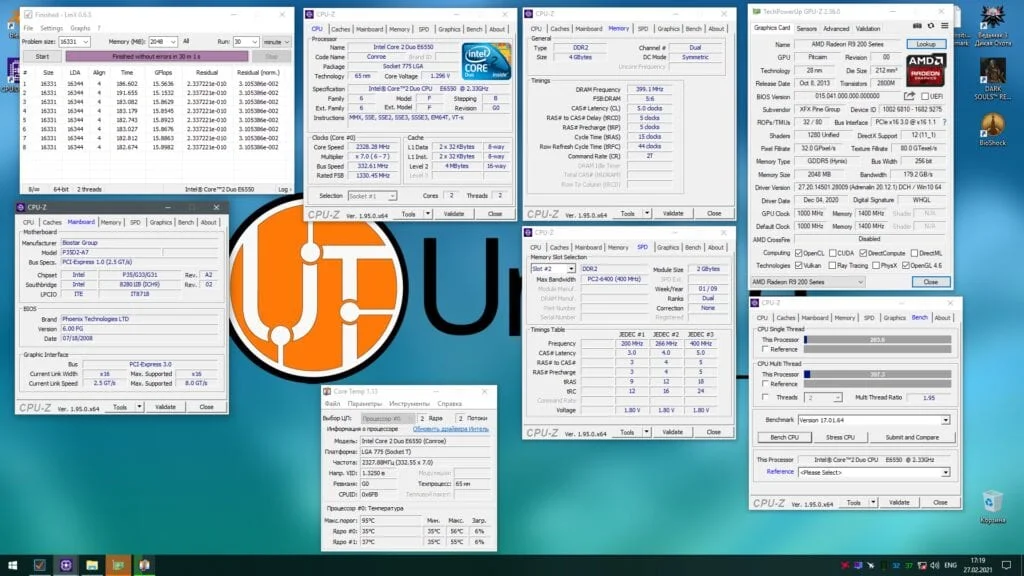
The Core 2 Duo E6550 features two cores running at a stock frequency of 2328 MHz (7x multiplier, 333 MHz FSB, 1333 MHz effective FSB). The chip has 4 MB of L2 cache, a stock voltage of 1.300 V, and a TDP of 65W.
Due to the specifics of the LGA 775 platform, the Core 2 Duo E6550 supports both DDR2 and DDR3 memory. That is because the memory controller is located in the northbridge rather than the CPU itself. In our case, that is the P35 chipset. While this chipset supports both RAM standards, our motherboard only has DDR2 slots.
As a result, we populated our system with two 2GB Kingston RAM sticks. At stock, the memory runs at 800 MHz with 5-5-5-20 2T timings.
 ⤢ ВІДКРИТИ
One obvious drawback of the E6550 is the lack of SSE4.1/SSE4.2 instruction support, which is a bare minimum these days. This is a massive issue: without SSE4.1/4.2, the chip simply won't launch many modern applications or games (though expecting the E6550 to run modern games is a bit of a stretch anyway).
But that's not all:
The Core 2 Duo E6550 has a very awkward combination of a low 7x multiplier and a 333 MHz stock FSB. This makes pushing for a truly high core clock a real challenge. See for yourself:
First of all, overclocking a low-multiplier CPU successfully requires a high-quality motherboard (to say the least) that can run stably at an FSB frequency above 450 MHz.
Second, to get the most out of your overclock, you either need decent DDR3 RAM (and a DDR3-capable board) or, given the platform's nature, top-tier DDR2 memory.
And third, you need a lucky CPU. FSB overclocking headroom doesn't just depend on the motherboard. If your sample refuses to boot at 440-460 MHz FSB, you've hit the dreaded 'FSB Wall.' Unfortunately, this is a dead end. Pushing past an FSB Wall is extremely difficult in most cases without dangerous voltages and extreme cooling.
Besides the FSB Wall, there is also the 'FSB Hole'—a dead zone in the bus frequency where the chip refuses to boot. If your CPU won't post at, say, 470, 475, or 480 MHz, try jumping straight to 490 or 500 MHz. If you're lucky, the overclock might proceed smoothly from there, though these are rare exceptions.
But even if you somehow manage to solve all three of these issues, you might still run into another major and quite unexpected quirk of old LGA 775 systems. First things first, though. Let's start with overclocking the Core 2 Duo E6550.
Test bench:
Processor: Core 2 Duo E6550;
Cooler: Cooler Master Hyper 212 Black Edition (RR-212S-20PK-R1);
LGA 775 RAM: four 2GB Kingston sticks (99U5429-007.A00LF 34CC2E04), 4GB total;
LGA 775 motherboard: Biostar P35D2-A7;
Graphics card: XFX Radeon R9 270X (1000/5600 MHz, 150% Power Limit);
SSD: Kingston 120GB SA400S37120G (Windows 10/Apps);
HDD: Seagate 2TB ST2000DM008-2FR102 (Games);
Power supply: Chieftec GPS-1250C.
Overclocking the Core 2 Duo E6550 and a quick guide for any LGA 775 CPU
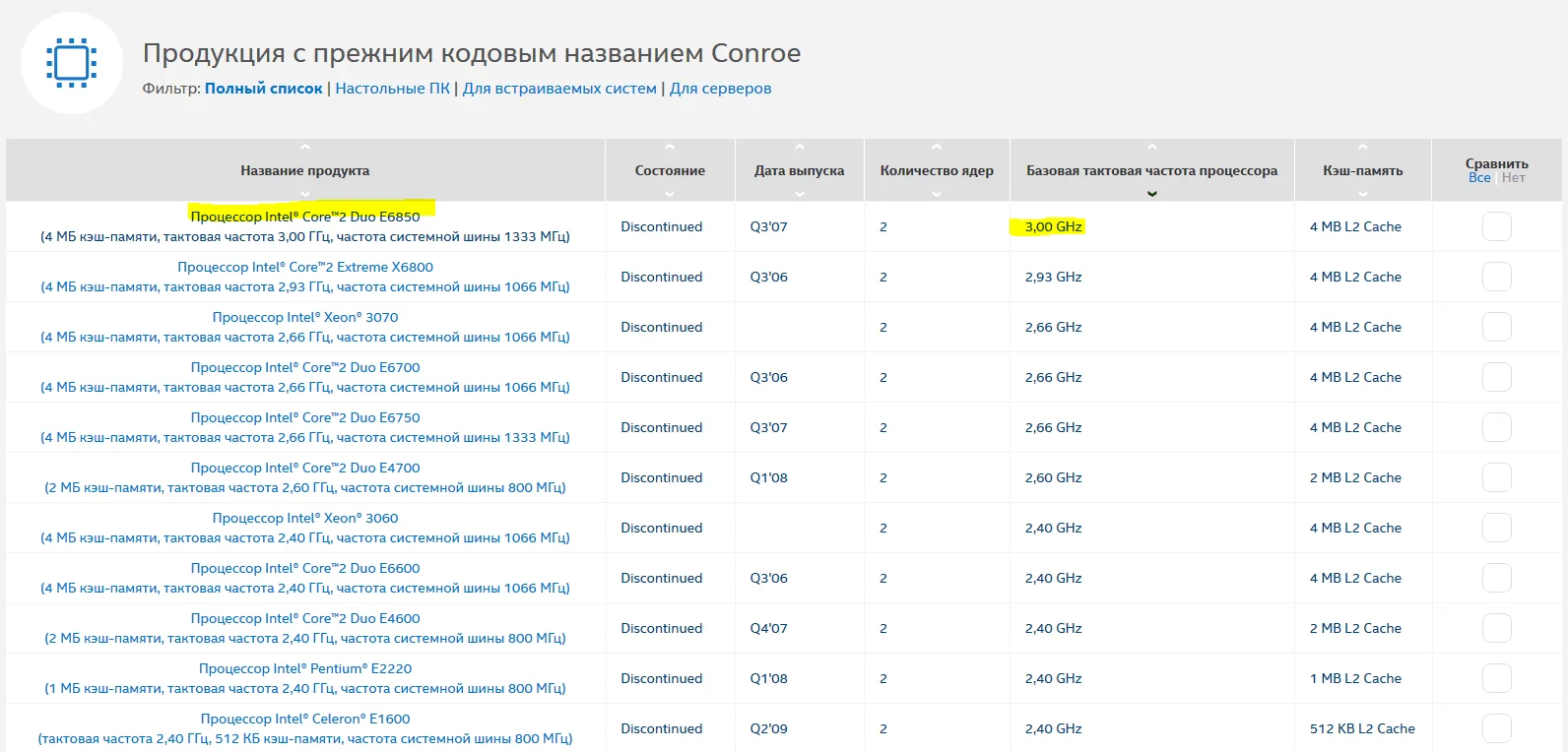
First, let's see what our E6550 sample can do at stock CPU core, RAM, and FSB voltages. Don't worry if you aren't familiar with fabrication nodes or CPU generations. To find out what your CPU can theoretically achieve, just look up its core codename (Conroe, in our case) and google the flagship model based on that same core.
 ⤢ ВІДКРИТИ
The fastest Conroe-based dual-core processor is the Core 2 Duo E6850, which runs at 3.0 GHz. In theory, our chip should also be able to run stably at 3.0 GHz. Let's find out:
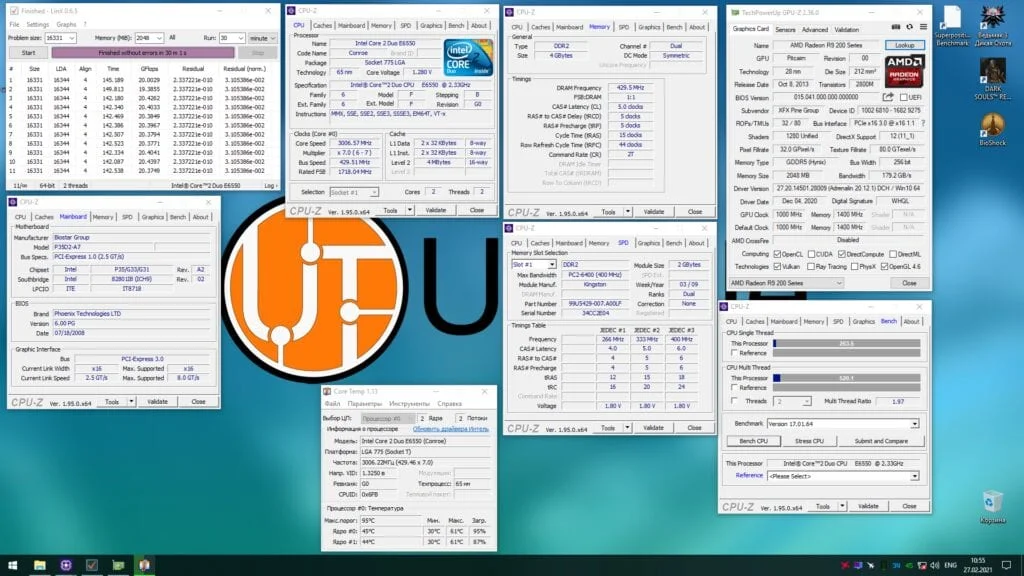
To overclock the E6550 to 3.0 GHz, we need to set the FSB frequency to 430 MHz and drop the RAM multiplier from DDR2-800 to DDR2-667.
After a quick reboot and a run of LinX, the CPU is perfectly stable at 3000 MHz:
 ⤢ ВІДКРИТИ
As a reminder, I haven't touched any of the voltages yet. In theory, this kind of overclocking won't harm the CPU, motherboard, or RAM, even in the long run. Still, keep in mind that any overclocking voids your warranty. So, any hardware tweaking you do is entirely at your own risk!
Next, we continue with stock voltages. We bump the FSB frequency by 5 MHz, reboot, and run LinX to check stability. If it passes, we add another 5 MHz to the FSB and repeat the process.
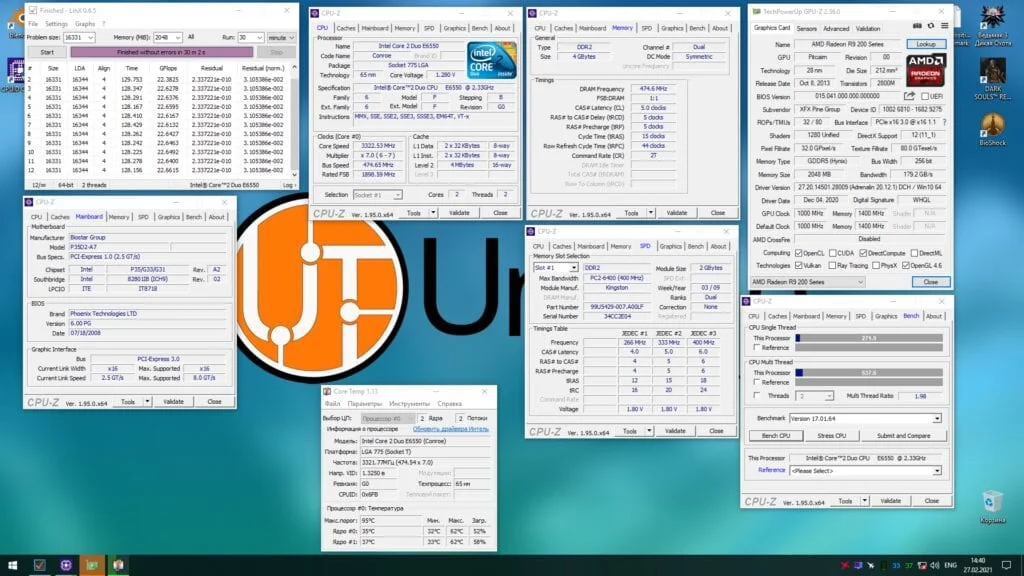
Without raising voltages, our particular Core 2 Duo E6550 topped out at 3322 MHz:
 ⤢ ВІДКРИТИ
BIOS settings for overclocking the Core 2 Duo E6550 to 3322 MHz:
Core voltage: 1.300 V (+0.000 over stock);
FSB frequency: 475 MHz;
FSB voltage: 1.250 V (+0.000 over stock);
RAM multiplier in BIOS: 667 MHz (resulting in an effective memory frequency of 948 MHz due to overclocking);
RAM voltage: 1.950 V (+0.000 over stock).
This is far from a record. You can find results online where other enthusiasts hit close to 3600 MHz on stock voltage. But that's the luck of the draw. Overclocking, after all, is a silicon lottery.
Now let's try bumping the voltages a bit to squeeze out another few hundred megahertz.
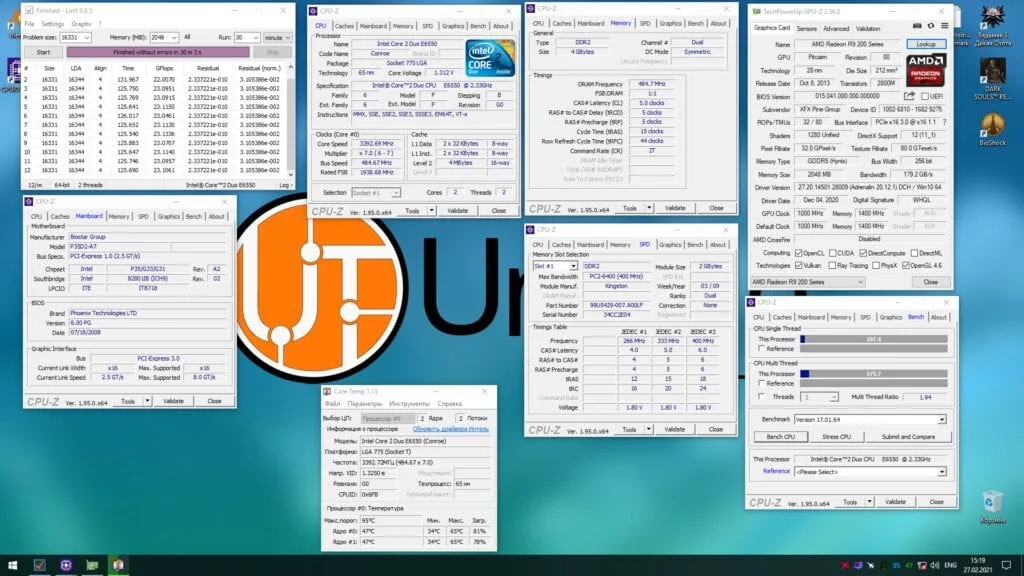
By raising the FSB to 485 MHz and the CPU core voltage by 0.037 V, I managed to squeeze 3392 MHz out of the E6550:
 ⤢ ВІДКРИТИ
BIOS settings for overclocking the Core 2 Duo E6550 to 3392 MHz:
Core voltage: 1.375 V (+0.037 over stock);
FSB frequency: 485 MHz;
FSB voltage: 1.250 V (+0.000 over stock);
RAM multiplier in BIOS: 667 MHz (resulting in an effective memory frequency of 970 MHz due to overclocking);
RAM voltage: 1.950 V.
And that was the limit of our overclocking run with this processor on the Biostar P35D2-A7 motherboard. You might rightly ask, "Wait, how? You've only just started raising the voltages and haven't even touched the FSB or DRAM!" And you'd be absolutely right. This brings us to a notorious quirk of older LGA 775 motherboards: a hard FSB wall at 485 MHz that no amount of voltage tweaking or memory timing adjustments can overcome.
But first, a quick side note:
Back in 2006–2010, 1 to 2 GB of RAM was the standard, and there was little reason to go higher. Games of that era—like GTA 4, Prototype, Saints Row 2, Warhammer, or Star Wars: The Force Unleashed—ran perfectly fine with that amount. Consequently, motherboards and their BIOSes were optimized specifically for low-capacity RAM, and some manufacturers didn't even mention support for 4 GB or 8 GB configurations.
See where I'm going with this?
But actions speak louder than words. Let's swap the two 2 GB sticks for two 1 GB sticks and try to hit a 500 MHz FSB:
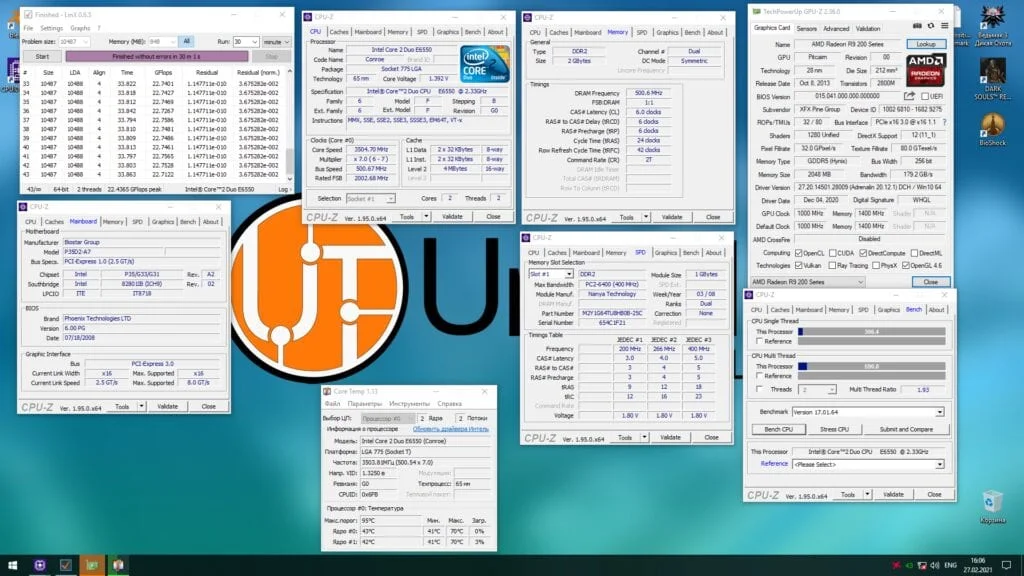 ⤢ ВІДКРИТИ
Core voltage: 1.400 V (+0.100 over stock);
FSB frequency: 500 MHz;
FSB voltage: 1.350 V (+0.100 over stock);
RAM multiplier in BIOS: 667 MHz (resulting in an effective memory frequency of 1000 MHz due to overclocking);
RAM voltage: 2.100 V.
And voila! The CPU and motherboard finally started responding to higher vCore and vFSB. Swapping in the two 1 GB sticks pushed our frequency ceiling right up to 3500 MHz.
Unfortunately, I don't have any 512 MB DDR2 modules left to demonstrate what I did in my 2012 guide on overclocking the Core 2 Duo E8400. But you can still read that article, where I managed to squeeze a 529 MHz FSB out of this exact same motherboard.
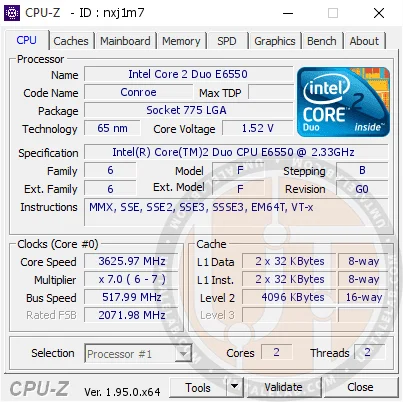
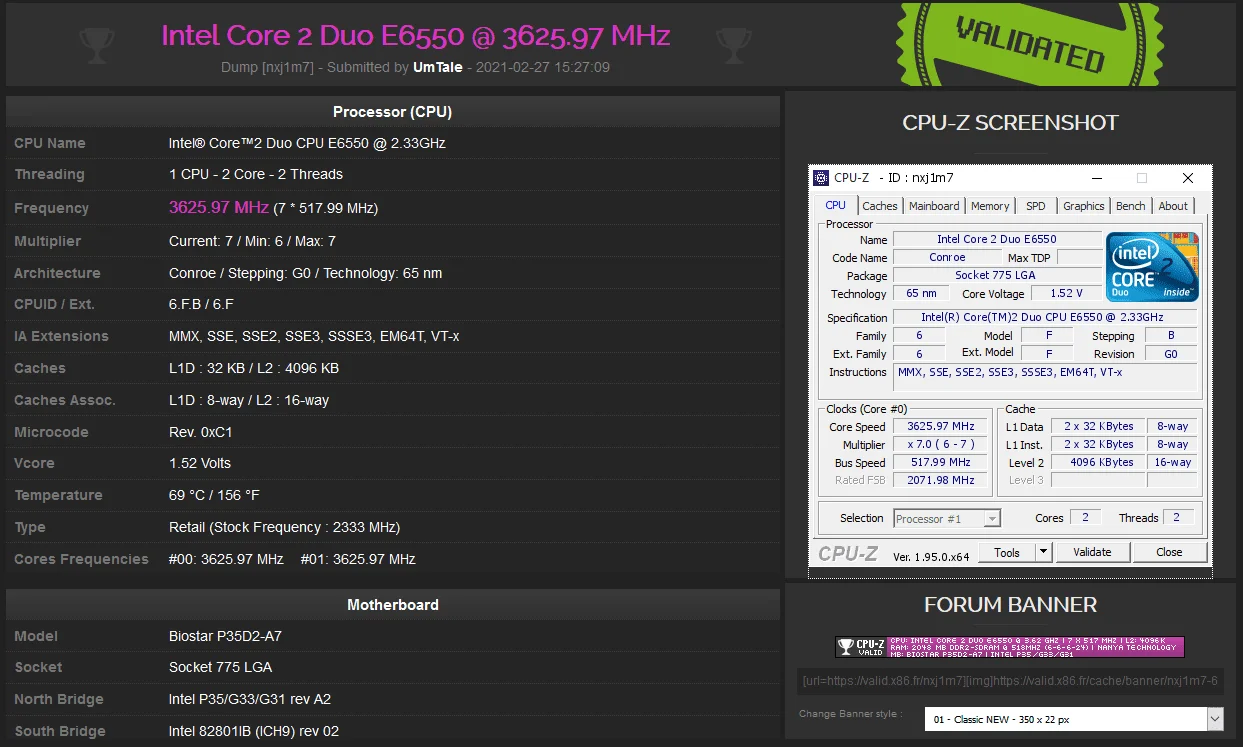
Still, I did manage to grab a suicide shot at 3625 MHz:
 ⤢ ВІДКРИТИ
 ⤢ ВІДКРИТИ
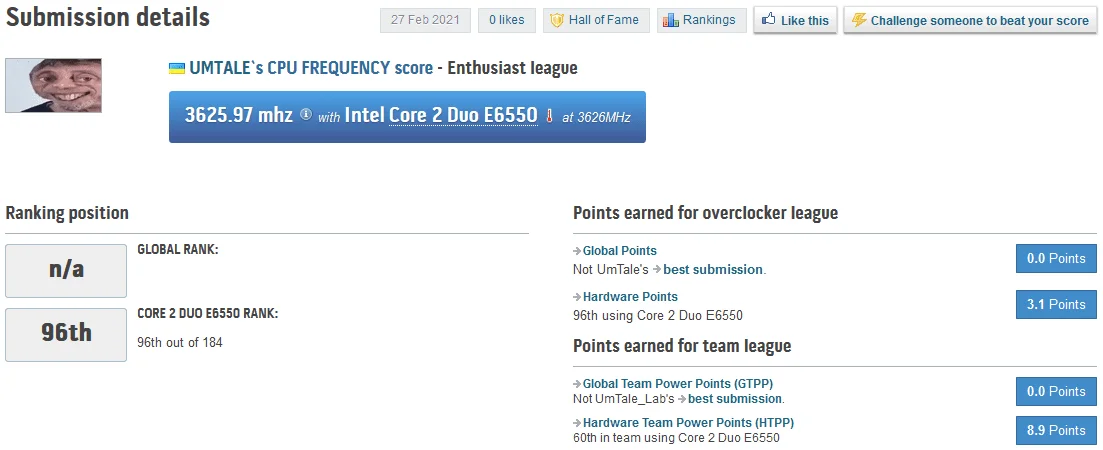
Incidentally, this frequency ranks 96th for the Core 2 Duo E6550 (as of writing):
 ⤢ ВІДКРИТИ
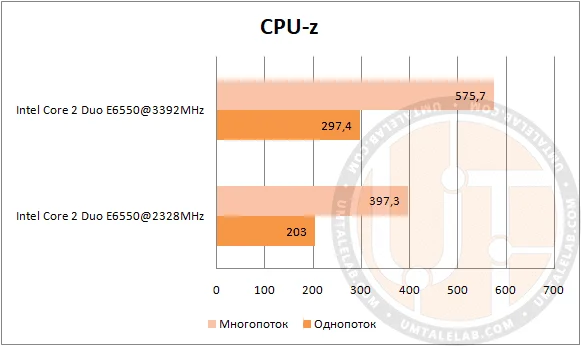
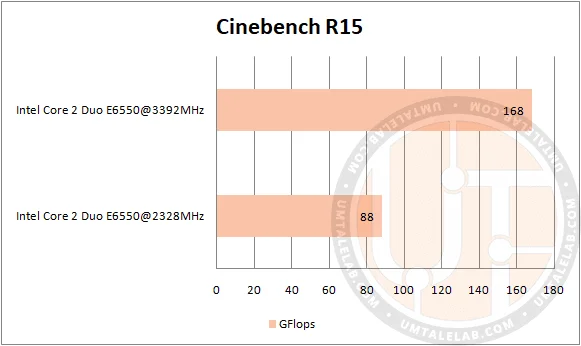
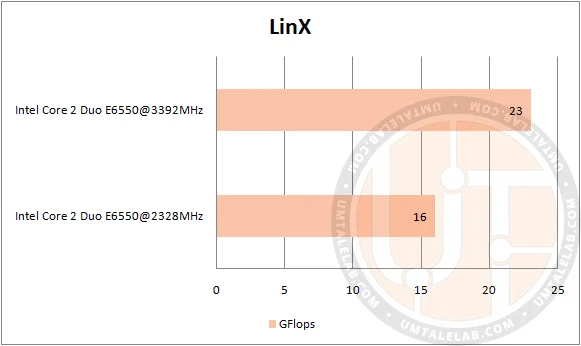
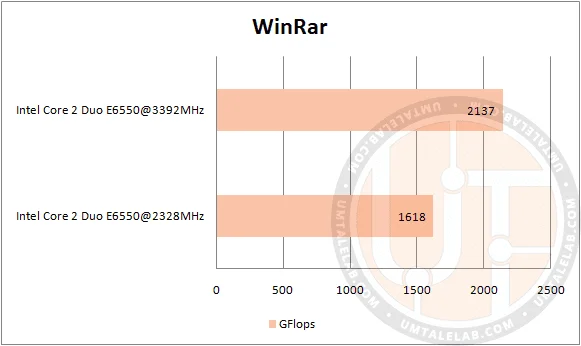
Obviously, there is not much point in testing anything with 2GB of RAM in 2021; even 4GB is barely enough for anything nowadays. Instead, let's look at a quick performance comparison of the Core 2 Duo E6550 running at 2330MHz versus 3392MHz.
Core 2 Duo E6550 software benchmarks:
CPU-Z benchmark:
 ⤢ ВІДКРИТИ
Cinebench R15:
 ⤢ ВІДКРИТИ
LinX:
 ⤢ ВІДКРИТИ
WinRAR:
 ⤢ ВІДКРИТИ
Benchmark: | Overclocked CPU advantage: |
CPU-Z benchmark | 44% |
Cinebench R15 | 90% |
LinX | 43% |
WinRAR | 32% |
Core 2 Duo E6550 gaming benchmarks:
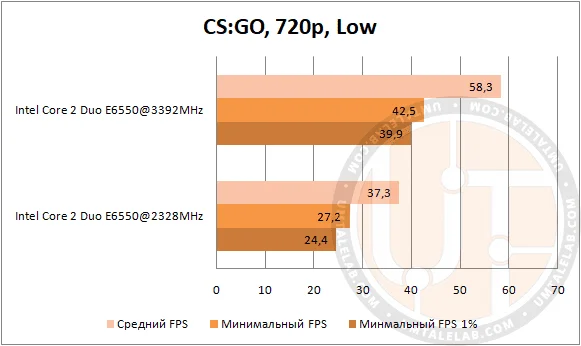
Counter-Strike: Global Offensive
 ⤢ ВІДКРИТИ
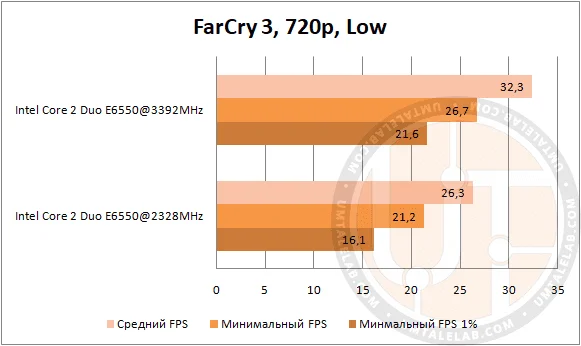
Far Cry 3
 ⤢ ВІДКРИТИ
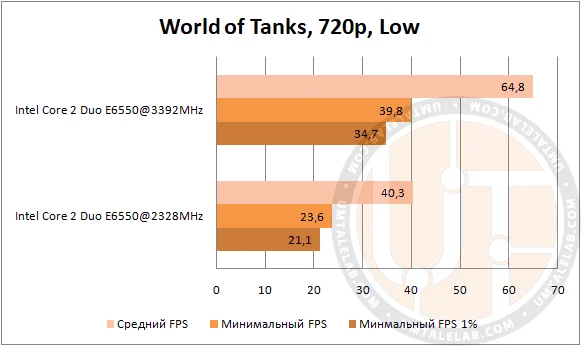
World of Tanks
 ⤢ ВІДКРИТИ
Game: | Overclocked CPU advantage: |
Counter-Strike: Global Offensive | 56% |
Far Cry 3 | 23% |
World of Tanks | 60% |
The overclocked Core 2 Duo E6550 showed the smallest lead over stock in Far Cry 3. Still, any dual-core CPU performs poorly in this game anyway.
However, CS:GO and World of Tanks saw an impressive framerate boost of around 60%. Overclocking the CPU to 3392MHz delivered a perfectly playable framerate in both titles.
P.S.:
Want to see the Core 2 Duo E6550 go head-to-head with the Pentium D 930 or Athlon II X2 260? Let me know in the comments! If there's enough interest, I'll definitely run those benchmarks.
Thanks for reading, and stay tuned for more!
If you found this article helpful and want to see more benchmarks on UmTale Lab, please consider supporting us on Patreon! Your support helps us expand our hardware pool and improve testing quality: we want to upgrade our test bench to a larger SSD and buy a capture card to prevent ShadowPlay recording from impacting the final results.