TESTS · CPU
PUBLISHED
READING13 min
Benchmarking 16 budget CPUs in The Witcher 3: Wild Hunt in 2021
We test the performance of 16 budget Intel and AMD CPUs in The Witcher 3: Wild Hunt across various graphics settings.
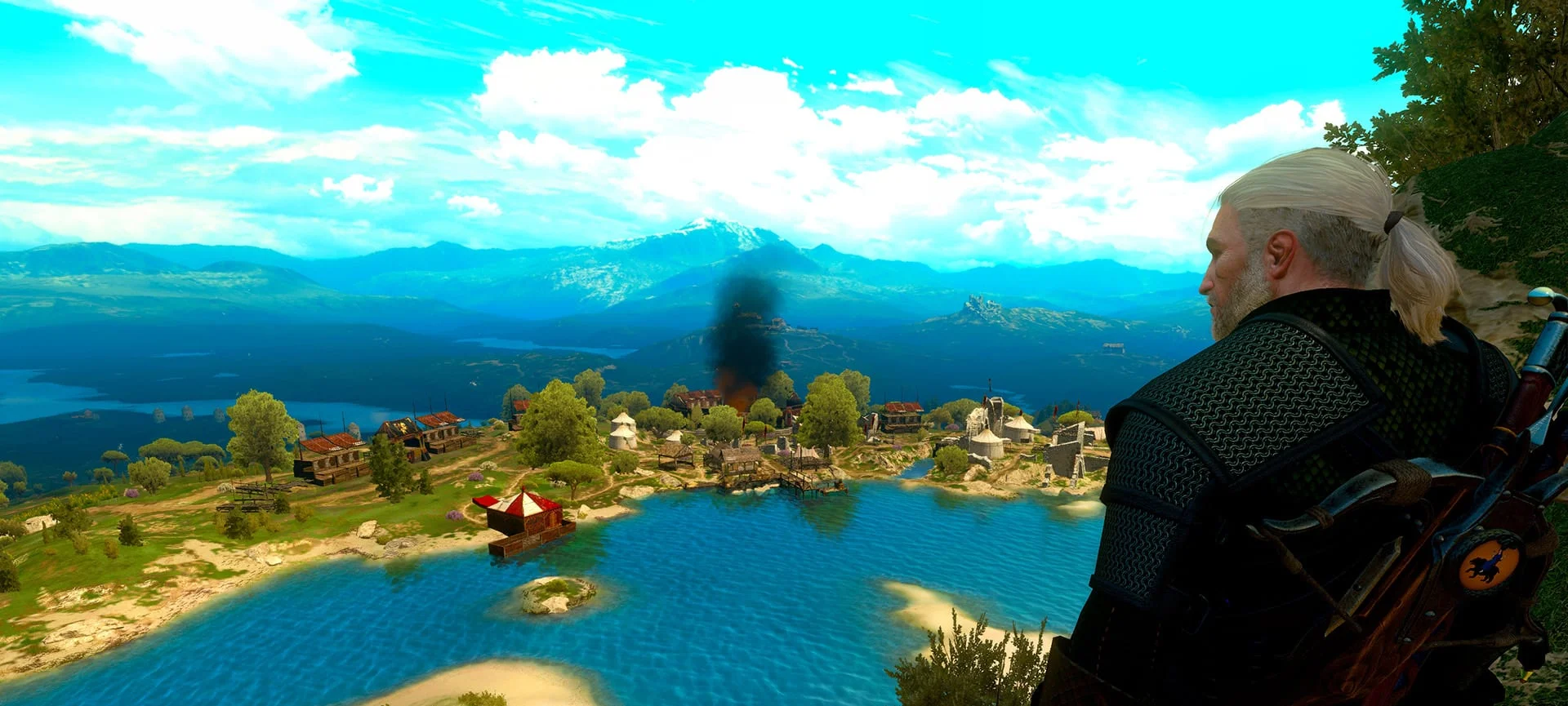
In this article, we test the performance of budget (and even ultra-budget) CPUs in the timeless action RPG, The Witcher 3: Wild Hunt.
 ⤢ ВІДКРИТИ
Graphics settings for The Witcher 3: Wild Hunt:
To avoid GPU bottlenecks, we tested CPU performance at 1280x720 resolution.
We used four graphics configurations to test the CPUs in The Witcher 3: Wild Hunt.
"Ultra High", or "Supreme" settings for CPUs capable of exceeding 45 FPS at this level, either at stock or when overclocked:
Game version 1.32.
DirectX 11.
Post-processing: Motion blur - off;
Blur - off;
Anti-aliasing - on;
Bloom - on;
Sharpening - low;
Ambient occlusion - HBAO+;
Depth of field - on;
Chromatic aberration - off;
Vignetting - off;
Light shafts - on.
General: NVIDIA HairWorks - on;
NVIDIA HairWorks AA - 8;
NVIDIA HairWorks preset - high;
Number of background characters - supreme;
Shadow quality - supreme;
Terrain quality - supreme;
Water quality - supreme;
Grass density - supreme;
Texture quality - supreme;
Foliage visibility range - supreme;
Detail level - supreme.
"High", or "High" settings for CPUs capable of exceeding 45 FPS at this level, either at stock or when overclocked:
Game version 1.32;
DirectX 11;
Post-processing: Motion blur - off;
Blur - off;
Anti-aliasing - on;
Bloom - on;
Sharpening - low;
Ambient occlusion - HBAO+;
Depth of field - on;
Chromatic aberration - off;
Vignetting - off;
Light shafts - on.
General: NVIDIA HairWorks - Geralt;
NVIDIA HairWorks AA - 4;
NVIDIA HairWorks preset - high;
Number of background characters - high;
Shadow quality - high;
Terrain quality - high;
Water quality - high;
Grass density - high;
Texture quality - high;
Foliage visibility range - high;
Detail level - high.
"Medium", or "Medium" settings for CPUs capable of exceeding 45 FPS at this level, either at stock or when overclocked:
Game version 1.32;
DirectX 11;
Post-processing: Motion blur - disabled;
Blur - disabled;
Anti-aliasing - enabled;
Bloom - enabled;
Sharpening - low;
Ambient occlusion - SSAO;
Depth of field - disabled;
Chromatic aberration - disabled;
Vignetting - disabled;
Light shafts - disabled.
General: NVIDIA HairWorks - off;
NVIDIA HairWorks AA - 0;
NVIDIA HairWorks - low;
Number of background characters - medium;
Shadow quality - medium;
Terrain quality - medium;
Water quality - medium;
Grass density - medium;
Texture quality - medium;
Foliage visibility range - medium;
Detail level - medium.
We also used "Low", or "Low" settings for all other processors that managed to clear the 30 FPS threshold under these settings, running either at stock or overclocked:
Game version 1.32;
DirectX 11;
Post-processing: Motion blur - disabled;
Blur - disabled;
Anti-aliasing - enabled;
Bloom - disabled;
Sharpening - disabled;
Ambient occlusion - disabled;
Depth of field - disabled;
Chromatic aberration - disabled;
Vignetting - disabled;
Light shafts - disabled.
General: NVIDIA HairWorks - off;
NVIDIA HairWorks AA - 0;
NVIDIA HairWorks - low;
Number of background characters - low;
Shadow quality - low;
Terrain quality - low;
Water quality - low;
Grass density - low;
Texture quality - low;
Foliage visibility range - low;
Detail level - low.
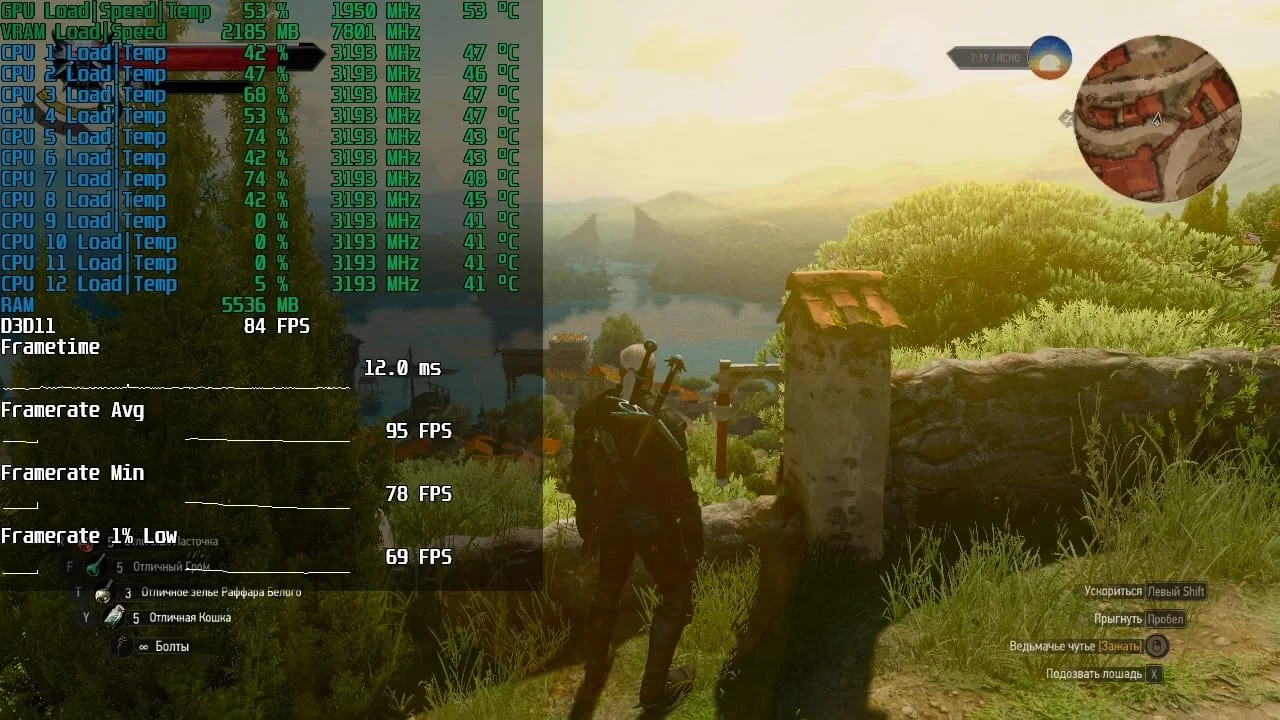
We tested CPU performance in the Blood and Wine expansion, using a run through Beauclair from the tailor's workshop to the Gate of the Rising Sun.
 ⤢ ВІДКРИТИ
For each CPU, we performed a preliminary warm-up run before taking six performance measurements. We then averaged these results to generate the final chart shown below.
Test setup:
Intel processors: Core i3-3220, Core i5-2500K, Core 2 Quad Q8200, Xeon E5440, Xeon X3450, Xeon X3470, Xeon X5550, Xeon X5570, Xeon X5660, Xeon W3520, Xeon W3565, Xeon E5-2620, Xeon E5-2643, Xeon E5-2620 v3;
AMD processors: Athlon II X3 450, Phenom II X4 955, FX-8350 (with cores disabled to simulate the FX-6350 and FX-4350);
CPU cooler: Cooler Master Hyper 212 Black Edition (RR-212S-20PK-R1);
RAM for LGA 1155/1156: 2x 8GB HyperX Genesis Na’Vi Edition (KHX16C9C2K2/8), 16GB total;
RAM for LGA 1366: 2x 8GB HyperX Genesis Na’Vi Edition (KHX16C9C2K2/8), 16GB total;
RAM for LGA 2011: 3x 8GB Micron MT36JSF1G72PZ-1G4M1HF, 16GB total;
RAM for LGA 2011 v3: 4x 4GB G.SKILL DDR4 @ 1866MHz F4-2400C15S-4GNT, 16GB total;
RAM for AM3+: 2x 8GB HyperX Genesis Na’Vi Edition (KHX16C9C2K2/8), 16GB total;
LGA 1156 motherboard: Dell OptiPlex 980 (0D441T, modded BIOS);
LGA 1155 motherboard: Gigabyte GA-Z68P-DS3 (rev. 2.0);
LGA 1366 motherboard: Dell T3500 (09KPNV);
LGA 2011 motherboard: Dell T3610 (09M8Y8);
LGA 2011 v3 motherboard: Kllisre X99-D8 (AD12) with a modded BIOS (Turbo Boost unlocked, memory timing controls enabled);
AM3+ motherboard: ASUS M5A97 LE R2.0;
Graphics card: KFA2 GeForce RTX 2060 SUPER 8GB (~1950/14000MHz, 112% Power Limit);
SSD: KINGSTON SUV400S37240G 240GB (Windows 10 / game);
PSU: Chieftec GPS-1250C.
Software
Operating system: Windows 10 x64 (updated as of February 2021);
Graphics driver: NVIDIA GeForce 461.40 WHQL;
FPS monitoring software: MSI Afterburner 4.6.2.
Tested CPU clock speeds in The Witcher 3: Wild Hunt
 ⤢ ВІДКРИТИ
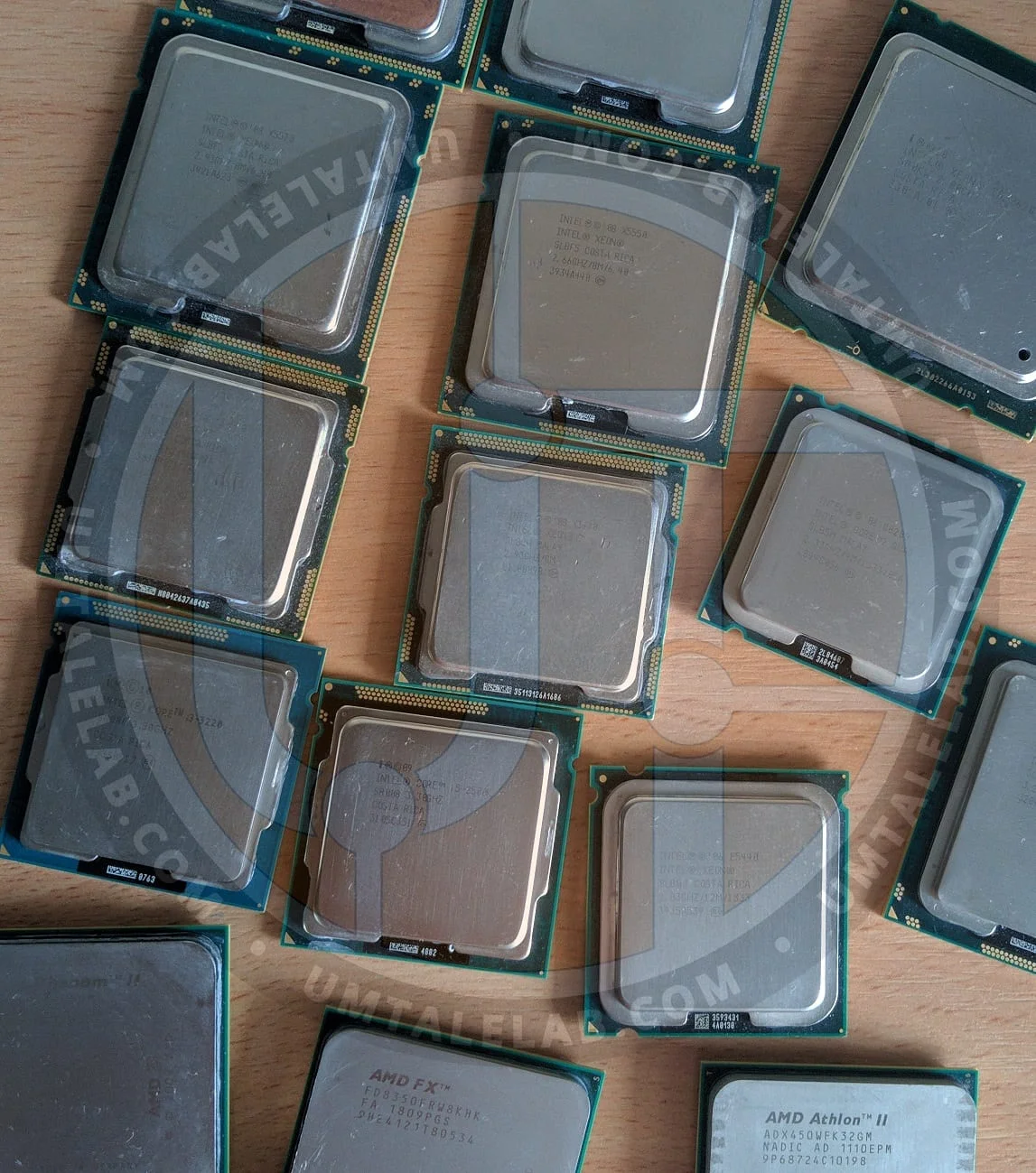
Intel processors:Core 2 Quad Q8200 @ 2333 MHz, DDR2 @ 800 MHz;
Core 2 Quad Q8200 @ 3006 MHz, DDR2 @ 862 MHz (CPU Core voltage: 1.375V, FSB voltage: 1.350V, DDR2 voltage: 2.100V (our RAM was a poor overclocker; ideally, DDR2 voltage without heatsinks shouldn't exceed 2.000V for typical overclocking));
Core i3-3220 @ 3300 MHz, DDR3 @ 1333 MHz;
Core i3-3220 @ 3432 MHz, DDR3 @ 1872 MHz (DDR3 voltage: 1.600V);
Core i5-2500K @ 3400 MHz, DDR3 @ 1333 MHz;
Core i5-2500K @ 4714 MHz, DDR3 @ 1912 MHz (CPU Core voltage: 1.452V, QPI/Vtt voltage: 1.250V, CPU PLL voltage: 1.800V, DDR3 voltage: 1.680V);
Xeon E5440 @ 2830 MHz, DDR2 @ 800 MHz;
Xeon E5440 @ 3422 MHz, DDR2 @ 802 MHz (CPU Core voltage: 1.400V, FSB voltage: 1.450V, DDR2 voltage: 2.100V);
Xeon X3450 @ 2800 MHz, DDR3 @ 1333 MHz;
Xeon X3470 @ 3200 MHz, DDR3 @ 1333 MHz;
Xeon X5550 @ 2933 MHz, DDR3 @ 1333 MHz;
Xeon X5570 @ 3200 MHz, DDR3 @ 1333 MHz;
Xeon X5660 @ 3066 MHz, DDR3 @ 1333 MHz;
Xeon W3520 @ 2800 MHz, DDR3 @ 1066 MHz;
Xeon W3565 @ 3333 MHz, DDR3 @ 1066 MHz;
Xeon E5-2620 @ 2300 MHz, DDR3 @ 1333 MHz;
Xeon E5-2643 @ 3400 MHz, DDR3 @ 1333 MHz;
Xeon E5-2620 v3 @ 3200 MHz, DDR4 @ 1866 MHz.
AMD processors:Athlon II X3 450 @ 3200 MHz, CPU-NB @ 2000 MHz, DDR3 @ 1333 MHz;
Athlon II X3 450 @ 4013 MHz, CPU-NB @ 2508 MHz, DDR3 @ 1672 MHz (CPU Core voltage: 1.570V, CPU-NB voltage: 1.250V, DDR3 voltage: 1.600V);
Phenom II X4 955 @ 3200 MHz, CPU-NB @ 2000 MHz, DDR3 @ 1333 MHz;
Phenom II X4 955 @ 4138 MHz, CPU-NB @ 2508 MHz, DDR3 @ 1672 MHz (CPU Core voltage: 1.560V, CPU-NB voltage: 1.350V, DDR3 voltage: 1.600V);
FX-4350 @ 4200 MHz, CPU-NB @ 2200 MHz, DDR3 @ 1866 MHz;
FX-4350 @ 4731 MHz, CPU-NB @ 2628 MHz, DDR3 @ 2102 MHz (CPU Core voltage: 1.456V, CPU-NB voltage: 1.350V, DDR3 voltage: 1.680V);
FX-6350 @ 4200 MHz, CPU-NB @ 2200 MHz, DDR3 @ 1866 MHz;
FX-6350 @ 4564 MHz, CPU-NB @ 2608 MHz, DDR3 @ 2086 MHz (CPU Core voltage: 1.440V, CPU-NB voltage: 1.350V, DDR3 voltage: 1.660V);
FX-8350 @ 4200 MHz, CPU-NB @ 2200 MHz, DDR3 @ 1866 MHz;
FX-8350 @ 4419 MHz, CPU-NB @ 2600 MHz, DDR3 @ 2070 MHz (CPU Core voltage: 1.392V, CPU-NB voltage: 1.350V, DDR3 voltage: 1.660V).
We should clarify that the FX-6350 and FX-4350 were simulated by disabling two and four cores on our FX-8350, respectively. Since AMD manufactures retail FX-6350 and FX-4350 chips using virtually the exact same method (deactivating cores on a full 8-core FX-8350 die via microcode), this is a perfectly valid simulation. More importantly, doing so saved us from having to source a bunch of extra hardware.
You can read more about the other test subjects in our full reviews, or by checking out the blogs section, where we post quick updates.
We should also explain why some processors were tested only at stock frequencies:
Unfortunately, we currently don't have enough suitable overclocking motherboards in the lab. For instance, our LGA 2011, LGA 2011 v3, and LGA 1366 boards don't support CPU overclocking, and our last LGA 1156 overclocking motherboard kicked the bucket. It was replaced by an OEM Dell board which, just like its older siblings, lacks any overclocking settings.
Testing 16 budget processors in The Witcher 3: Wild Hunt:
The game is well-optimized for 8-thread CPUs, so chips with fewer than 8 threads struggle. This is especially noticeable in 1% lows, which look pretty rough on 4-thread processors at times. Frame rates in The Witcher 3 are also highly sensitive to RAM and memory controller speeds, as well as support for technologies that were current back in 2015. So, while Nehalem (LGA 1366) chips put up a decent fight, they just can't compete with CPUs that have modern instruction sets and faster memory controllers.
But first things first.
Ultra settings benchmarks
 ⤢ ВІДКРИТИ
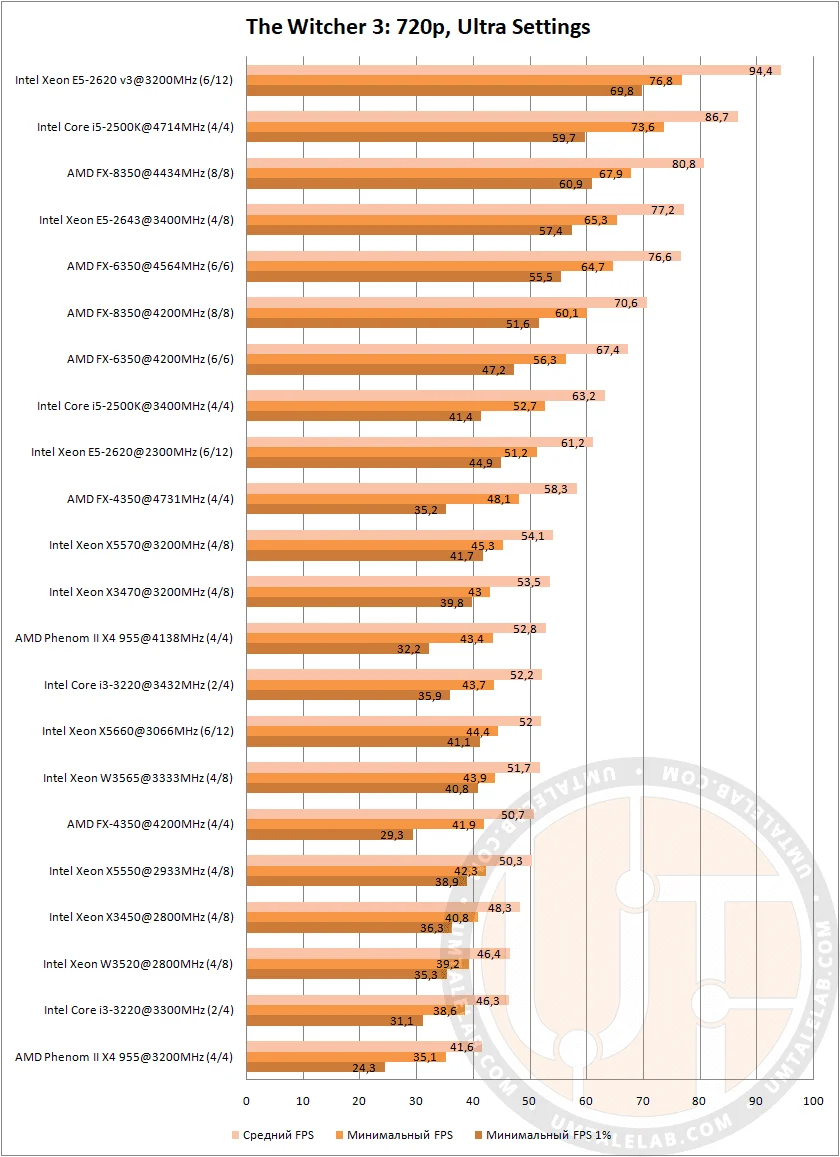
At ultra settings, a Core i3-3220 or higher can handle Geralt's third adventure.
The Phenom II X4 955 only made it into this group because its overclocked version managed a decent 52 FPS. However, even clocked at 4138 MHz, the Phenom couldn't deliver a truly stable frame rate. In crowded locations, 1% lows on the aging quad-core often dipped below 35 FPS, causing noticeable stuttering.
Just a reminder: the game is installed on an SSD.
We saw a similar picture with the Core i3-3220 and FX-4350, both at stock speeds and when overclocked. Still, if you aren't too demanding, these processors can provide a perfectly playable experience.
The performance leader at ultra settings is the 6-core, 12-thread Intel Xeon E5-2620 v3. Following at a significant distance in 1% lows is the Core i5-2500K overclocked to 4700 MHz, with an AMD FX-8350 pushed to 4434 MHz rounding out the top three. The game runs flawlessly on the Xeon and FX-8350, offering extremely smooth gameplay. While the Core i5-2500K occasionally drops frames in 1% lows compared to its multi-core rivals, it doesn't really hurt the overall experience.
Nearly all LGA 1366 processors, including the 6-core, 12-thread Xeon X5660, showed similar results. Unfortunately, the REDengine cannot scale to 12 threads, which hits older, low-frequency multi-threaded chips pretty hard.
Still, it's impressive that even the low-end LGA 1366 Xeon W3520 managed to clear 45 FPS. That is an outstanding result for a CPU that costs literally one dollar!
One of the entry-level six-core LGA 2011 chips also delivered a surprising performance: the Xeon E5-2620 v1 maintained a solid average of 61 FPS and never dipped below 44 FPS in 1% lows. Not bad at all, considering its clock speed is just 2300 MHz!
The same goes for AMD's six-core option. Even at its stock 4200 MHz, the FX-6350 delivered an impressive 74 FPS. Once overclocked to 4564 MHz, it even managed to beat its 8-core sibling, the FX-8350, running at stock settings.
High settings benchmarks
 ⤢ ВІДКРИТИ
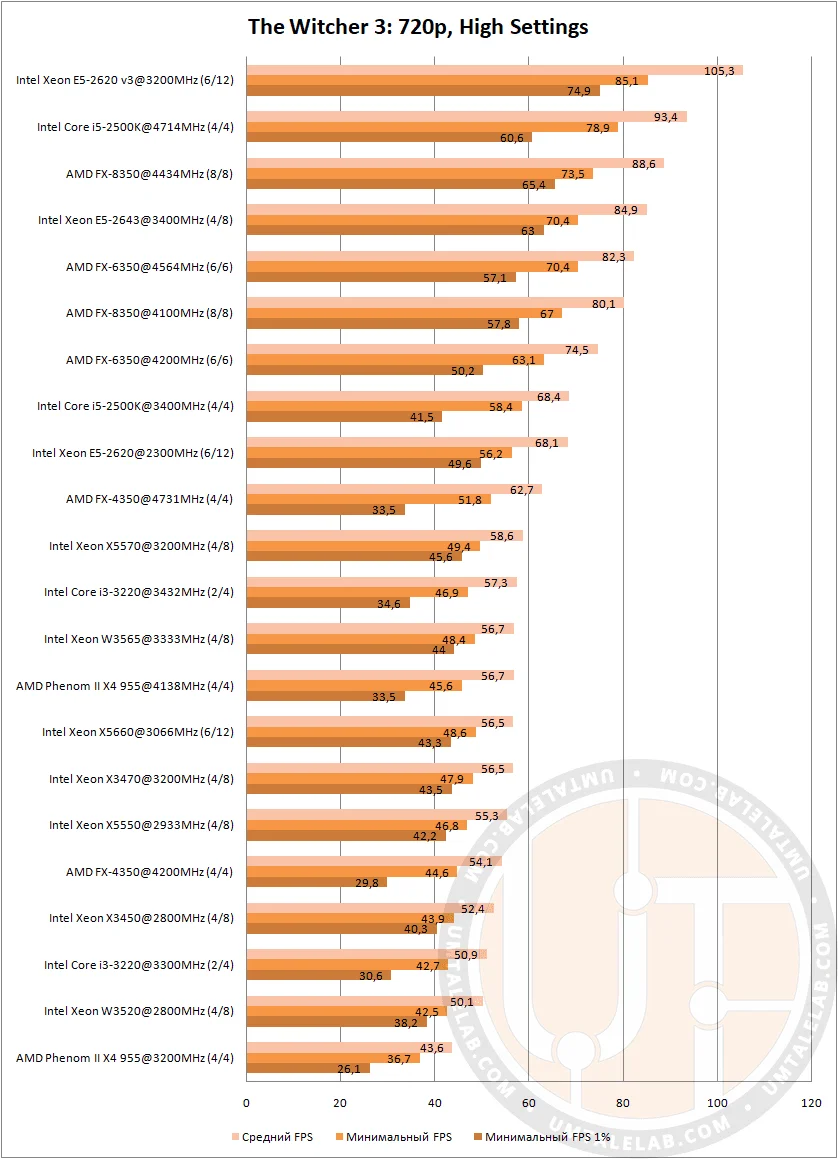
Aside from slightly higher frame rates across the board, the performance trends at high settings are virtually identical to the ultra preset. There isn't much else to discuss here.
Medium settings benchmarks
 ⤢ ВІДКРИТИ
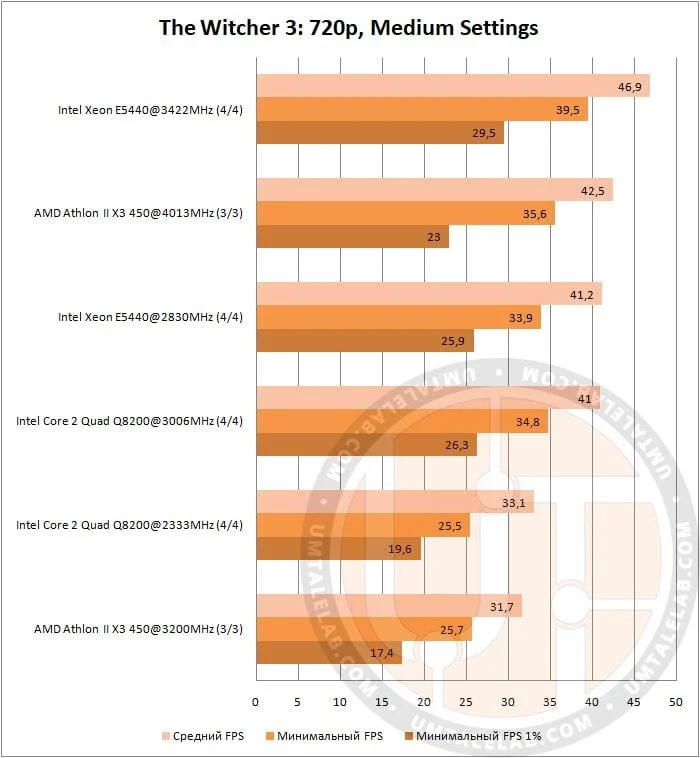
This group features chips that couldn't crack the 45 FPS barrier at higher quality settings. However, looking at the charts, it's clear that some of these CPUs can't handle The Witcher 3 even at medium settings.
An Intel Xeon E5440 overclocked to 3422 MHz, an AMD Athlon II X3 pushed to 4013 MHz, a stock E5440, and a Core 2 Quad Q8200 at 3006 MHz all show relatively decent performance. That said, none of them escape noticeable stuttering.
AMD's aging triple-core chip struggles hard with The Witcher 3. While its average frame rate looks decent, terrible 1% lows make the game unplayable, even when the chip is overclocked. This is especially true in crowded locations; performance in forests, fields, and mountains is much better.
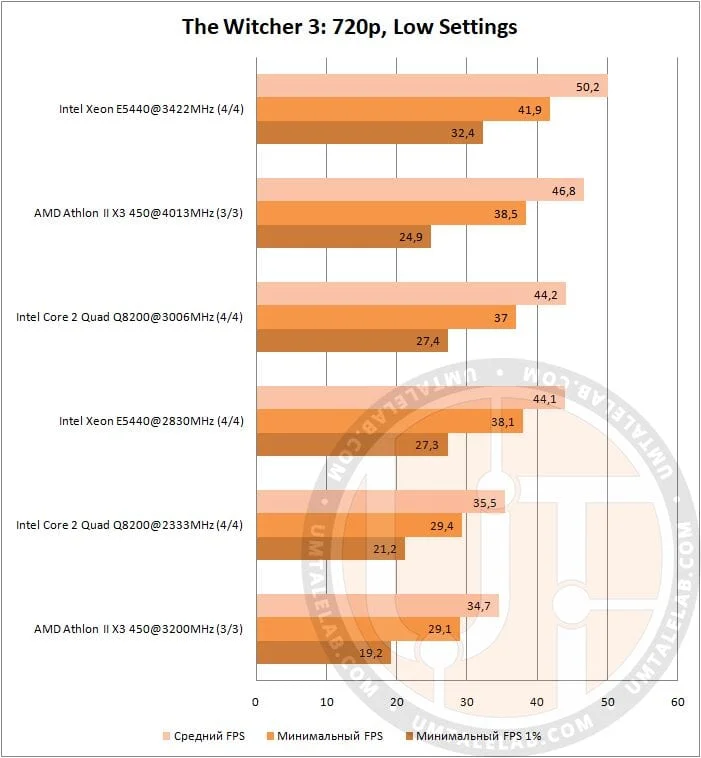 ⤢ ВІДКРИТИ
The situation doesn't change much at low settings. Frame rates bumped up across all tested CPUs, but it didn't really save most of them.
Thanks for reading, and stay tuned for more!
If you found this article helpful and want to see more benchmarks on UmTale Lab, please support us on Patreon! Our primary funding goal is to expand our test bench and improve testing quality (specifically, upgrading to a larger test-bench SSD and buying a capture card to prevent ShadowPlay recording from skewing the results).