TESTS · CPU · INTEL
PUBLISHED
READING33 min
Benchmarking the Xeon E5-2699 v3: An 18-core monster in modern games and applications
A look at the significantly cheaper 18-core Xeon E5-2699 v3 processor. We analyze its gaming and application performance, cooling requirements, and overclocking potential.
Frankly, no need for a lengthy intro here. The reason is just five words:eighteen cores, thirty-six threads Behold, the ultimate Haswell, the crowning achievement of 2014 engineering. Ladies and gentlemen, we're hosting the Xeon E5-2699 v3 — one of the most powerful 22-nanometer processors ever made!
But first, let's take a look at the prices of the processors featured in this article:
Processor | Price |
Ryzen 5 3600 | $75-85 |
Ryzen 5 1600X | $35-45* |
Ryzen 7 1800X | $60-75* |
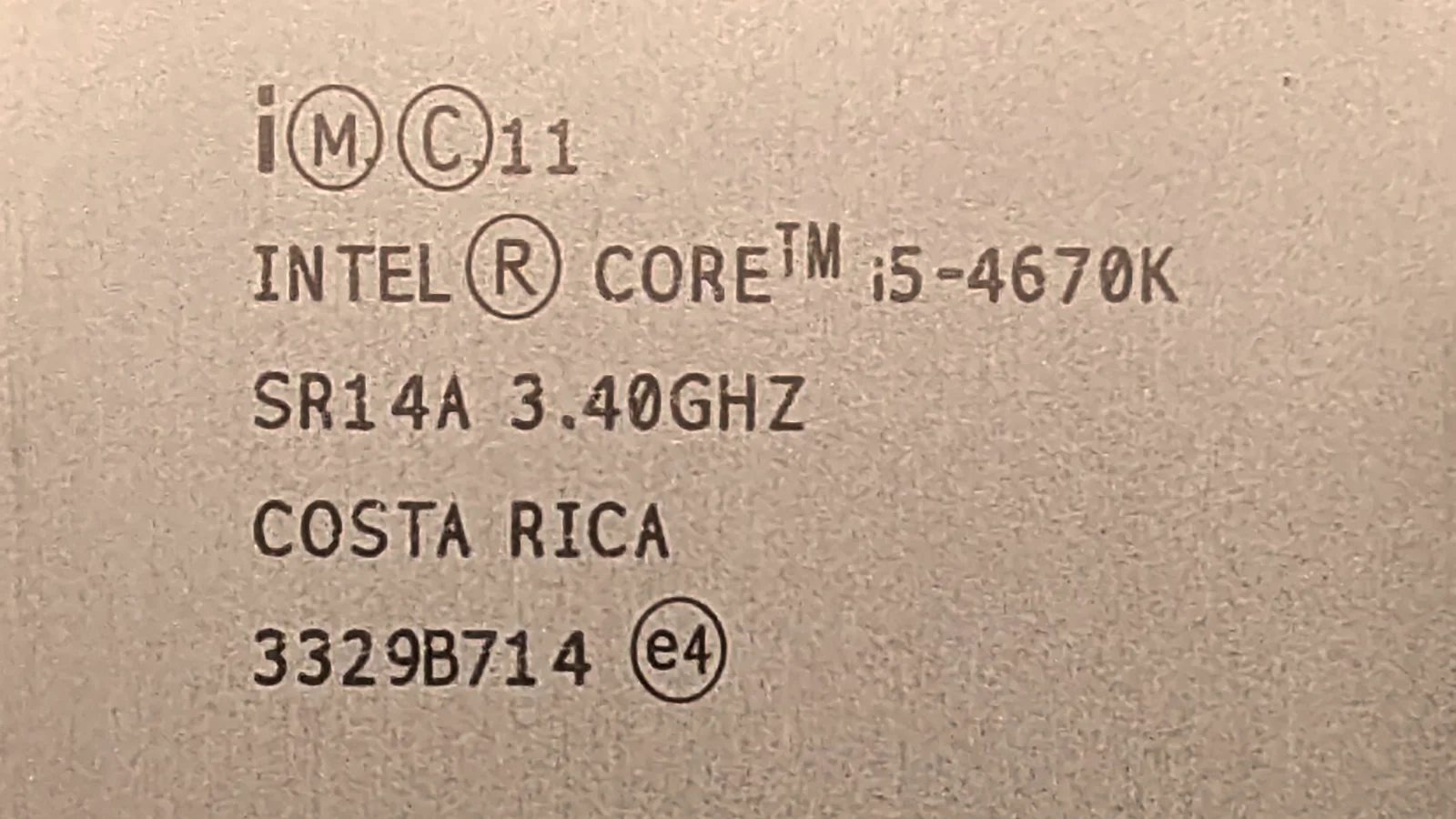
Core i5-4670K | $12-16* |
Core i3-10100F | $55-60 |
Core i5-10400F | $95-100 |
Core i3-12100F | $95-105 |
Core i5-12400F | $145-155 |
Core i7-11700K | $250-300 |
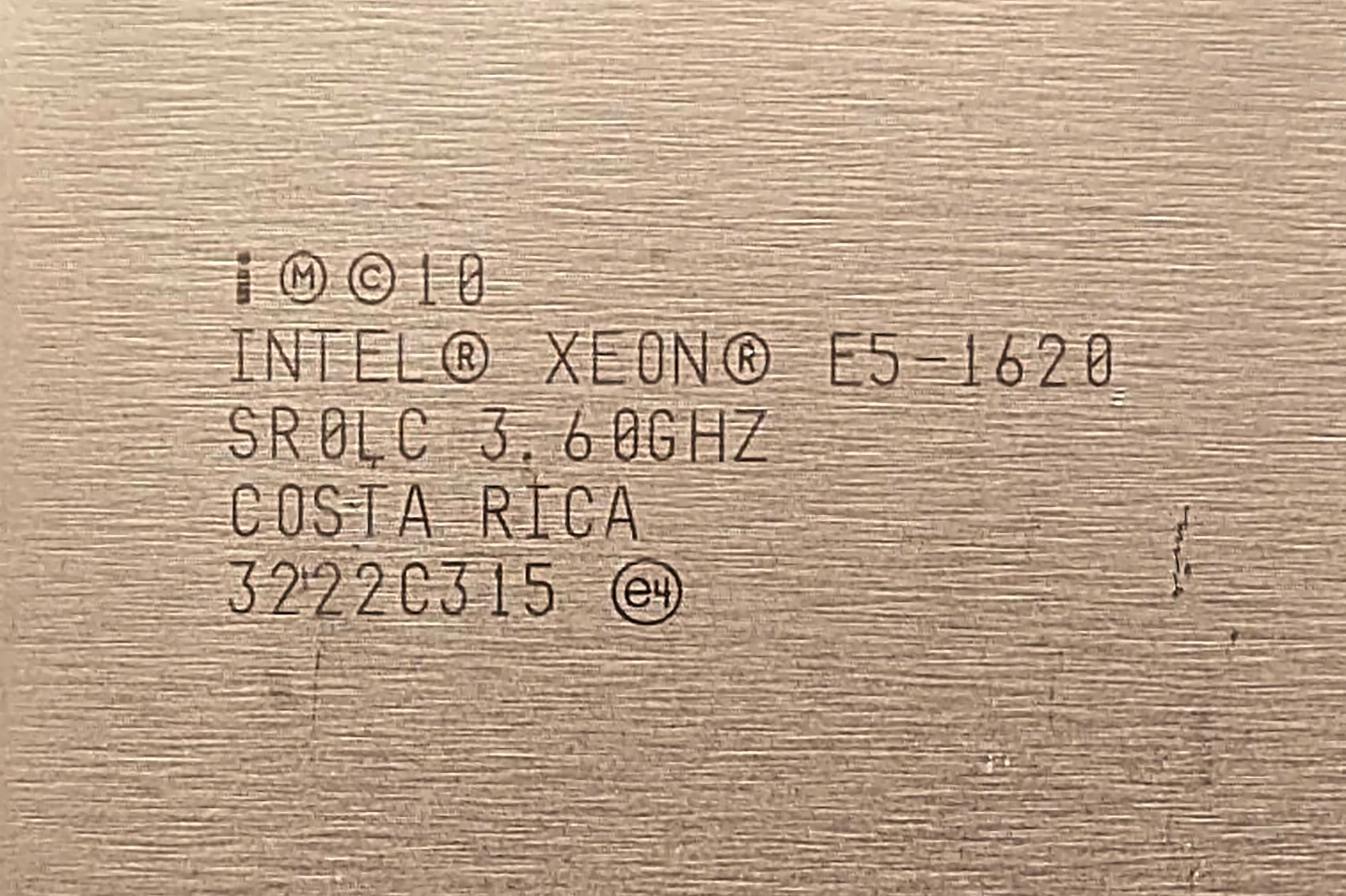
Xeon E5-1620 | $4-5* |
Xeon E5-2690 | $5-7* |
Xeon E5-2630 v3 | $2-3* |
Xeon E5-2670 v3 | $7-10* |
Xeon E5-2699 v3 | $45-60* |
Xeon E5-2640 v4 | $6-8* |
An 18-core, 36-thread processor priced cheaper than a new Core i3-10100F? It's absolutely true. In recent months, virtually all Xeon E5 v3 series chips have seen significant price drops — to an almost absurd extent. You can find a 6-core 2620 v3 for just $1 on local online marketplaces, while a 12-core 2670 v3 goes for only $7!
So what about your 18-core chip? you might ask. We 'snatched up' our specific 2699 v3 sample for a modest $45. This wasn't from the usual AliExpress, but a trusted local seller, who clearly wasn't selling this chip without their own markup.
Thus, there's a non-trivial chance to buy a Xeon E5-2699 v3 chip at an even more attractive price. However, we didn't take that risk and opted for a reliably safe store.
The processor
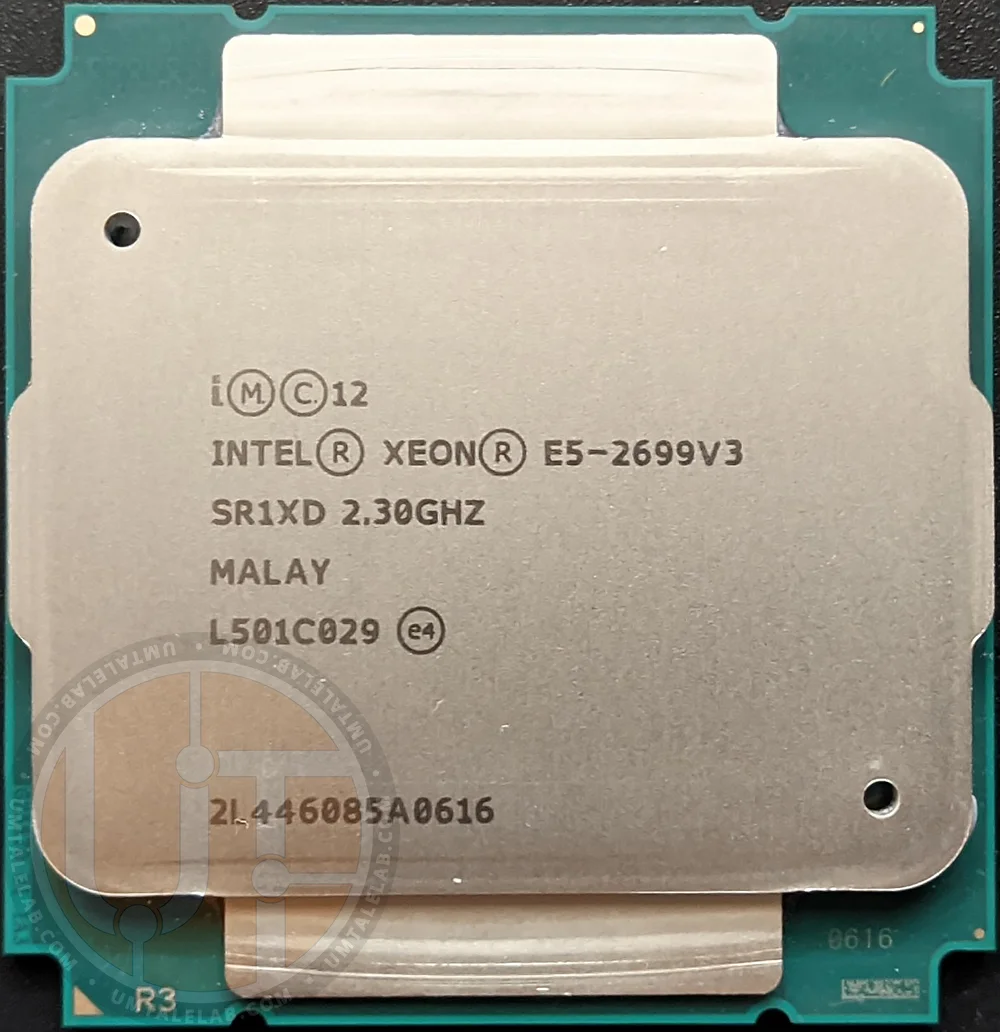
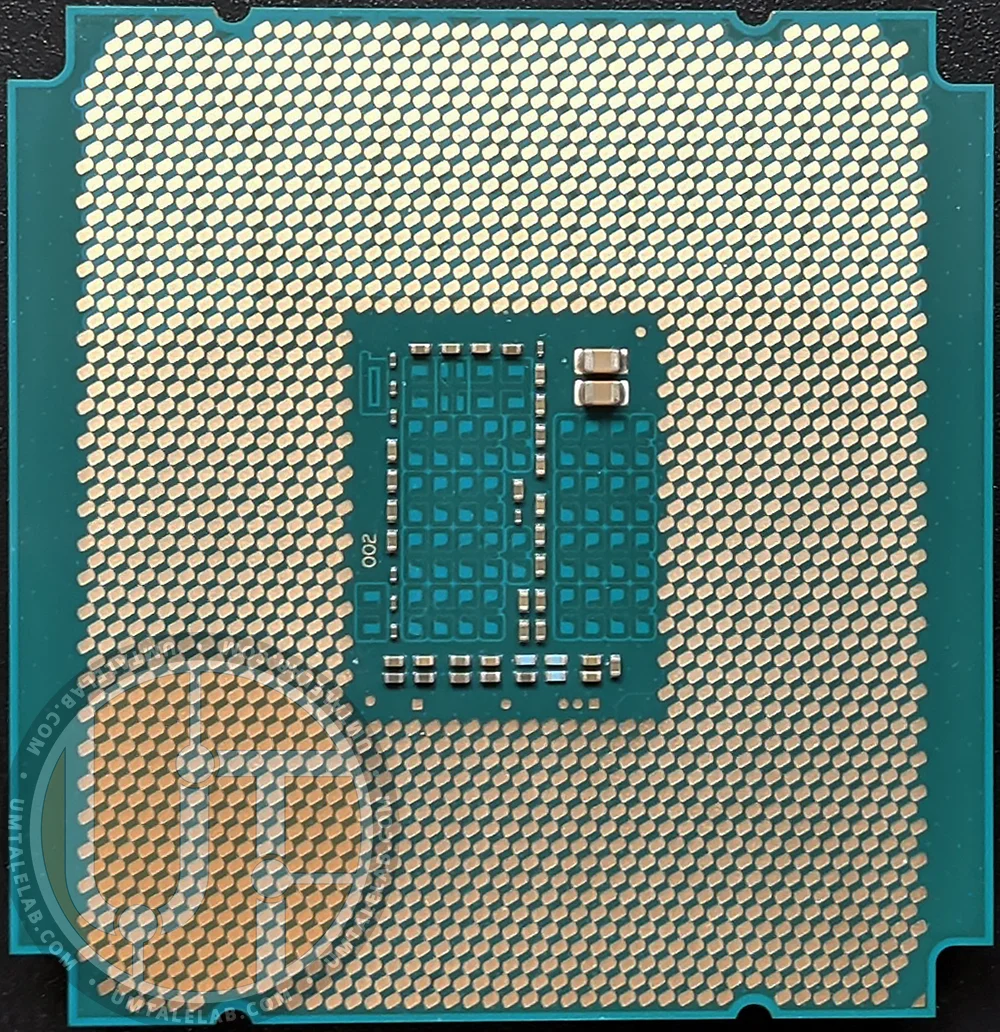
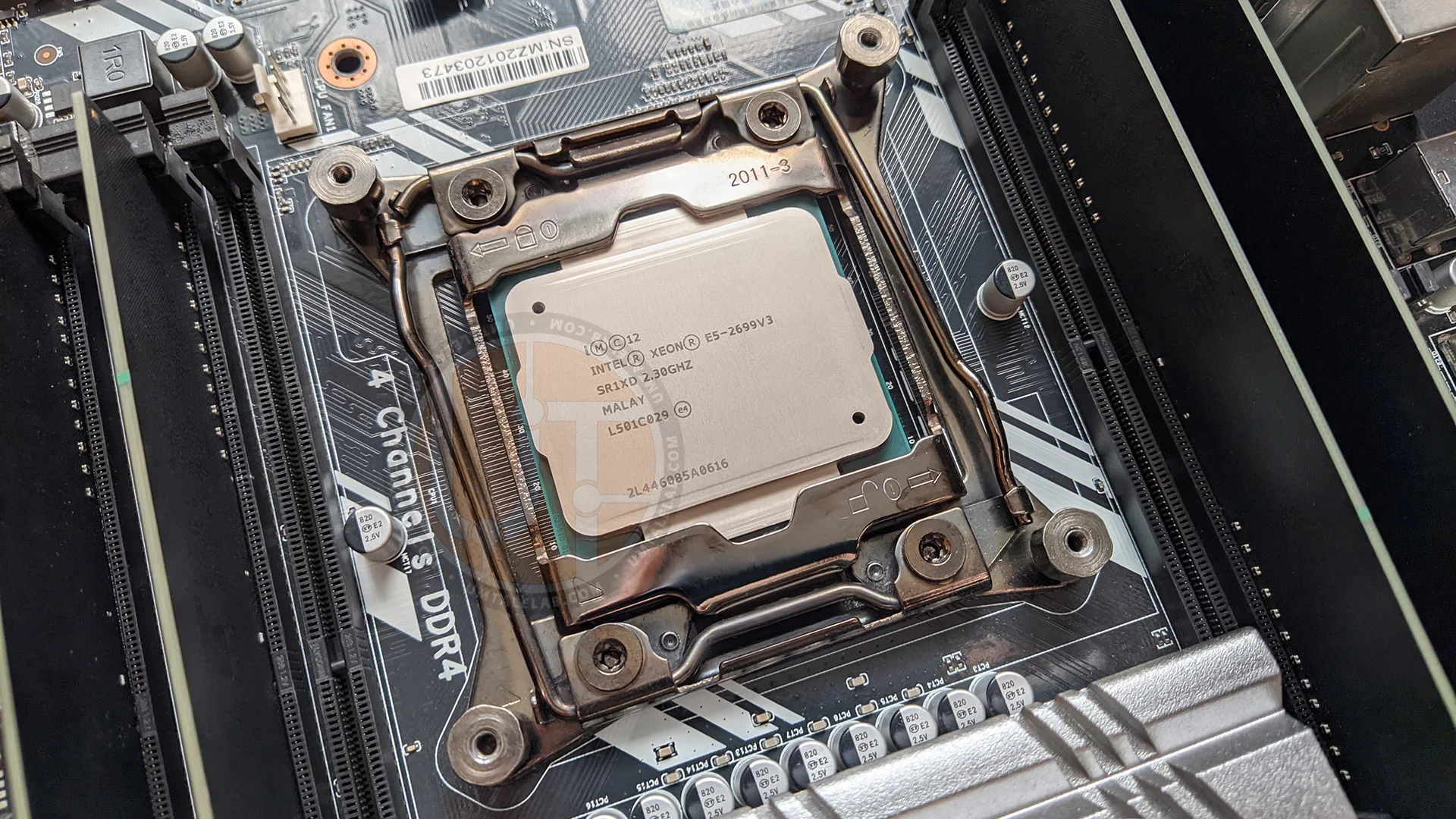
Our test sample's marking is SR1XD. This is a retail tray-packaged version of the CPU for workstations.
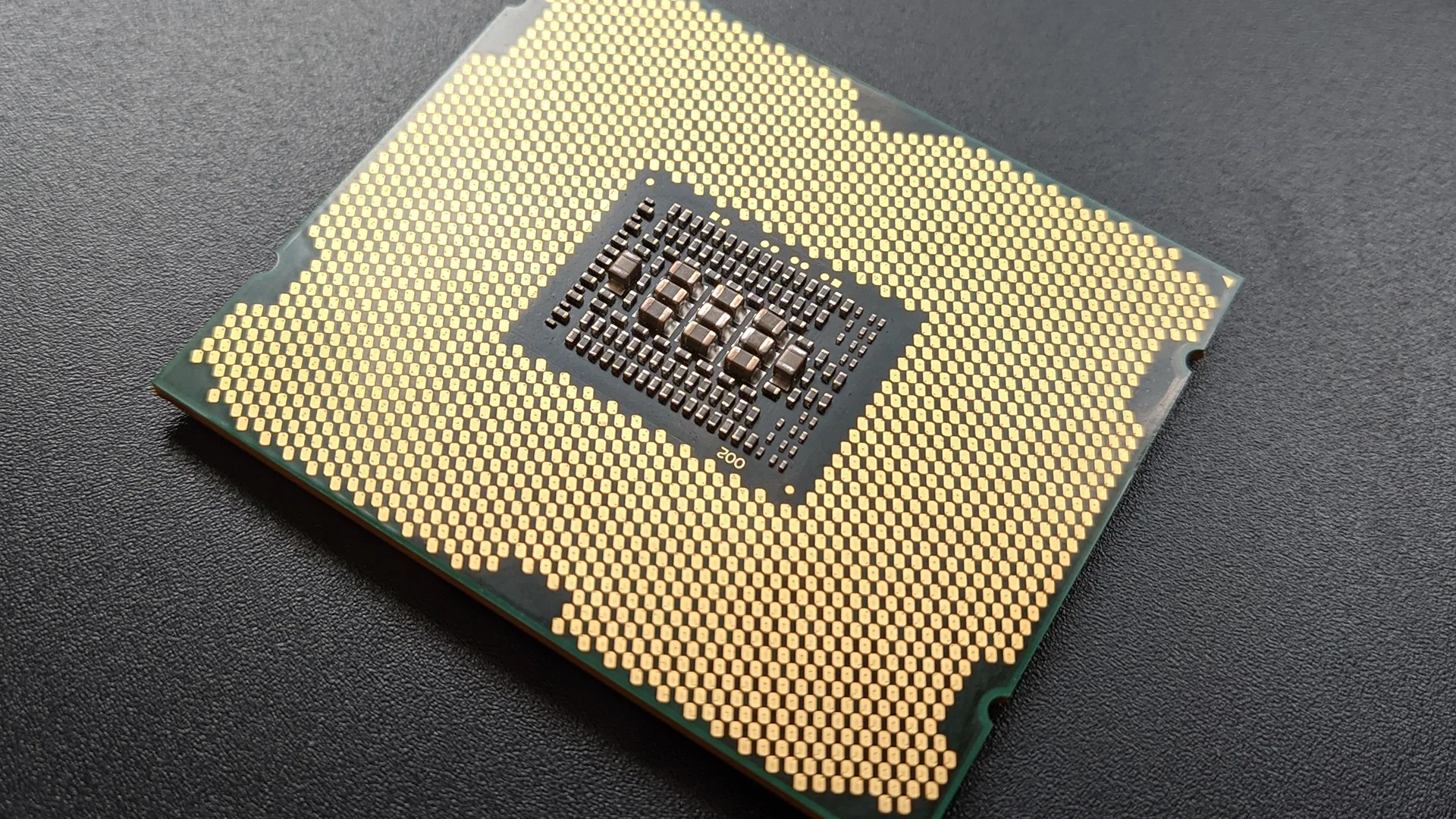
The 2699 v3 is slightly wider than its LGA 2011 v3 socket siblings, a difference visible to the naked eye in the following photos:
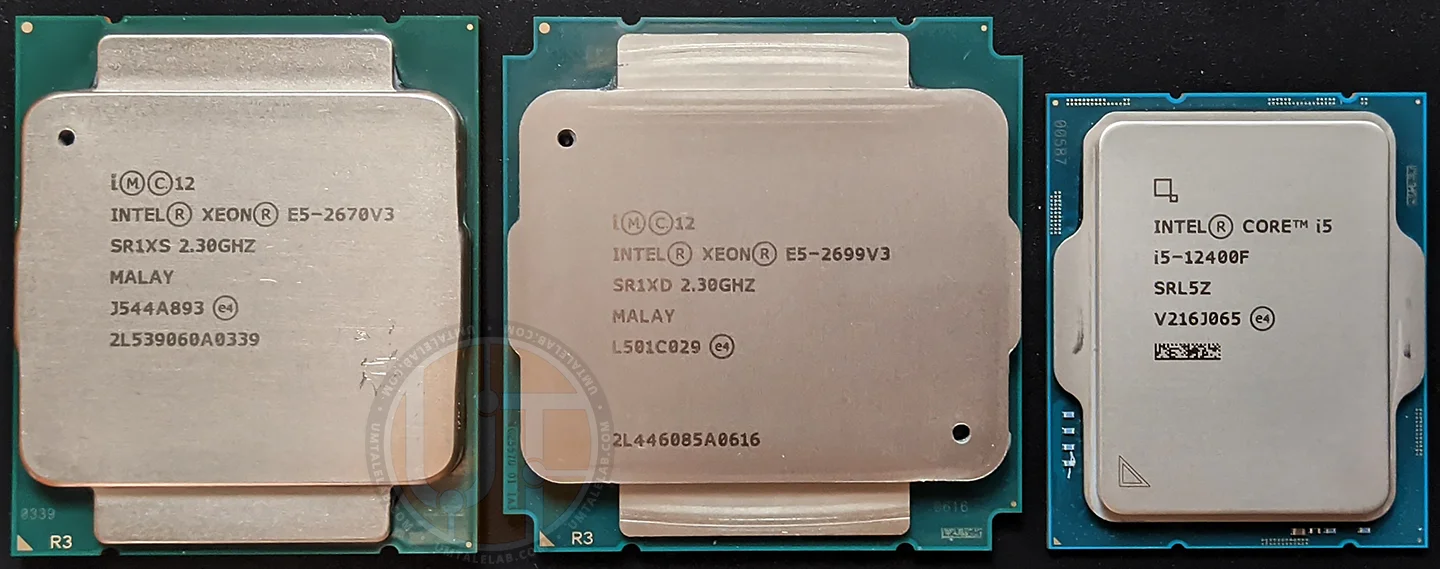
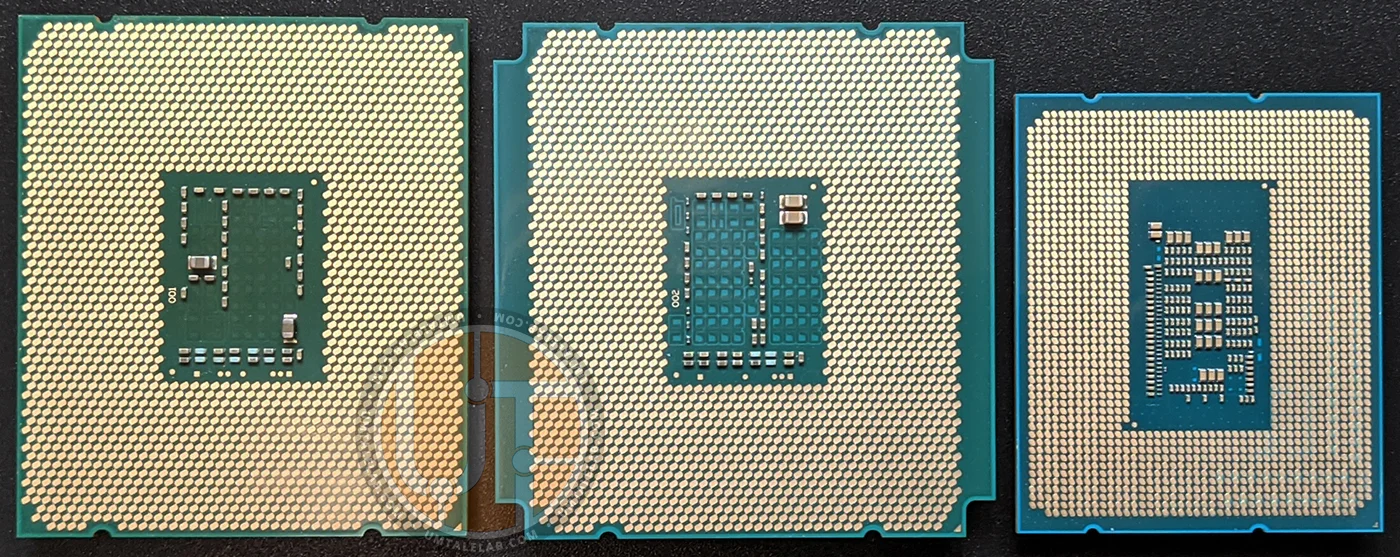
However, this doesn't mean the Xeon E5-2699 v3 has any specific socket requirements. The chip installs without issues into the vast majority of LGA 2011 v3-compatible motherboards. In theory, booting shouldn't be an issue either, but there are some nuances. We'll discuss these in more detail below.
Processor specifications
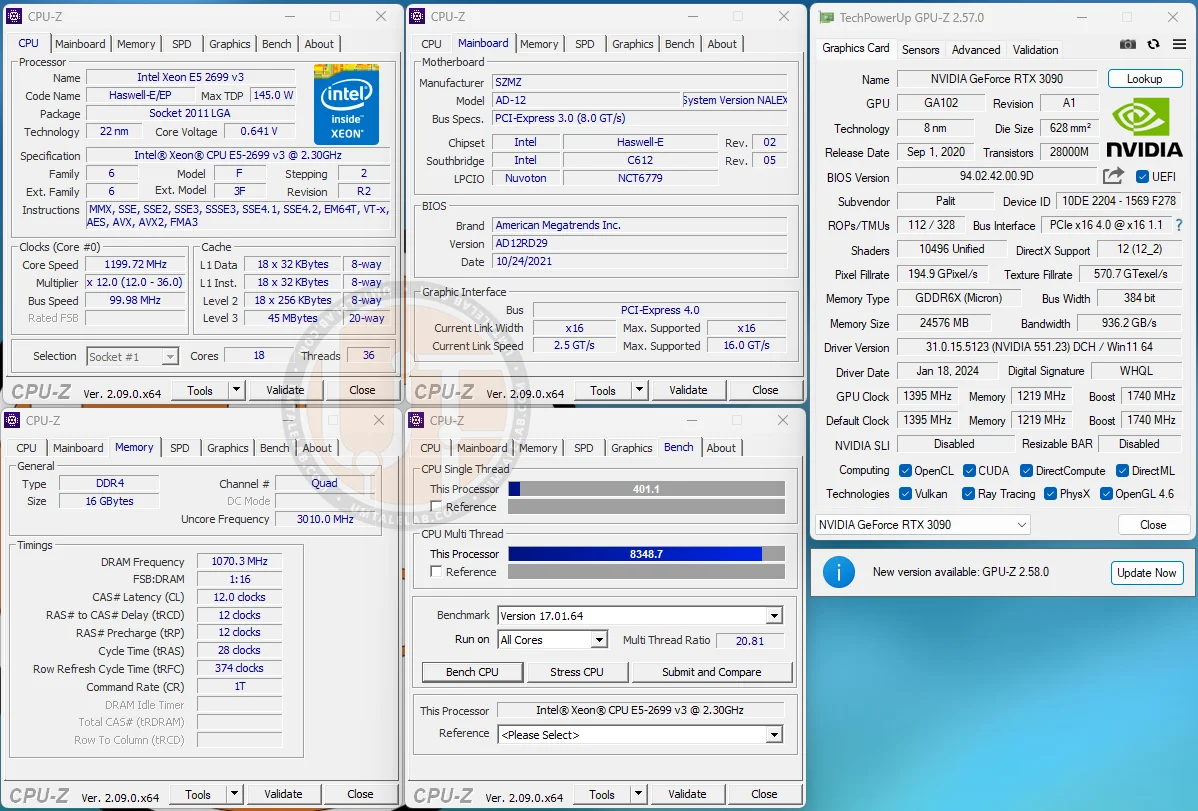
The Intel Xeon E5-2699 v3 chip is based on an 18-core, 36-thread, 22nm R2 revision die, built on the Intel Haswell-EP architecture. This CPU configuration is the maximum possible for third-generation mainstream server chips. Thus, we have the top representative of its generation (the Xeon E5-2696 v3 also exists, but this beast is much rarer and likely a custom-ordered part).
This chip can operate in both single and dual-processor configurations, though for our setup, we're using the former.
 ⤢ ВІДКРИТИ
The chip features 256KB of L2 cache per core and a whopping 45MB of L3 cache, truly massive for its era. This CPU is designed for motherboards with an LGA 2011 v3 socket. Its nominal frequency is 2300MHz, but Turbo Boost technology can push it up to 3600MHz for a single core, or 2800MHz across all 18 cores and 36 threads. The Xeon E5-2699 v3 also supports the full suite of modern processor instructions, including AVX2 and FMA3.
Like all v3 series chips, the 2699 v3's integrated memory controller (IMC) and L3 cache speeds aren't tied to the core frequency; they use their own divider. In our specific case, this is 3000MHz.
Regarding supported RAM frequency, the 2699 v3 officially limits maximum DDR4 speed to quad-channel 2133MHz. Unfortunately, there's no way to bypass this through overclocking or other methods.
This chip's TDP is set at 145W. Our measurements show it's quite easy to hit that power consumption figure, even without specialized benchmarks like LinX using AVX instructions.
In games with good multi-threaded optimization, the E5-2699 v3's power consumption typically stays around 90-120W. However, in professional software, the chip often hits its TDP limit.
Keep in mind: the E5-2699 v3 demands special attention to its cooling. Coolers with four or more heat pipes will suffice. However, if you're building a system for 24/7 operation (rendering, encoding, etc.), it's best to invest in a tower-style cooling system with six heat pipes.
Beyond the CPU itself,also ensure adequate cooling for your motherboard's power delivery VRMs! Even decent motherboards with respectable VRMs (for Chinese devices) struggle immensely when running the E5-2699 v3!
Undervolting and turbo boost unlock
Nobody's going to use a processor like this at stock speeds, especially since most Chinese motherboards now come with Turbo Boost Unlock baked into the BIOS as standard. If you're unlucky and your board doesn't have this "luxury" out of the box, the internet is full of instructions and pre-modded BIOSes with Turbo Boost Unlock for almost any board. We won't go into detail here and will jump straight to undervolting the CPU.
In our case, we achieved stability with the following voltage values: CPU cores at -80mV (our sample was stable at -100mV in games and lighter tasks), L3 cache at -70mV, and the memory controller at -60mV.
This simple method slightly increased performance in demanding tasks like rendering with AVX2 instructions, while significantly boosting frame rates in games.
Why? It's quite simple. Take Cinebench R24, for example, whose engine is built with AVX2 in mind. Logically, without Turbo Boost Unlock, the CPU frequency during multi-threaded rendering is only 2800MHz. What about after UTB? Just 2900MHz. So while there's a frequency gain, it's a far cry from the potential 3600MHz.
The reason for such a modest frequency increase is simple: the processor is hitting its 145W TDP limit. This is woefully insufficient to make all 36 threads run at 3600MHz.
Certainly, it's possible to bypass this limit by disabling SVID/FIVR in the BIOS settings. However, the problem is that this trick works well on chips like the E5-2670 v3 or E5-2660 v3, but not on the top-tier 2699 v3 (you'll get 3000MHz instead of 2900MHz). Besides the TDP limit, processors also have an EDP (Electrical Design Point) limit, which is essentially a consumption restriction based on maximum current. And there's no way to bypass EDP.
Furthermore, since the processor does start consuming significantly more power, disabling SVID/FIVR can damage your motherboard's power delivery. With the 2699 v3, we recorded it exceeding the 180W threshold. And let's face it: not every Chinese motherboard can handle that kind of TDP. Therefore, we believe it's best not to disable SVID/FIVR when using the Xeon E5-2699 v3 chip.
We've covered heavy loads. But what about games after enabling Turbo Boost Unlock? Well, things are quite good. Most often, the CPU frequency hovers around 3400-3600MHz, leaning closer to the latter. Even in Starfield, it didn't drop below 3500MHz, which is an excellent result.
Hyper-threading
If you've read our review of the Xeon E5-2670 v3, you probably remember that Hyper-Threading, the technology for simultaneously processing two threads per core, can play a cruel trick on overall CPU performance in poorly optimized applications (most often games), especially with multi-core solutions.
However, those conclusions were based on tests performed on Windows 10. For this benchmark session, we switched to Microsoft's latest operating system, Windows 11. We won't keep you in suspense — nothing has changed. Thus, there's a non-trivial probability that the problem lies not in the OS, but in Haswell's integrated hardware scheduler. However, we won't definitively state whether that's actually the case.
Regardless, after a series of tests, we found that in some applications, and the vast majority of games, the Xeon E5-2699 v3 delivers relatively weak results with Hyper-Threading enabled (which is what gives the 18-core processor its staggering 36 threads). The cause isn't a thermal or electrical package limitation. Instead, the problem lies in the difficulty of distributing a small workload across such a massive number of execution units, leading to slowdowns in poorly optimized applications.
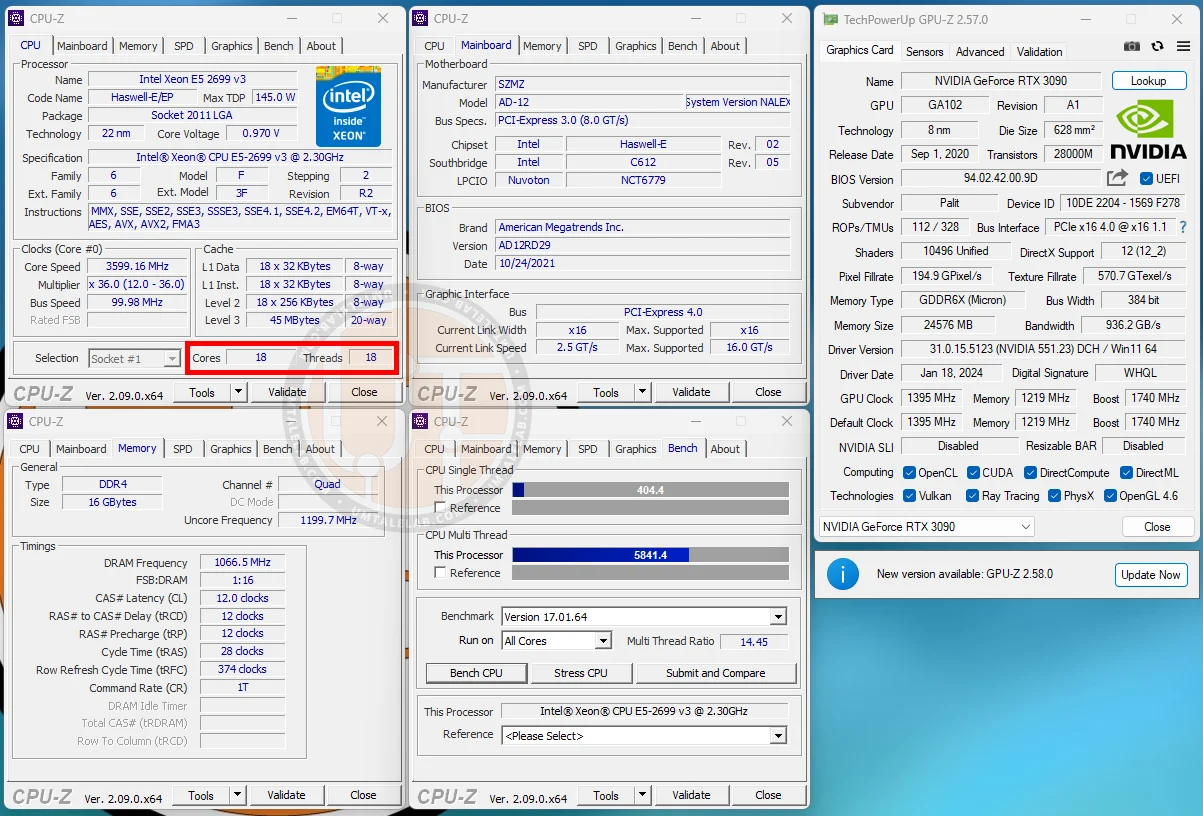
For this reason, we've decided to test the processor in two modes once again: with active Hyper-Threading (HT-ON) and without it (HT-OFF). This means you'll see two versions of the Xeon E5-2699 v3 chip on the charts:
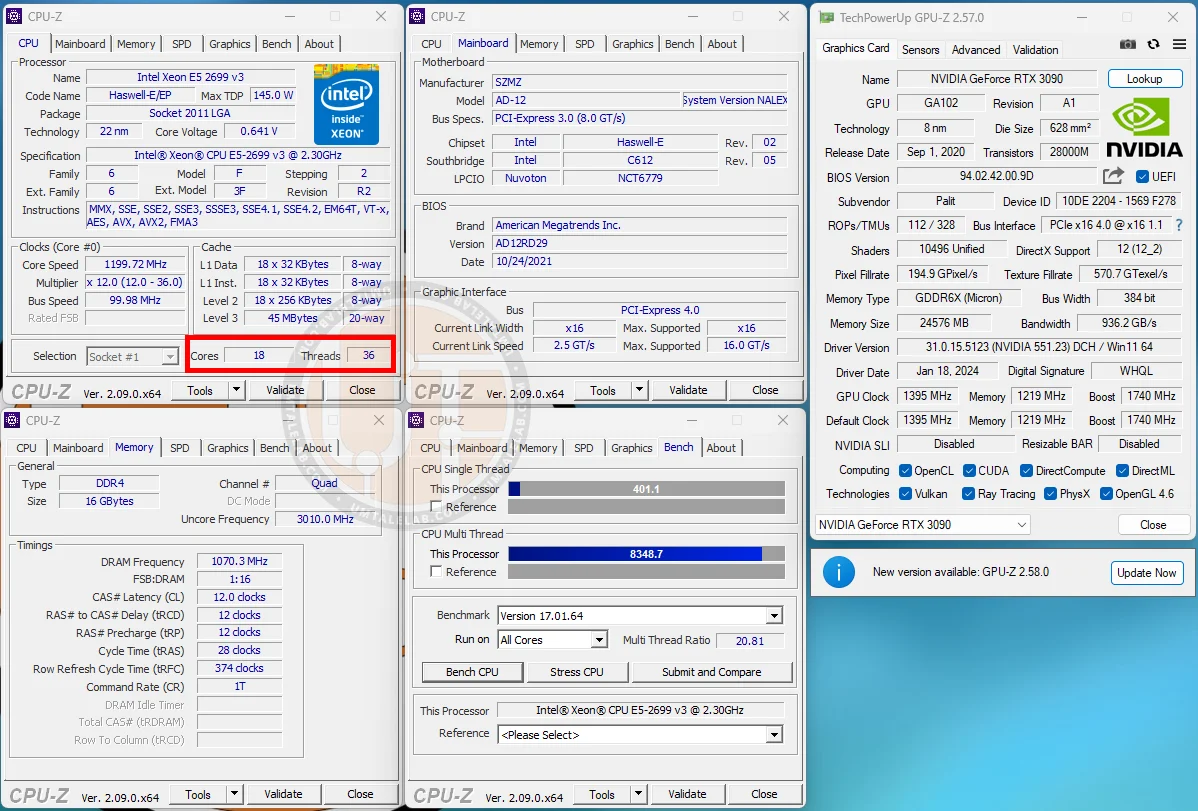
Xeon E5-2699 v3@2900-3600 MHz (18/36) UTB, HT-ON- a full-fledged processor with active multithreading technology (18 cores/36 threads) and Unlock Turbo-Boost.
Xeon E5-2699 v3@3000-3600 MHz (18/18) UTB, HT-OFF- a version with deactivated multithreading technology, in other words, "pure 18 cores" + Unlock Turbo-Boost.
You've probably already noticed that the two versions have slightly different minimum frequencies. This isn't an error: under heavy AVX2 loads, the Hyper-Threading-free variant can maintain 3000 MHz across all cores, while the full CPU only hits 2900 MHz. However, in other scenarios (games, light software, daily tasks, etc.), the frequencies of both versions match completely. For instance, in Starfield, which is the most demanding project for these processors, both variants operate at 3500 MHz.
Test setup, software, and CPU settings
Resizable BAR was activated on platforms that support it in the BIOS.
Test setup
Intel processors: Core i5-4670K, Core i3-10100F, Core i5-10400F, Core i7-11700K, Core i3-12100F, Core i5-12400F, Xeon E5-1620, Xeon E5-2690, Xeon E5-2630 v3, Xeon E5-2670 v3, Xeon E5-2699 v3, Xeon E5-2640 v4;
AMD processors: Ryzen 5 1600X, Ryzen 7 1800X, Ryzen 5 3600;
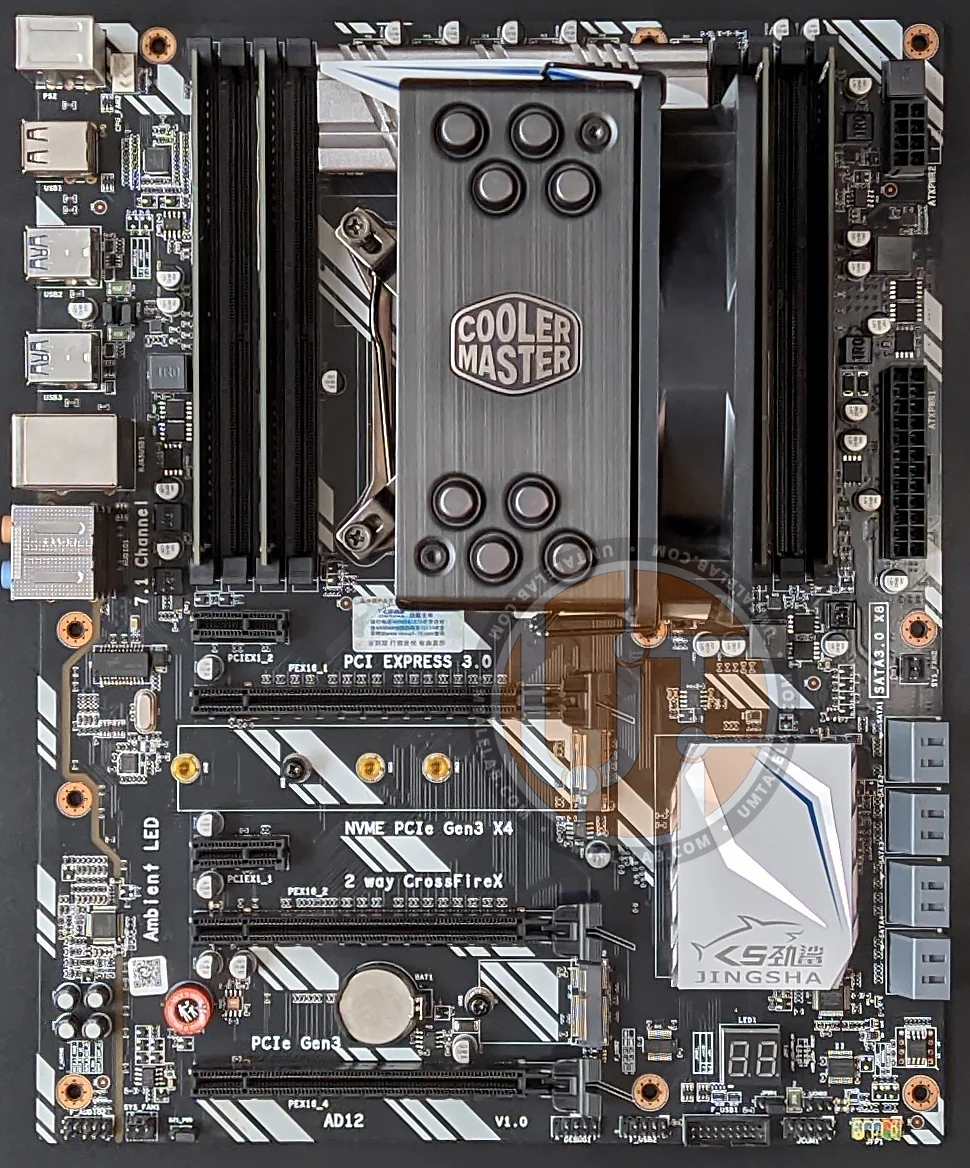
CPU cooling: Cooler Master Hyper 212 Black Edition (RR-212S-20PK-R1);
RAM for LGA 1150: 2 x 8 GB HyperX Genesis Na’Vi Edition (KHX16C9C2K2/8), total 16 GB;
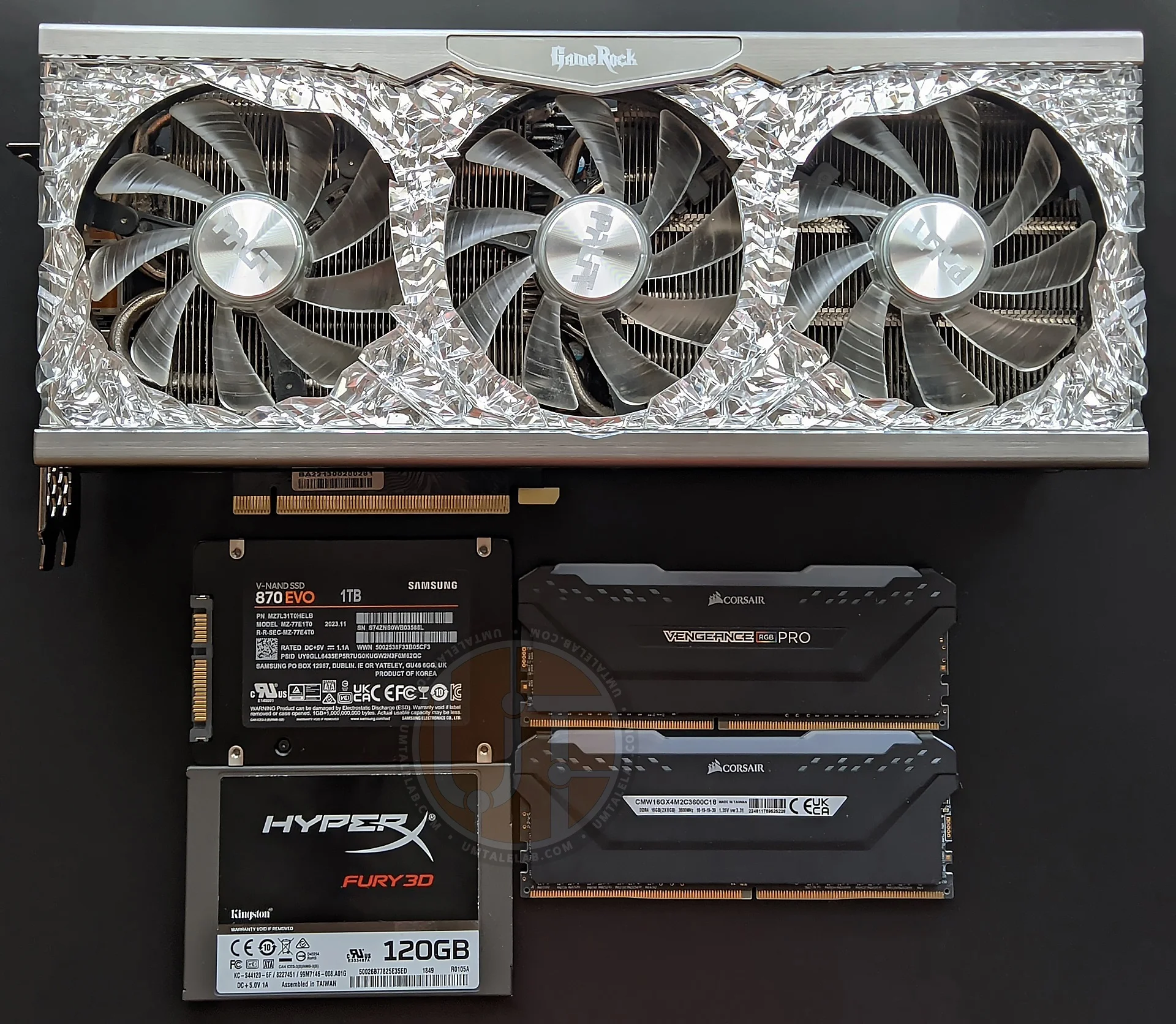
RAM for LGA 1200, LGA 1700, and AM4: 2 x 8 GB Corsair Vengeance RGB PRO (CMW16GX4M2C3600C18), total 16 GB (Micron E-Die chips);
RAM for LGA 2011: 4 x 8 GB Micron MT18KSF1G72PZ-1G6E1HI, total 32 GB (Micron D9PQL chips);
RAM for LGA 2011 v3: 4 x 4 GB G.SKILL DDR4 F4-2400C15S-4GNT, total 16 GB (Hynix MFR chips);
Motherboard LGA 1150: ASRock Z87 Pro4;
Motherboard LGA 1200: GIGABYTE Z490 AORUS ELITE AC for Core i7-11700K, ASUS PRIME B560M-A for Core i3-10100F and Core i5-10400F;
Motherboard LGA 1700: MSI PRO Z690-A DDR4 (MS-7D25);
Motherboard LGA 2011: DELL T3610 (09M8Y8);
Motherboard LGA 2011 v3: Kllisre X99-D8 (AD12) with a modified BIOS (Unlock Turbo Boost, Undervolt, and unlocked timing control);
Motherboard AM4: ASUS TUF GAMING B450M-PRO II;
Graphics card: PALIT GAMEROCK GeForce RTX 3090 24 GB (~1900/19000 MHz, Power Limit 113%);
Solid-state drives: 2 x KINGSTON SUV400S37120G 120.0 GB (AMD/Intel Windows 11), SAMSUNG 870 EVO 1 TB (Games/Applications);
Power supply unit: Chieftec GPS-1250C.
Software
Operating System: Windows 11 Pro x64 with the latest updates as of February 2024. Core isolation/memory integrity disabled;
Graphics Card Drivers: NVIDIA GeForce 551.23 WHQL;
FPS Measurement Software: MSI Afterburner 4.6.5;
Games: testing was conducted on the latest game versions as of February 2024;
Game Settings: testing was performed at maximum graphics settings in 1080p resolution.
Tested CPU configurations
Intel Processors:Core i5-4670K@3400-3800MHz, Dual Channel DDR3@1600MHz (motherboard auto: 9-9-9-27);
Core i5-4670K@4500MHz, UnCore@4100 MHz, Dual Channel DDR3@2133MHz (11-12-12-28), vCore voltage – 1.4v, VCCIN/VRIN voltage – 1.9v, CPU Cache – 1.32v, SA voltage – 1.25v, DDR3 voltage – 1.69v;
Core i3-10100F@3600-4300 MHz, Dual Channel DDR4@2667 MHz (motherboard auto: 16-18-18-36);
Core i3-10100F@3600-4300 MHz, Dual Channel DDR4@4000 MHz (16-21-21-42), IO voltage – 1,2v, SA voltage – 1.2v, DDR4 voltage — 1.420v;
Core i5-10400F@2900-4300 MHz, Dual Channel DDR4@2667 MHz (motherboard auto: 16-18-18-36);
Core i5-10400F@2900-4300 MHz, Dual Channel DDR4@4000 MHz (16-21-21-42), IO voltage – 1,2v, SA voltage – 1.2v, DDR4 voltage — 1.420v;
Core i7-11700K@3600-5000 MHz, Dual Channel DDR4@3200 MHz (motherboard auto: 16-18-18-36);
Core i7-11700K@4800 MHz, UnCore@4400 MHz, Dual Channel DDR4@3600 MHz (16-19-19-38) GEAR 1, vCore voltage – 1.33v, mem-IO voltage – 1.2v, SA voltage – 1.23v, DDR4 voltage – 1.36v;
Core i3-12100F@3300-4300 MHz, Dual Channel DDR4@3200 MHz (motherboard auto: 18-19-19-39) GEAR 1;
Core i3-12100F@3300-4300 MHz, Dual Channel DDR4@3600 MHz (16-19-19-38) GEAR 1;
Core i5-12400F@2500-4400 MHz, Dual Channel DDR4@3200 MHz (motherboard auto:18-19-19-39) GEAR 1;
Core i5-12400F@2500-4400 MHz, Dual Channel DDR4@3600 MHz (16-19-19-38) GEAR 1;
Xeon E5-1620@3600-3800 MHz, Quad-Channel DDR3@1600 MHz (motherboard auto: 11-11-11-28);
Xeon E5-2690@2900-3800 MHz, Quad-Channel DDR3@1600 MHz (motherboard auto: 11-11-11-28);
Xeon E5-2630 v3@3200 MHz (Unlock Turbo Boost on UTB charts), vCore -60mv, UnCore -50mv, SA -50mv, Quad-Channel DDR4@1866 MHz (10-10-10-24);
Xeon E5-2670 v3@3100 MHz (Unlock Turbo Boost on UTB charts), vCore -50mv, UnCore -50mv, SA -50mv, Quad-Channel DDR4@2133 MHz (12-12-12-35);
Xeon E5-2699 v3@2900-3600 MHz, Hyper-Threading - ON, 18 cores / 36 threads, (Unlock Turbo Boost on UTB charts), vCore -80mv, UnCore -70mv, SA -60mv, Quad-Channel DDR4@2133 MHz (12-12-12-35);
Xeon E5-2699 v3@3000-3600 MHz, Hyper-Threading - OFF, 18 cores / 18 threads (Unlock Turbo Boost on UTB charts), vCore -80mv, UnCore -70mv, SA -60mv, Quad-Channel DDR4@2133 MHz (12-12-12-35);
Xeon E5-2640 v4@2400-3400 MHz, Quad-Channel DDR4@2133 MHz (12-12-12-28).
AMD Processors: Ryzen 5 1600X@3600-4000 MHz, Dual Chanel DDR4@2667 MHz (motherboard auto: 18-18-18-44);
Ryzen 5 1600X@4000 MHz, Dual Chanel DDR4@3600 MHz (16-19-16-38), vCore voltage – 1.42v, SOC voltage — 1.075v, cLDO VDDP voltage – 0.975v, DDR4 voltage — 1.350v;
Ryzen 7 1800X@3600-4000 MHz, Dual Chanel DDR4@2667 MHz (motherboard auto: 18-18-18-44);
Ryzen 7 1800X@3900 MHz, Dual Chanel DDR4@3600 MHz (16-19-16-38), vCore voltage – 1.4v, SOC voltage — 1.1v, cLDO VDDP voltage – 1.025v, DDR4 voltage — 1.350v;
Ryzen 5 3600@3600-4200 MHz, Dual Chanel DDR4@3200 MHz (motherboard auto: 22-22-22-53) Infinity Fabric@1600 MHz (1:1);
Ryzen 5 3600@4325 MHz, Dual Chanel DDR4@3733 MHz (16-19-16-38) Infinity Fabric@ 1866 MHz (1:1), vCore voltage – 1.39v, SOC voltage — 1.125v, cLDO VDDP voltage – 1.075v, VDDG CCD voltage – 1.025v, VDDG IOD voltage – 1.025v, DDR4 voltage — 1.380v;
You can find more detailed information about almost all the tested components in our full reviews, or by checking out the blog section, where we post shorter notes.
As a reminder, here's our CPU testing methodology: Each benchmark, application, and game was run five times. We then calculated the average score from those five runs and recorded it as the final result.All games and applications were installed on an SSD.
Benchmark results
Data archiving
7-Zip
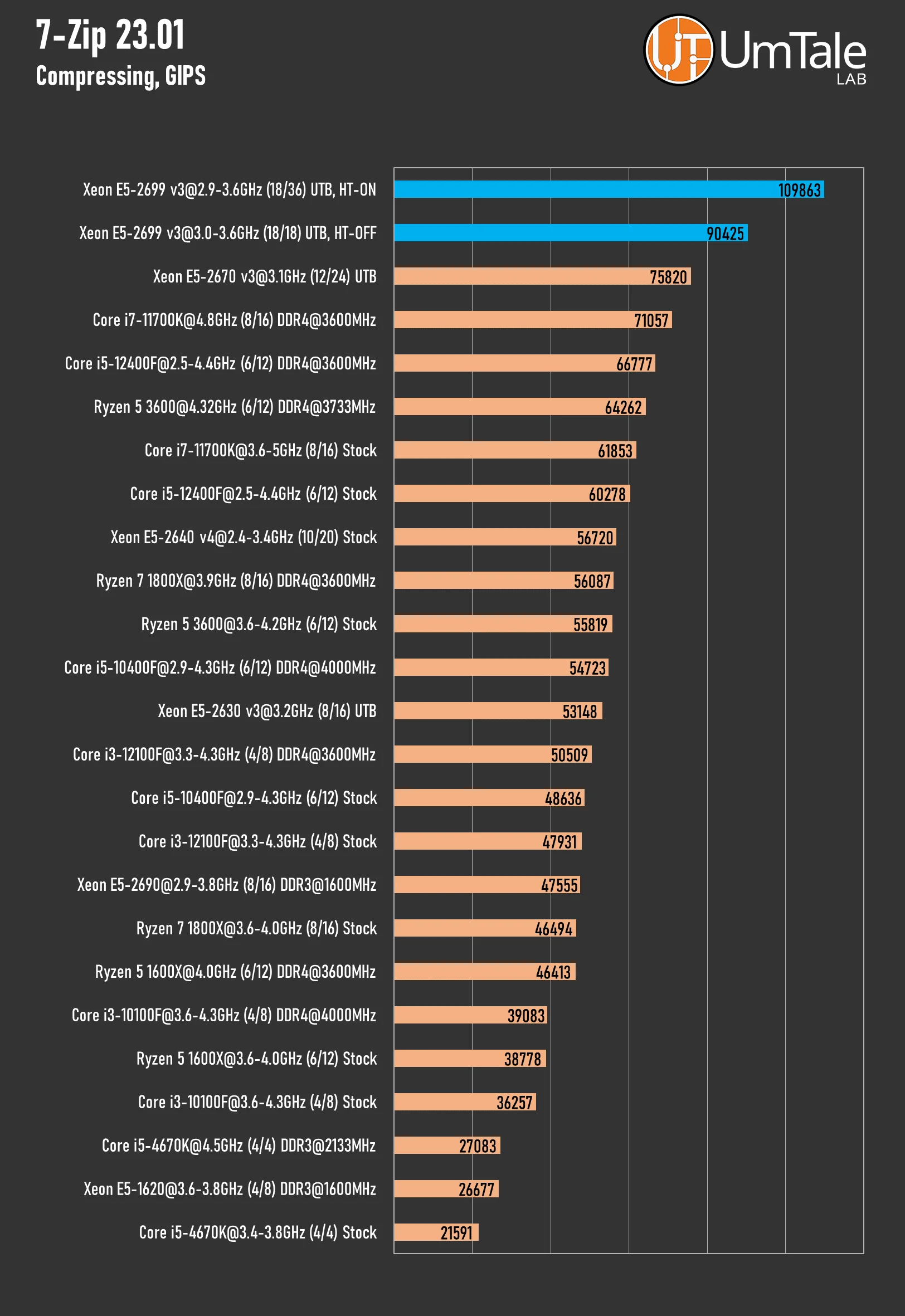
The popular free file archiver 7-Zip supports multiple compression algorithms and numerous data formats, including its proprietary 7z format with the highly efficient LZMA algorithm. It can utilize a large number of CPU threads and responds well to increased RAM frequencies.
File compressing
 ⤢ ВІДКРИТИ
It's been quite a while since we tested a CPU capable of surpassing the Xeon E5-2670 v3 in data archiving. Even the overclocked Core i7-11700K, which we had some hopes for, couldn't handle the task. However, the 12-core's dominance couldn't last forever. The 18-core, 36-thread E5-2699 v3 significantly outpaced its smaller sibling by a massive 44%!
Disabling Hyper-Threading predictably reduced the tested CPU's performance, but even then, it still maintained a 20% lead over its closest competitor.
File decompressing
 ⤢ ВІДКРИТИ
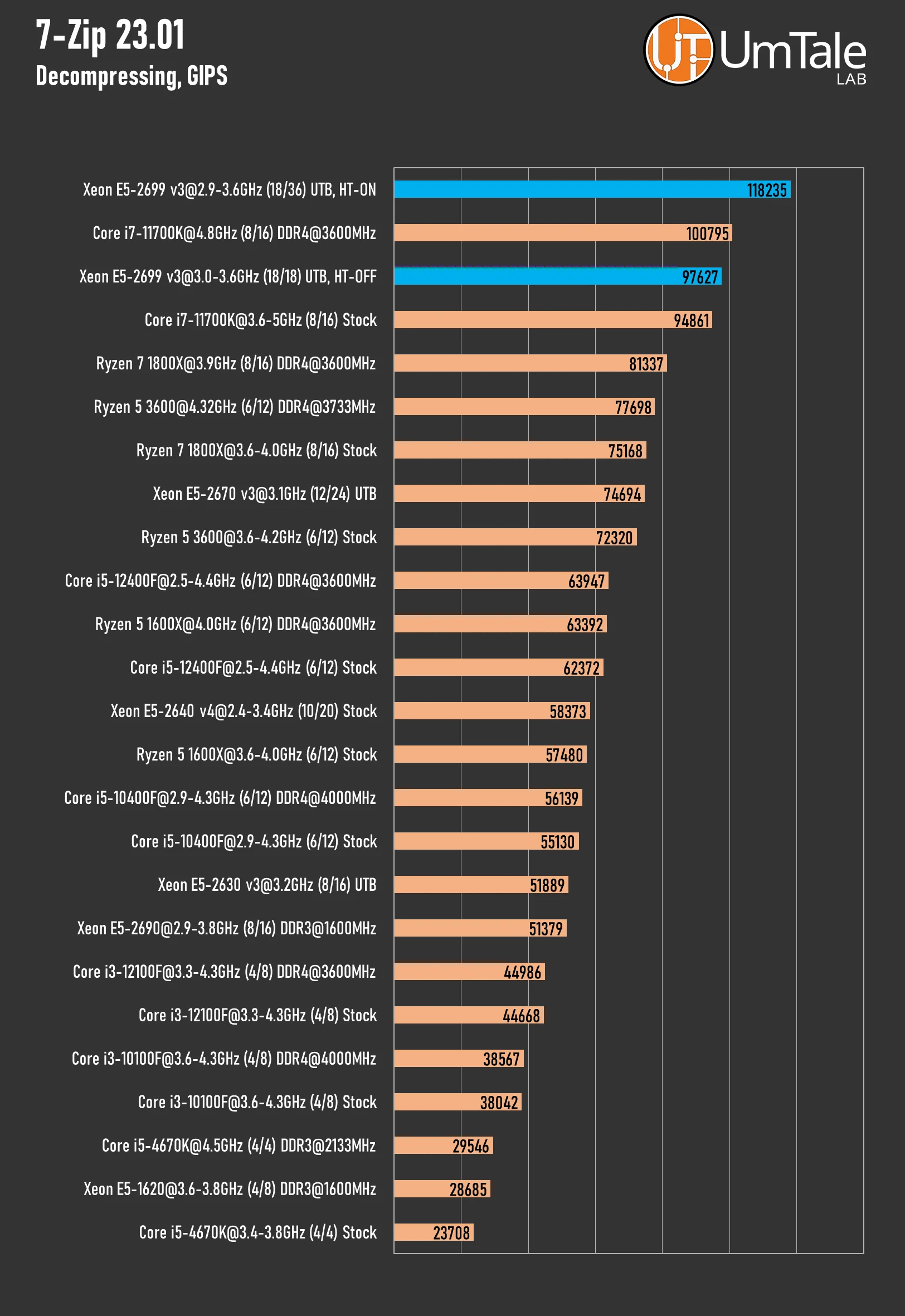
Low-frequency chips often aren't great at file decompression, but that's not the case for the 2699 v3. The 36-thread variant managed to beat the i7-11700K by 17%, and the pure 18-core model virtually matched the $300 CPU.
3D rendering
Blender
Blender is a versatile, free, open-source 3D content creation suite. It supports the entire 3D modeling pipeline, from rigging, animation, simulation, rendering, compositing, and motion tracking to video editing and game creation.
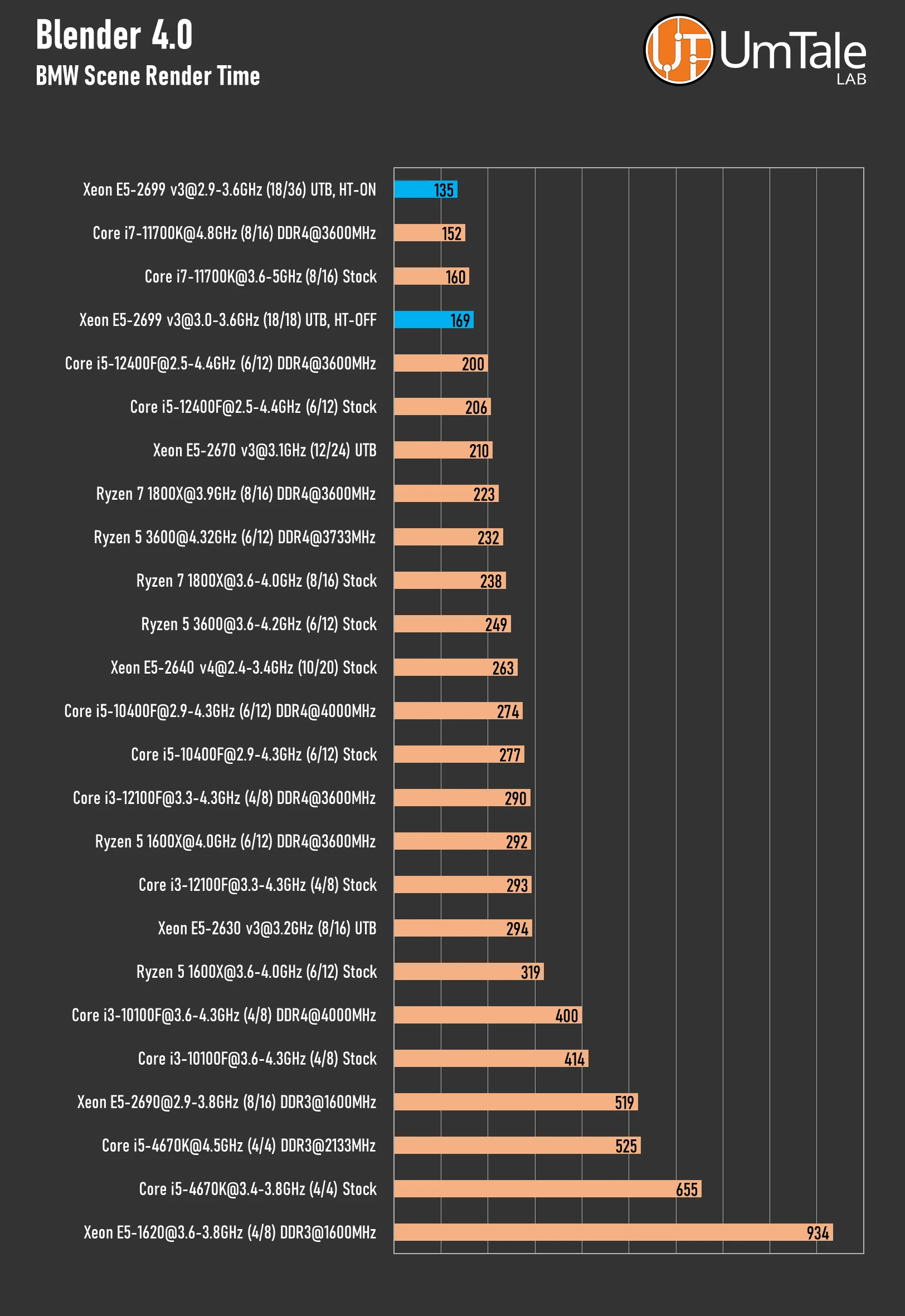
We test CPU rendering speed using Blender's built-in Cycles engine and the BMW scene.
 ⤢ ВІДКРИТИ
If you're using Blender's built-in Cycles engine, the Xeon E5-2699 v3 will significantly cut down your final render times (by about 11%). This is even when compared to the much more expensive and overclocked Core i7-11700K. But what's even more interesting is that not only is the 36-thread Haswell more performant, it also consumes significantly less power compared to the 16-thread Rocket Lake (145W vs. 180-210W).
Without multithreading technology, the E5-2699 v3 loses about 20% of its performance. Even so, its results aren't far off from the base i7-11700K.
Corona 10 Benchmark
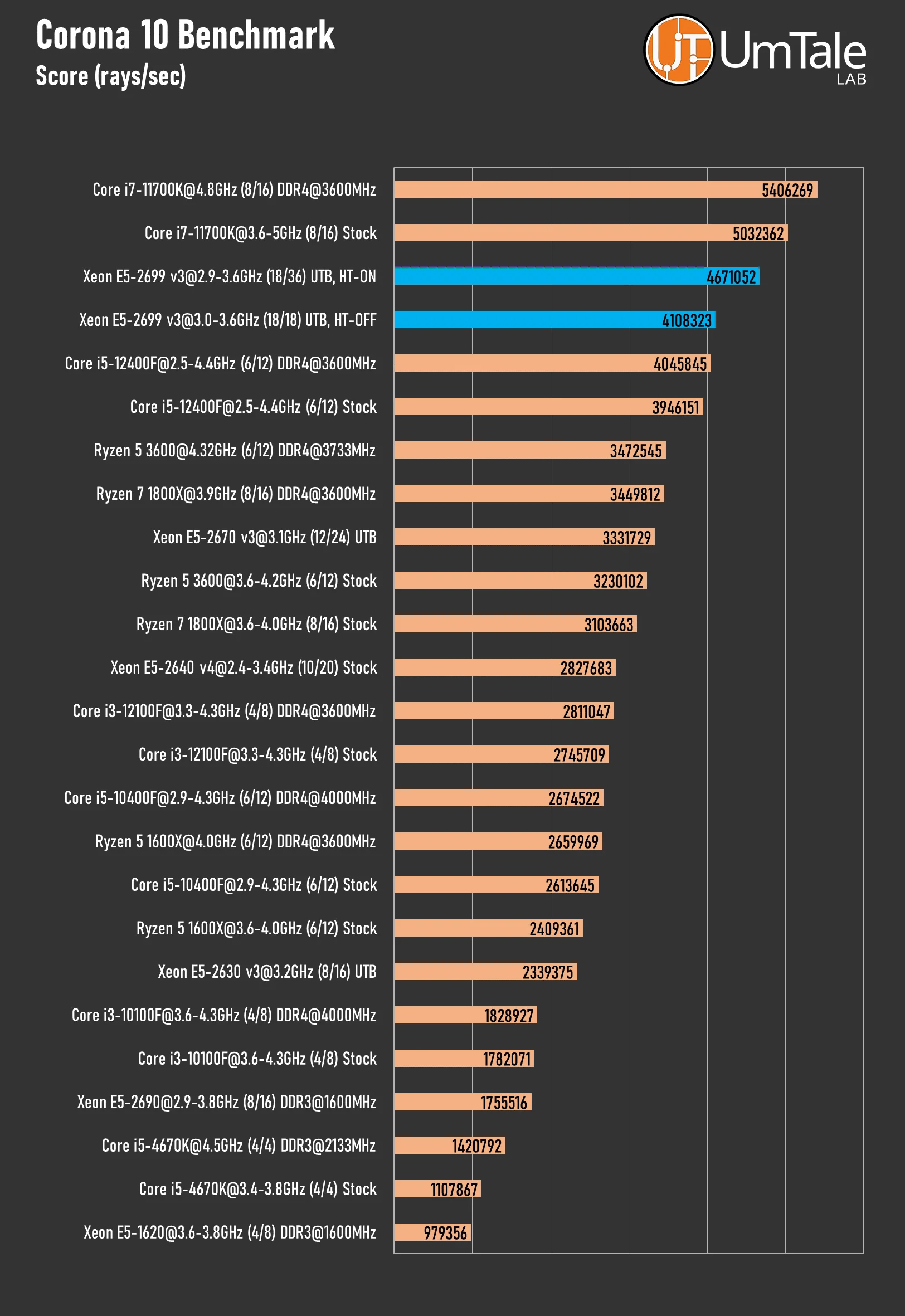
The Corona 10 Benchmark is based on the popular Corona 10 render engine, favored by professionals. This engine is available for scene visualization in 3ds Max and Cinema 4D. The benchmark assesses CPU rendering speed using its proprietary technologies.
 ⤢ ВІДКРИТИ
However, in Corona 10, the 2699 v3 chip doesn't exactly shine. While the results are respectable given the CPU's price, after the previously mentioned achievements of this 36-thread monster, an 8% deficit against the stock 11700K seems unconvincing.
Without Hyper-Threading, the 18-core Xeon E5-2699 v3 can only compete with the 6-core, 12-thread Core i5-12400F.
Cinebench R23
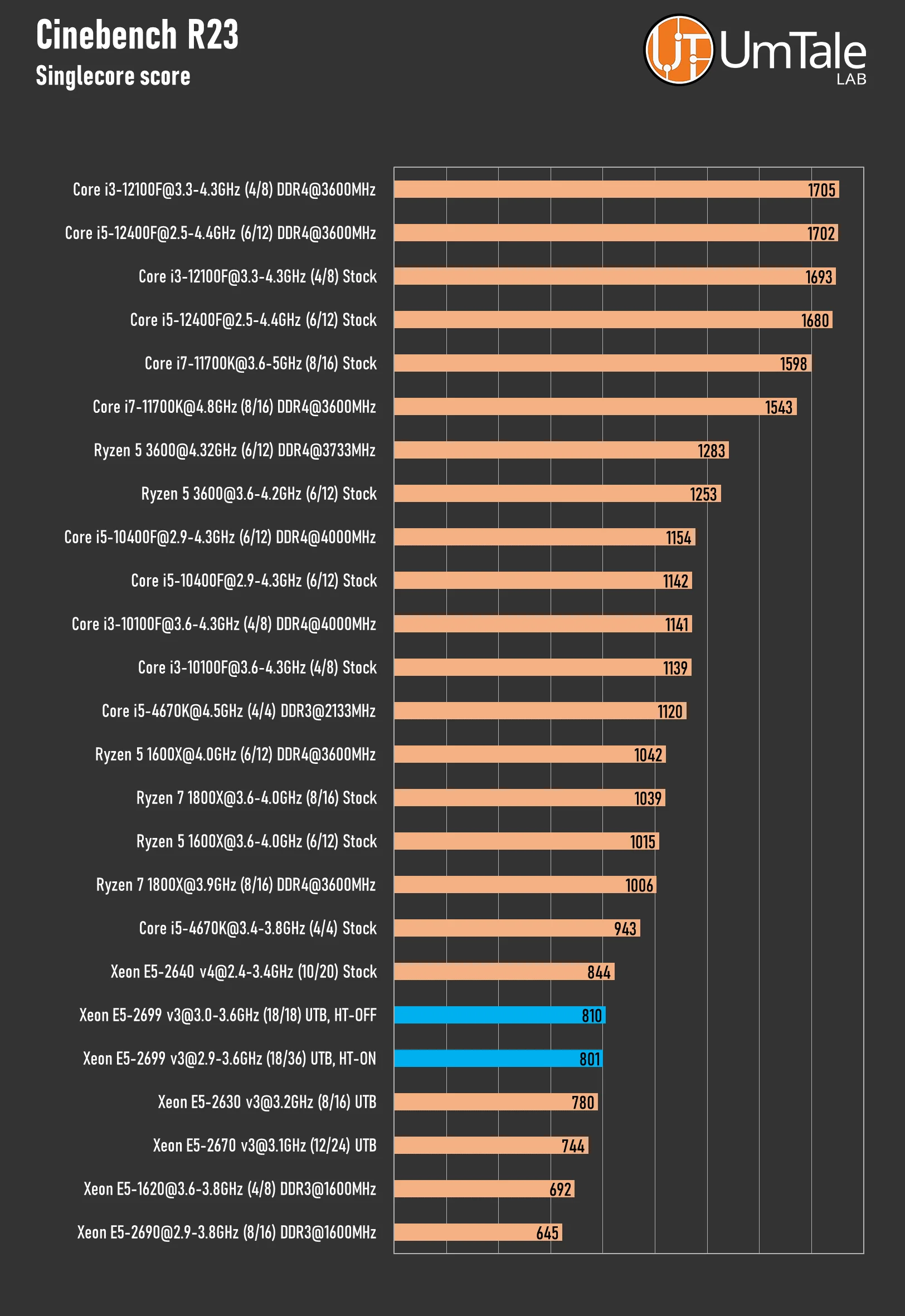
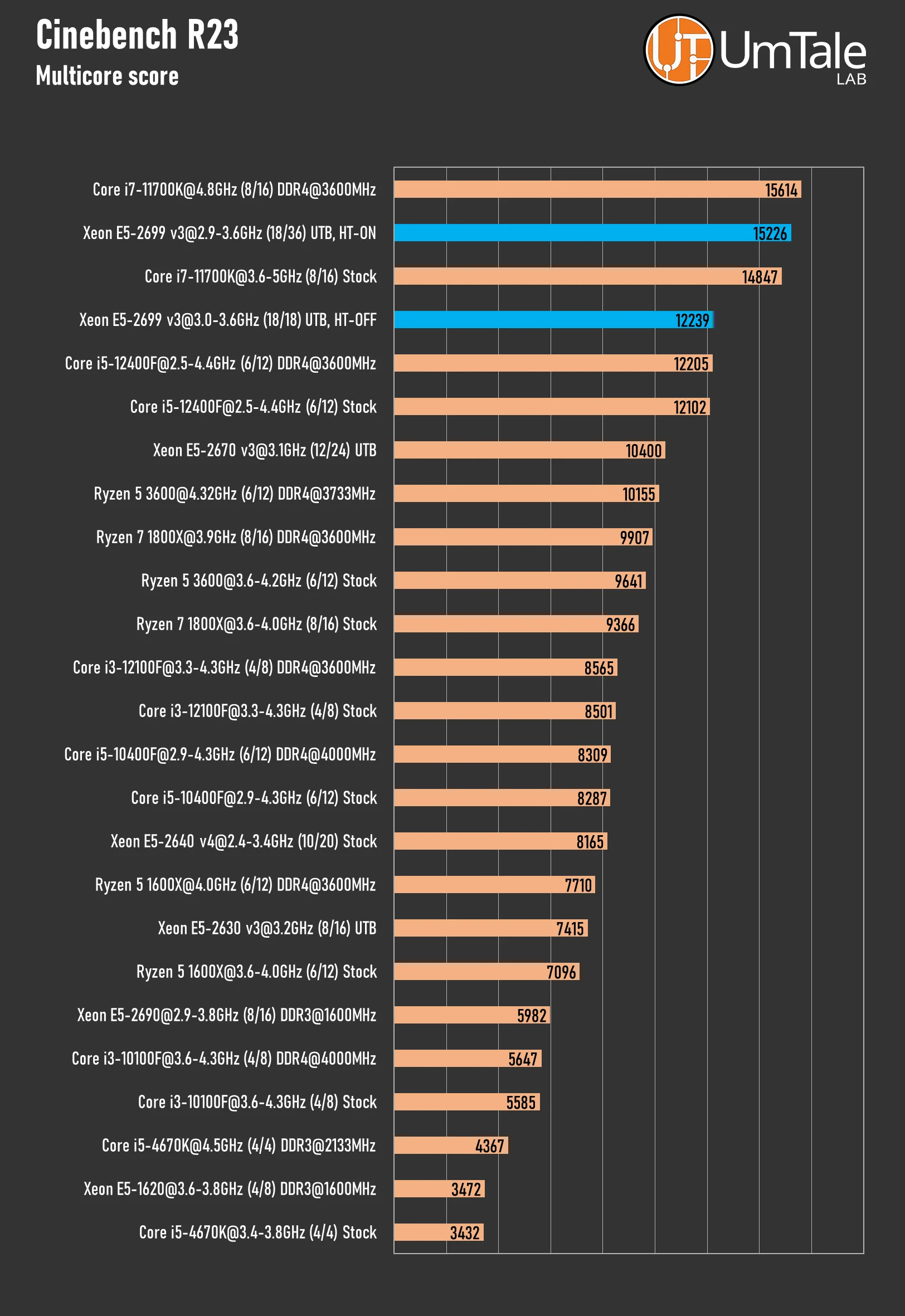
This is a somewhat outdated, but still relevant, benchmark version of the popular Cinema 4D editor for computer 3D animation, modeling, simulation, and rendering.
Single-core score
 ⤢ ВІДКРИТИ
The single-core Cinebench R23 test isn't particularly interesting to us, as it's clear the 2699 v3's results won't differ much from other Haswell chips. However, the multi-core test is a different story.
Multi-core score
 ⤢ ВІДКРИТИ
The 36-thread chip reclaims its lead after a defeat in Corona. While it couldn't overcome the overclocked Core i7-11700K, the 2699 v3 did manage to beat its stock version.
Without simultaneous processing of two threads per core, our 18-core chip can only compete with the Core i5-12400F once again.
Cinebench R24
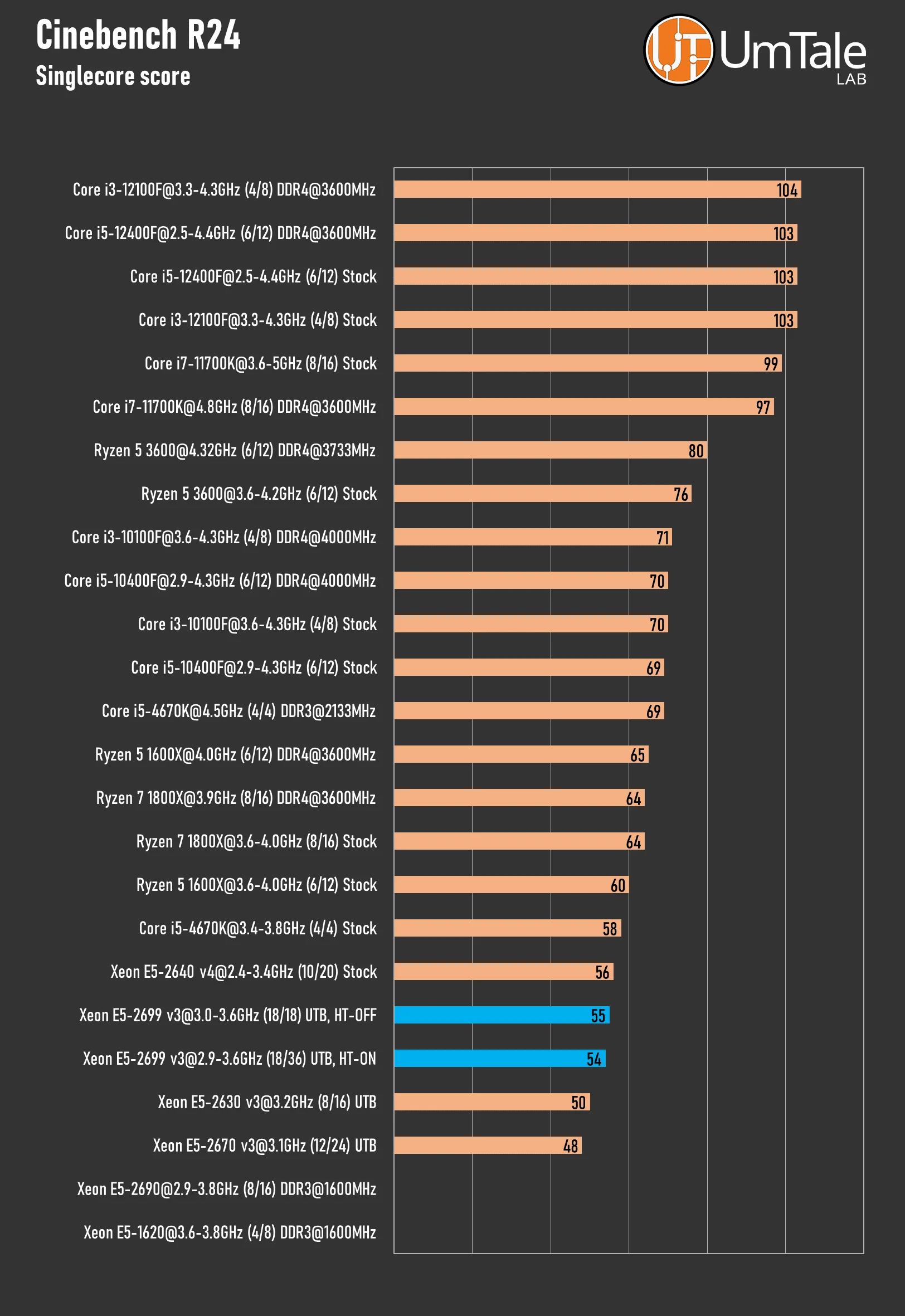
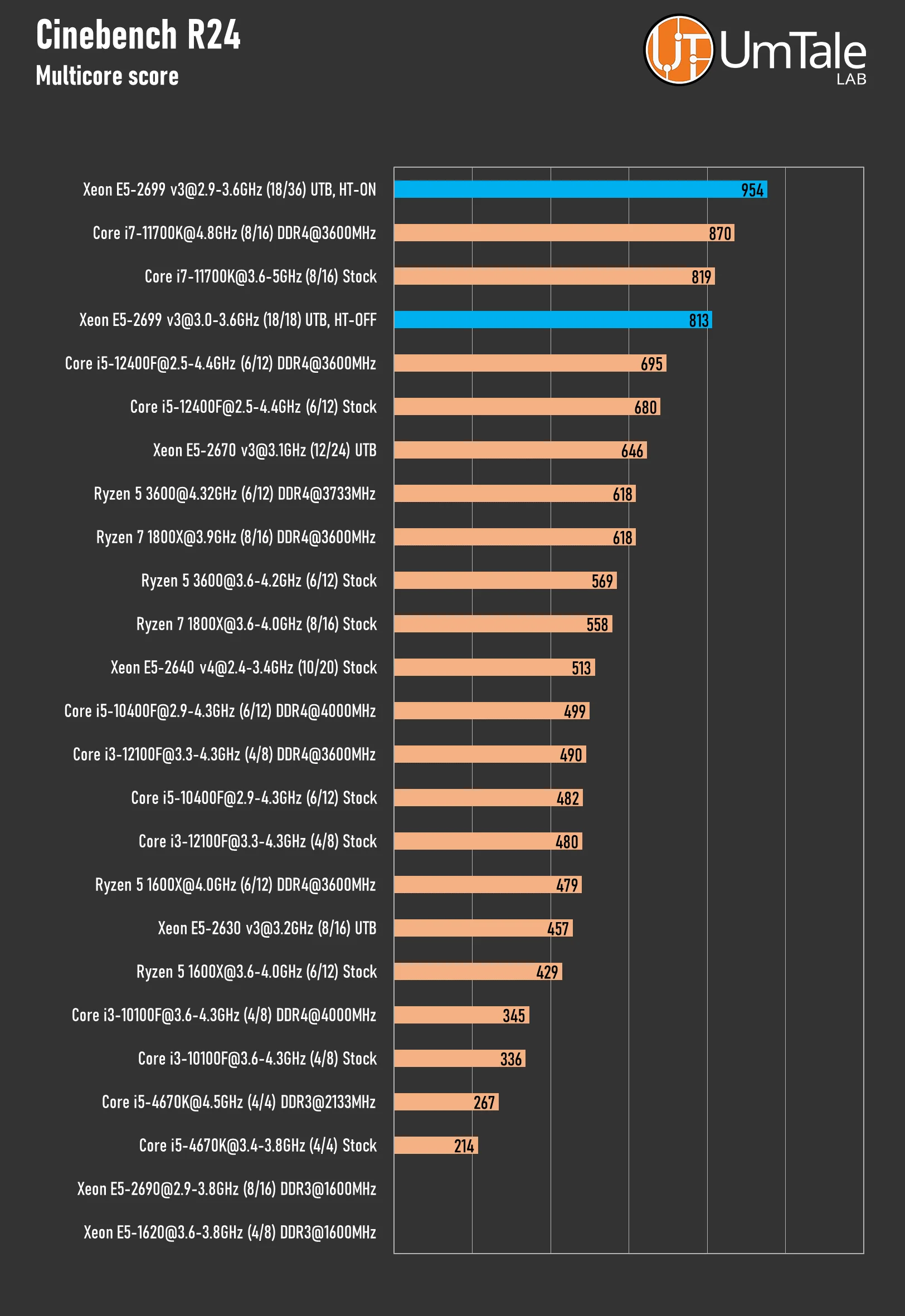
This is the latest version of the benchmark for the highly popular Cinema 4D editor, used for computer 3D animation, modeling, simulation, and rendering. Starting with this release, the main CPU test now requires AVX2 instruction set support from the processor.
Single-core score
 ⤢ ВІДКРИТИ
Multi-core score
 ⤢ ВІДКРИТИ
The latest Cinebench version brought a surprise. The developers certainly earned their keep, further improving optimization for multi-core solutions. In this release, the 36-thread 2699 v3 outperforms both the stock and overclocked versions of the 11700K. A stunning result!
But that's not all: the pure 18-core variant performs on par with the base 16-thread Rocket Lake and significantly outperforms the 12-thread Core i5-12400F!
If you're using Maxon software and haven't yet upgraded to the latest Cinema 4D, now seems to be the perfect time to do so.
V-Ray 6 Benchmark
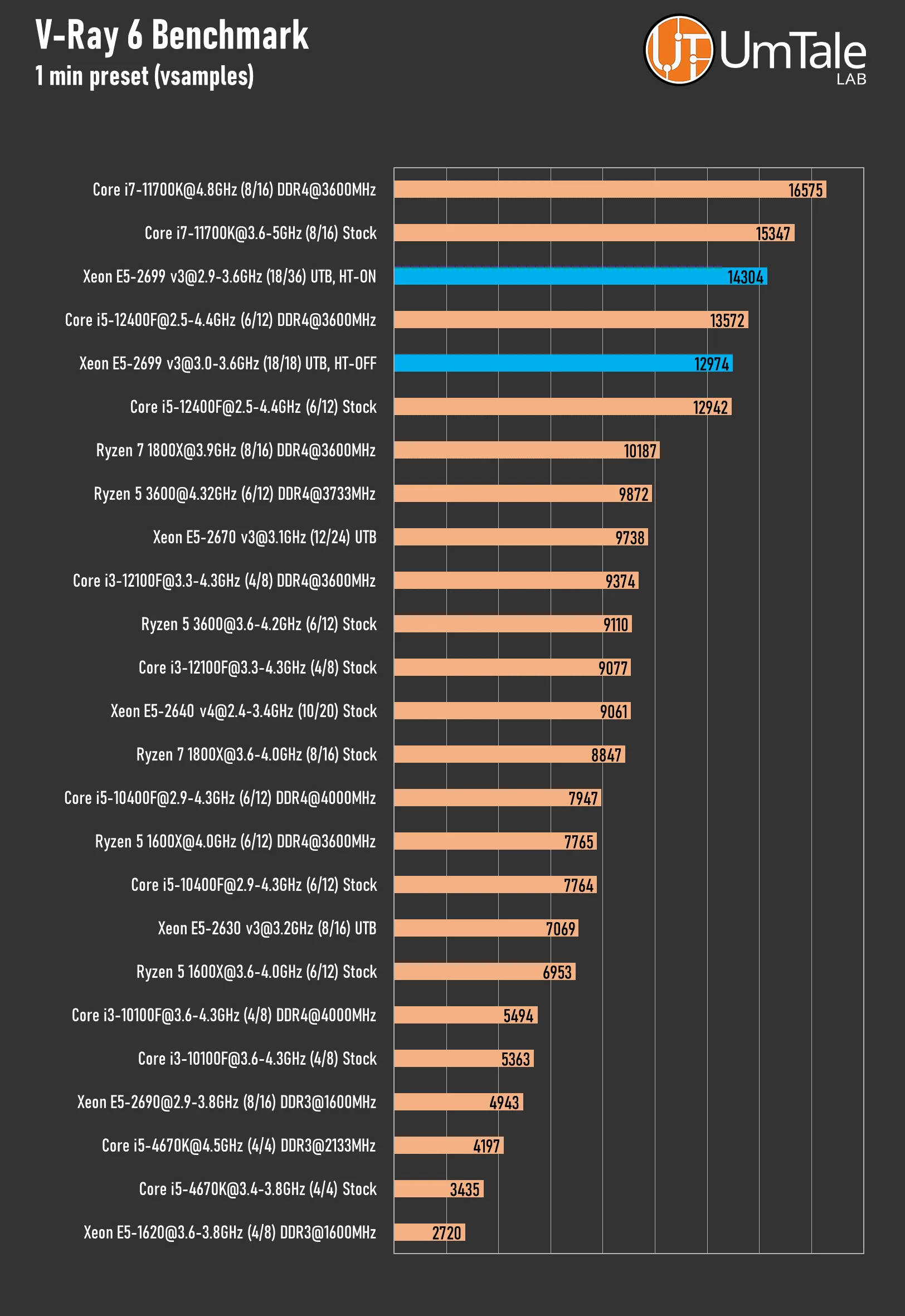
This is the current version of the V-Ray render engine benchmark. Various versions of this product are available for many solutions, including 3DS Max, Maya, Cinema 4D, Blender, and Unreal Engine.
 ⤢ ВІДКРИТИ
V-Ray 6 proved less favorable to the Xeon E5-2699 v3. In this render engine, the 36-thread chip couldn't deliver ultimate performance. It only slightly surpassed the Core i5-12400F, and without Hyper-Threading, the situation is even more dire.
xNormal – Baking Texture Maps
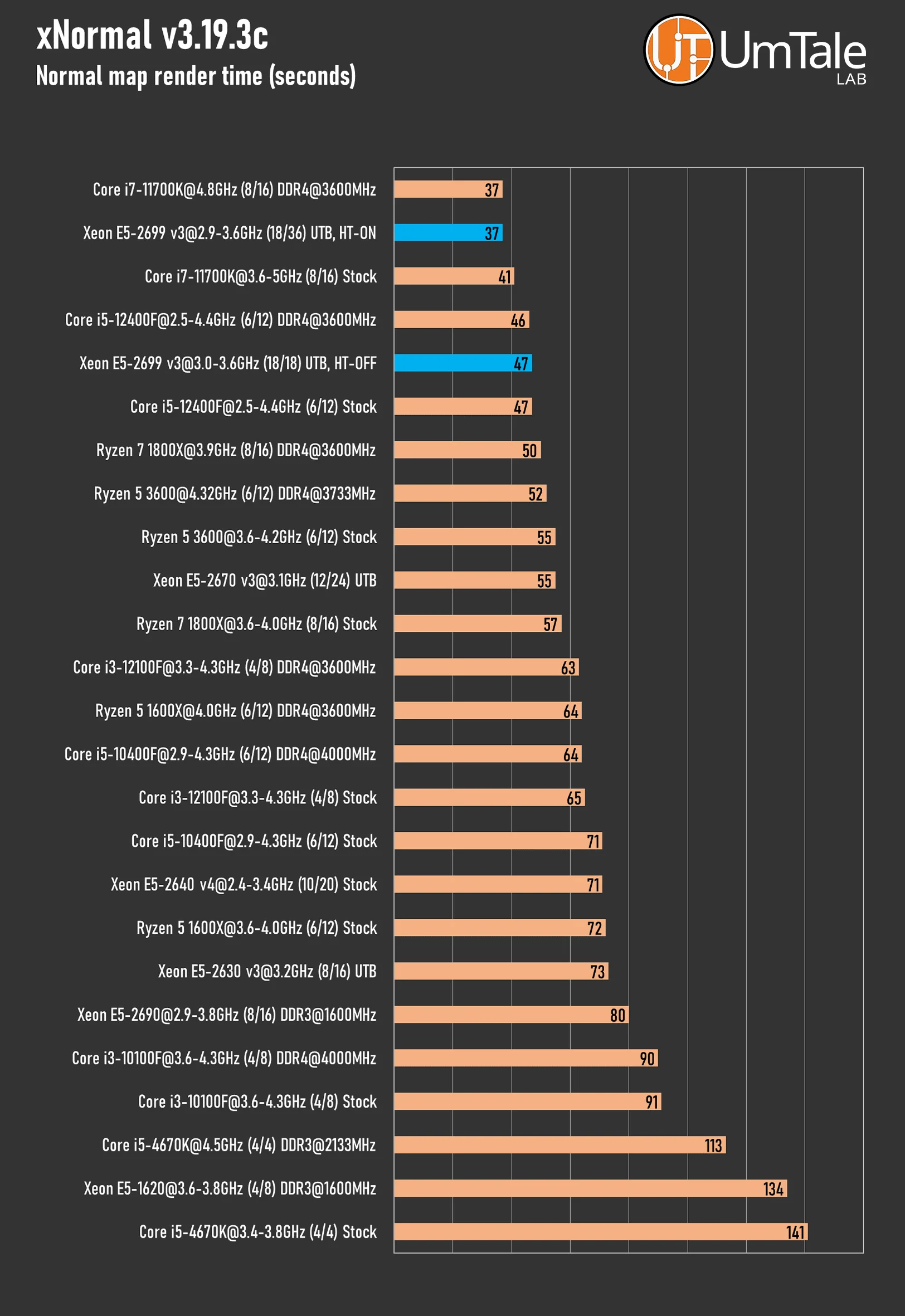
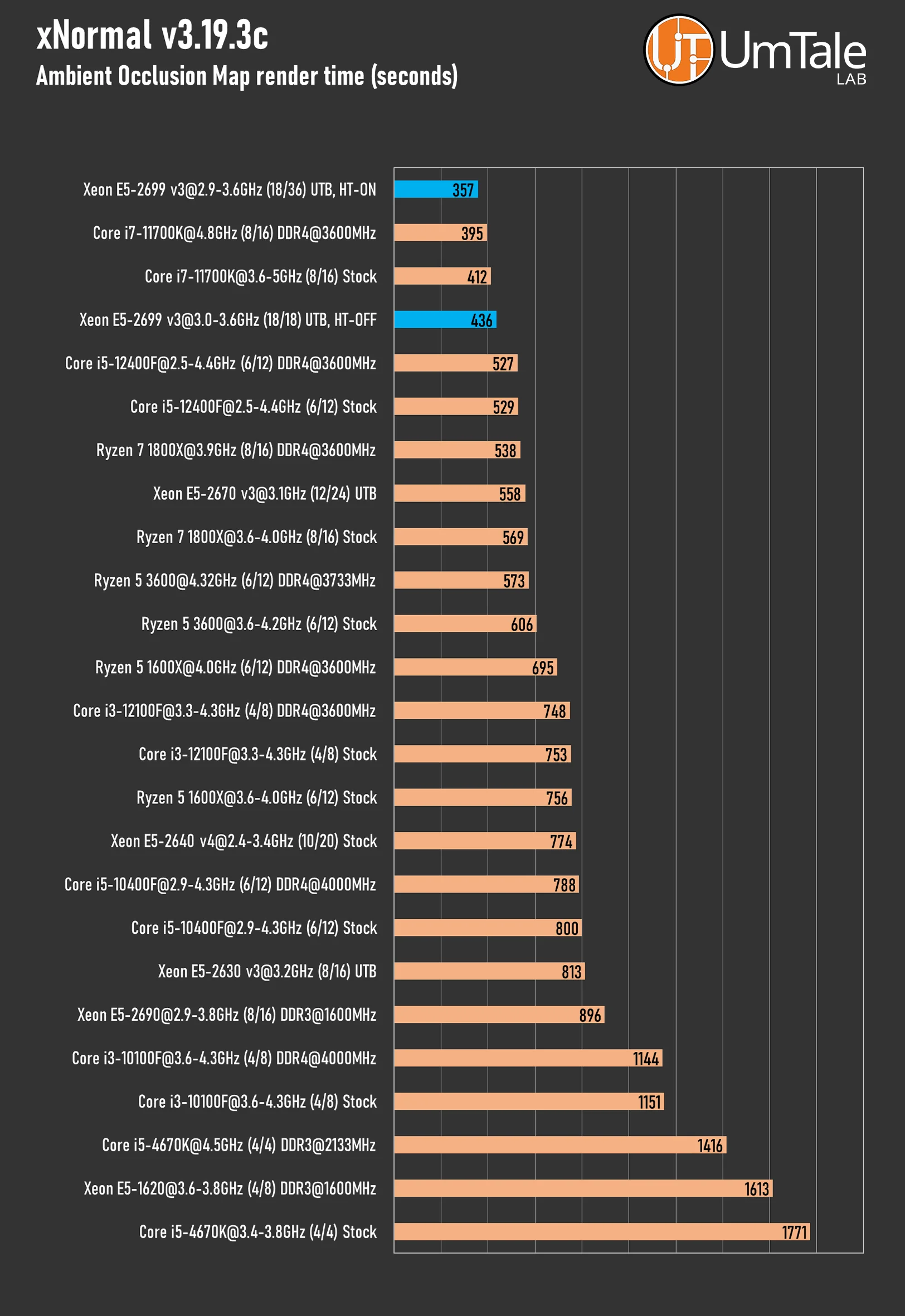
External texture baking programs aren't as popular as they once were, but xNormal is still used by tens of thousands of game developers. This is all thanks to its user-friendly interface and numerous useful features.
Normal Map Render
 ⤢ ВІДКРИТИ
Ambient Occlusion Map Render
 ⤢ ВІДКРИТИ
In xNormal, the Xeon E5-2699 v3 is back in the lead. The 36-thread version's performance matches the overclocked Core i7-11700K, while the 18-core variant sits between the stock 16-thread Rocket Lake and the 12-thread Alder Lake.
Overall Performance
CPU-Z Benchmark
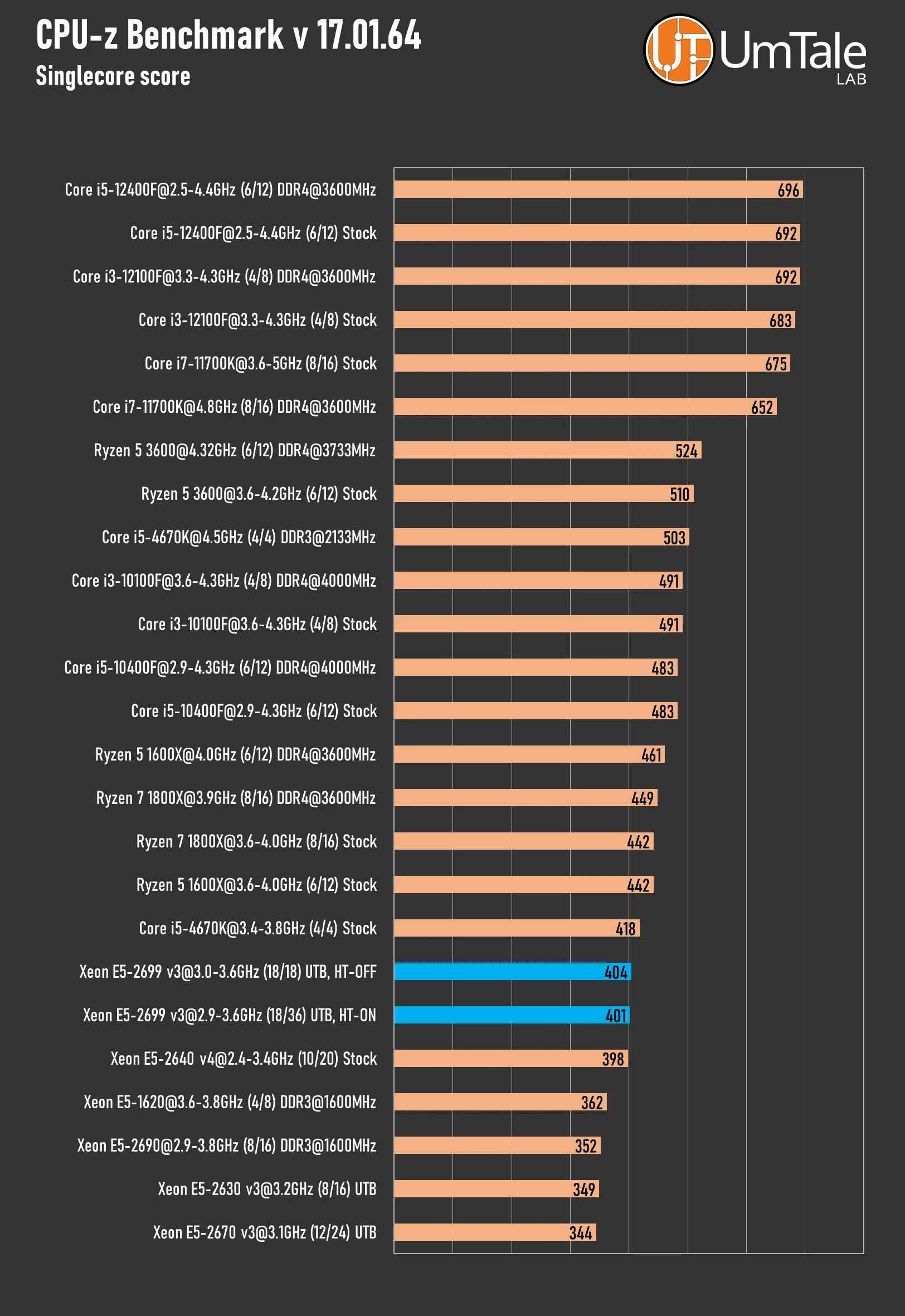
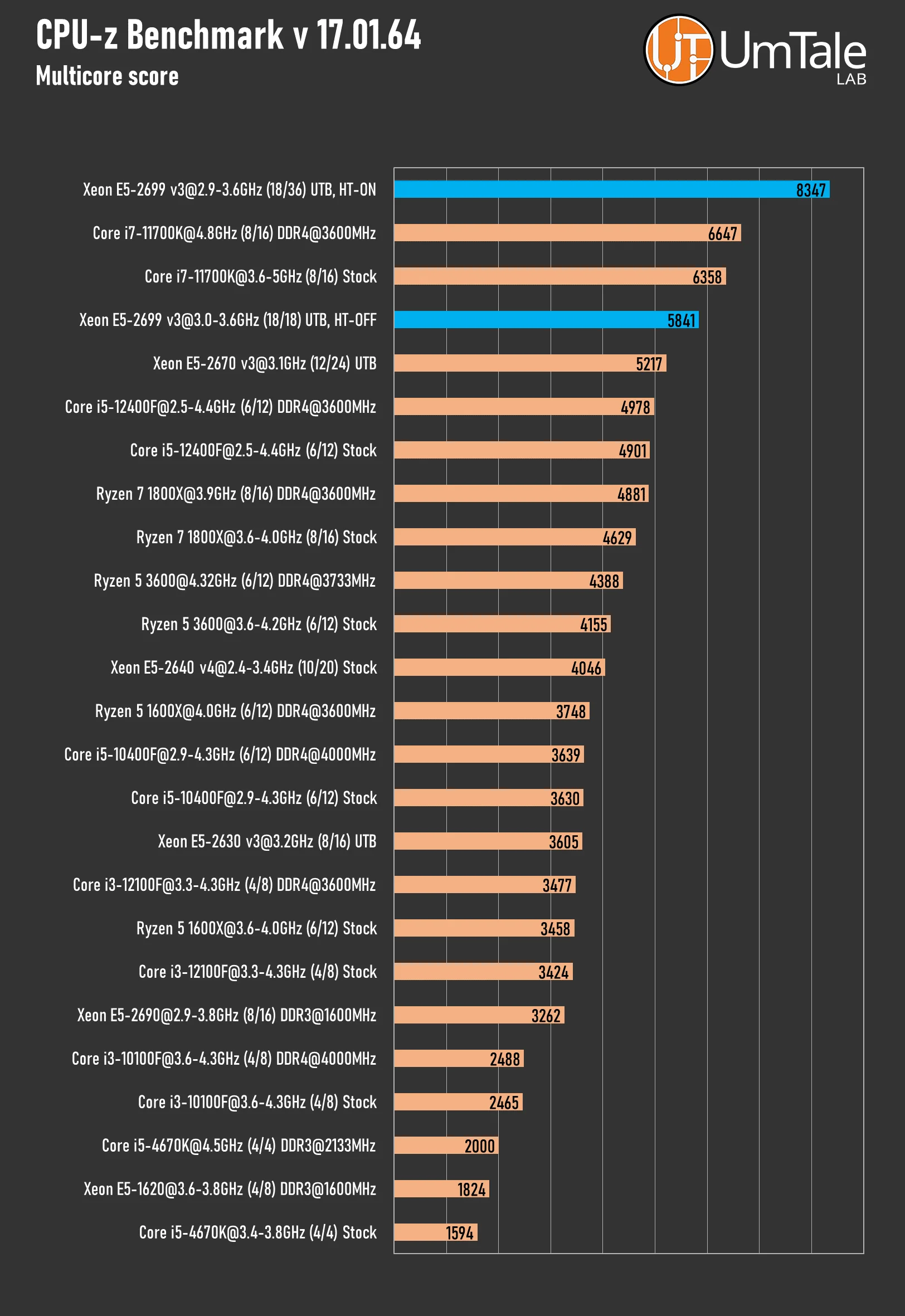
The CPU-Z information utility benchmark reveals little about a CPU's real-world performance and is currently more of an optional test. However, we continue to run tests in this discipline out of long-standing tradition.
Single-core score
 ⤢ ВІДКРИТИ
Multi-core score
 ⤢ ВІДКРИТИ
As we state in every article, the CPU-Z Benchmark in no way reflects a CPU's real-world performance. Based on the utility's internal test, the Xeon E5-2699 v3 is a significant 25% faster than the 11700K in the multi-core test.
Geekbench 6
This benchmark measures a processor's single-core and multi-core performance across various tasks – from checking email to photography and music playback, or all of these simultaneously. Additionally, Geekbench 6 assesses performance in new CPU application areas like augmented reality and machine learning.
Single-core score
 ⤢ ВІДКРИТИ
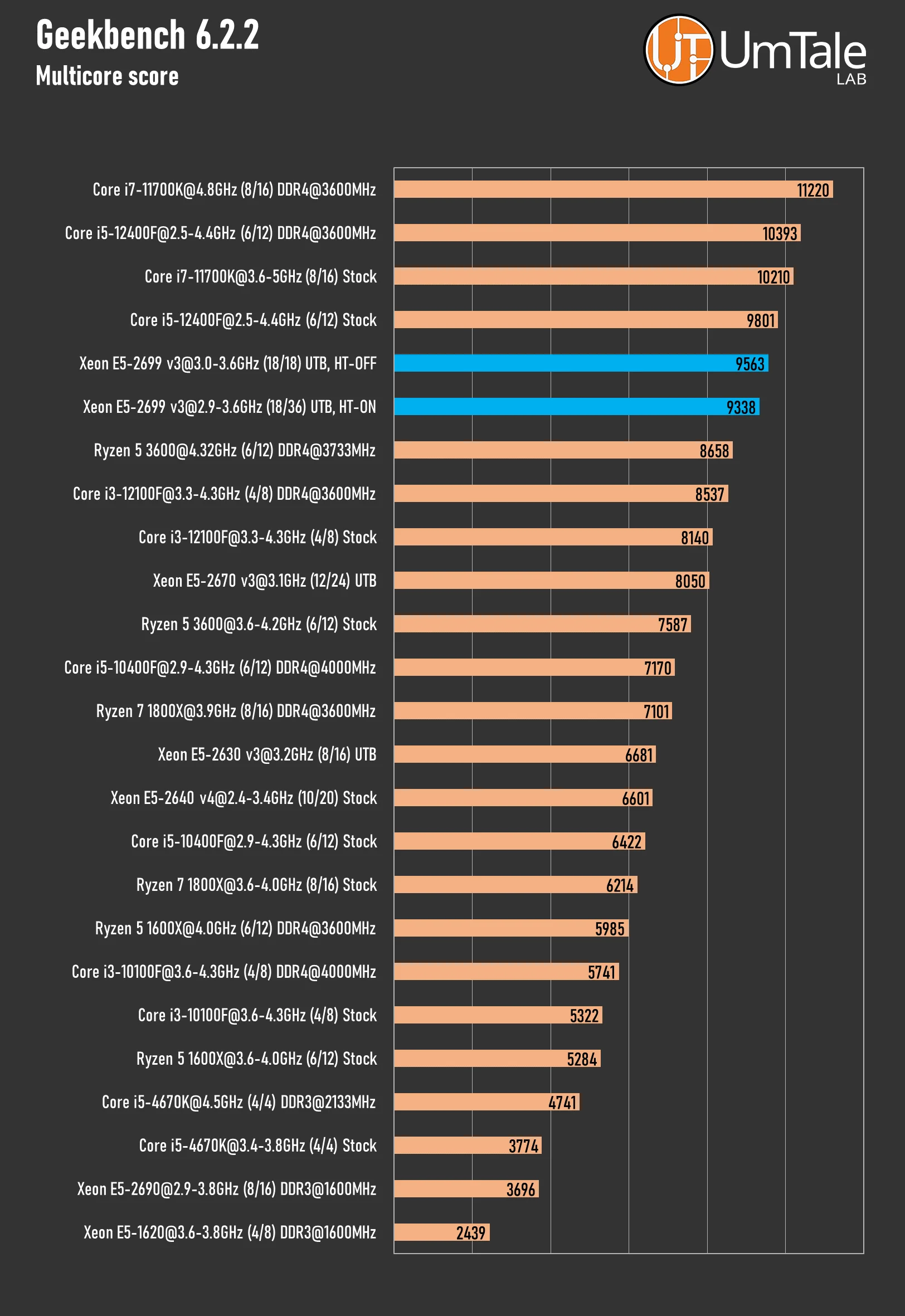
Multicore score
 ⤢ ВІДКРИТИ
Geekbench 6 was the first to show a performance drop when the Xeon E5-2699 v3 utilized all 36 threads. While the 18-core version of the chip is only 2% faster, it's genuinely disappointing to see additional threads actually hurt the processor's overall speed.
What's more, the E5-2699 v3 doesn't exactly impress in this benchmark overall. The top-tier Haswell's performance sits between an overclocked Ryzen 5 3600 and the Core i5-12400F. While that's not terrible, it certainly doesn't reach the Core i7-11700K's level.
Video encoding
HandBrake
HandBrake is free, open-source software for converting video from virtually any format into a range of modern, widely supported codecs like AV1, H265, H264, and many others.
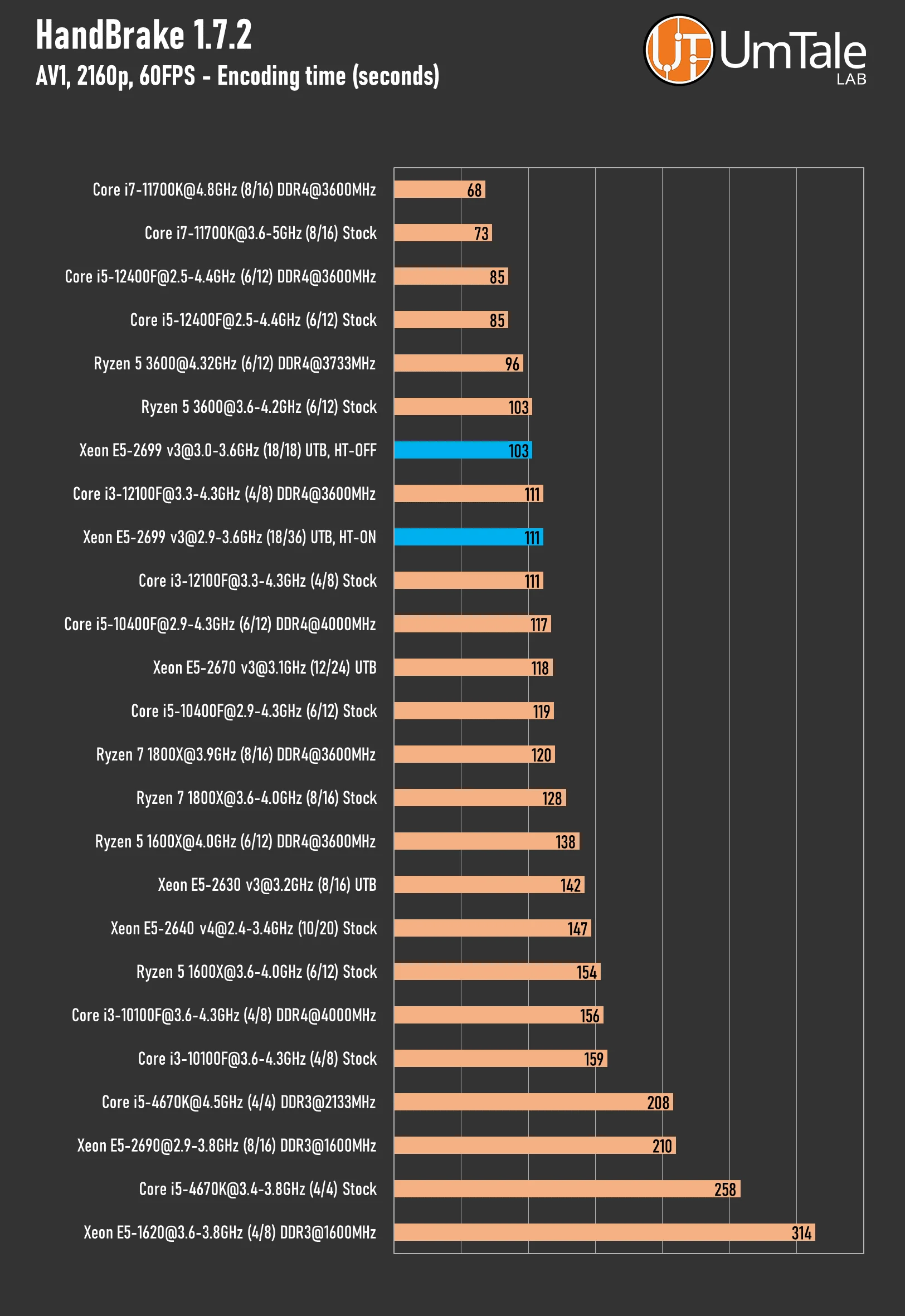
Codec – AV1
 ⤢ ВІДКРИТИ
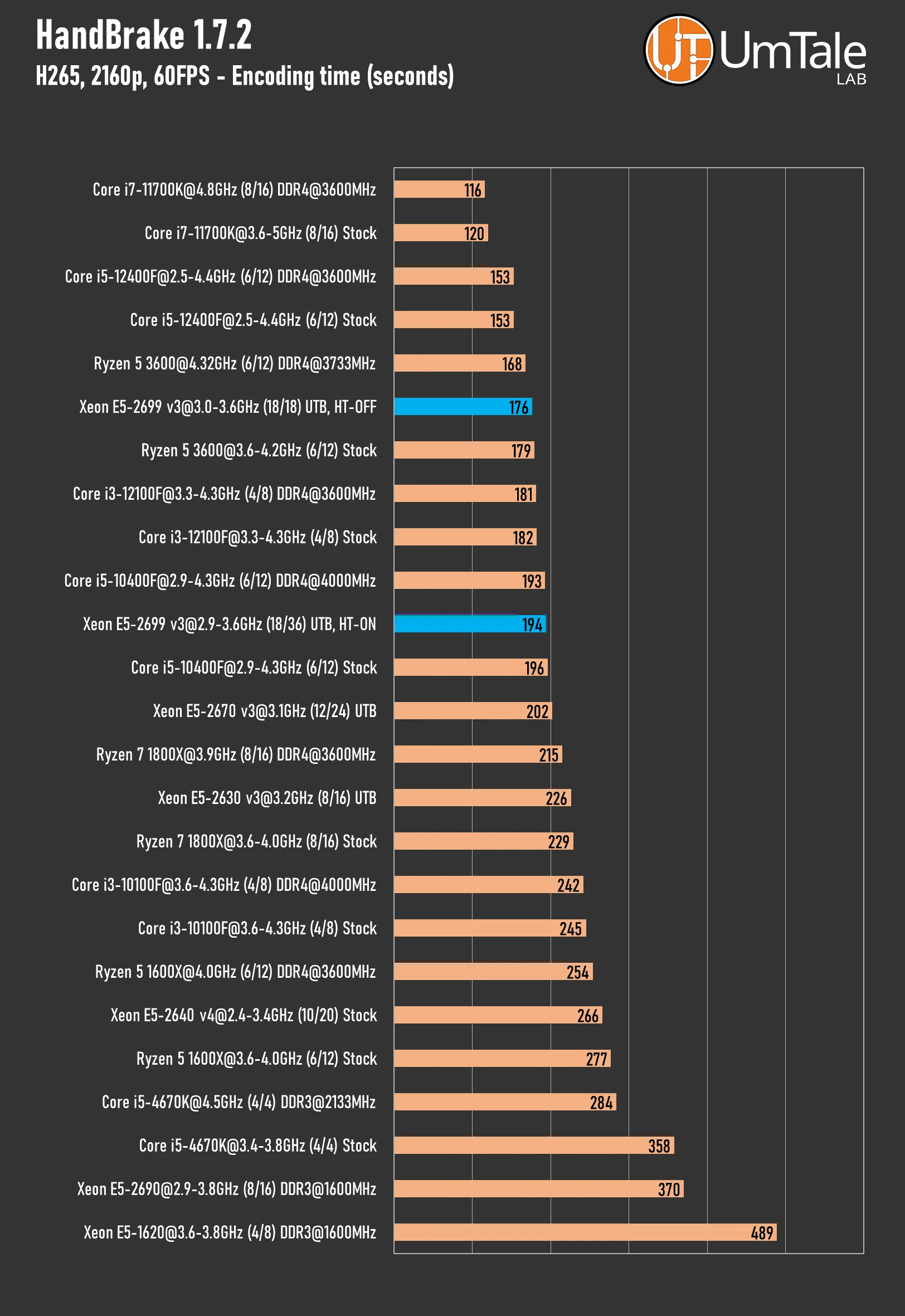
Codec – H265
 ⤢ ВІДКРИТИ
Video transcoding using AV1 and H265 codecs is clearly not the Xeon E5-2699 v3's strength. In both scenarios, this ultimate Haswell CPU performs at the level of a Ryzen 5 3600, significantly trailing a 16-thread Rocket Lake processor.
Furthermore, we again observed a slight performance dip when utilizing the full 36-thread processor.
Web browsing
JetStream 2.1
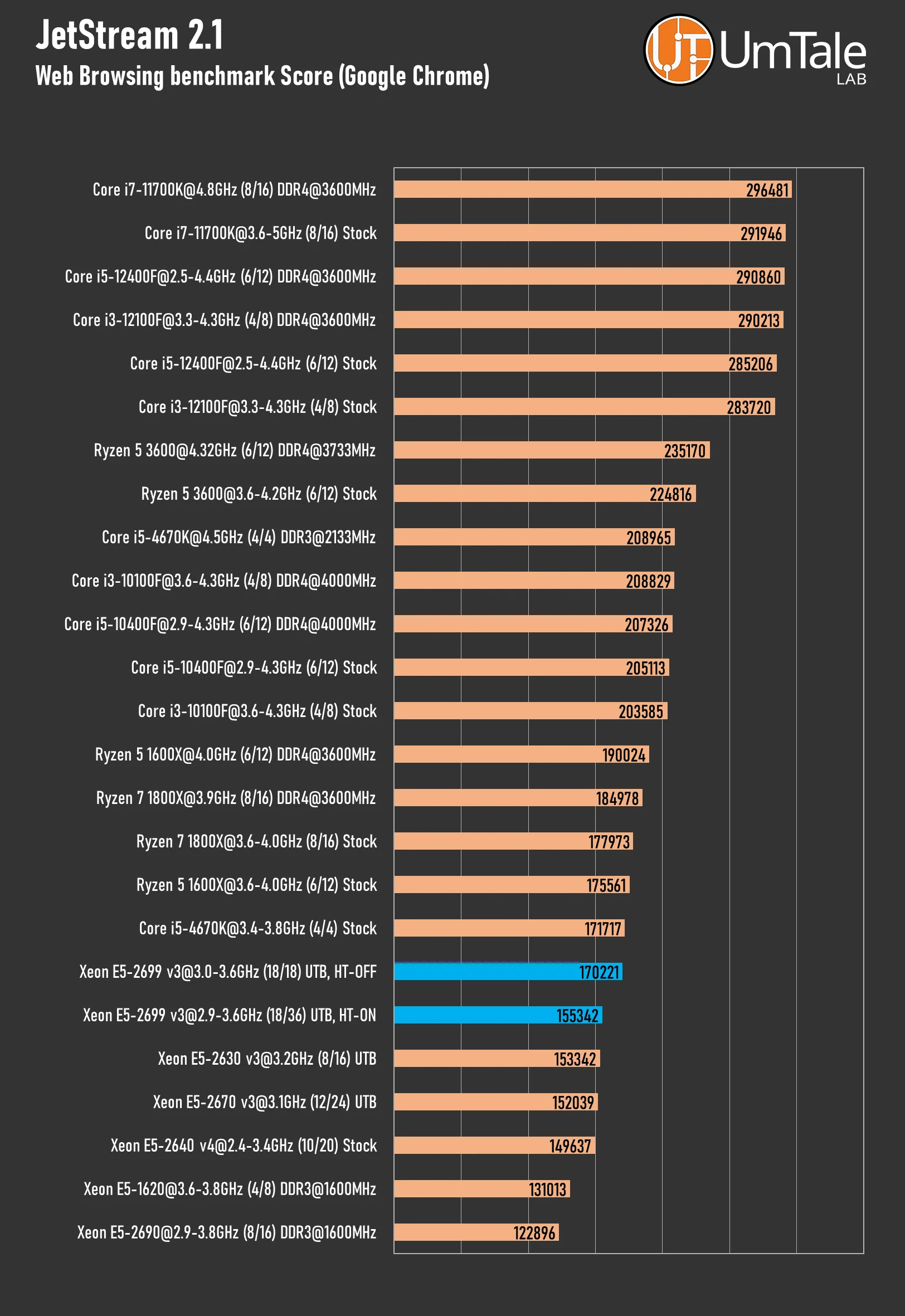
JetStream 2.1 is a suite of JavaScript and WebAssembly benchmarks designed for the latest browsers and web applications. We observed that most of its sub-tests can utilize up to four threads, which is quite typical for web browsing scenarios.
 ⤢ ВІДКРИТИ
Speedometer 2.1
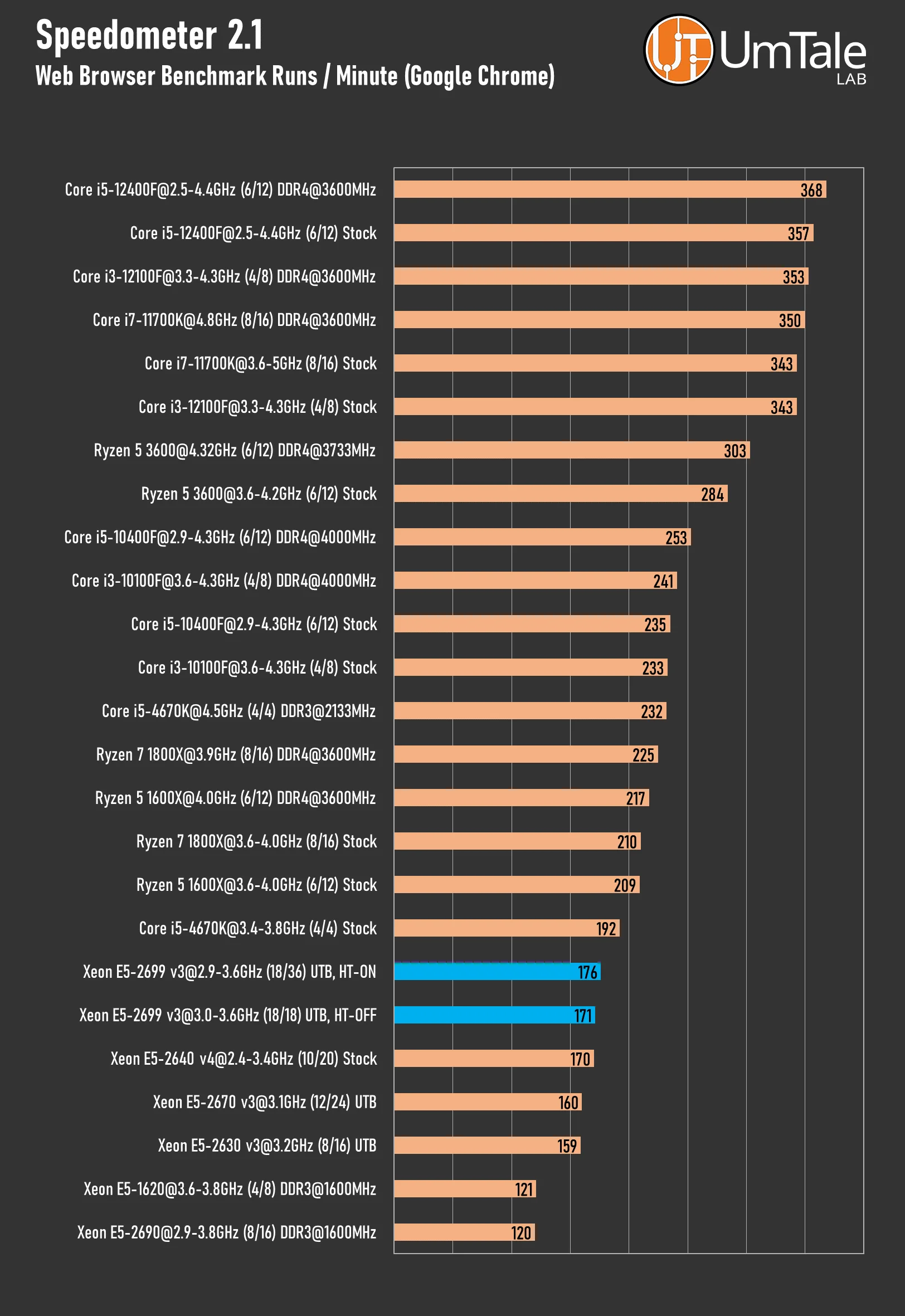
Speedometer tests the responsiveness of web applications in the browser. The benchmark simulates user actions such as adding, completing, and removing items from a to-do list across several TodoMVC examples. Some tests directly call DOM APIs from ECMAScript 5 (ES5), ECMAScript 2015 (ES6), ES6 transpiled to ES5, and Elm transpiled to ES5. Others leverage one of eleven popular JavaScript frameworks: React, React with Redux, Ember.js, Backbone.js, AngularJS, (new) Angular, Vue.js, jQuery, Preact, Inferno, and Flight.
 ⤢ ВІДКРИТИ
Kraken 1.1
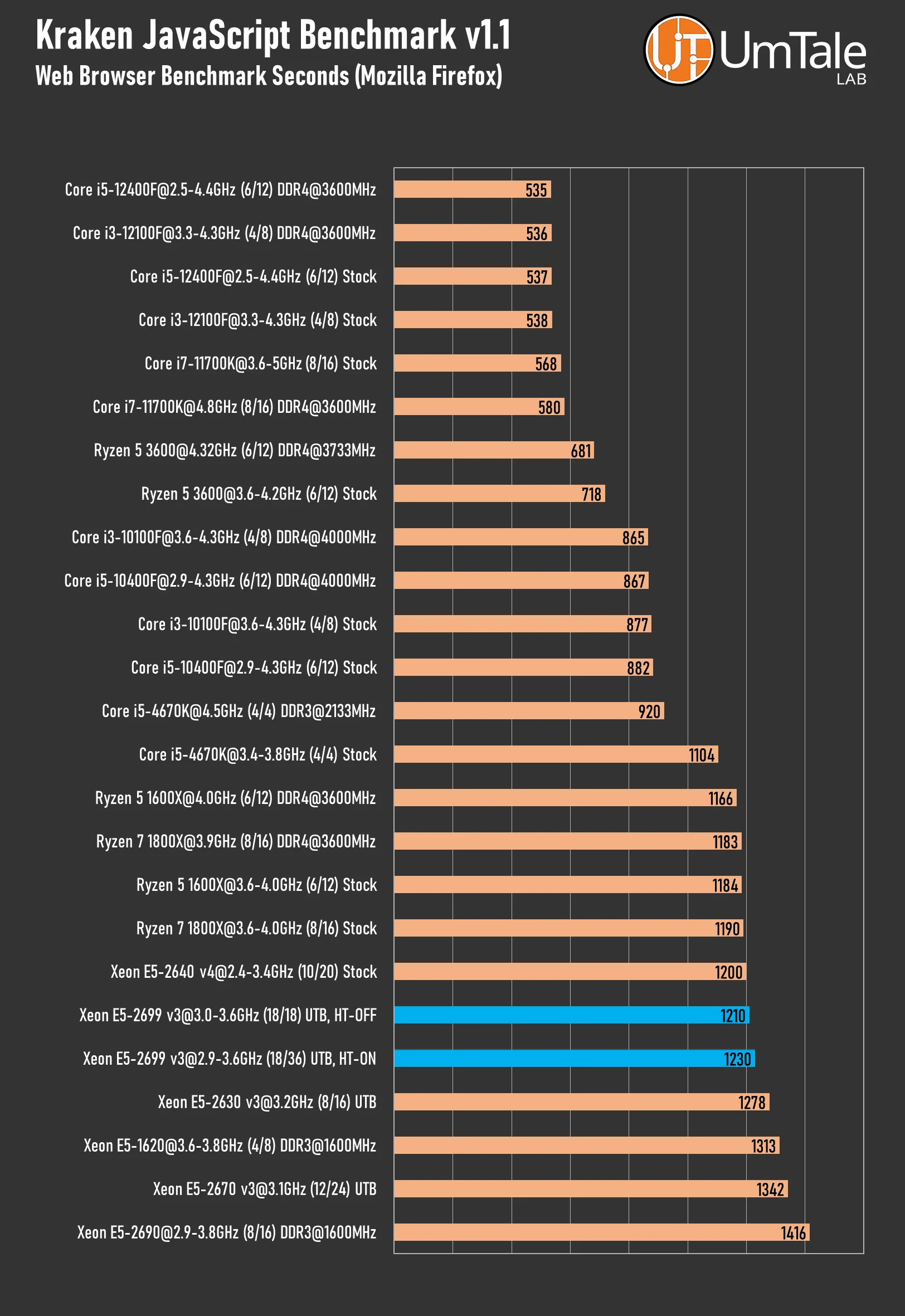
Kraken is a JavaScript performance benchmark developed by Mozilla. It measures the execution speed of several test cases derived from real-world applications and libraries. Its sub-tests cover areas such as audio processing via the DSP.js library, image filtering, JSON parsing, and cryptographic operations.
 ⤢ ВІДКРИТИ
Web browser performance isn't a distinguishing feature for this multi-core solution either. If your work primarily involves web browsing, you'd be better off with a more modern, high-frequency processor.
Application test analysis
Our research suggests the 36-thread Xeon E5-2699 v3 offers more compelling application performance. Despite minor wins in video encoding and a slight edge in web browsing, the 18-core version's overall performance lags significantly, a difference particularly pronounced in 3D rendering.
Gaming, synthetic benchmarks
3DMark Time Spy
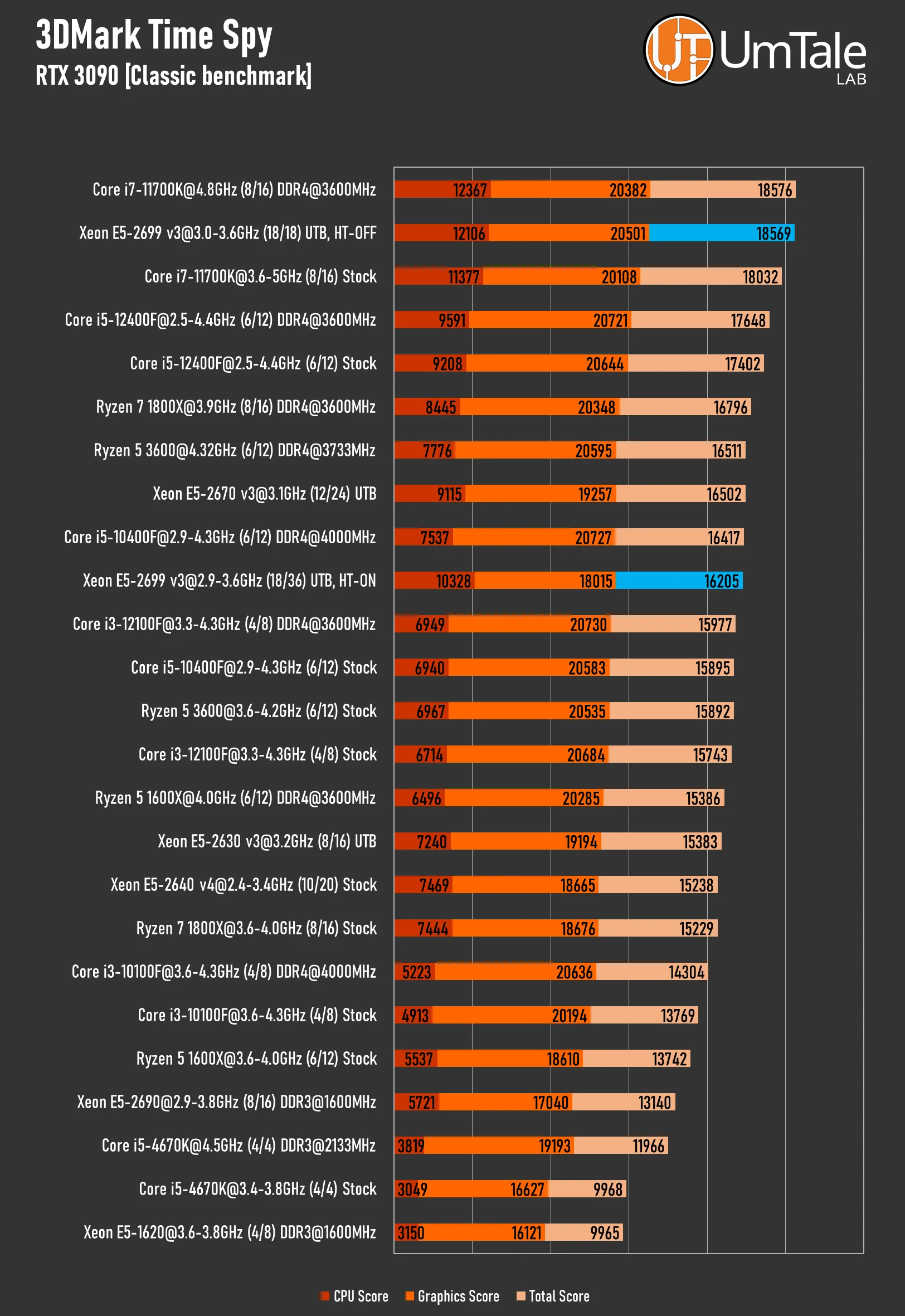
Time Spy is a DirectX 12 benchmark designed for gaming PCs running Windows 10 or 11. Built with a ground-up engine, it fully supports all new DirectX 12 API features, including asynchronous compute, AMD Crossfire, NVIDIA SLI, and multi-threading.
 ⤢ ВІДКРИТИ
In our first gaming-adjacent benchmark, the Xeon E5-2699 v3 with Hyper-Threading showed a 15% performance drop. Notably, this performance hit wasn't limited to the graphics subtest; it appeared in the CPU subtest as well.
Games
Assassins Creed Valhalla
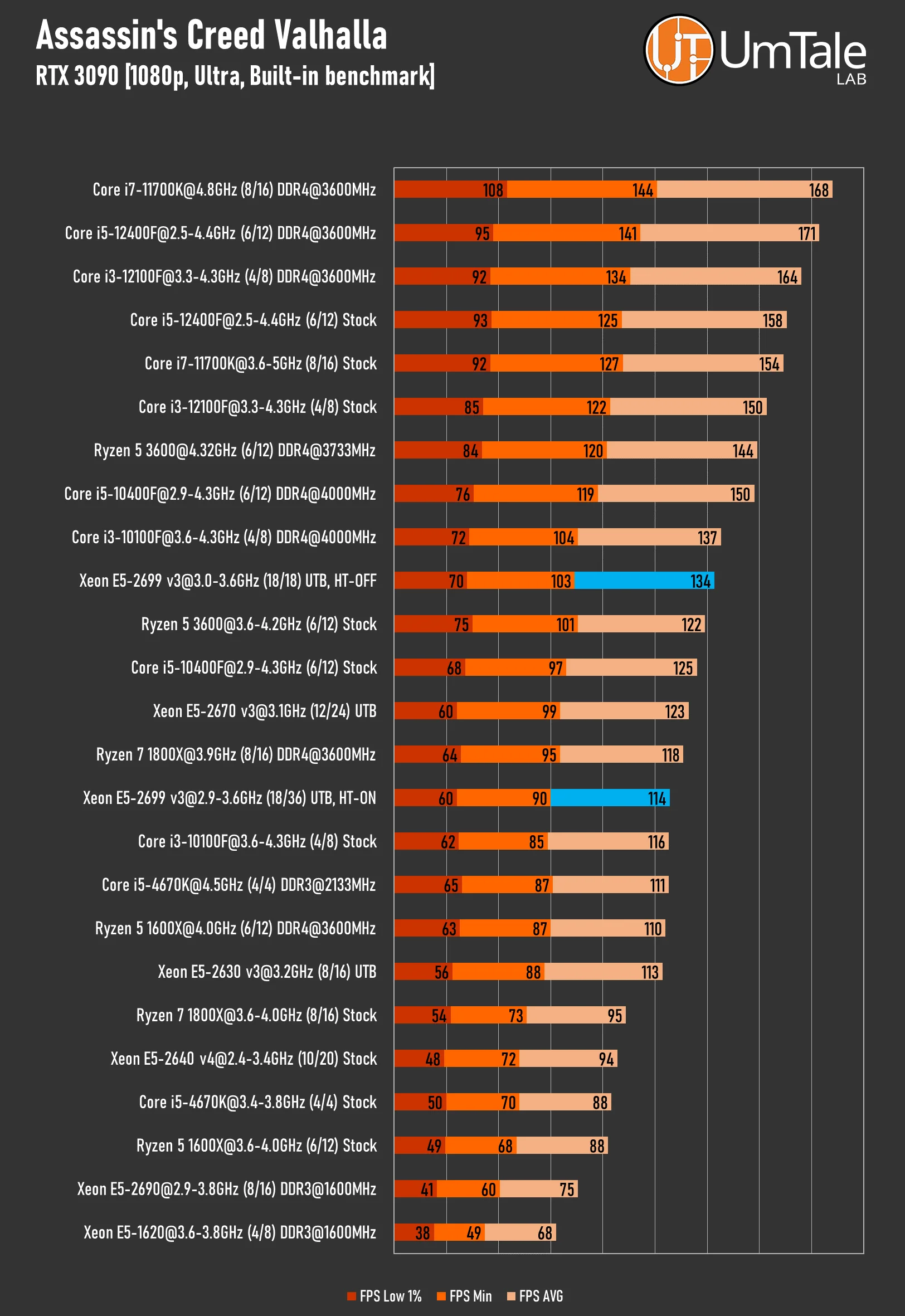
This is a key installment in the Assassin's Creed franchise. Built on the Ubisoft Anvil engine, the game can fully utilize up to 12 threads, with some partial support for 16-24 threads.
 ⤢ ВІДКРИТИ
In Valhalla, both versions of the Xeon E5-2699 v3 deliver decent performance. However, the non-HT variant is 18% faster than the full chip, performing almost on par with the Ryzen 5 3600 and i3-10100F.
Baldur’s Gate 3
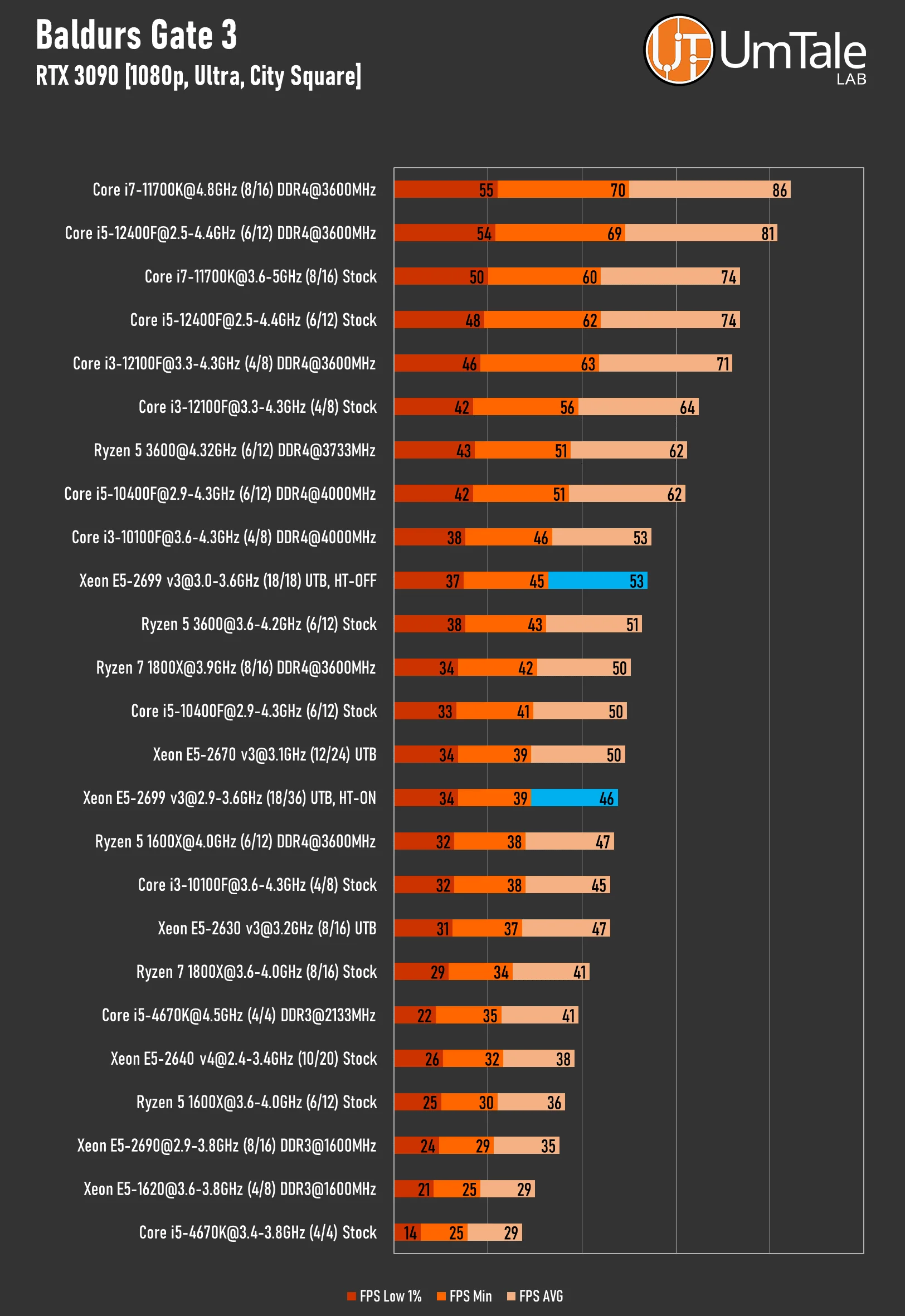
Baldur’s Gate 3 stands as one of the best modern turn-based RPGs and was crowned game of the year. It runs on the Divinity 4.0 Engine, which can use up to 16 threads but performs optimally with 12-thread CPUs. The game's extremely high level of detail frequently accesses RAM, meaning Baldur's Gate 3 benefits greatly from ample L3 cache and high-frequency RAM.
Our test scene is set in the city of Baldur's Gate, specifically during the game's third act.
 ⤢ ВІДКРИТИ
Baldur’s Gate 3 is arguably the most demanding game for any CPU, and unfortunately, even a top-tier Haswell isn't an exception. The Xeon E5-2699 v3 struggles to maintain a consistent 60 FPS in densely populated areas, with minimum framerates frequently dipping below 35 FPS.
Disabling Hyper-Threading provides an additional 15% performance, making gameplay slightly more comfortable, but it doesn't fundamentally change the overall situation.
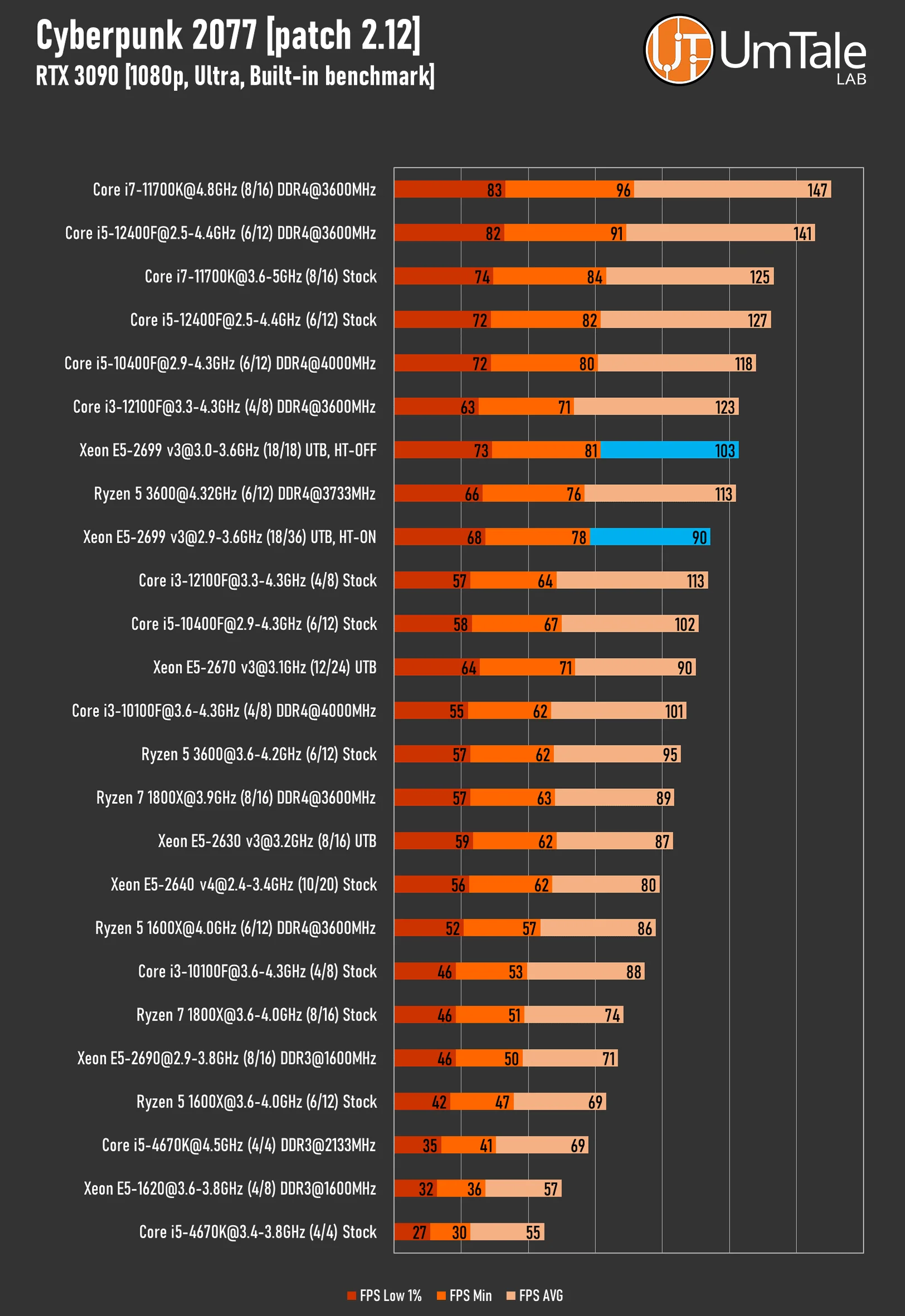
Cyberpunk 2077
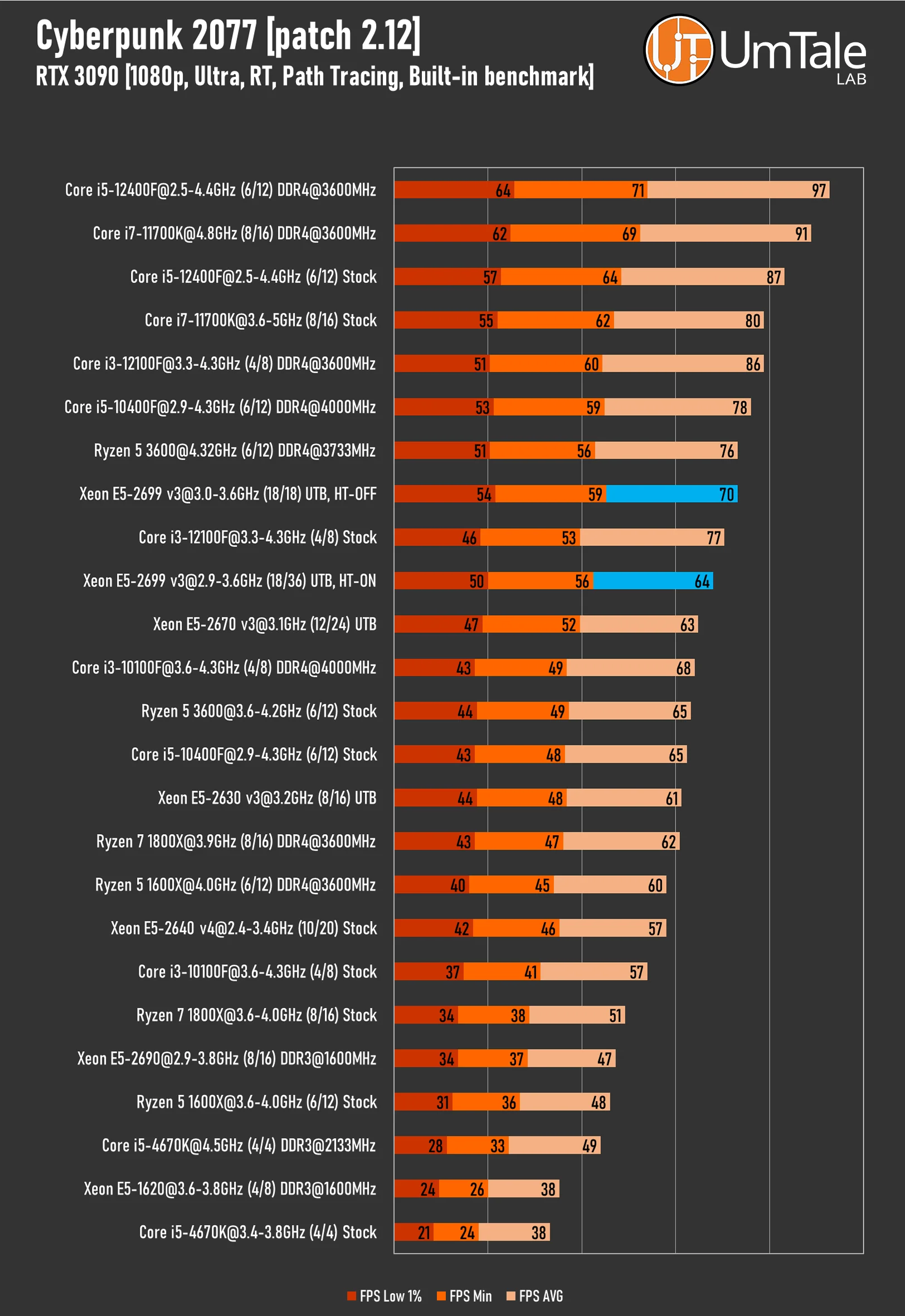
CD Projekt RED's latest creation, Cyberpunk 2077, runs on the REDengine 4 and can leverage over 16 CPU threads. The game also significantly benefits from higher RAM frequencies and lower latencies.
Ray Tracing – ON, Path Tracing – ON
 ⤢ ВІДКРИТИ
With ray tracing enabled, Cyberpunk 2077 runs well on both processor variants. However, disabling Hyper-Threading unlocks truly impressive performance, matching the results of overclocked Core i5-10400F and Ryzen 5 3600.
Ray Tracing – OFF, Path Tracing – OFF
 ⤢ ВІДКРИТИ
Without ray tracing, performance for both versions scales proportionally, but their relative positions on the charts remain unchanged.
It's worth noting, however, that thanks to CD Projekt RED's monumental optimization efforts for multi-core CPUs, the minimum FPS recorded on the Xeon E5-2699 v3 is significantly higher than any Core i3 chip.
Far Cry 6
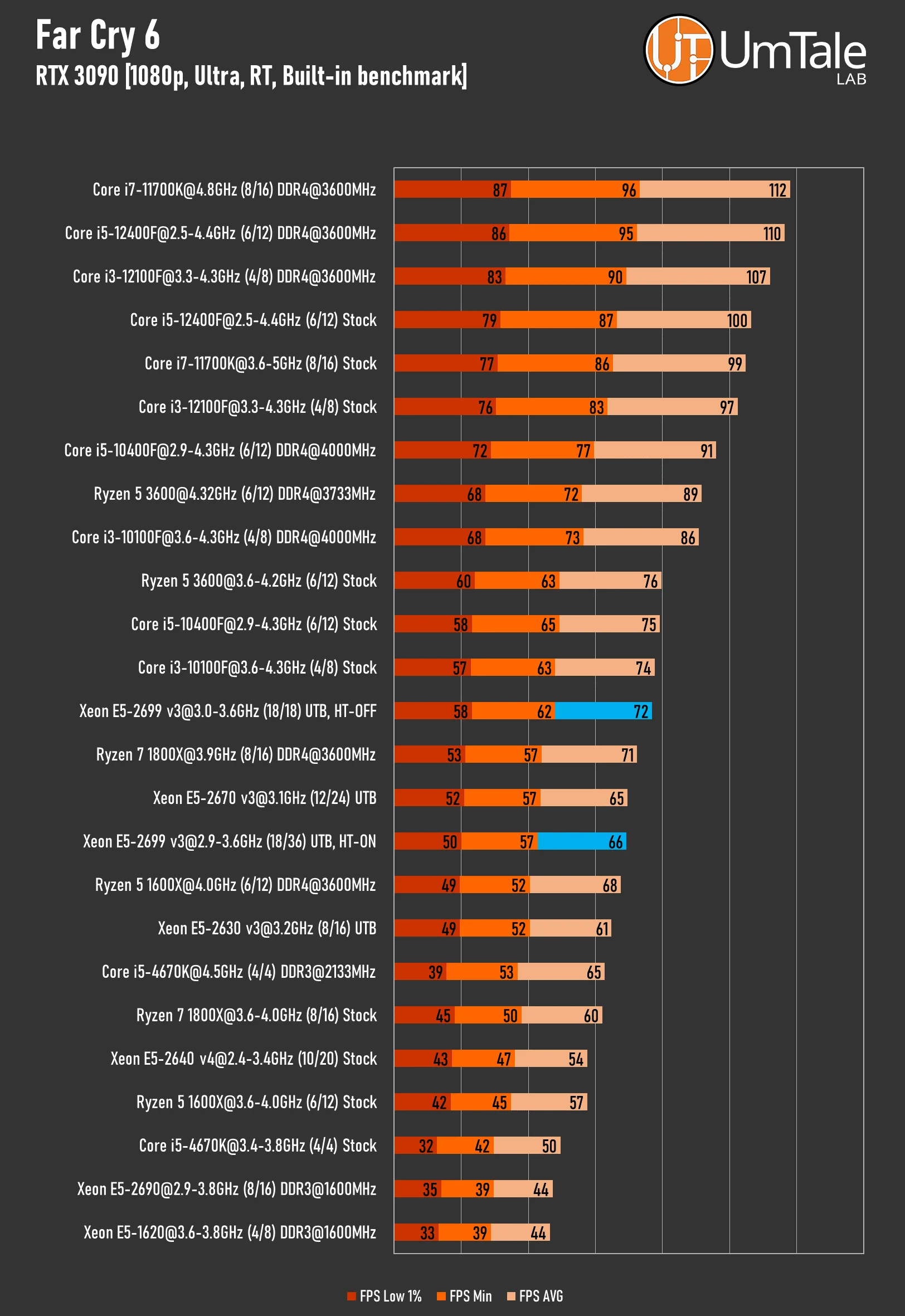
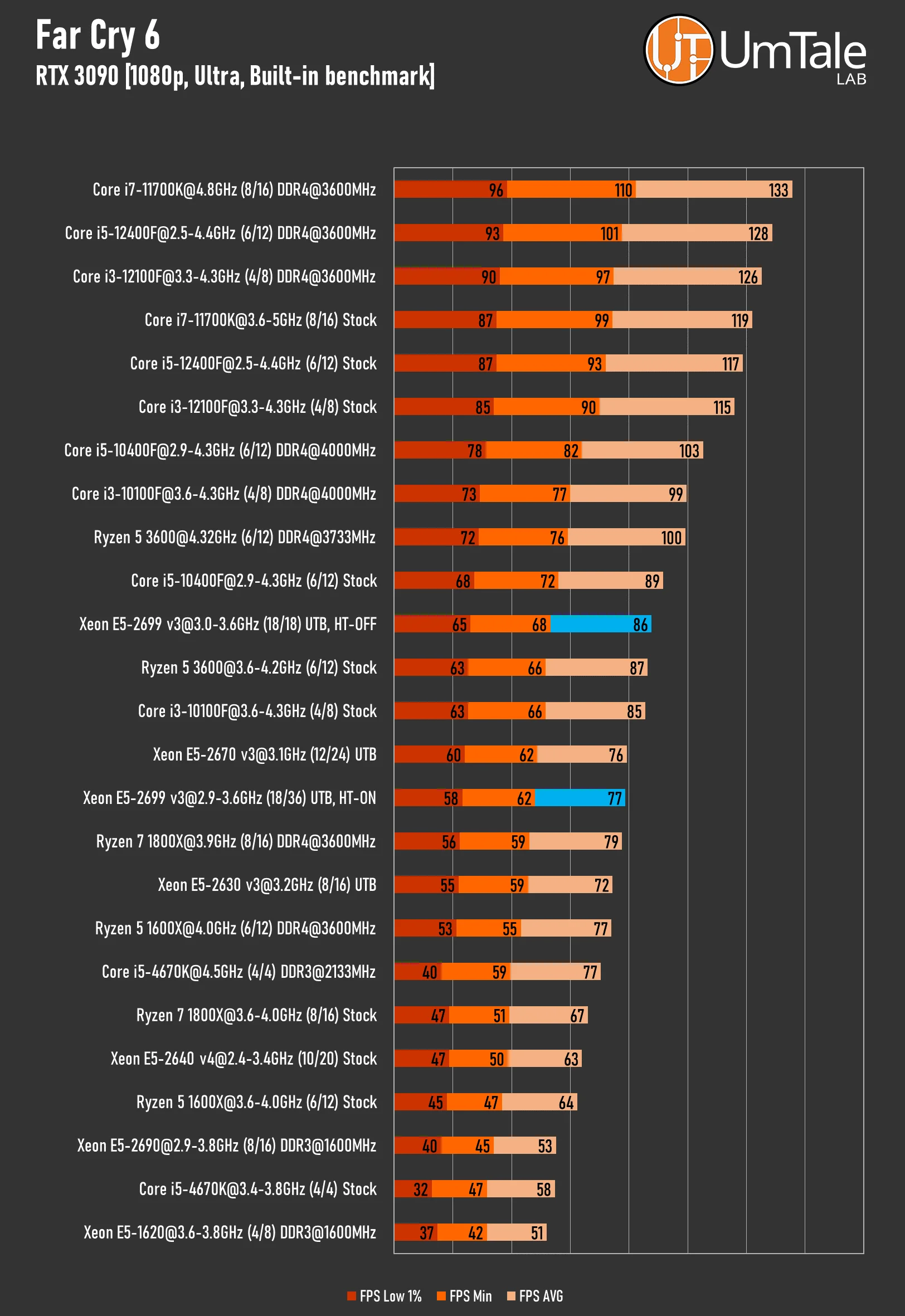
Far Cry 6 runs on the Dunia Engine v2. This engine has a long history, dating back to Far Cry 2, of notoriously poor optimization for multi-threaded CPUs. Our tests show the game handles eight threads adequately. Interestingly, some CPUs with over 10 cores that also feature SMT/HT (simultaneous multi-threading, processing two or more threads per core) can actually see a performance decrease in this game. It's important to note, however, that this isn't true for all CPUs on the market.
Ray Tracing – ON
 ⤢ ВІДКРИТИ
Far Cry 6 struggles with multi-core CPUs, essentially putting the 36-thread Xeon E5-2699 v3 on par with its less powerful sibling, the 2670 v3. However, there's a workaround: disabling Hyper-Threading on the 18-core processor yields significantly better results, even allowing it to reach Core i3-10100F levels of performance.
Ray Tracing – OFF
 ⤢ ВІДКРИТИ
Disabling ray tracing significantly boosts FPS, allowing the 2699 v3 to outperform the stock i3-10100F and R5 3600. However, deactivating RT had no impact on the performance difference between the HT-ON and HT-OFF versions of the processor.
Marvel’s Spider-Man Miles Morales
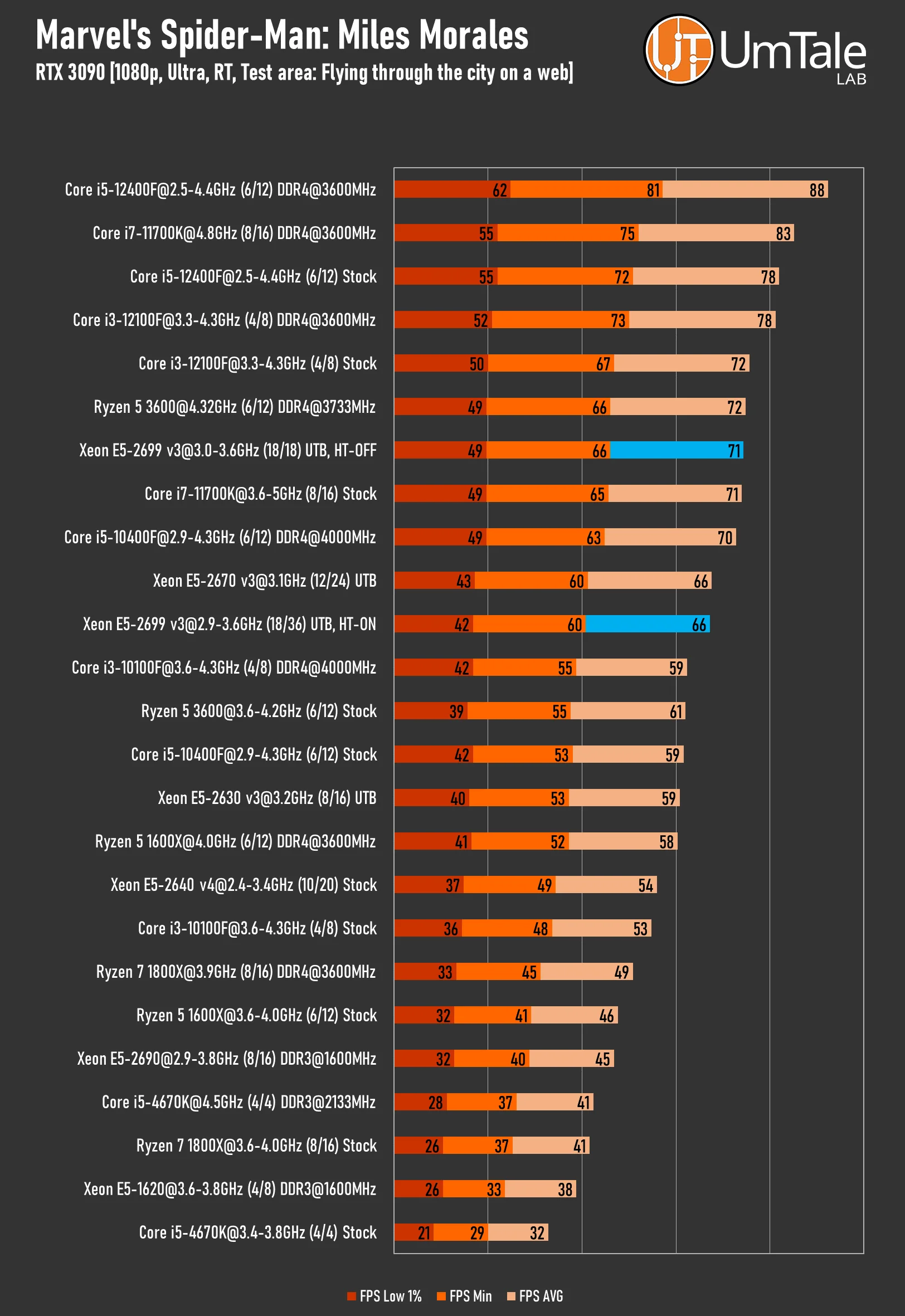
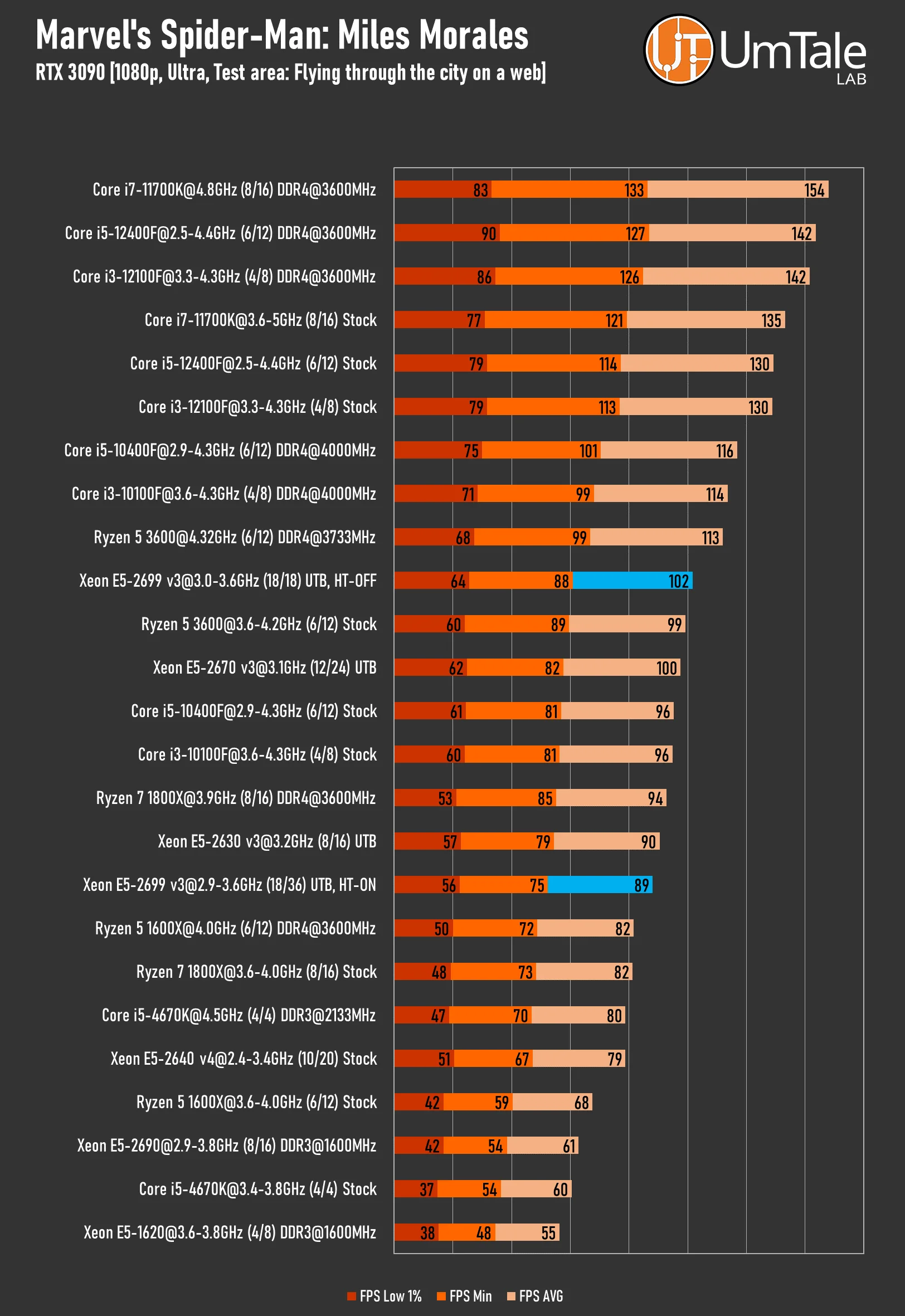
Marvel's Spider-Man Miles Morales, once a PlayStation console exclusive, is a relatively well-optimized PC port. While Insomniac Games' proprietary engine can effectively utilize multi-core CPUs, the overall stability of games built on it still leaves much to be desired.
Ray Tracing – ON
 ⤢ ВІДКРИТИ
The Xeon E5-2699 v3 is an excellent choice for Marvel's Spider-Man Miles Morales with ray tracing enabled. The 36-thread variant's performance is similar to the Xeon E5-2670 v3, while the pure 18-core version manages to challenge the overclocked Ryzen 5 3600 and stock Core i3-12100F.
Ray Tracing – OFF
 ⤢ ВІДКРИТИ
In less demanding scenarios, both 2699 v3 variants lose some ground, allowing them to compete only with stock versions of modern CPUs.
Starfield
Starfield is the new blockbuster from the highly respected guru Todd Howard. The project is based on an updated version of the Creation Engine 2, which was also used in Fallout 4. However, "updated" is the key word here. Bethesda didn't lie in their statements. While the current Creation Engine can certainly be criticized for many things (terrible storage performance, poor optimization for modern graphics cards, and so on), the developers have seriously optimized its code for multi-threaded processors.
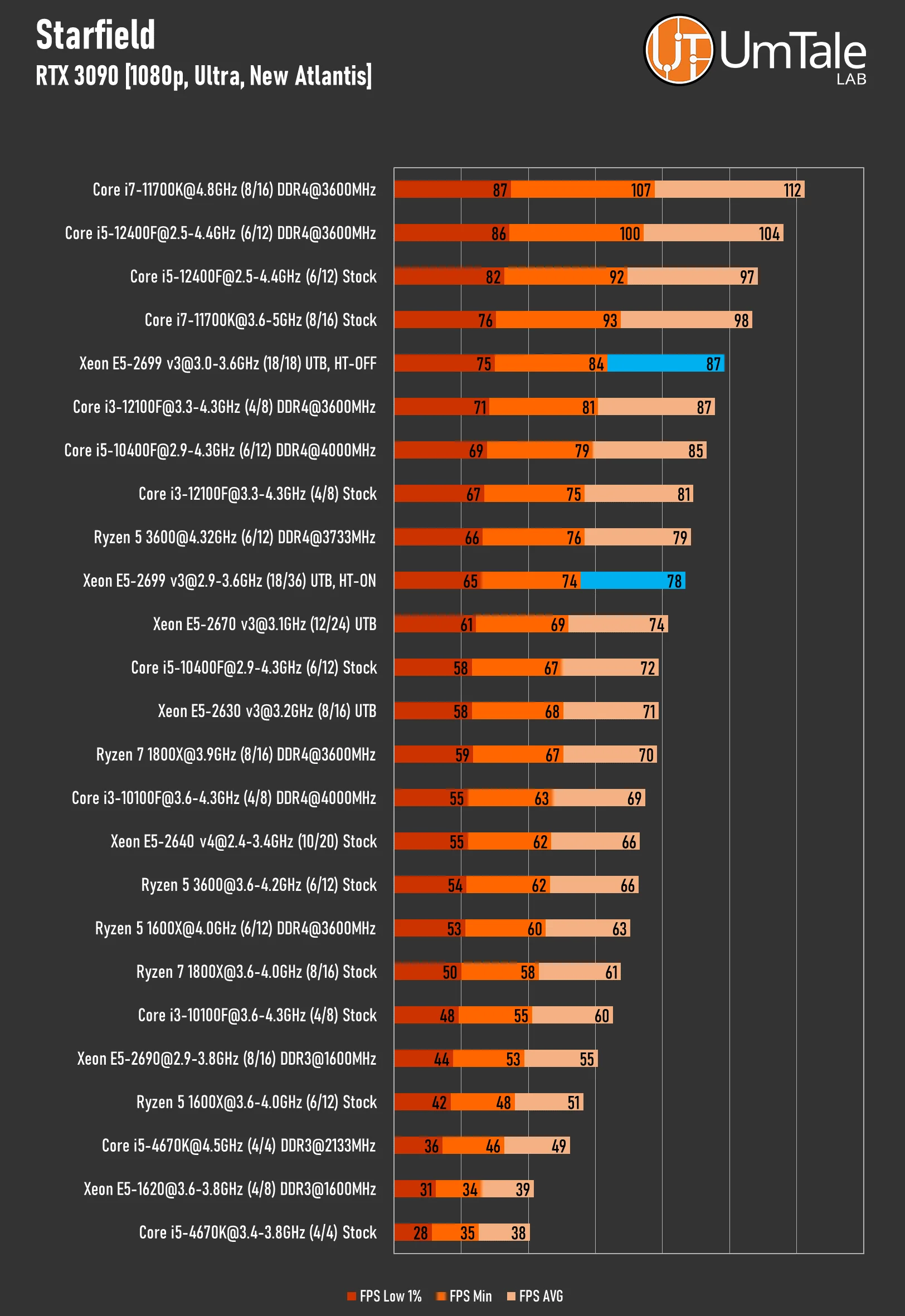
Our test scene is set in the heart of New Atlantis, or Nova Atlantis—whichever you prefer. We measure FPS using a segment from the landing pad to the central plaza.
 ⤢ ВІДКРИТИ
The updated Creation Engine 2 has proven highly favorable to the Xeon E5-2699 v3. Even the 36-thread version of the chip performs extremely well, easily outperforming the E5-2670 v3. Meanwhile, the 18-core variant faces virtually no competition from the overclocked i5-10400F, positioning itself right behind the Core i5-12400F and Core i7-11700K.
The only thing we'd note is that we had very high expectations for the E5-2699 v3's performance in Starfield. Given Creation Engine 2's excellent optimization for multi-core processors, we thought this game would fully unleash the potential of 36 threads. However, experiments showed that Starfield can only load up to 24 threads. Still, there's absolutely nothing to fault the developers for; they did a great job with their product.
The Witcher 3 Next-Gen Update 4.04
The updated version of The Witcher 3 transitioned to an improved REDengine 3 with Ray Tracing support. However, the project wasn't ready for such complex changes, and as a result, the game became significantly more demanding than even Cyberpunk 2077.
The Next-Gen Update is extremely CPU-dependent, yet it struggles to adequately utilize powerful CPUs with eight or more cores. The Witcher 3 performs most efficiently on 6-core, 12-thread chips. Additionally, REDengine 3 responds quite well to high-frequency RAM.
Ray Tracing – ON
 ⤢ ВІДКРИТИ
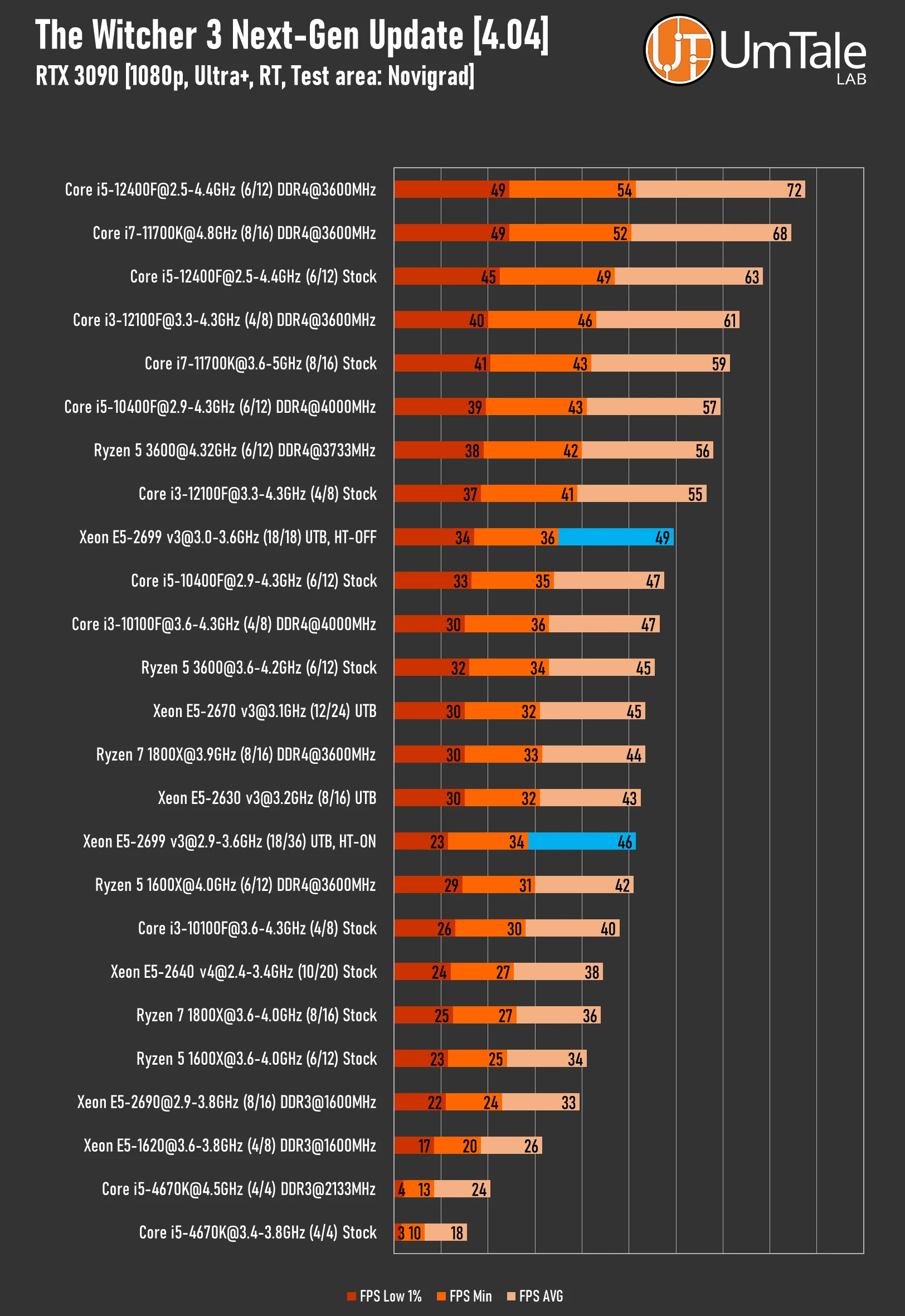
The Witcher 3's Next-Gen Update with ray tracing performs simply horribly on the 36-thread version of the Xeon E5-2699 v3. The minimum recorded FPS stands at a dismal 23 frames, a performance level akin to the aging Xeon E5-2690 and a stock Ryzen 5 1600X. The game constantly micro-stutters, making it impossible to call such gameplay even minimally acceptable.
Fortunately, this isn't a death sentence. Disabling Hyper-Threading significantly boosts both minimum and average FPS. The 18-core variant easily catches up to and even slightly surpasses stock Core i5-10400F and Ryzen 5 3600.
Ray Tracing – OFF
 ⤢ ВІДКРИТИ
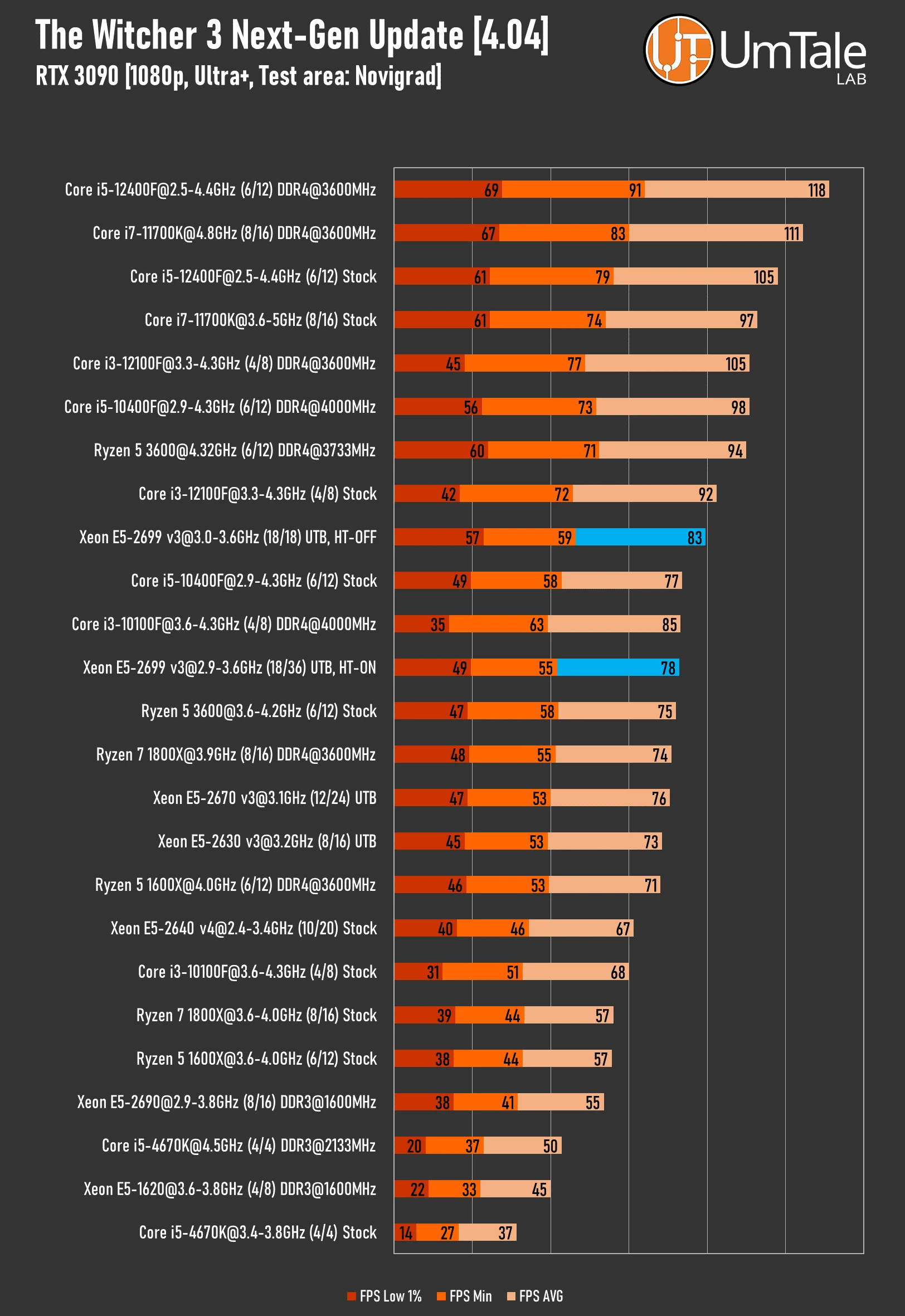
Without the infamous Ray Tracing, the 36-thread version's performance evens out somewhat, with its results now comparable to a stock i5-10400F, while the 18-core variant reaches i3-12100F levels.
Watch Dogs Legion
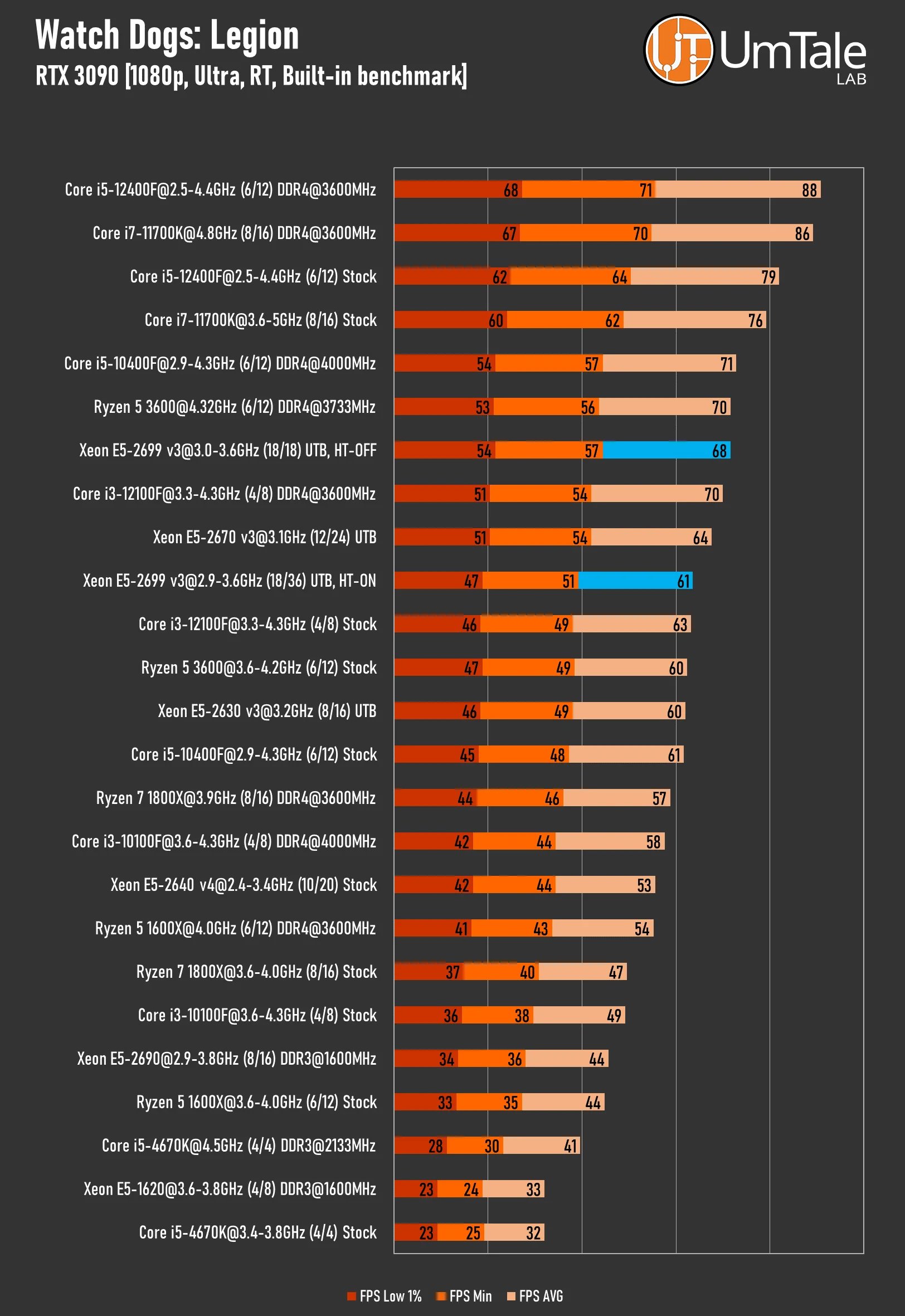
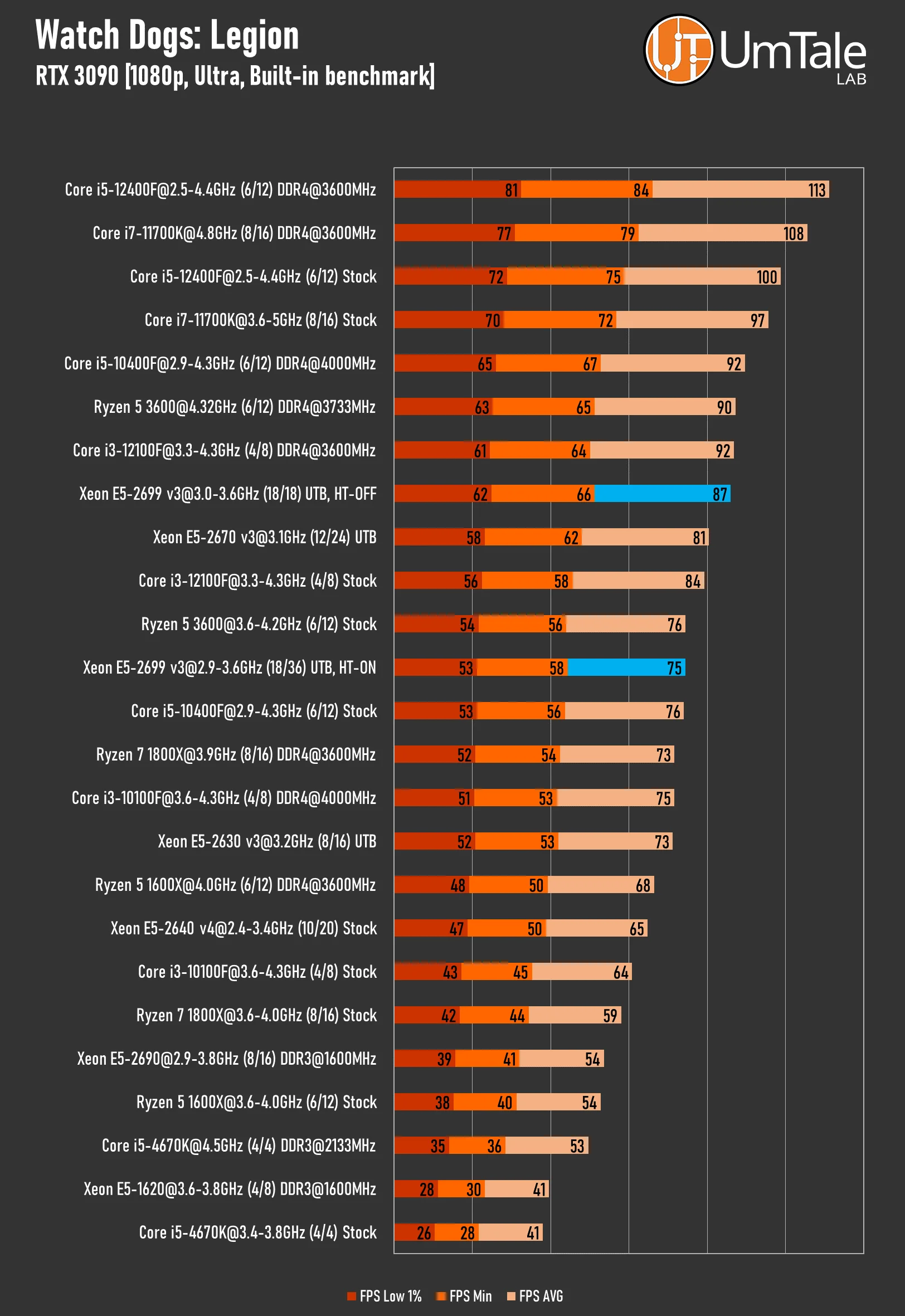
The third installment of the Watch Dogs franchise is most likely based on an improved Disrupt 2 engine. Since the release of the first game, projects in this series have performed quite well with multi-core CPUs, and Legion is no exception. The game can easily utilize over 20 threads and also responds positively to high-frequency memory.
Ray Tracing – ON
 ⤢ ВІДКРИТИ
Legion handles 24 threads relatively well, but 36 is already too much for it. Nevertheless, even in this scenario, both 2699 v3 variants perform quite decently with ray tracing enabled.
Ray Tracing – OFF
 ⤢ ВІДКРИТИ
FPS sees a significant boost without Ray Tracing, though this doesn't fundamentally alter the pecking order.
RPCS3, Red Dead Redemption
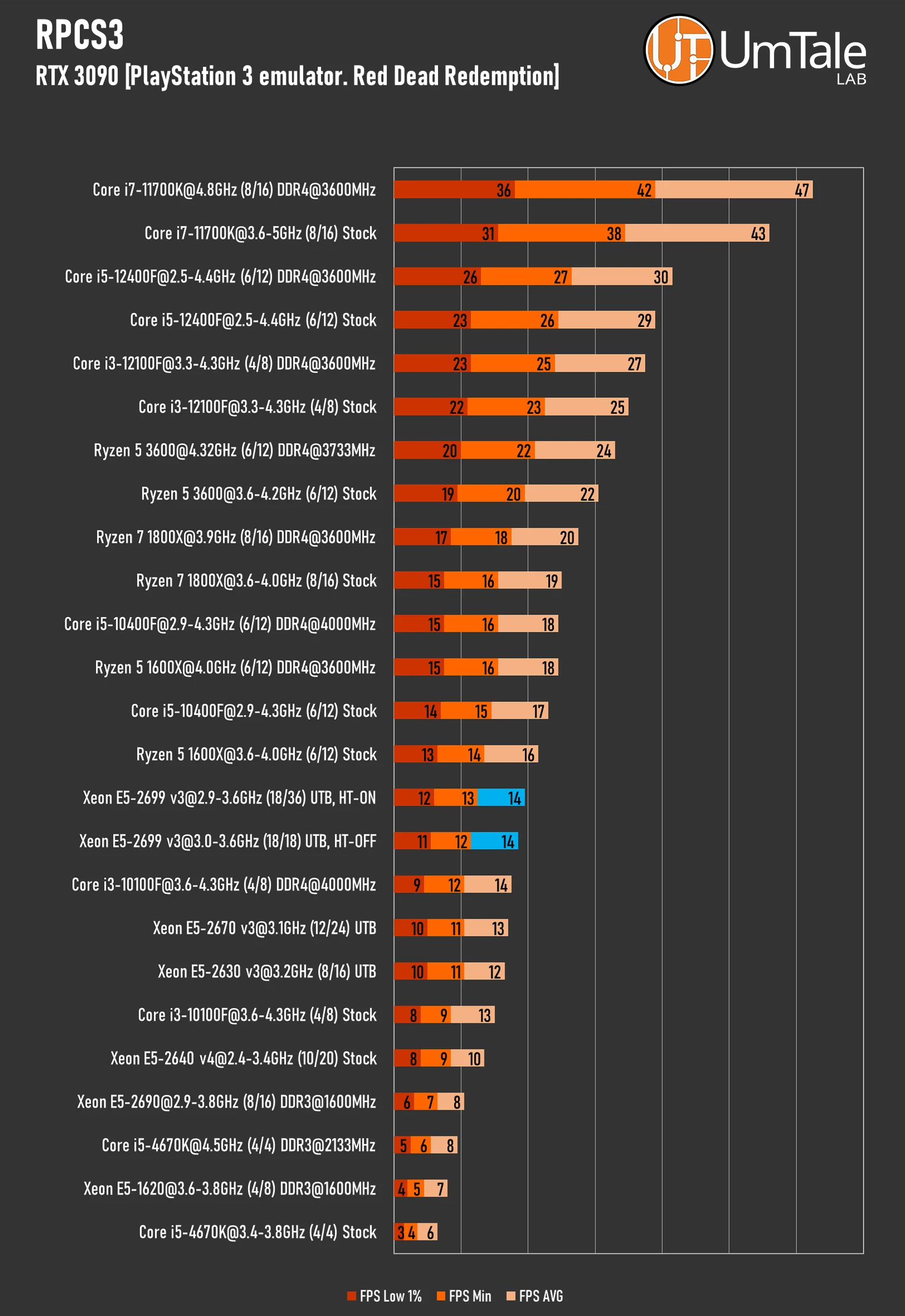
RPCS3, the leading PlayStation 3 emulator, excels at parallelizing shader compilation across numerous threads. However, its workload distribution during actual game emulation significantly declines. While performance undeniably varies by game, our observations indicate that modern 6-8 core CPUs with high clock speeds deliver the best results.
Furthermore, instruction sets like AVX-512 and TSX can provide a noticeable performance boost. Be aware, though, that TSX can occasionally lead to instability in certain projects.
Emulator settings for Red Dead Redemption: SPU block size – Mega, ZCULL accuracy – Relaxed, Write color buffers – On, Sleep timers accuracy – As Host, RSX FIFO accuracy – Atomic, 1080p resolution.
 ⤢ ВІДКРИТИ
Within the PlayStation 3 emulator, the Xeon E5-2699 v3 saw virtually no performance benefit from its additional cores/threads compared to its lower-end counterparts. Its only advantage, enabling it to surpass them, was its higher clock speed.
It's worth noting, however, that the Xeon E5-2699 v3 significantly speeds up game loading and shader compilation compared to, for example, an E5-2670 v3.
Analysis of in-game benchmarks
Just like with the Xeon E5-2670 v3, we must conclude that this multi-threaded processor can't unleash its full gaming performance potential when Hyper-Threading is enabled.
If you're eyeing the Xeon E5-2699 v3 as a budget gaming CPU, make sure to disable Hyper-Threading in your motherboard's BIOS. Doing so can boost overall performance by 15-25%, delivering not just high, but crucially, stable frame rates.
Conclusion
 ⤢ ВІДКРИТИ
If you're already an LGA 2011 v3 platform owner with a modest CPU, or if you're considering the platform, it seems the time to upgrade to a top-tier Xeon E5-2699 v3 is now. This powerful chip costs about the same as entry-level Core i3 or Ryzen 3 CPUs, yet its performance can sometimes rival that of significantly pricier Core i5-12400F and Core i7-11700K chips.
Undoubtedly, the E5-2699 v3's gaming performance often trails that of overclocked Core i5-10400F or Ryzen 5 3600 CPUs. However, disabling Hyper-Threading largely rectifies this discrepancy.
The E5-2699 v3's setup is quite straightforward: if heavy software like archiving tools or 3D modeling suites is your priority, keep Hyper-Threading enabled. For gamers, however, it's best to disable it.
Ultimately, the Xeon E5-2699 v3 is an excellent processor that generally delivers positive results. Just remember: this CPU demands a motherboard with a robust VRM capable of delivering stable power to the 145-watt chip, along with high-quality cooling.