TESTS · CPU · INTEL
PUBLISHED
READING9 min
2/4 in 2020: overclocking and benchmarking the Intel Core i3-3220
Can a 2-core, 4-thread Intel Core i3-3220 still handle modern tasks in 2020? We test its limits and see how much performance we can squeeze out by overclocking the CPU and RAM.
In late 2019, we wrote that the LGA 1156 platform was no longer relevant, and by late 2020, this can be easily applied to the vast majority of budget and mid-range LGA 1155 CPUs. The only exceptions are certain unlocked Core i5/i7 models and Xeon chips.
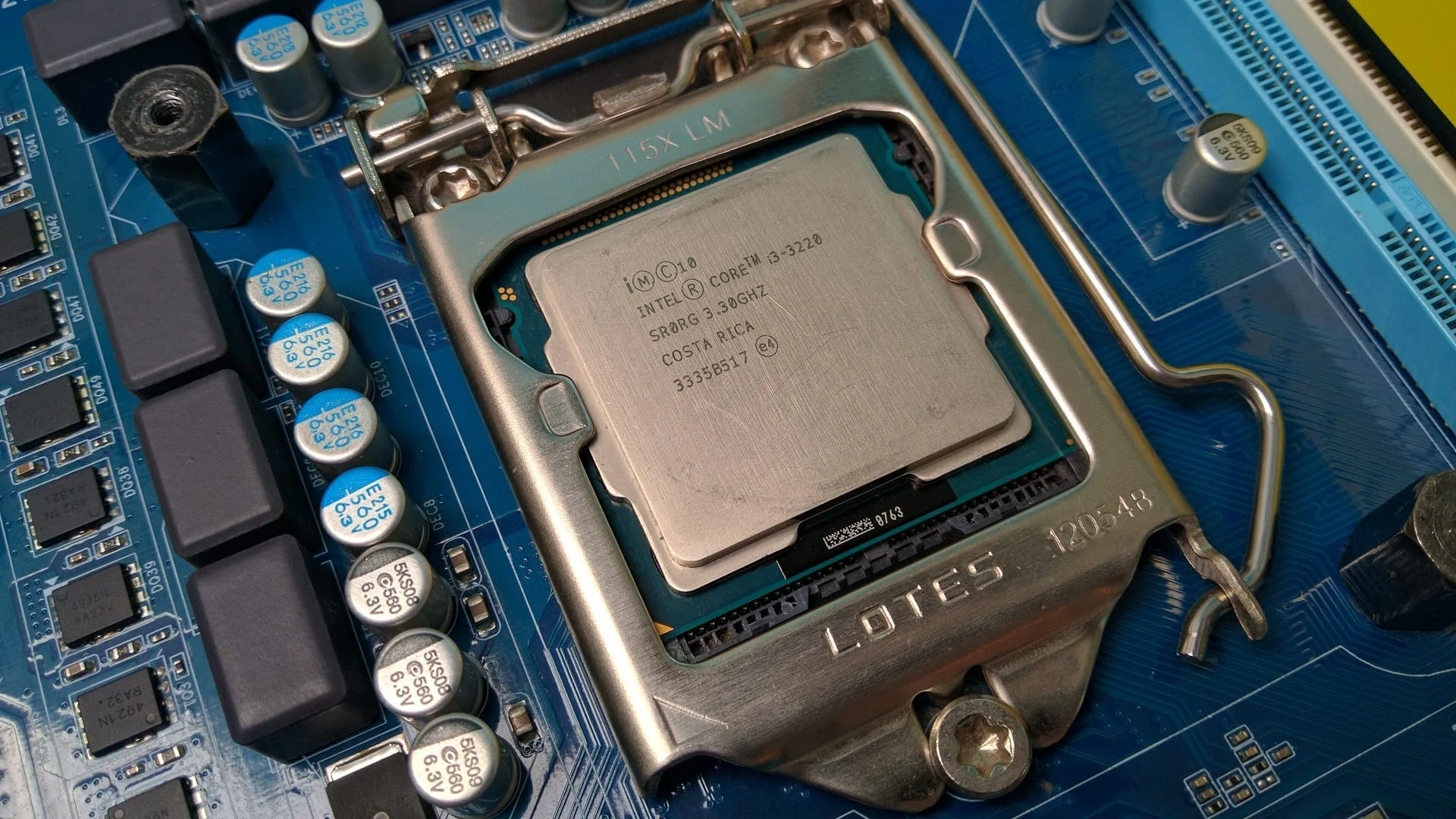
Still, with hardware prices constantly rising, a large number of casual gamers are still running first- and second-generation Core i3 processors. In this article, we'll see if the dual-core, four-thread Intel Core i3-3220 can still deliver decent performance in 2020.
 ⤢ ВІДКРИТИ
Processor
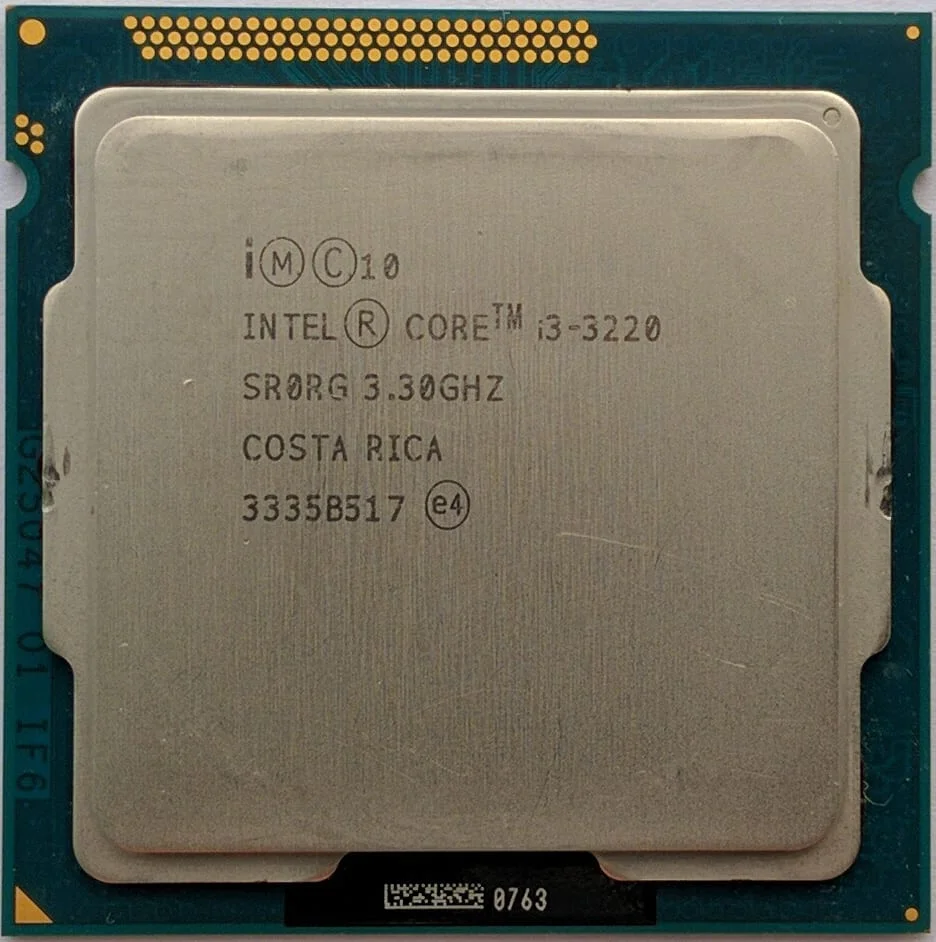
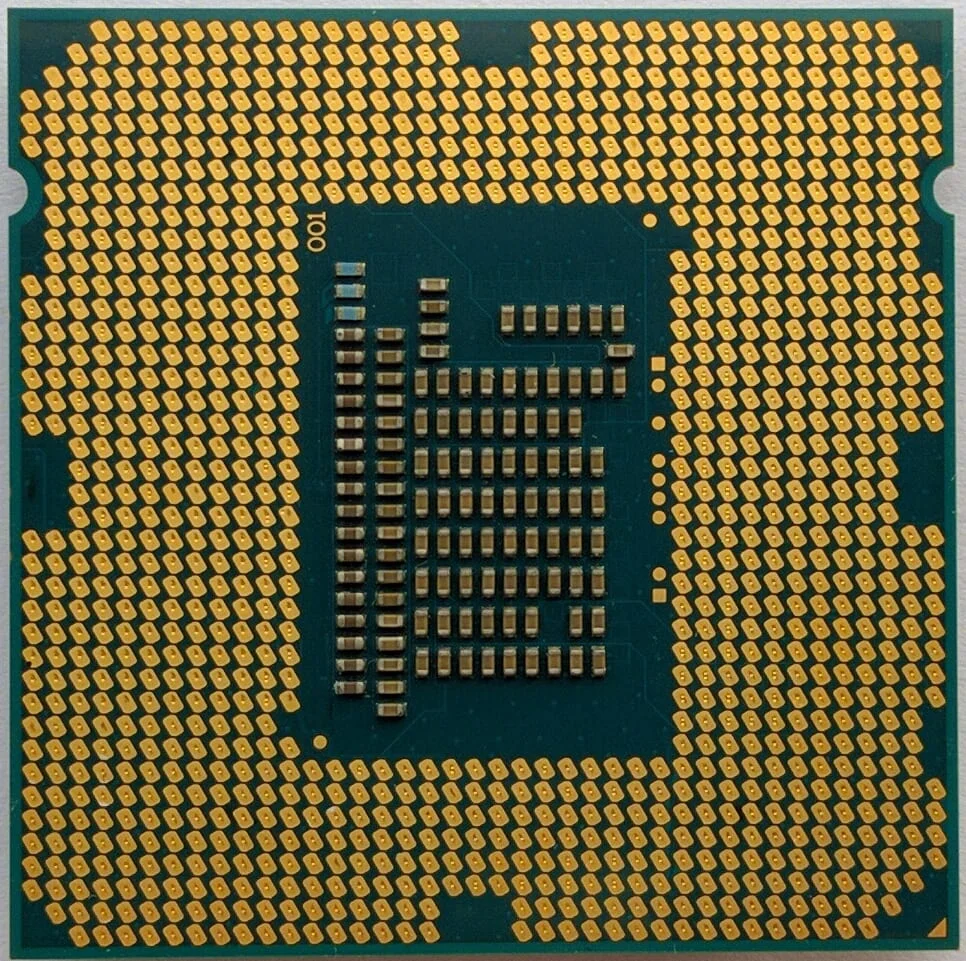
Our review sample is marked SR0RG. Manufactured in Costa Rica, the chip has a base clock of 3300 MHz.
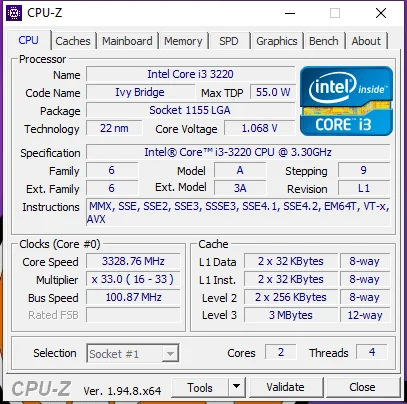
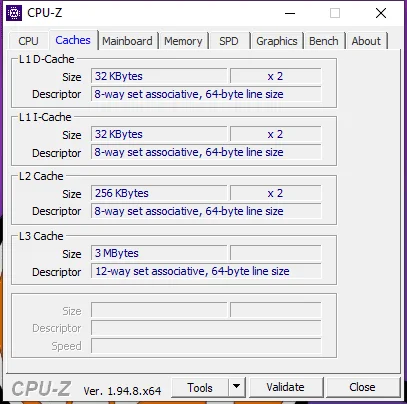
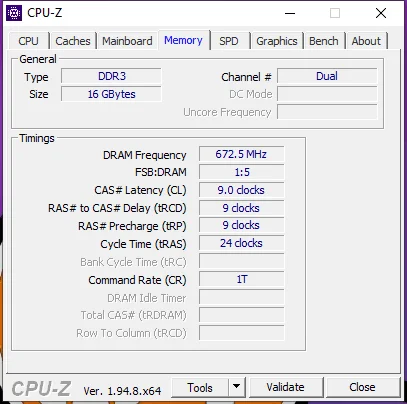
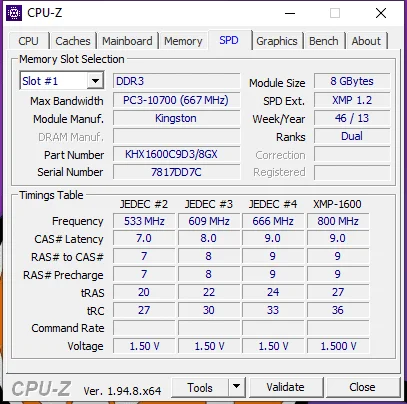
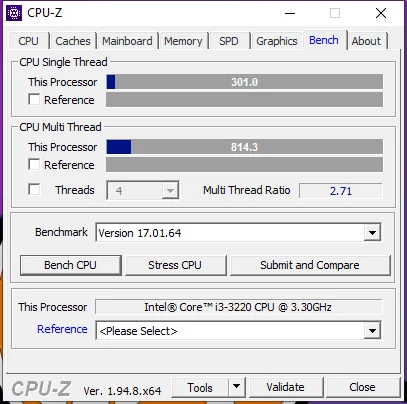
The Intel Core i3-3220 is based on a 22nm, dual-core, four-thread Ivy Bridge die. Designed for LGA 1155 motherboards, this chip lacks Turbo Boost support, meaning its maximum frequency is locked to its base clock of 3300 MHz.
The Core i3-3220 features 256 KB of L2 cache per core and a small, shared 3 MB L3 cache. The integrated memory controller runs at the core frequency (3300 MHz, which also clocks the L3 cache), while the maximum RAM speed is limited to DDR3-1333 MHz.
However, memory overclocking is still possible when pairing a Core i3 with a Z67/Z77 motherboard, which we will explore below.
Overclocking the Core i3-3220
To start, successful LGA 1155 overclocking requires a Z68 or Z77 motherboard. That's because you won't get any meaningful CPU frequency gains directly, since the maximum stable bus speed on LGA 1155 tops out at 106 to 108 MHz at best. Most of the time, you'll hit a wall before even reaching 105 MHz, at least not without compromising the stability of other components like your graphics card, HDD/SSD, or PCI/PCIe expansion cards.
Under these constraints, optimizing memory performance becomes the primary way to boost overall system speed. This, in turn, is only possible on Z68 and Z77 boards.
To begin, set the BCLK to 103 or 104 MHz and run a few stress tests and benchmarks. If the system remains stable, try increasing it by another 1 MHz. If you lose stability or the system fails to boot, drop the BCLK frequency by 0.5 MHz and try again.
In our case, the motherboard wouldn't even let us squeeze out 105 MHz:
 ⤢ ВІДКРИТИ
However, that's only half the job. Once you find the maximum stable BCLK frequency, it's time to overclock the RAM.
Since the default memory frequency for the Core i3-3220 is 1333 MHz, the next logical step is to set the multiplier to 1600 MHz and run stress tests like AIDA64, LinX, or Prime95. If it passes, bump it up to 1866 MHz and repeat the testing.
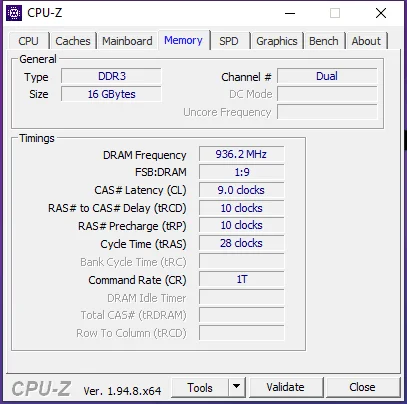
More often than not, memory overclocking success depends entirely on the BIOS capabilities of your specific motherboard. In our case, we topped out at 1872 MHz with 9-10-10-28 timings at 1.680V:
 ⤢ ВІДКРИТИ
To help you find the right timings for your frequency, here is a quick reference table:
For high-quality, overclocking-grade RAM:
RAM frequency (MHz) | 1333 | 1600 | 1866 | 2133 | 2400 |
tCL timing | 7 | 9 | 10 | 12 | 13 |
tRP timing | 7 | 9 | 10 | 12 | 13 |
tRCD timing | 7 | 9 | 10 | 12 | 13 |
tRAS timing | 22 | 26 | 28 | 32 | 34 |
tWR timing | 8 | 10 | 11 | 13 | 14 |
tRFC timing | 87 | 103 | 119 | 134 | 150 |
tWTR timing | 5 | 6 | 7 | 9 | 10 |
tRRD timing | 4 | 4 | 5 | 6 | 7 |
tRTP timing | 5 | 6 | 7 | 9 | 10 |
tFAW timing | 21 | 23 | 25 | 28 | 30 |
tRC timing | 29 | 35 | 38 | 44 | 47 |
For standard, cheap RAM or a mismatched mix of sticks:
RAM frequency (MHz) | 1333 | 1600 | 1866 |
tCL timing | 9 | 10 | 11 |
tRP timing | 9 | 10 | 11 |
tRCD timing | 9 | 10 | 11 |
tRAS timing | 24 | 28 | 30 |
tWR timing | 8 | 10 | 11 |
tRFC timing | 97 | 113 | 129 |
tWTR timing | 6 | 7 | 8 |
tRRD timing | 4 | 4 | 5 |
tRTP timing | 5 | 6 | 7 |
tFAW timing | 21 | 23 | 25 |
tRC timing | 29 | 35 | 38 |
Of course, these timing settings might not work for you because overclocking is a silicon lottery. However, these tables should help you find a baseline for stable RAM frequencies and latencies, giving you a starting point for further experimentation. As for DRAM voltage, we wouldn't recommend exceeding 1.70V. That said, if your RAM has decent heatsinks and you really want to hit that coveted 2400-2533 MHz mark, you can push it to 1.8V. Just remember: any hardware modifications you make are entirely at your own risk!
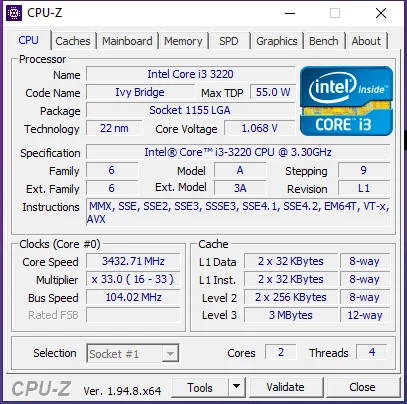
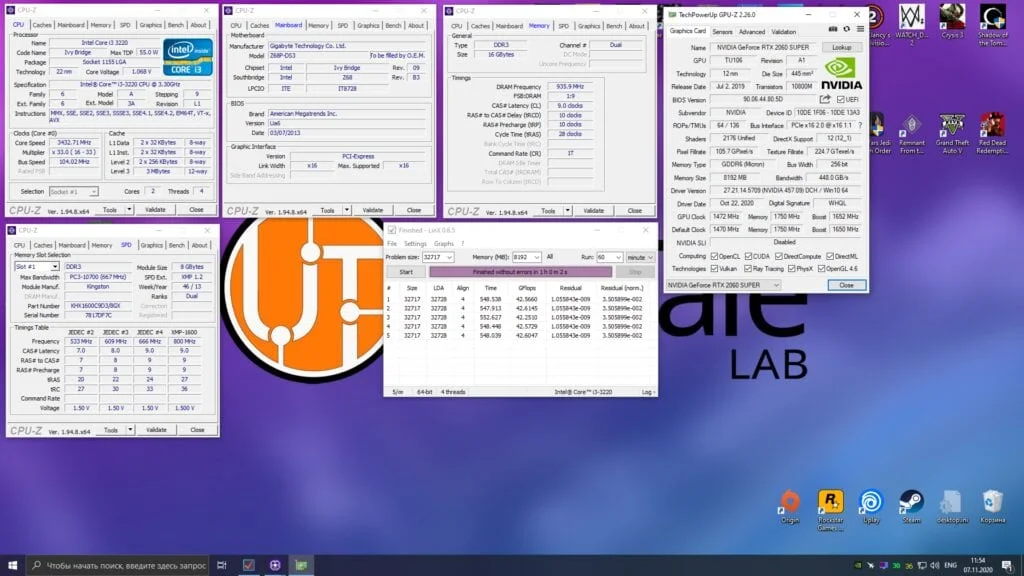
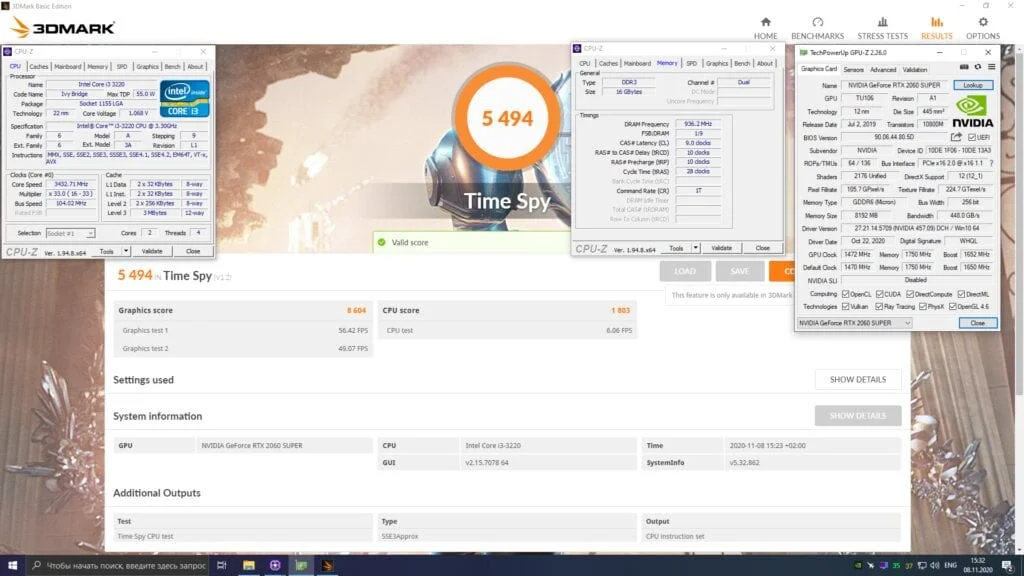
Ultimately, overclocking our Core i3-3220 yielded a modest 3432 MHz on the CPU cores and a relatively decent 1872 MHz for the DDR3 RAM:
 ⤢ ВІДКРИТИ
It's not much, but it's typical for a locked multiplier CPU on the LGA 1155 platform. Now we need to test and see if such a modest overclock is actually worth it, or if the performance gains are too negligible to bother.
The i3-3220's opponent
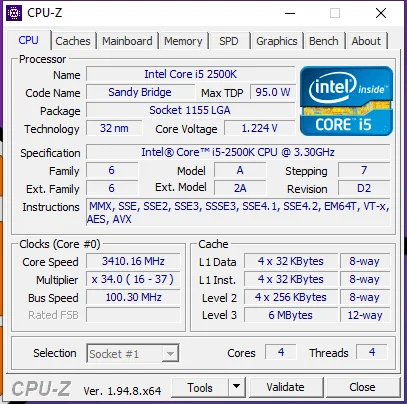
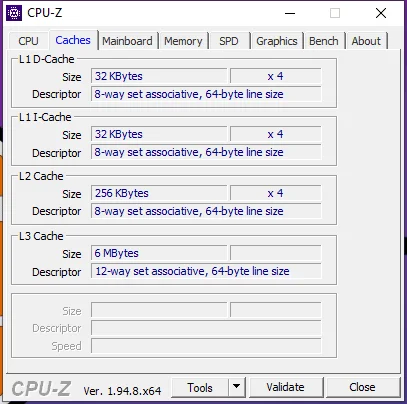
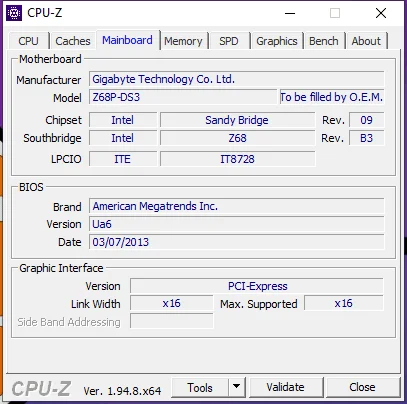
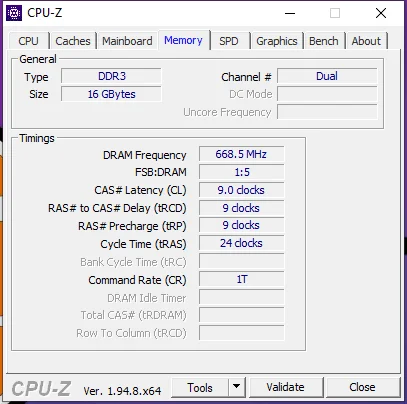
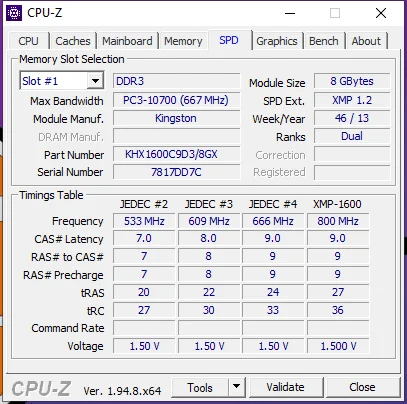
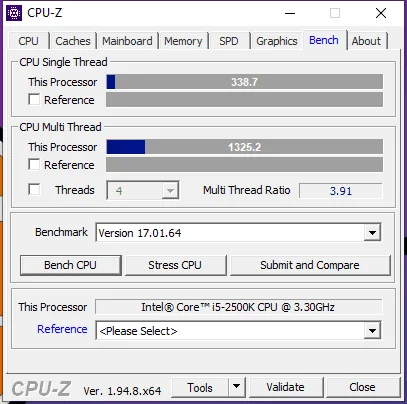
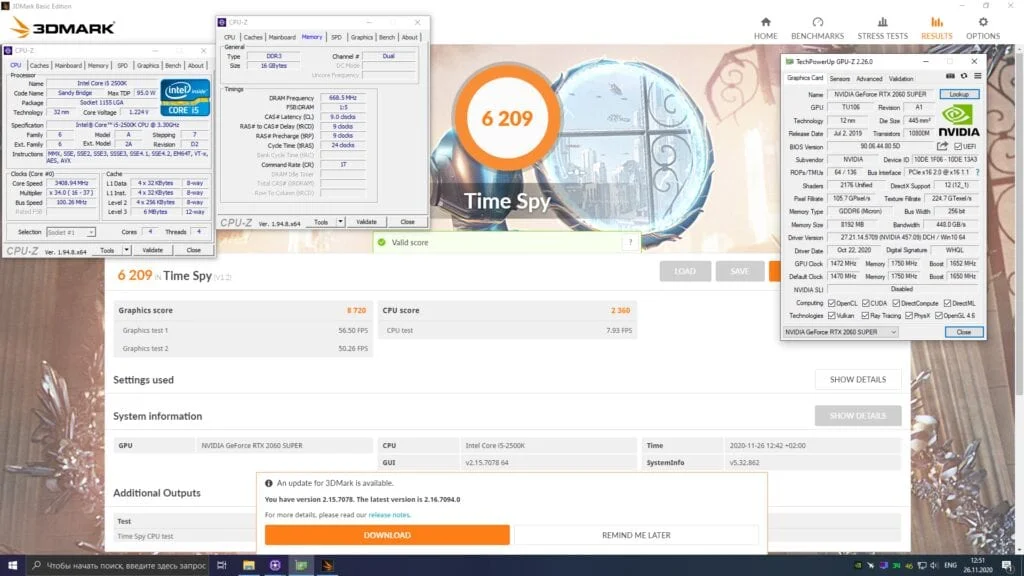
To test against the Core i3-3220, we chose a Core i5-2500K, which was the only suitable chip available in our lab. However, we'll soon get our hands on some very interesting AMD CPUs from the same era and run some additional tests with the Core i3-3220.
 ⤢ ВІДКРИТИ
In this test, the Core i5-2500K will run at its maximum stock frequency of 3400 MHz with a base RAM speed of 1333 MHz. If you want to see what this quad-core chip can do when overclocked, check out this article.
Test bench:
Processors: Core i3-3220 and Core i5-2500K;
Cooling: Cooler Master Hyper 212 Black Edition (RR-212S-20PK-R1);
LGA 1155 RAM: two 8 GB HyperX Genesis Na’Vi Edition sticks (KHX16C9C2K2/8) for 16 GB total;
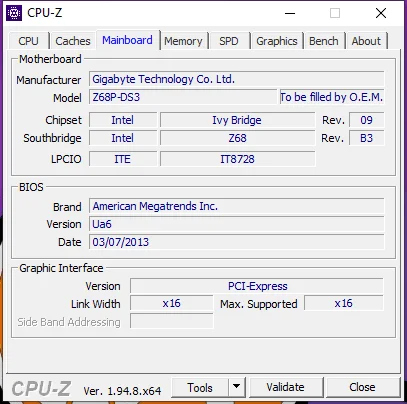
LGA 1155 motherboard: Gigabyte GA-Z68P-DS3 (rev. 2.0);
Graphics card: KFA2 GeForce RTX 2060 SUPER 8 GB (~1950/14000 MHz, 112% Power Limit);
SSD: Kingston A400 120 GB SA400S37120G (Windows 10/Apps);
HDD: Seagate 2 TB ST2000DM008-2FR102 (Games)
Power supply: Chieftec GPS-1250C
Software:
Windows 10 Pro v1909 x64;
CPU-Z v1.94.8 x64;
AIDA64 v6.10.5200;
NVIDIA driver v457.09;
Cinebench R15.38;
Cinebench R20.060;
Cinebench R23.200;
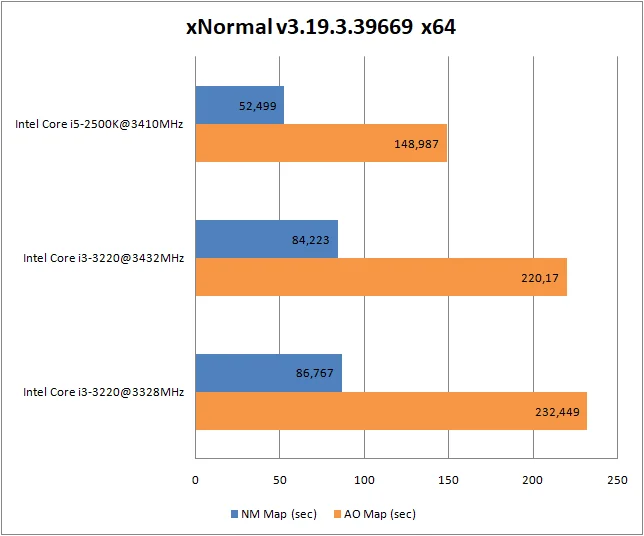
xNormal 3.19.3.39669 x64 (NM Map anti-aliasing x4, AO Map anti-aliasing x1);
Blender 2.90.0;
HWBot x265 Benchmark v2.0.0;
WinRAR v5.91 x64;
7-Zip v20.02 alpha x64.
Testing the Core i3-3220 in applications and benchmarks:
First, let's look at the results in basic test suites before moving on to real-world applications.
Overall performance:
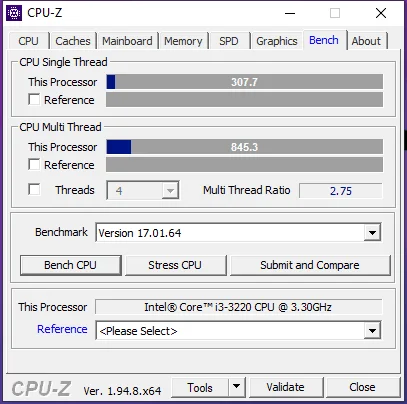
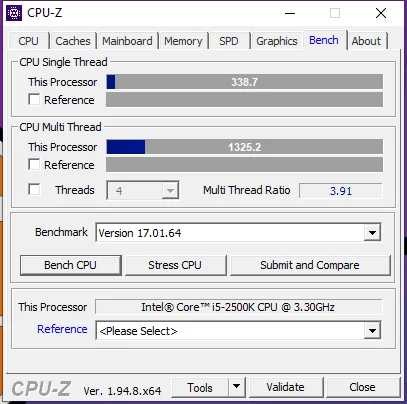
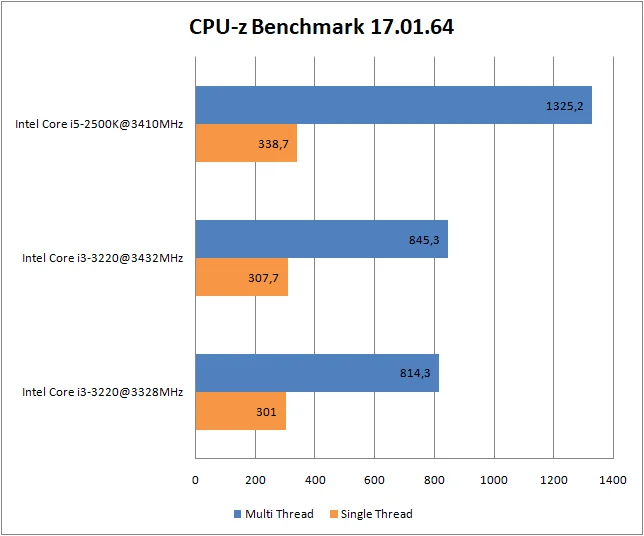
CPU-Z benchmark
 ⤢ ВІДКРИТИ
Rendering and benchmarks:
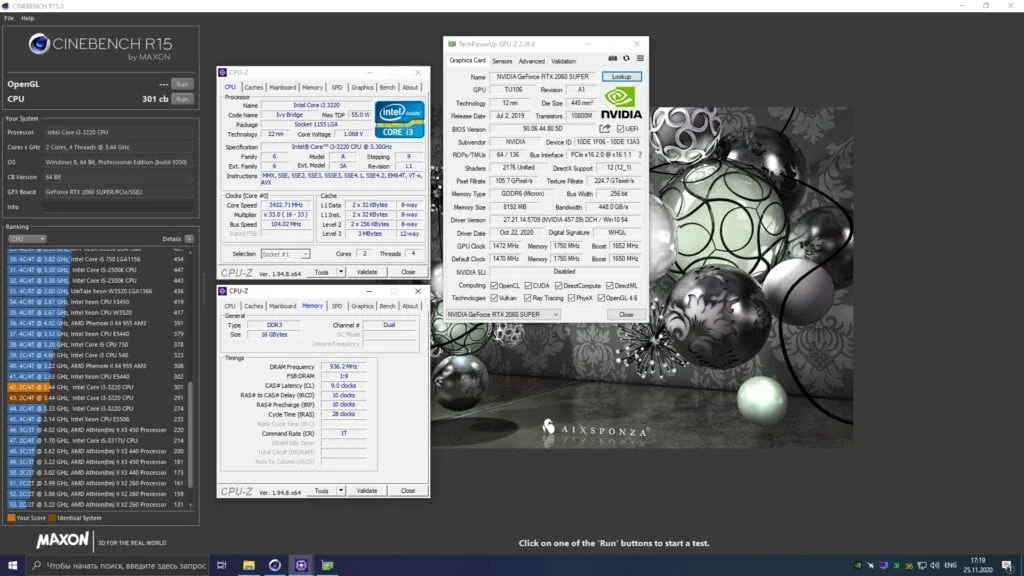
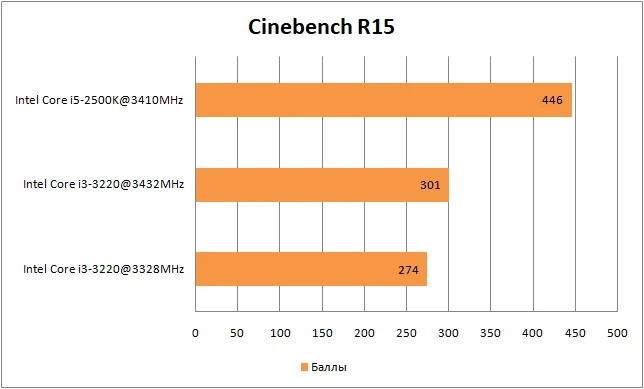
Cinebench R15
 ⤢ ВІДКРИТИ
 ⤢ ВІДКРИТИ
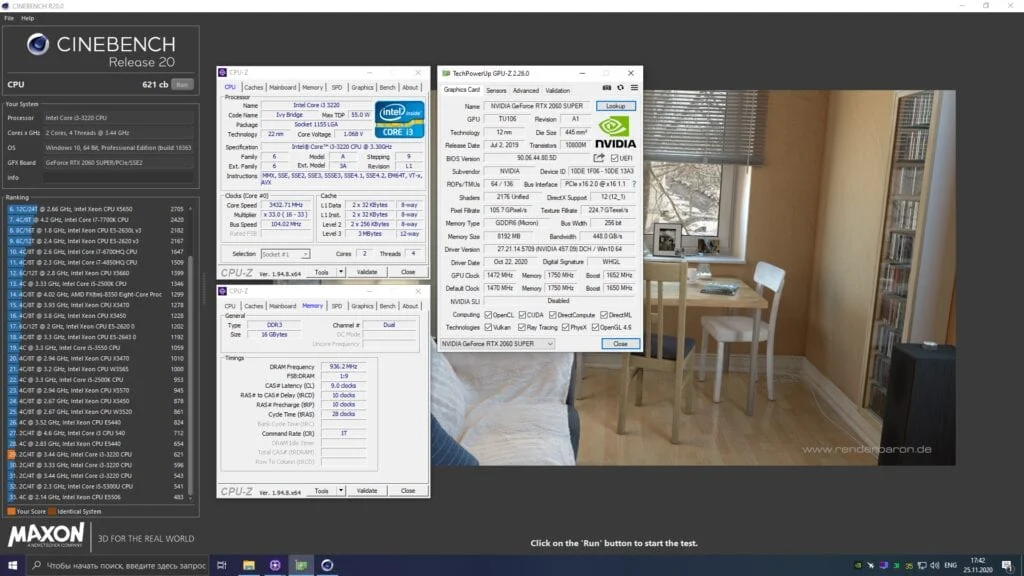
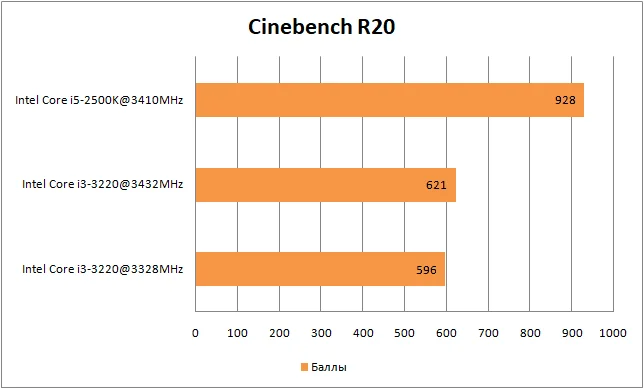
Cinebench R20
 ⤢ ВІДКРИТИ
 ⤢ ВІДКРИТИ
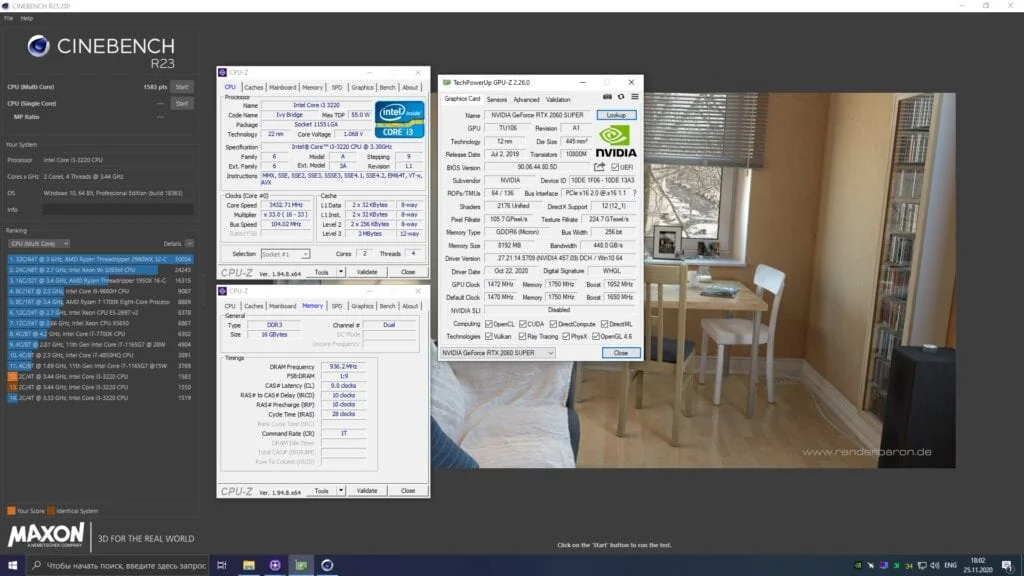
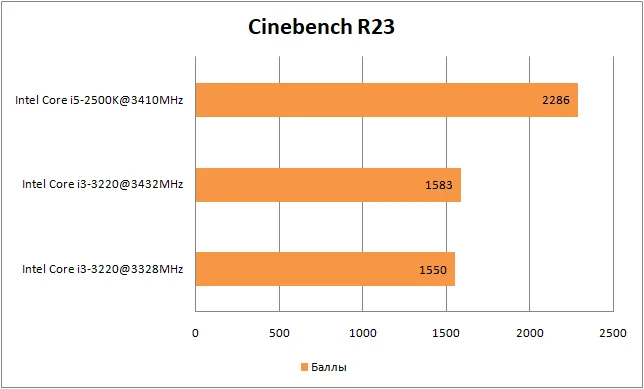
Cinebench R23
 ⤢ ВІДКРИТИ
 ⤢ ВІДКРИТИ
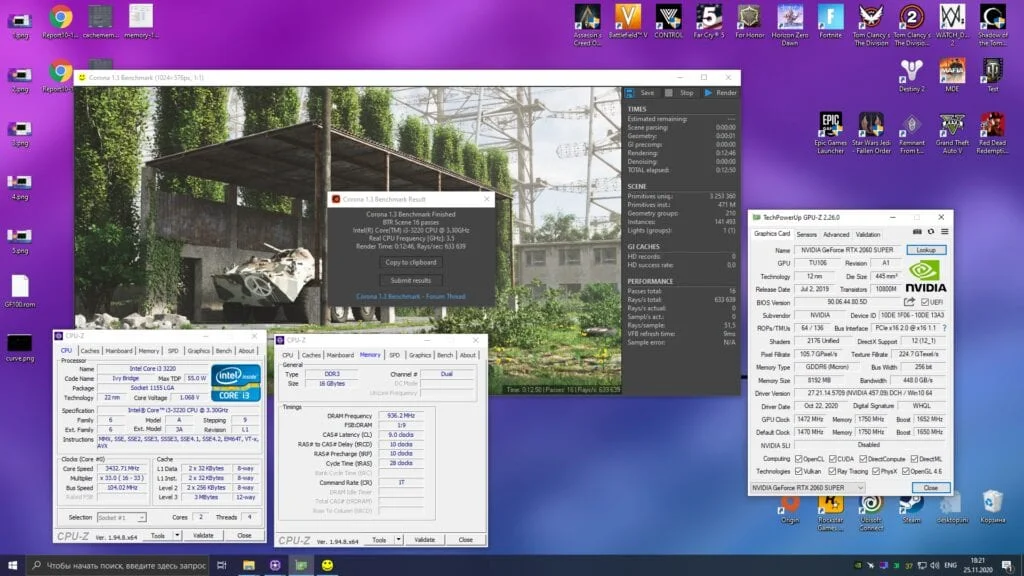
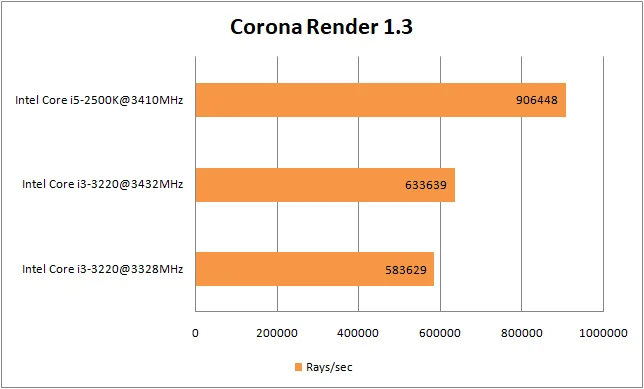
Corona Render 1.3
 ⤢ ВІДКРИТИ
 ⤢ ВІДКРИТИ
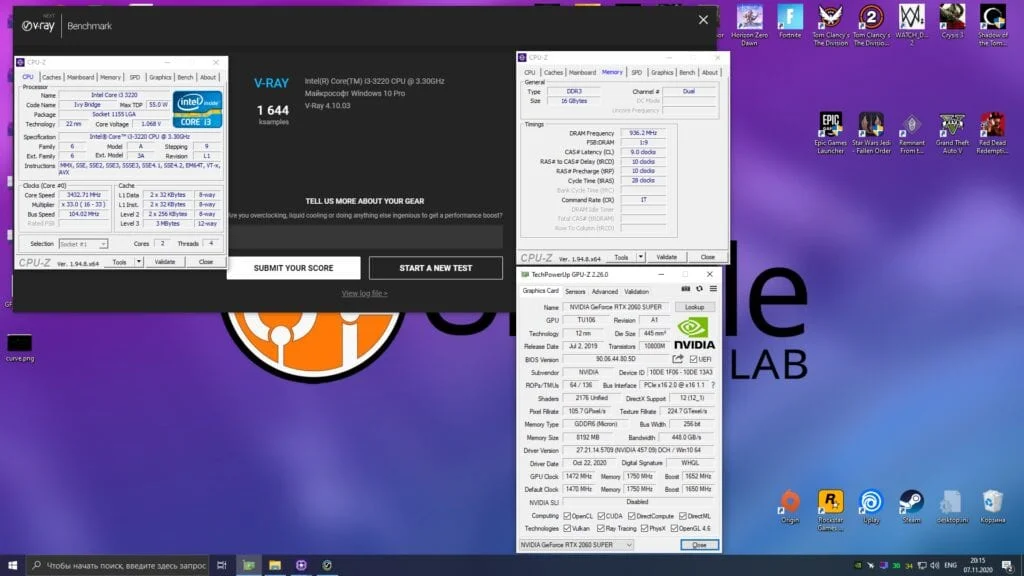
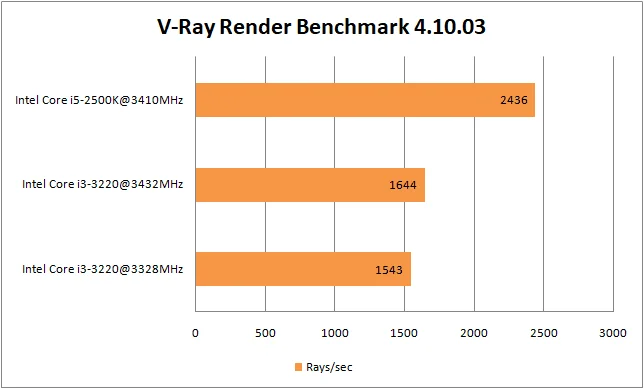
V-Ray Render Benchmark
 ⤢ ВІДКРИТИ
 ⤢ ВІДКРИТИ
Rendering, real-world tasks:
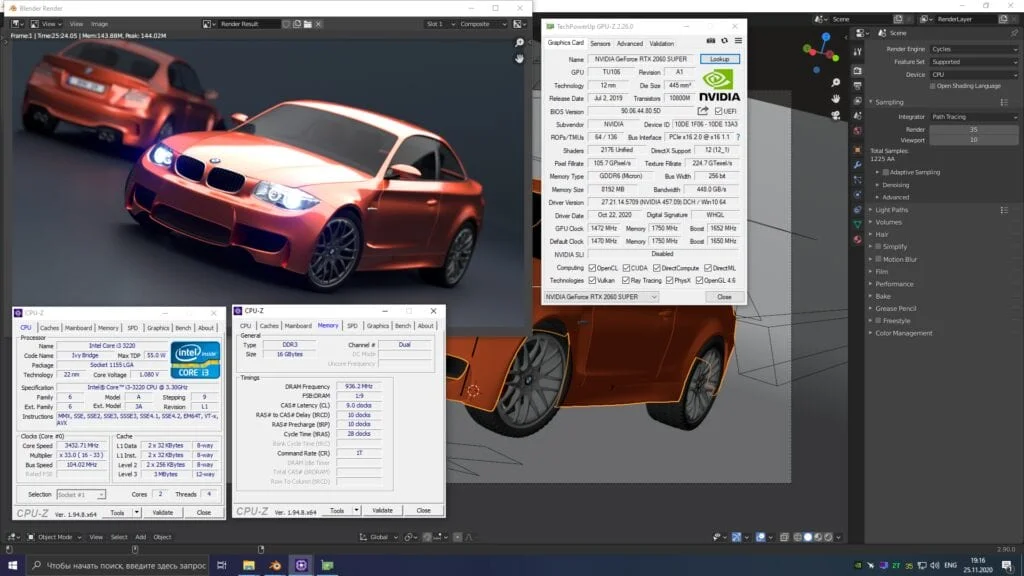
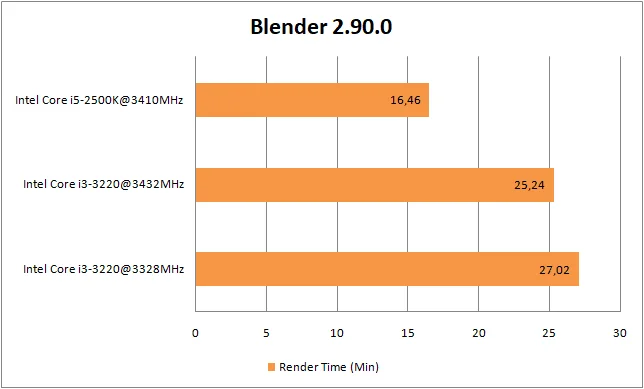
Blender
 ⤢ ВІДКРИТИ
 ⤢ ВІДКРИТИ
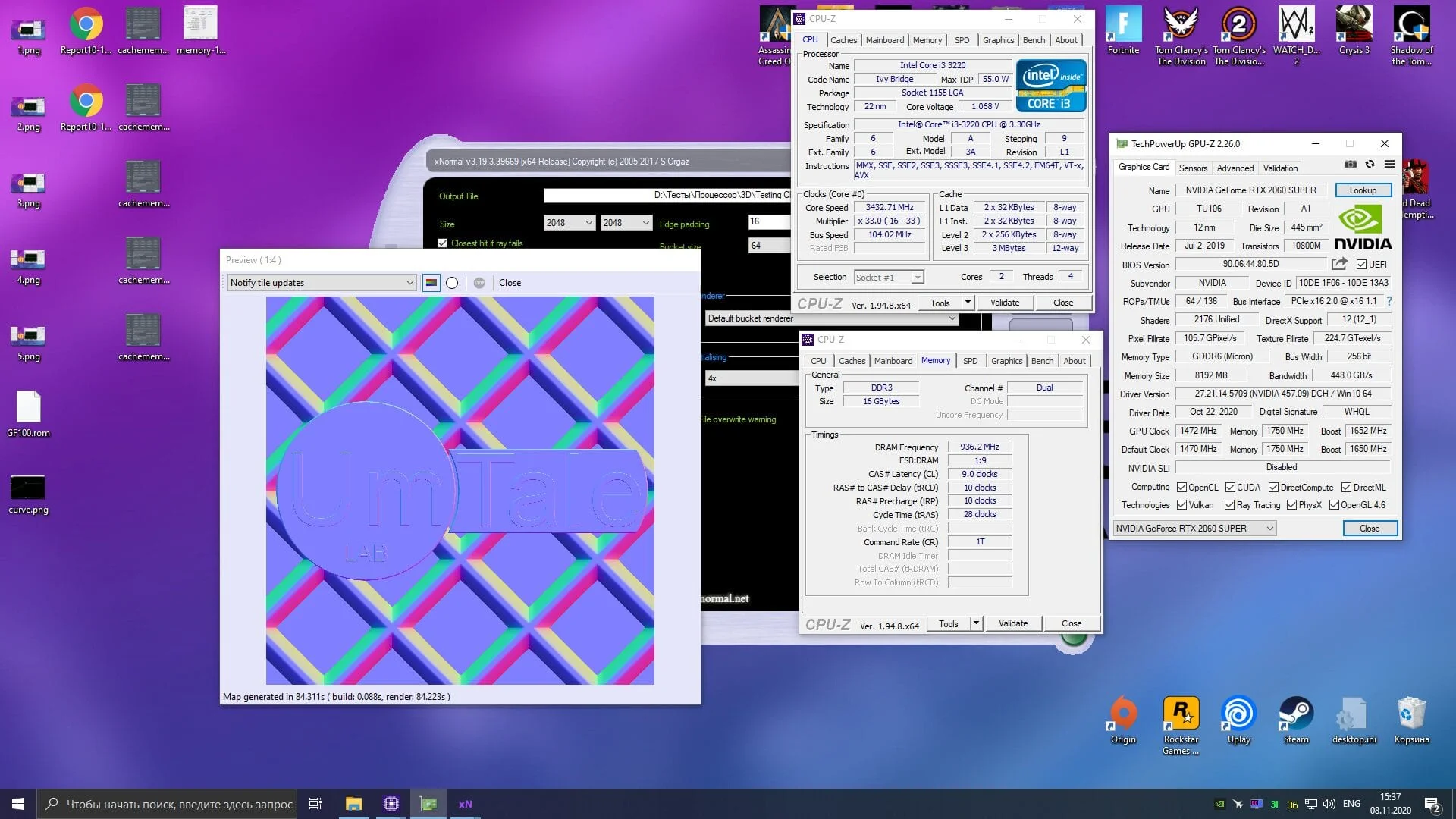
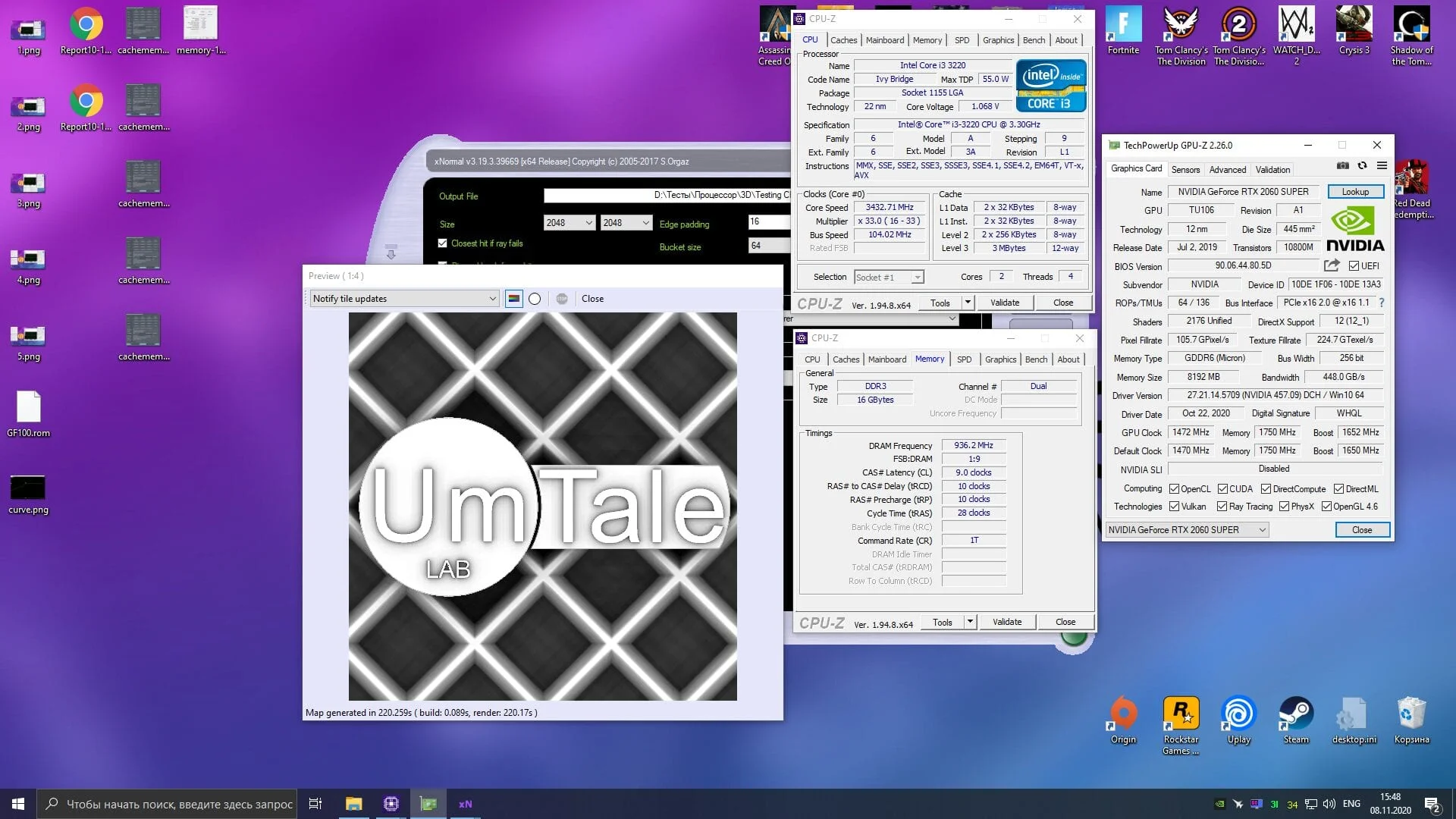
xNormal
 ⤢ ВІДКРИТИ
Video encoding
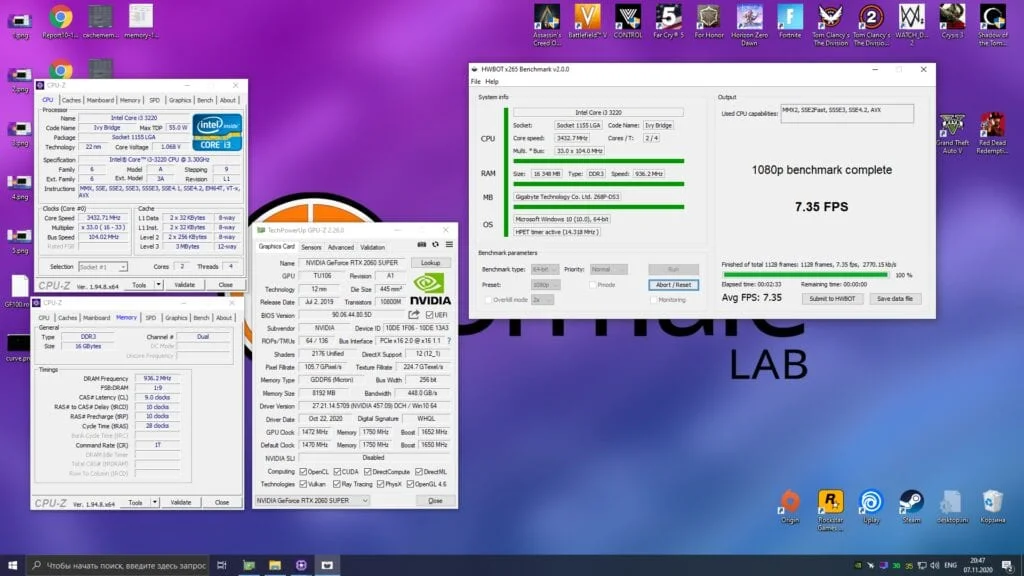
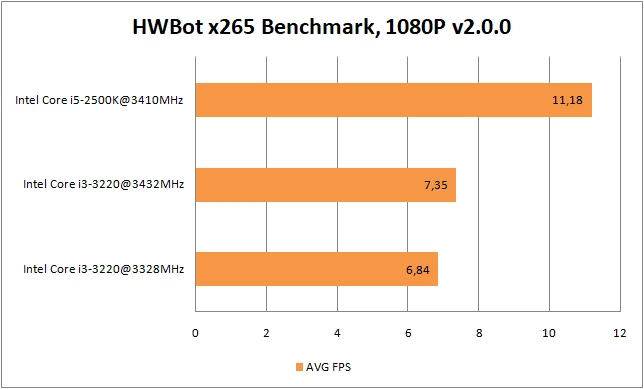
HWBot x265 Benchmark, 1080p
 ⤢ ВІДКРИТИ
 ⤢ ВІДКРИТИ
File compression
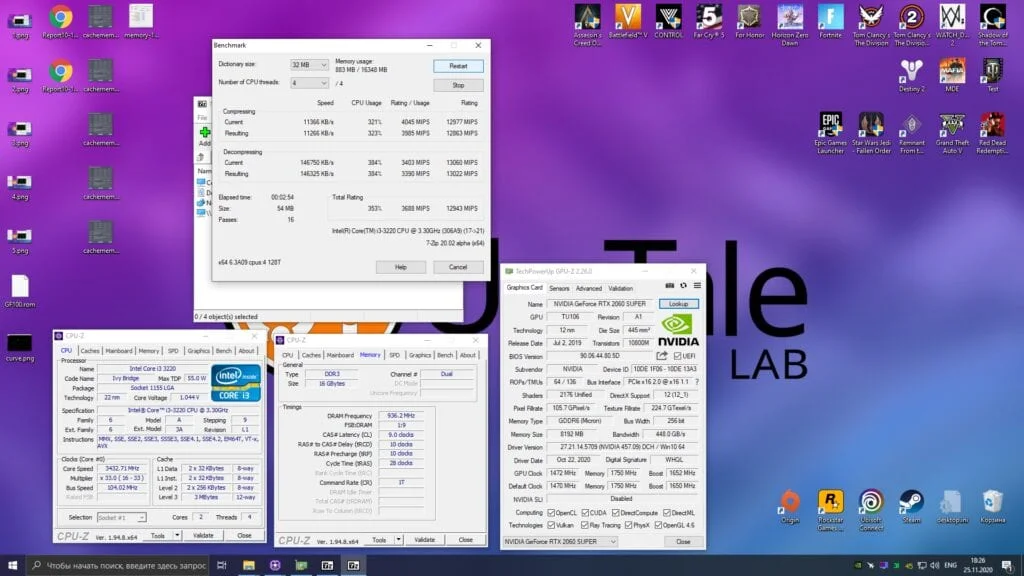
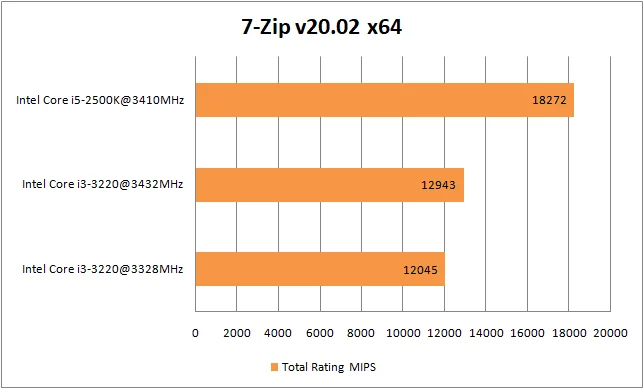
7-Zip
 ⤢ ВІДКРИТИ
 ⤢ ВІДКРИТИ
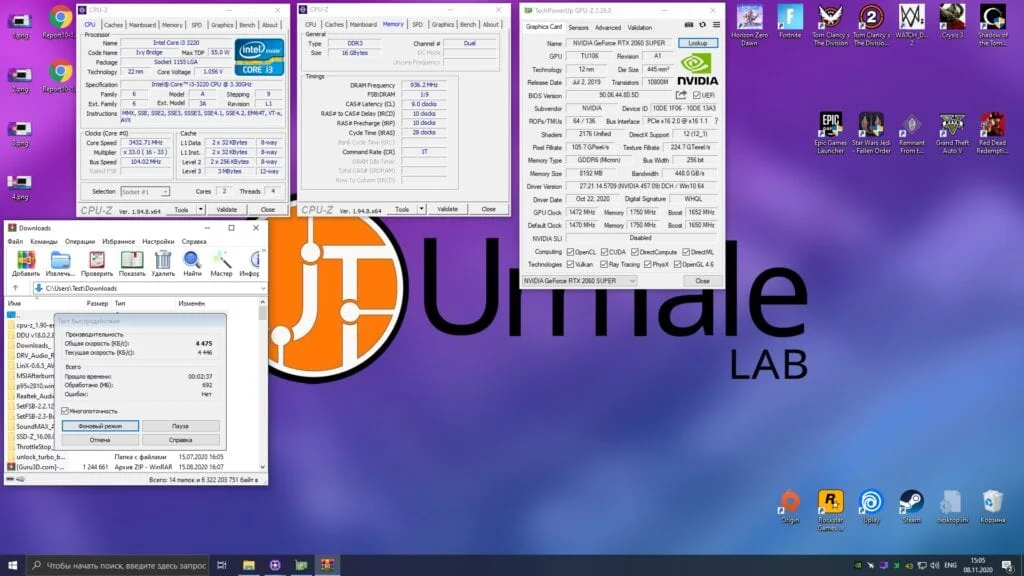
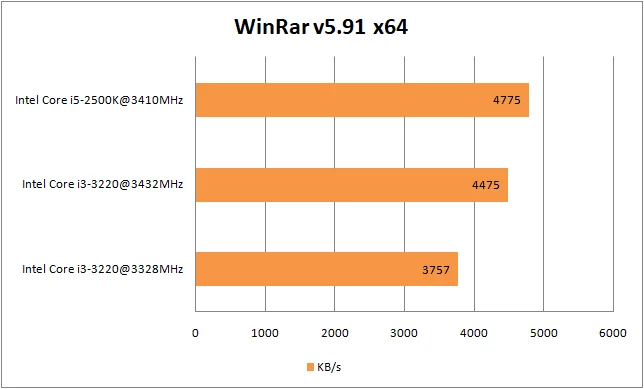
WinRAR
 ⤢ ВІДКРИТИ
 ⤢ ВІДКРИТИ
Benchmark: | Overclocked CPU advantage: |
CPU-Z Benchmark | 4% |
Cinebench R15 | 9% |
Cinebench R20 | 4% |
Cinebench R23 | 2% |
Corona Render 1.3 | 8% |
V-Ray Render Benchmark | 6% |
Blender | 6% |
xNormal | 5% |
HWBot x265 Benchmark, 1080p | 7% |
7-Zip | 7% |
WinRAR | 16% |
On average, Core i3-3220 performance in applications and benchmarks went up by 6.72%. That is hardly mind-blowing. Still, it is worth keeping in mind that only a few of the tested apps actually benefit from increased RAM bandwidth.
Now for the fun part: testing the Core i3-3220's gaming performance.
Testing the Core i3-3220 in games and synthetic benchmarks
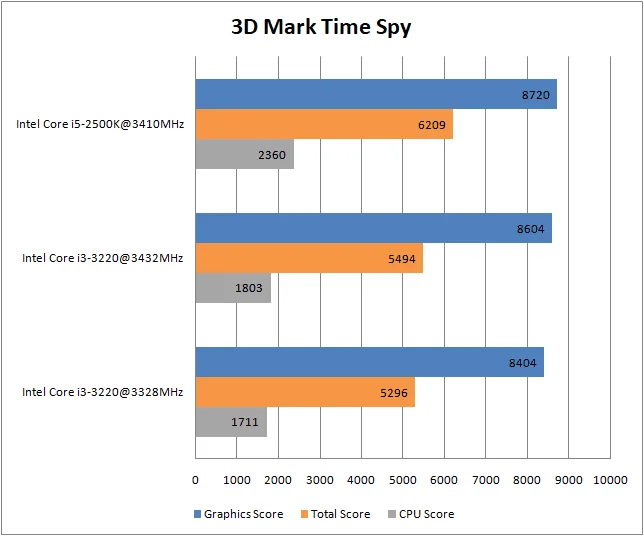
3DMark Time Spy
 ⤢ ВІДКРИТИ
 ⤢ ВІДКРИТИ
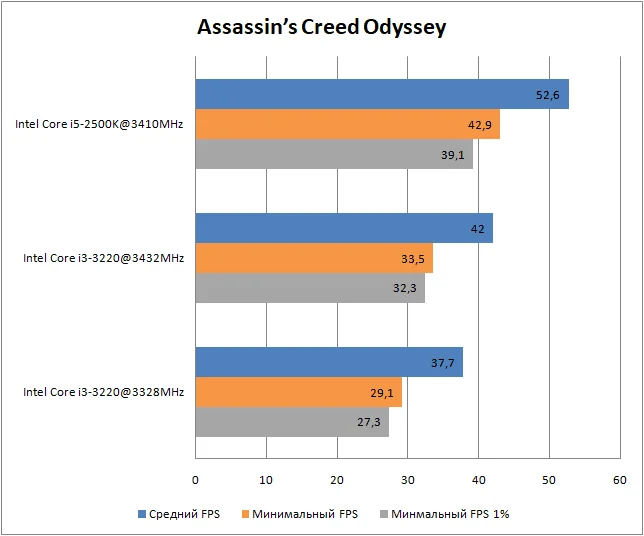
Assassin’s Creed Odyssey
 ⤢ ВІДКРИТИ
 ⤢ ВІДКРИТИ
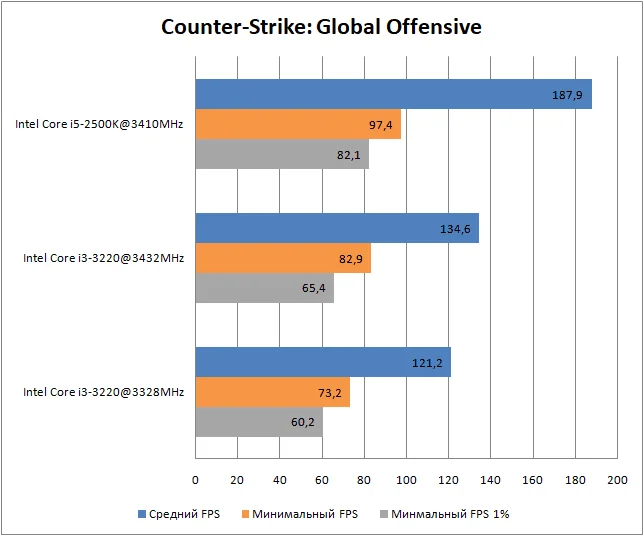
Counter-Strike: Global Offensive
 ⤢ ВІДКРИТИ
 ⤢ ВІДКРИТИ
Destiny 2
 ⤢ ВІДКРИТИ
 ⤢ ВІДКРИТИ
Far Cry 5
 ⤢ ВІДКРИТИ
 ⤢ ВІДКРИТИ
Horizon Zero Dawn
 ⤢ ВІДКРИТИ
 ⤢ ВІДКРИТИ
Mafia: Definitive Edition
 ⤢ ВІДКРИТИ
 ⤢ ВІДКРИТИ
Red Dead Redemption 2
 ⤢ ВІДКРИТИ
 ⤢ ВІДКРИТИ
World of Tanks
 ⤢ ВІДКРИТИ
 ⤢ ВІДКРИТИ
Game: | Overclocked CPU advantage in average FPS: | Overclocked CPU advantage in minimum FPS: |
Assassin’s Creed Odyssey | 13% | 18% |
Counter-Strike: Global Offensive | 11% | 13% |
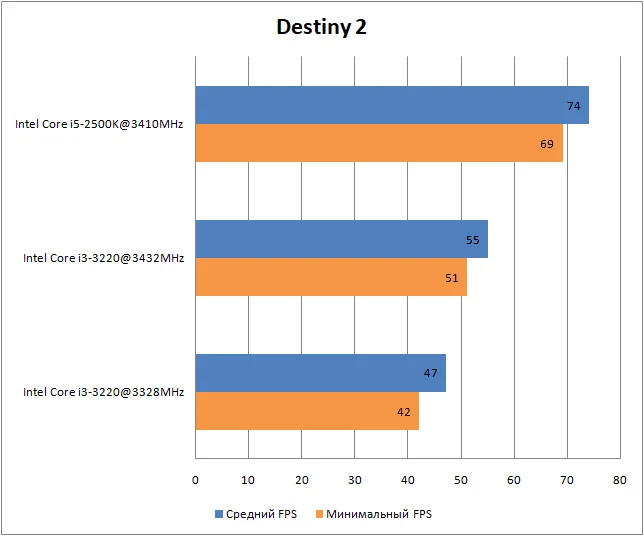
Destiny 2 | 17% | 21% |
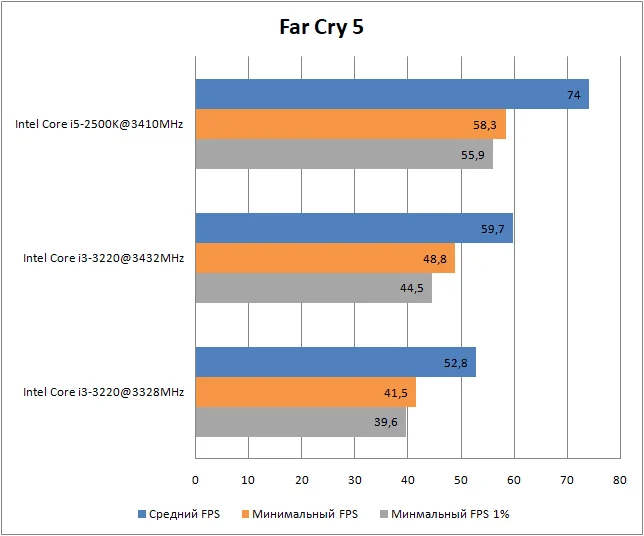
Far Cry 5 | 13% | 18% |
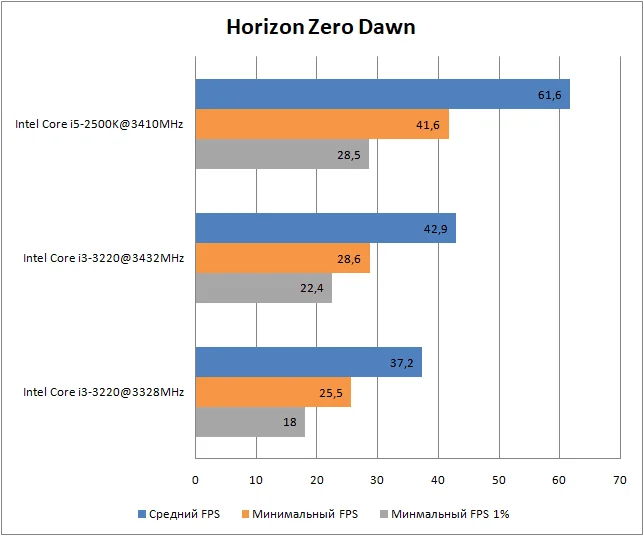
Horizon Zero Dawn | 15% | 12% |
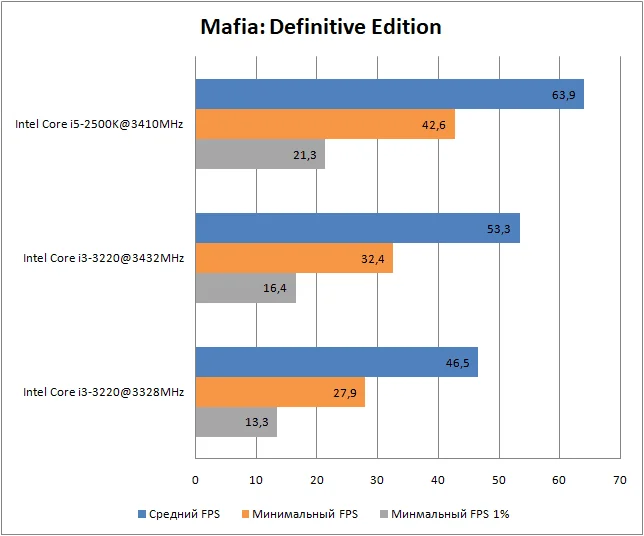
Mafia: Definitive Edition | 13% | 16% |
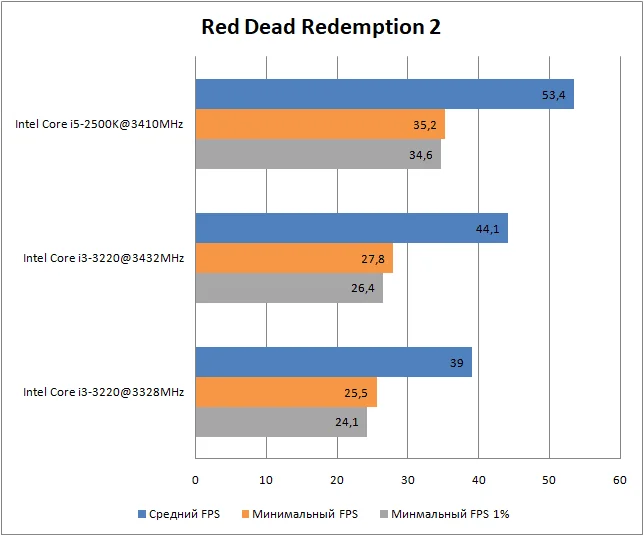
Red Dead Redemption 2 | 13% | 9% |
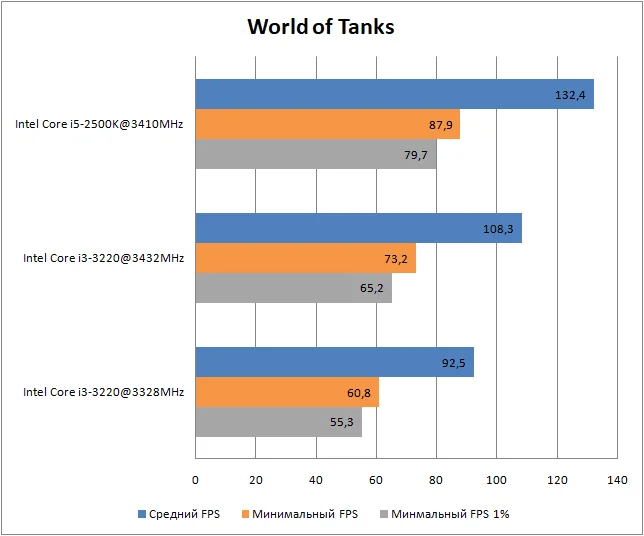
World of Tanks | 17% | 21% |
On average, the Core i3-3220 overclocked to 3432 MHz outperformed its stock counterpart by 14% in average FPS and 16% in minimum FPS. That is a stunning result, especially considering the CPU frequency only went up by 3%!
Of course, these impressive results are largely thanks to the RAM overclock, which pushed memory frequency a massive 29% past stock settings.
Conclusion
 ⤢ ВІДКРИТИ
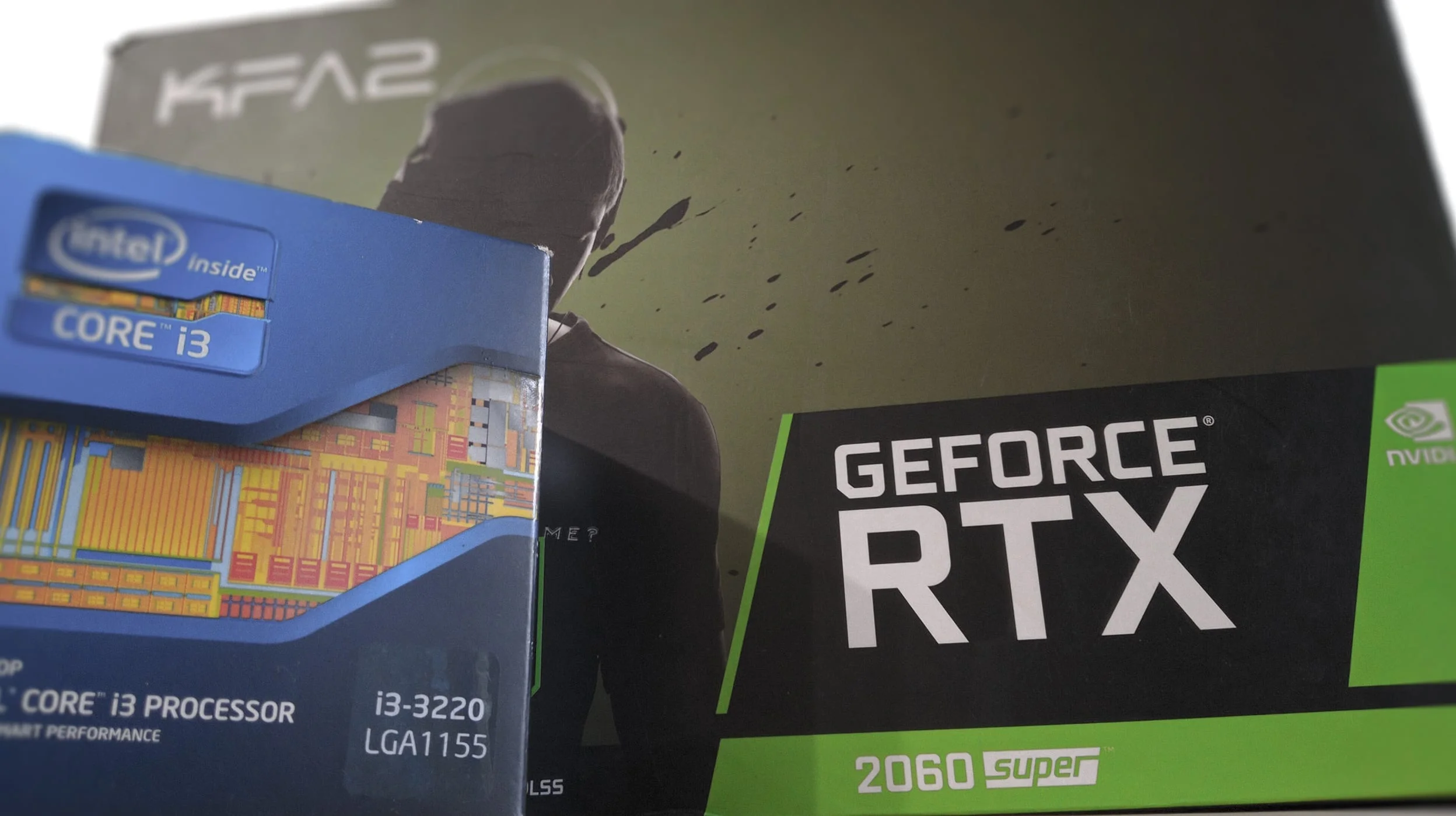
Even though overclocking gave this 2-core, 4-thread processor a ~7% boost in synthetic benchmarks and a 14% lift in games, the results still do not make it viable for modern content creation or consumption. The only remaining use case for chips like the Core i3-3220 is basic office PCs and word processors, though even that comes with some caveats.
If you are still running a Core i3-3220 or any other LGA 1155 Core i3 processor at the end of 2020, and upgrading to a modern LGA 1200 or AM4 platform is out of your budget, your best option is to look for a reasonably priced Core i5, i7 (2500/2600/3500/3700), or Xeon E3 (v1/v2) chip. That is an easy way to squeeze a bit more life out of your current PC.