NEWS · EMULATORS
PUBLISHED
READING2 min
RPCS3: Scott Pilgrim vs. the World: The Game Now Playable Online
RPCS3 emulator now supports online play for Scott Pilgrim vs. the World: The Game via a temporary test server. Connection stability for Bomberman Ultra has also been improved.
One of the latest versions of the RPCS3 emulator (specifically a parallel network branch) has added online support for the beat 'em up game Scott Pilgrim vs. the World: The Game. Additionally, the development team reports that with emulator version v0.0.12 Alpha, it's now much easier to connect with other players. These fixes and improvements are particularly noticeable when trying to host a two, three, or four-player game in Bomberman Ultra.
Check out the video from the official RPCS3 channel below:
YouTube
By loading, you allow content from YouTube (cookies may be set).
If you want to try playing Scott Pilgrim vs. the World: The Game online, you'll need to use these emulator settings:
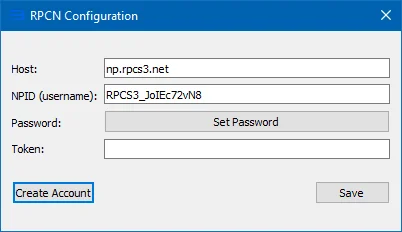
First, right-click on the Scott Pilgrim vs. the World: The Game icon and select «Change Custom Configuration». Then, navigate to the «RPCN Configuration» tab and enter test-np.rpcs3.net into the «Host» field. After that, type your email into the «NPID (username)» field (it won't be checked, so you can theoretically type anything you want), and then click the «Create Account» button.
 ⤢ ВІДКРИТИ
RPCN Test server is test-np.rpcs3.net You need to make an account(email isn't checked, you can just click Create Account after changing host to test server) This server is temporary and can be taken down at any time Don't use the test server to connect to DeS as you won't be able to connect to other users.
It's important to note that this server is only temporary and can be taken down at any time! So don't expect it to be around indefinitely.
You can download the emulator version required for online play via this link.
Additionally, you can follow (and download new versions of) the progress on RPCS3's network debugging via a dedicated GitHub branch.