For most users, NVIDIA's specialized P100 series graphics cards are synonymous with scrap metal, and that's not far from the truth (the popular P106-100 being a notable exception, but that's a different story). These are classic "headless" Pascal-architecture compute cards. Their display blocks are locked in the silicon, the video output traces aren't soldered onto the PCB, and the PCIe bus is severely throttled to an extremely slow PCIe 1.0 x4 mode.
This means that to play games on these cards, you'd need custom Windows drivers and either integrated graphics or a separate, fully functional graphics card with active video outputs. What's more, not all games will perform well with a PCIe 1.0 x4 bus, potentially leading to extremely low frame rates or, even worse, micro-stutters.
In short, gamers face numerous potential problems with the P100 series. But what if we view these devices specifically as CUDA accelerators? Fortunately, in that context, the painfully slow PCIe bus doesn't often bottleneck Pascal's architectural potential. Once an LLM loads into VRAM, for example, it rarely needs to move large amounts of data across the PCIe bus (unless you're splitting a diffusion model for image generation across multiple GPUs).
In this article, we'll focus on discussing and testing the cheapest member of NVIDIA's mining card lineup: the P104-100.
P104 pricing
So, how did a mid-range card end up being the cheapest? It's quite simple: the P106-100 can unlock 16 PCIe 1.0 lanes, making it more versatile. The top-tier P102-100, on the other hand, is an absolute performance monster in the series, so it's naturally expensive. This made the mid-range P104 the most accessible card in its lineup. For enthusiasts, this is a huge benefit: we can get 8GB of VRAM for next to nothing.
Let's get a bit more specific. As of late August/early September 2026, the P104-100 sells on the secondary market for 550 to 900 Hryvnia ($12-20). Pricing varies based on the card's condition, model/manufacturer, whether it includes a branded cooler (most shipped fan-less), and, of course, the seller's asking price.
We picked up several P104-100s for these tests at 600 Hryvnia each, roughly $12. I consider this price extremely fair, as these cards are over six years old — some even eight or nine — and have essentially outlived their expected lifespan. Paying more than $15 is a clear risk. We'll discuss that further later, but for now, let's examine the accelerators themselves.
Zotac P104-100
Photos and general overview
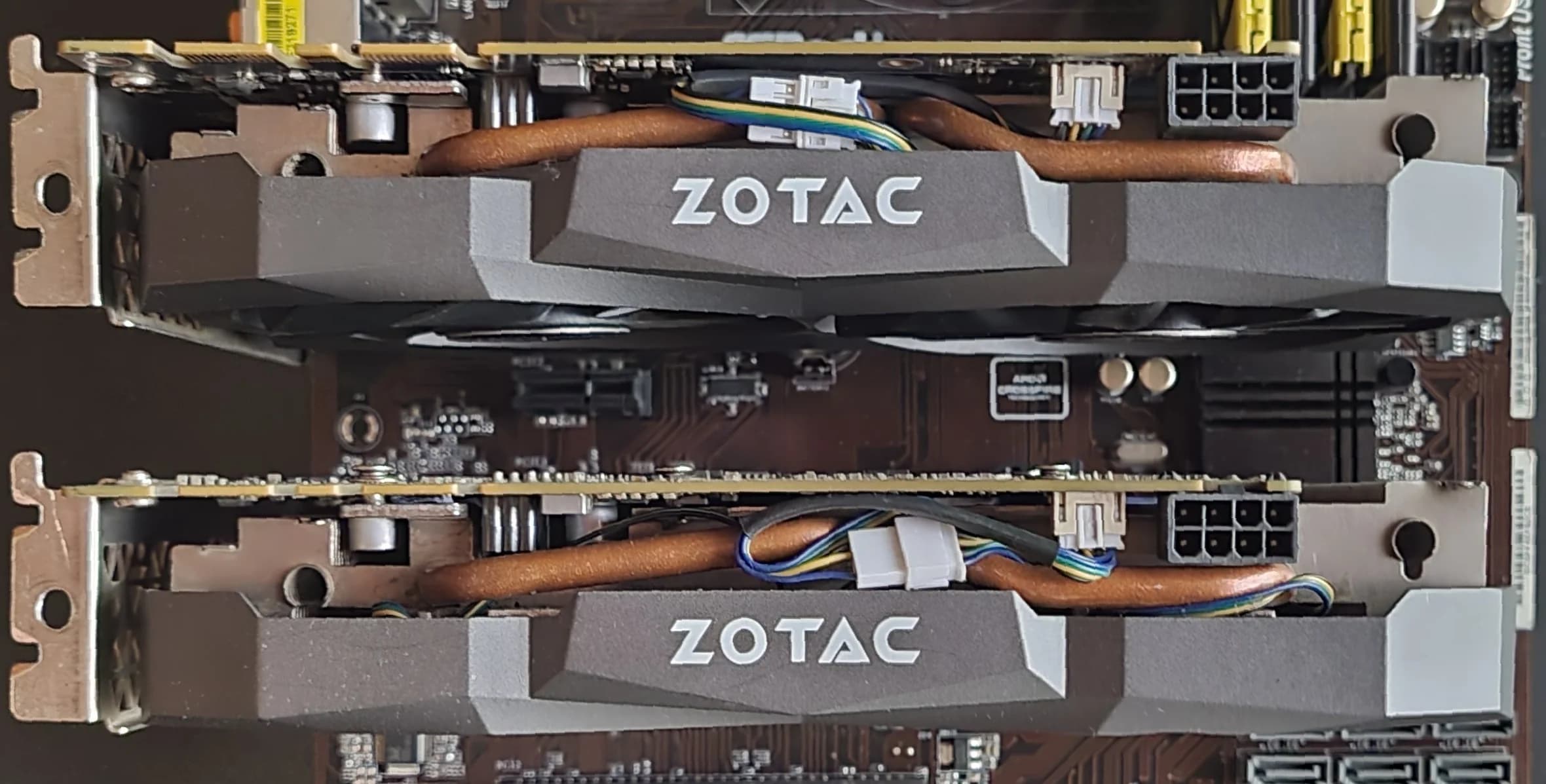
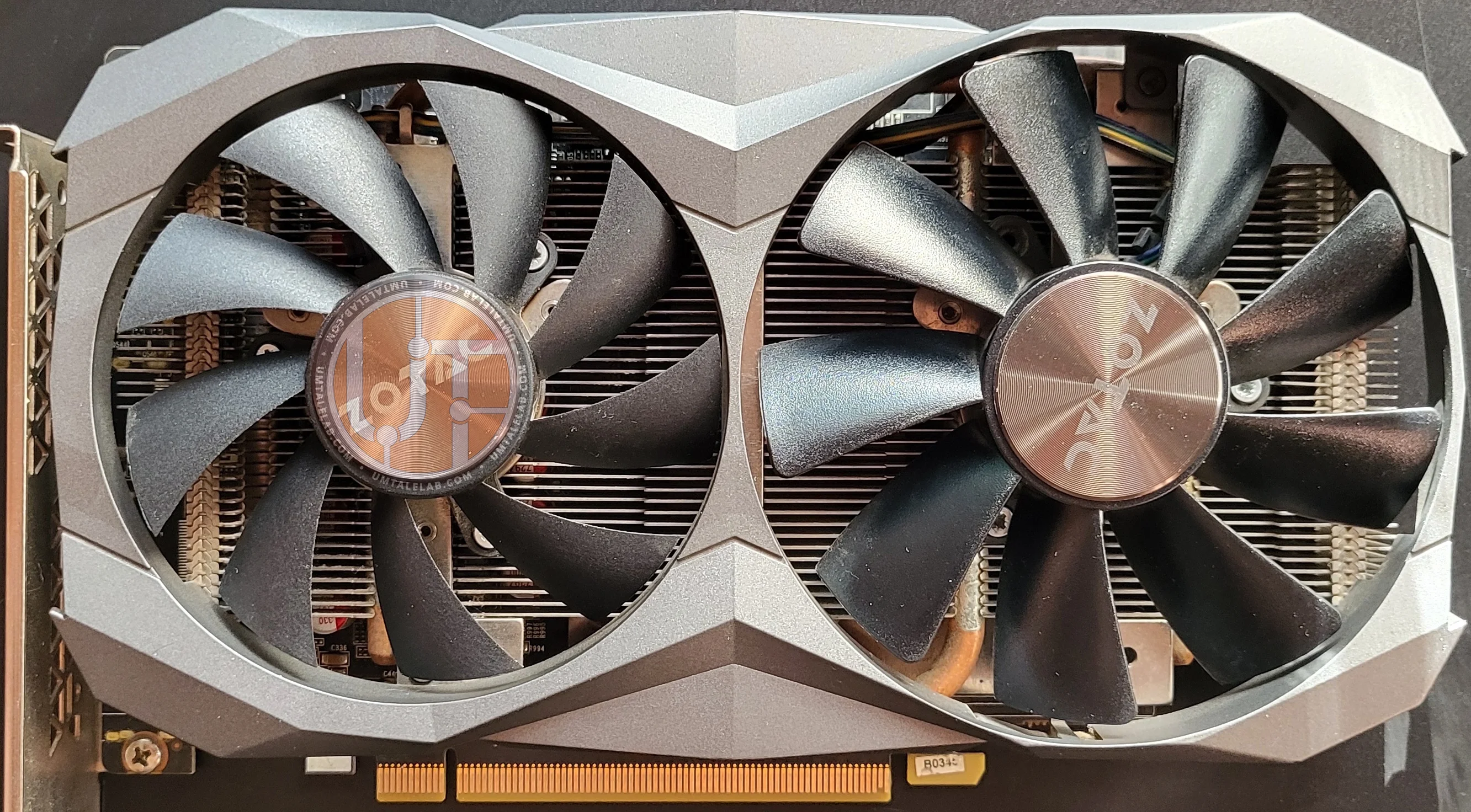
Here's a Zotac P104-100. Unfortunately, I couldn't find any original photos to see how these accelerators looked from the factory. When we received them, it was clear the previous owner had replaced the fans with similar ones that didn't match the mounting points. The photos show the fans are screwed directly into the heatsink fins, which is quite dangerous due to the non-trivial risk of hitting a heat pipe with a screw (or worse, a self-tapping screw).
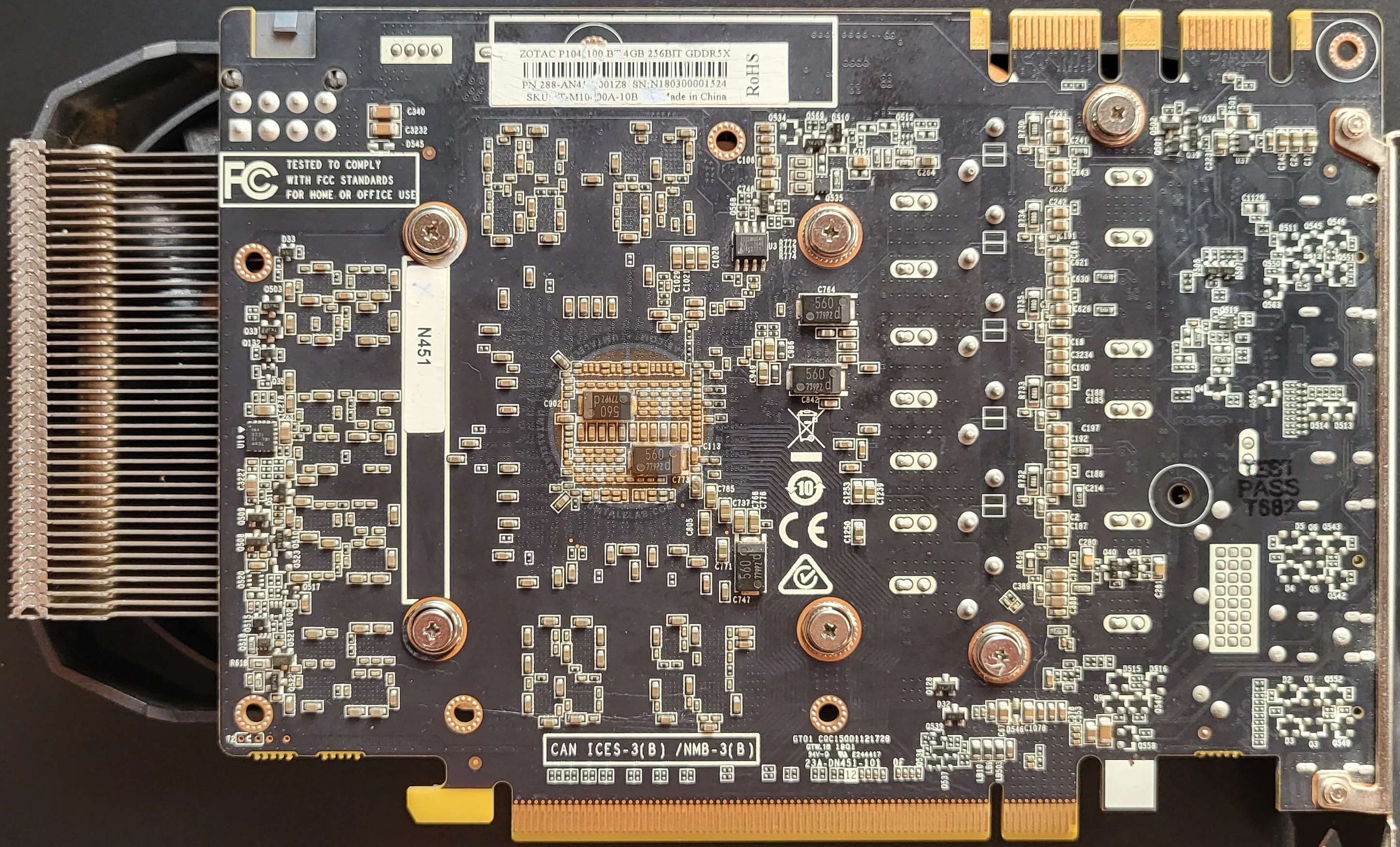
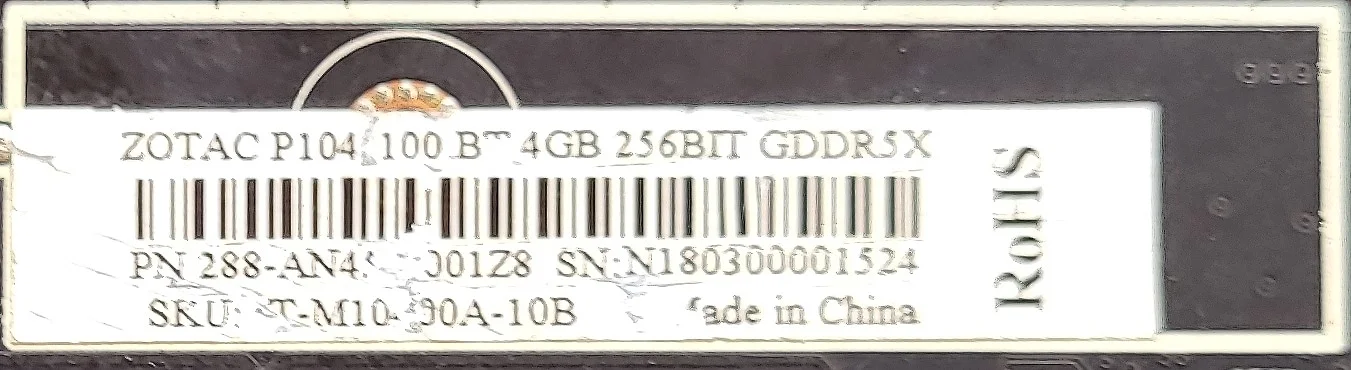
The back of the board displays the model name and the factory-default active video memory capacity.
 ⤢ ВІДКРИТИ
Why "active"? It's quite simple: you'll rarely find P104 accelerators with their original BIOS for sale today. Most miners flashed their cards to enable the full available VRAM, which for the P104-100 is 8GB of GDDR5X. As you might have guessed, our acquired samples already came with the updated BIOS version.
Graphics processor and video memory
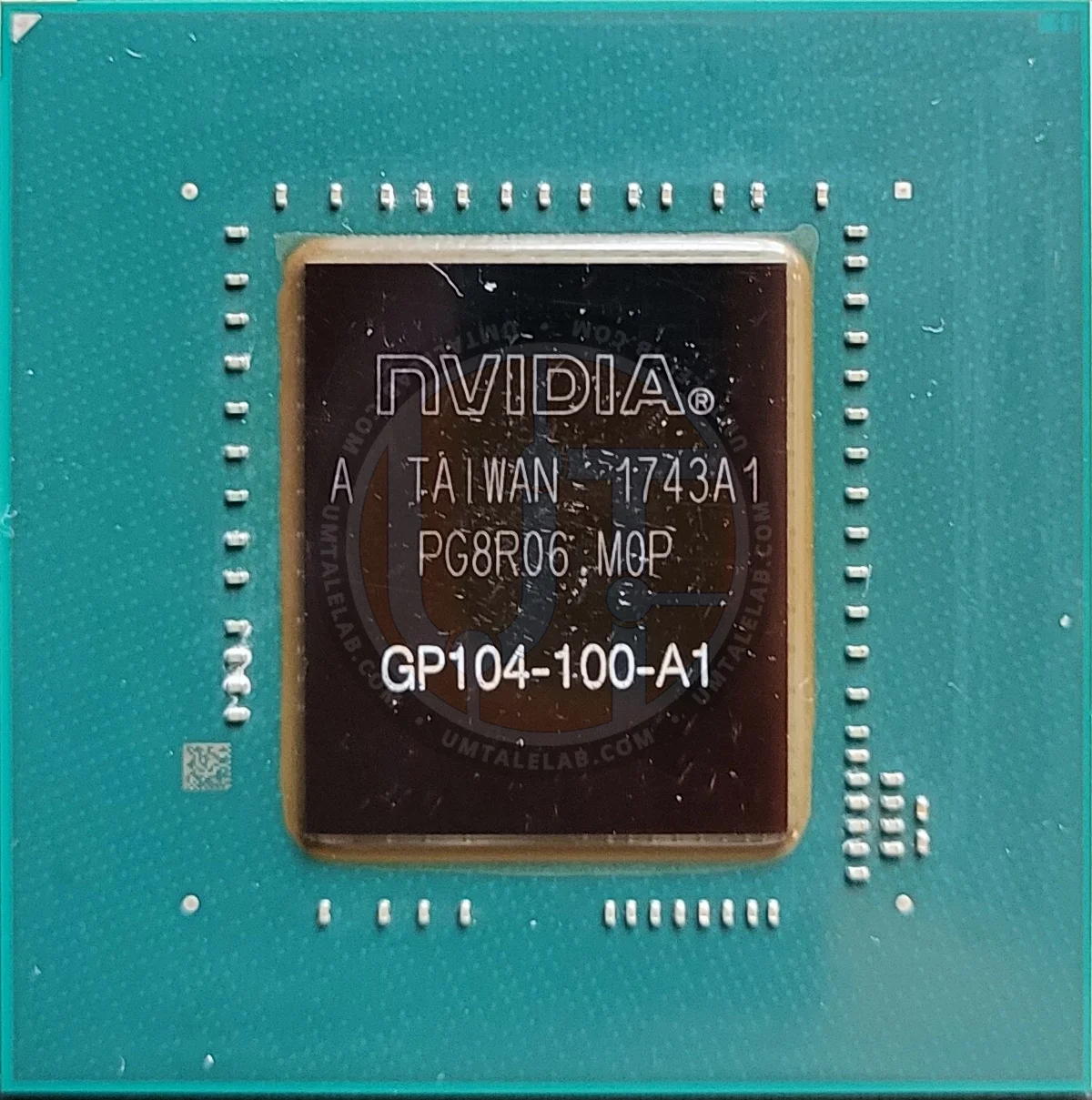
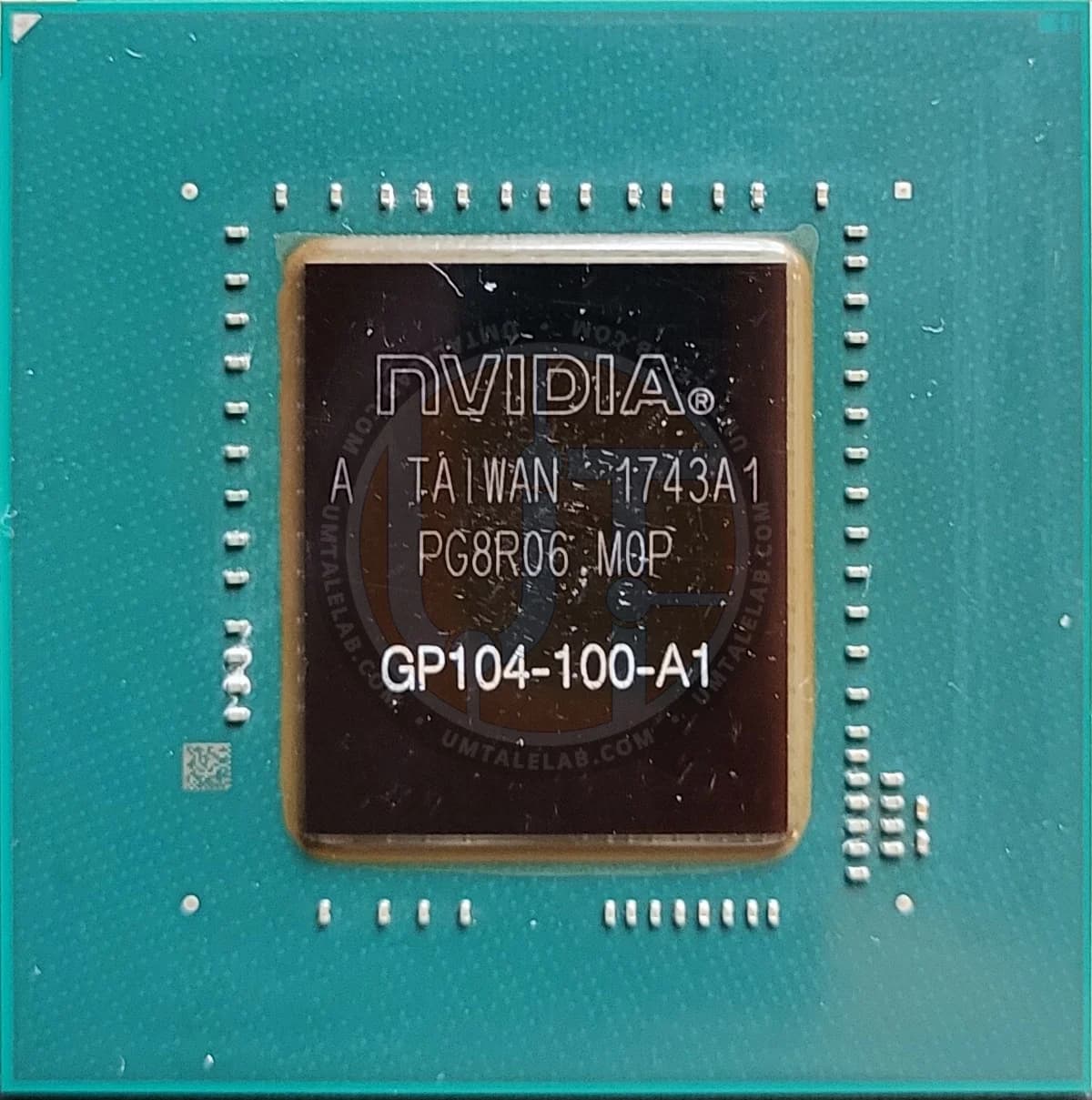
The accelerator uses a 16nm GP104-100-A1 GPU, configured with 64 ROPs, 120 texture units, and 1920 CUDA cores.
 ⤢ ВІДКРИТИ
To my knowledge, the GP104-100-A1 graphics chip was used exclusively in the P104-100 and no other consumer cards.
Now, let's talk about the condition. If you examine the compound around the die, it's visibly light brown to the naked eye. What does this indicate? A rather unfortunate scenario. The normal (factory) color for most GPU compounds is creamy, light gray, or just gray. This shift from gray to brown is unnatural and typically occurs when a GPU has operated at critically high temperatures for extended periods.
This is an alarming sign. The memory controller on the GP104 (and many other GPU series like GP10x, TU10x, GA10x, AD10x, etc.) is arranged in an inverted "L" shape along the die's edge, right up against the compound. Prolonged overheating in this specific area risks degrading the silicon transistors of the memory controller itself or its execution units.
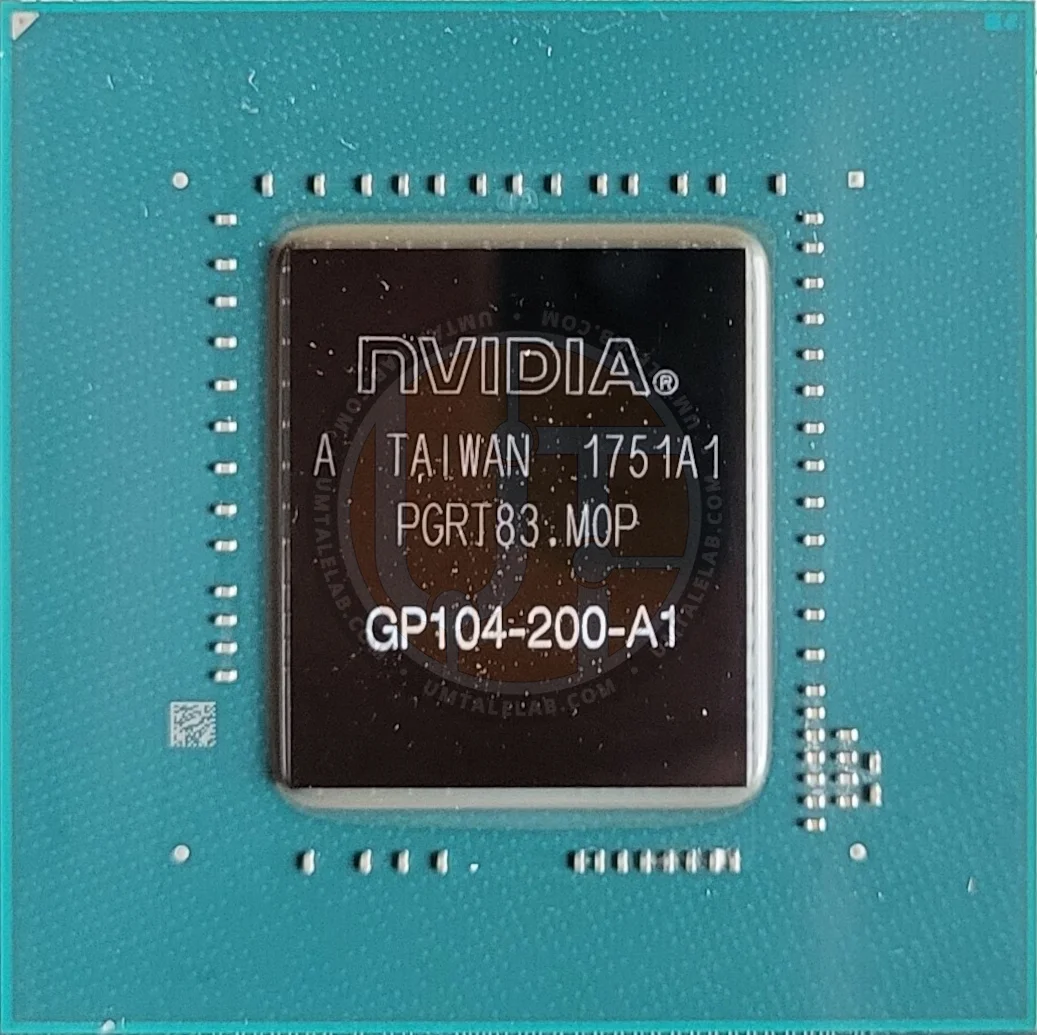
To illustrate this, I concurrently disassembled a GTX 1070 test card and took a few photos of its GP104-200-A1 for a visual comparison:
 ⤢ ВІДКРИТИ
I emphasize: this isn't a new GPU — our GTX 1070 is over 9 years old. Yet, it never overheated, and its GP104 never saw temperatures above 60 degrees Celsius (71 hot spot). Here's a comparison of both graphics chips:
 GeForce GTX 1070 (GP104-200-A1)
As you can see, the compound color difference is quite significant. Based on my observations (and generally accepted ones), the color of the GP1xx chips' compound subtly suggests their lifespan is limited. This was the case with the GP106 on the test bench GTX 1060 3GB we once bought for testing, and with numerous graphics cards I repaired (GTX 1080 Ti, etc.). Brownish compound eventually leads to MATS errors across all VRAM chips, ultimately sending the GPU to the scrap heap.
So, what's the point of all this? My long speech essentially means that when buying similar adapters after mining, especially the P100 series, you might encounter such specimens. How long they'll last under neural network workloads is hard to say. Therefore, be careful and check the accelerators' condition before purchasing.
 ⤢ ВІДКРИТИ
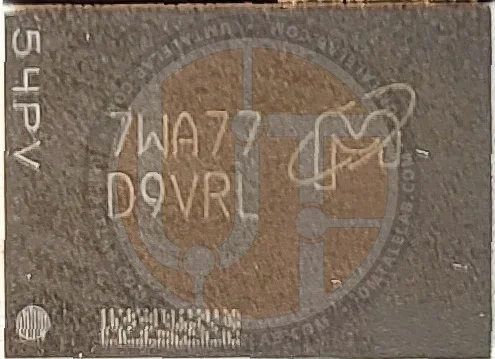
The P104-100 test sample's video memory consists of eight "banks" labeled 7WA77 D9VRL. These are 8-gigabit (1 GB) chips designed to operate at 11,000 MT/s, with a physical frequency of 1375 MHz. Potentially, in their factory state, these banks can easily be overclocked to 1500 MHz (12,000 MT/s).
Printed circuit board analysis
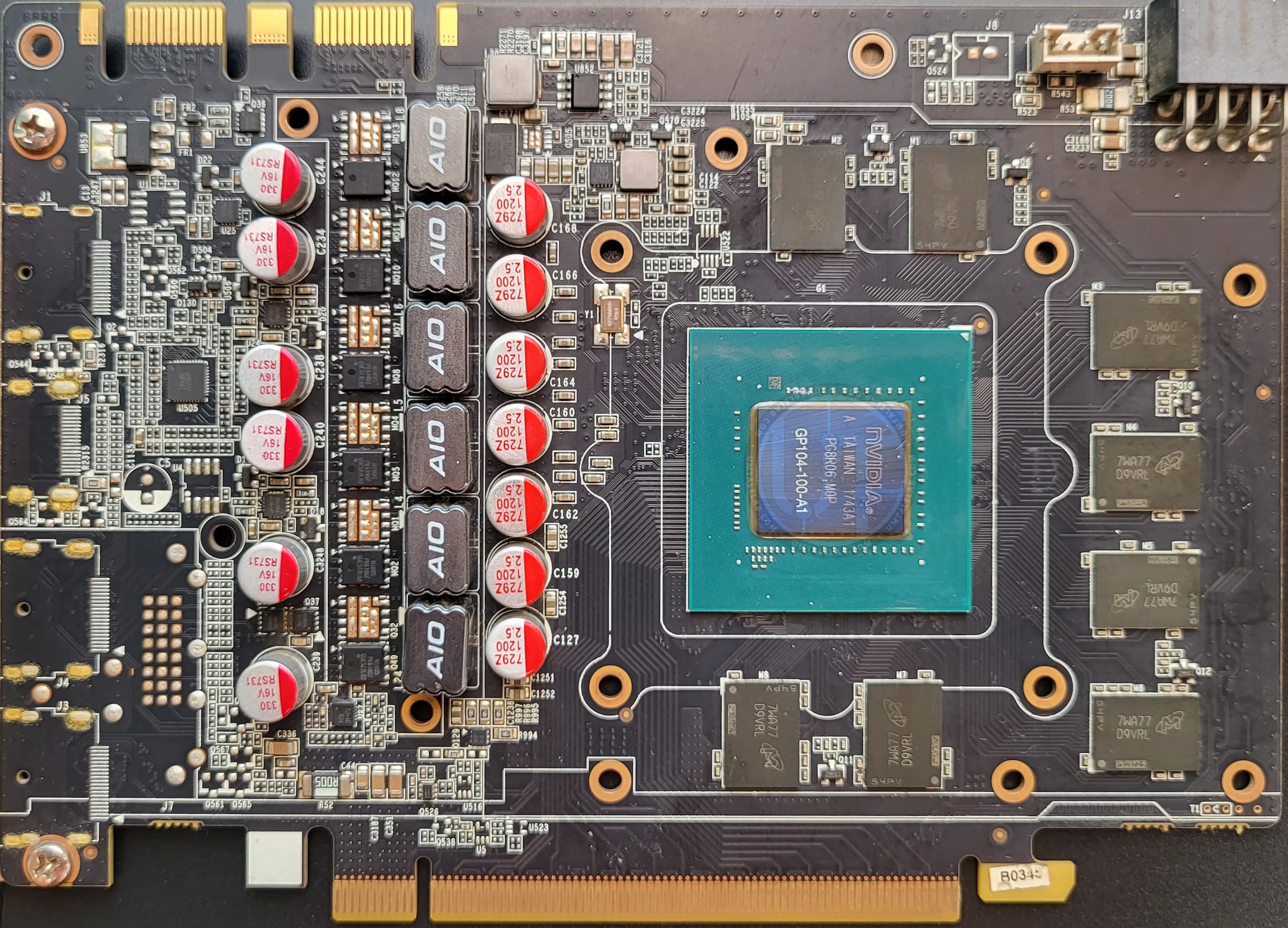
The Zotac P104-100 model shares the exact same printed circuit board as the Zotac GeForce GTX 1080 Mini 8 GB.
 ⤢ ВІДКРИТИ
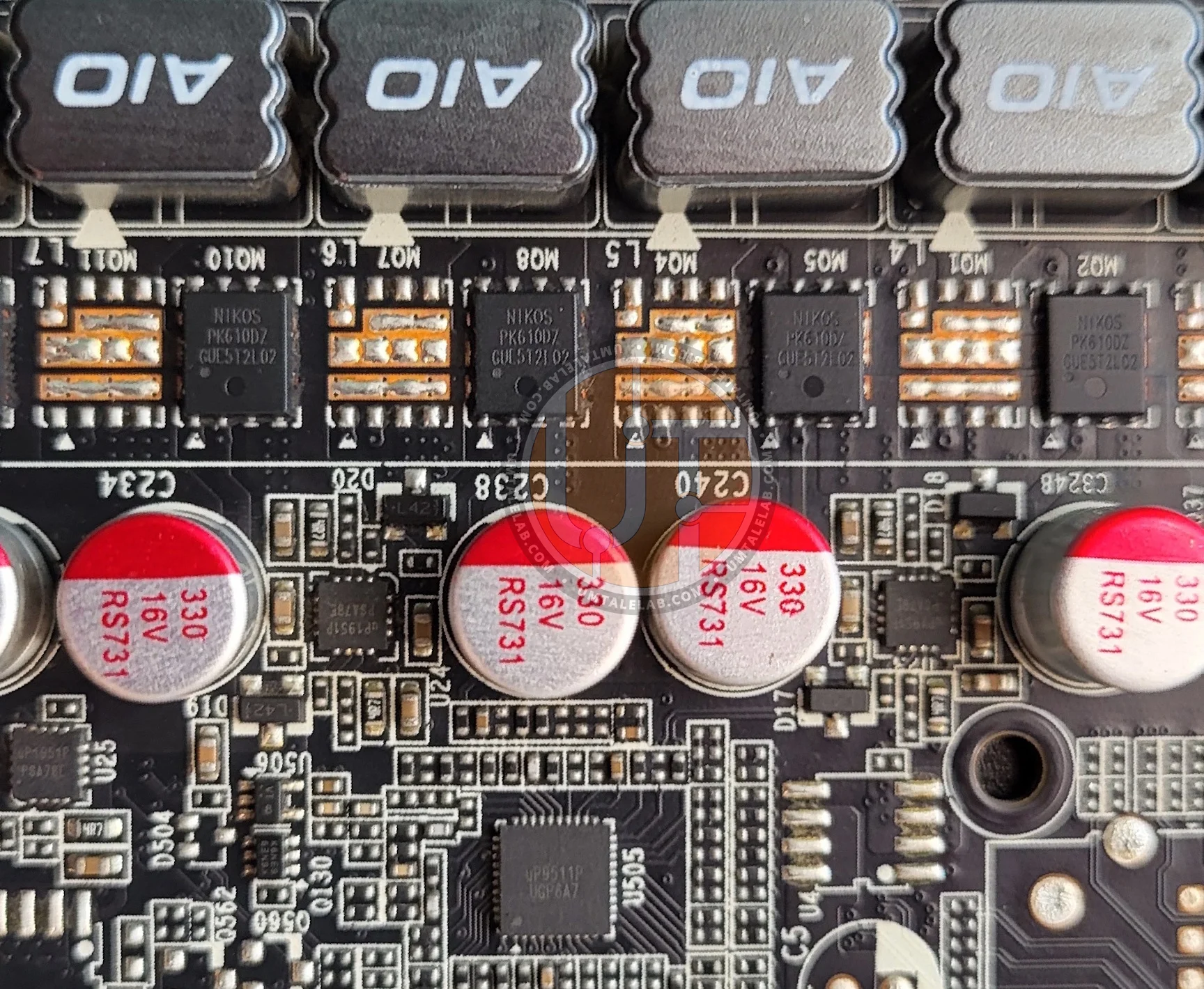
The only obvious difference is the absence of video outputs, associated circuitry, and an RGB connector. But overall, this board is a twin sister to the GTX 1080 Mini:
 ⤢ ВІДКРИТИ
It features the same 5+1 phase power delivery for the GPU and GDDR5X, built with dual NIKOS PK610DZ N-channel MOSFETs controlled by uP1951 drivers, and an identical uP9511P PWM controller.
Well, what we have here is a typical cut-down GeForce GTX 1000 series graphics card, specifically, a very close analog to the GeForce GTX 1070. The P104-100 features the same 1920 CUDA cores, 120 Texture Mapping Units (TMUs), 64 Raster Operation Units (ROPs), and a 256-bit memory bus. However, the P104-100's video memory type is not from a standard GTX 1070. For some reason, NVIDIA was generous and decided to use more expensive GDDR5X memory. Thus, we have a non-existent, and of course, a very hypothetical GeForce GTX 1070 SUPER. This is excellent news, as high memory bandwidth (BW) is rarely excessive in the world of AI.
Test bench and software
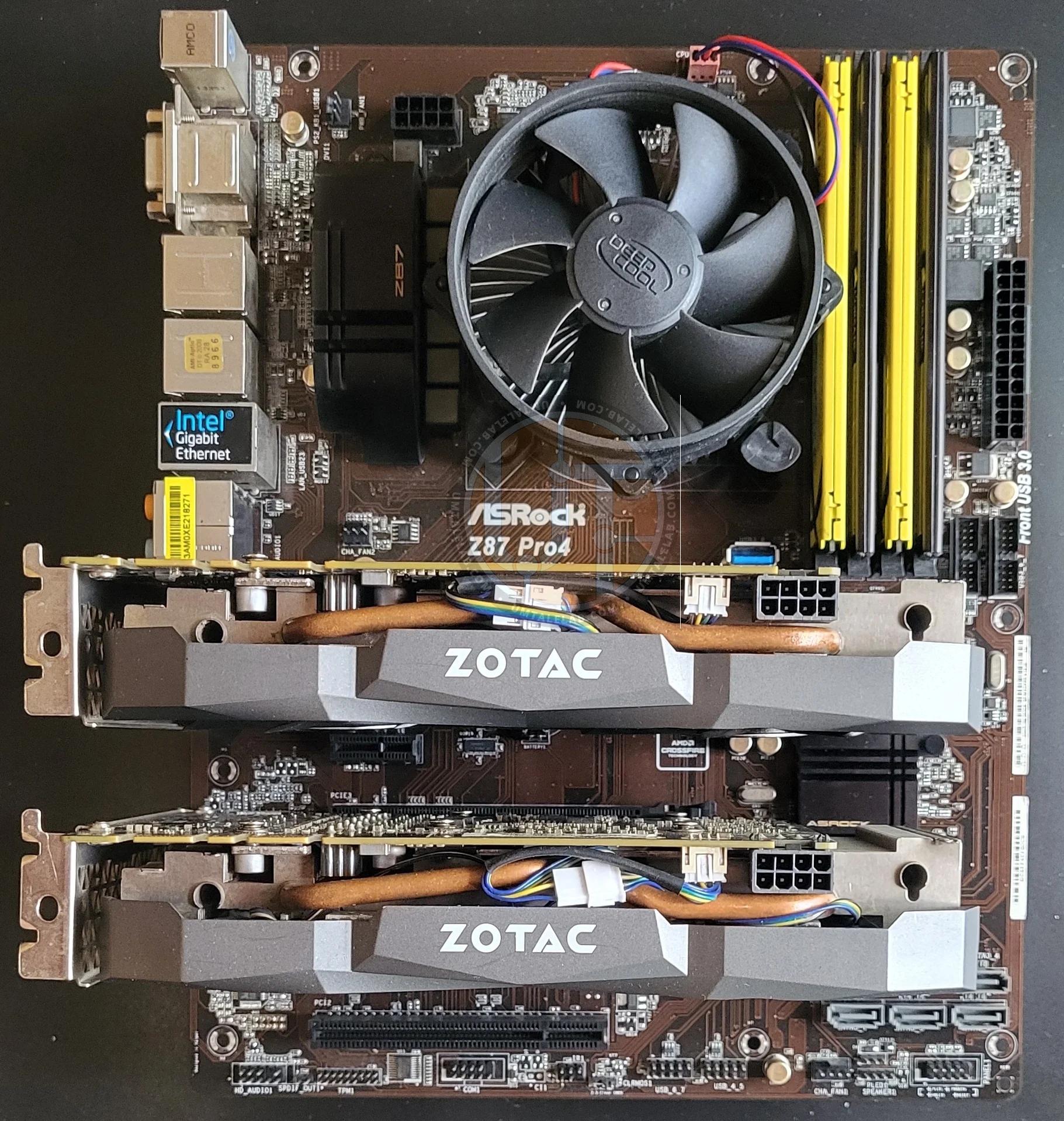 ⤢ ВІДКРИТИ
Hardware
Processor - Intel Core i5-4670K;
Motherboard - ASRock Z87 Pro4;
RAM - 24 GB DDR3 1866 MHz, comprised of 4 modules: 2 x 8 GB, 2 x 4 GB.
Graphics cards - Zotac P104-100 8GB, Manli Gallardo GTX 1070 8GB, KFA2 RTX 2060 SUPER EX 8GB, Palit Gamerock RTX 3090 24GB, Sapphire Nitro RX 470 8GB;
Storage - Kingston 120GB;
Power supply unit - Chieftek GPS-1250C.
I deliberately chose the most budget-friendly foundation for a P104-100 based mini-server. This was to demonstrate, through a real-world example, that properly utilizing 16GB of VRAM on GP104 chips doesn't require fancy Chinese motherboards, relatively expensive DDR4, or a plethora of PCIe lanes found in Xeon LGA 2011 v3 systems. Furthermore, you don't even need to replicate my exact build. All you need is a 4-core CPU with integrated graphics and AVX2 instruction support, a minimum of 16GB of dual-channel 1600 MHz DDR3 RAM, and any motherboard featuring two physically full-sized PCIe x16 slots (the second slot can be electrically x4, but the key is being able to insert a full-length card; alternatively, use risers).
Software
Operating system: Linux EndeavourOS with the latest updates as of August 2026;
Llama.cpp: a "fat binary" build including both CUDA (active architectures: Pascal 61, Turing 75, Ampere 86) and Vulkan backends;
Stable-diffusion.cpp: a "fat binary" build including both CUDA (active architectures: Pascal 61, Turing 75, Ampere 86) and Vulkan backends;
We initially chose the current Linux EndeavourOS release as the operating system, which turned out to be a mistake. As an Arch-based, rolling-release distribution, it means you'll always have the latest kernel, Python, and CUDA compilers.
If you do decide to build a P104-100 based mini-server, it's better to choose an operating system fully compatible with CUDA 12.8-12.9.
Why is that? For those truly interested, here's why:
In practice, Arch's 'freshness' led to a constant battle with the environment. The latest system GCC 14 was incompatible with nvcc, and the updated glibc 2.41 broke standard CUDA headers due to rsqrt conflicts. This forced us to manually patch and freeze packages. Choosing a fixed-release distribution, like Ubuntu 22.04/24.04 LTS or Debian 12, immediately eliminates this headache. Their system GCC and glibc versions are certified for the CUDA 12.8–12.9 stack from the start. This means projects like llama.cpp or stable-diffusion.cpp compile seamlessly out of the box, without any pinning shenanigans with GCC 13 or manual edits to NVIDIA's system includes.
However, I'm a 'genius' who enjoys Arch, so I was forced to go through this hell. You don't have to.
Models
LLM
Gemma 4 E4B (QAT, Q4_KM quant);
Gemma 4 26B A4B (QAT, IQ4_XS quant);
Qwen 3.5 9B (IQ4_XS quant);
Qwen 3.8 27B (UD-IQ4_XS quant).
Let me briefly explain the choice of models for testing. The Gemma 4 E4B is a new and complex LLM, featuring approximately 4.5 billion 'effective' parameters, though it occupies about 8 billion physical parameters in VRAM across 42 layers. The main difference lies in its Per-Layer Embeddings (PLE): each decoder layer has its own large embedding table. However, this table is used solely for quick token index lookups, not for full matrix computations, so it isn't counted towards the 'effective' computational budget. Despite this, it fully resides in memory, effectively expanding E4B from ~4.5B to ~8B total parameters.
Intellectually, it's quite close to Qwen 3.5 9B, which was my second choice due to its solid everyday performance.
The Gemma 4 26B A4B is simply a 'paradise' for local execution on older hardware. It's an MoE (Mixture of Experts) model: while its total parameter count is 26 billion, only 4 billion are activated per token. This makes Gemma 4 26B incredibly fast, regardless of whether your GPU has dedicated matrix blocks. What's more, it performs quite well even on moderately powerful modern CPUs.
Finally, we have the Qwen 3.8 27B. This is the newest and most powerful open-source model, having just been released. Benchmark results show it significantly outperforms all other available local LLMs. More importantly, Qwen 3.8 27B is a dense model. This means that for every token, it must process all its weights through the graphics adapter's VRAM.
Diffusion
Krea 2 Turbo (DiT, Q3_K quant);
ANIMA (DiT, Q8 quant);
Illustrious XL (SDXL fine-tune, U-Net, Q8 quant).
Now, regarding diffusion models. Krea 2 is one of the most powerful models you can run locally. It boasts 12 billion parameters, uses Qwen3-VL-4B as its text encoder, and a Qwen image VAE. At maximum precision, Krea 2 alone weighs approximately 23 GB, the encoder adds 8 GB, and the VAE takes about 256 MB. This means running the full weights at FP16 precision requires more than 32 GB—factoring in the diffusion process workload, you're looking at around 35-36 GB.
However, that's far from a dealbreaker. We can easily run and comfortably use Krea 2 on a single P104-100, and crucially, without splitting computations between the CPU or a second graphics card.
The diffusion model itself uses a Q3_K quant. Don't be surprised or alarmed: Q3_K can yield quite impressive results (we'll show examples below). However, for the text encoder, it's best not to go below a fourth quant; hence, I chose the balanced Q4_KM for Qwen3-VL-4B. With the VAE, things are much simpler: it should only be FP16.
 ⤢ ВІДКРИТИ
Here's what we ended up with: using the --offload-to-cpu flag (which loads only one active neural network module into VRAM at a time, instead of everything at once):
Krea 2 itself — 5.13 GB (plus working space for generation, from 1 GB for 512x512 and about 2.7 GB for 1920x1080);
Qwen3-VL-4B encoder — 2.32 GB;
Qwen VAE — 256 MB.
This way, we never hit the 8GB VRAM ceiling. The card processes modules sequentially at full GPU speed, without offloading computations to a slower CPU.
I don't expect any issues with Illustrious XL and ANIMA; these models fit into 8GB without much trouble, even in FP16. So why did we choose Q8 quants specifically?
First, they offer virtually identical quality to FP16 but weigh half as much. Second, if you're using a single card and want to run, say, Gemma 4 E4B in Q4_KM (3.92 GB, for editing or creating prompts) alongside ANIMA in Q8 (2.08 GB, for image generation itself), you simply won't have a choice but to use the Q8 quant. Otherwise, you'll hit an OOM (out-of-memory) crash due to critical video memory shortage.
Testing Methodology
Each model was run three times on each accelerator using either llama.cpp bench or a custom benchmark for stable-diffusion.cpp. We then calculated the average score and recorded it in the final table.
Testing
P104-100 vs. GTX 1070
First, I wanted to answer a crucial question: Is a full GTX 1070 with 16 active PCIe lanes faster than its cut-down mining counterpart, the P104-100?
 ⤢ ВІДКРИТИ
Settings:
  -dev CUDA0 \
  -fa on \
  -ctk f16 -ctv f16 \  # FP16 (default, these two flags can simply be removed)
  -ctk q8_0 -ctv q8_0 \  # Q8 KV Cache
  -ctk q4_0 -ctv q4_0 \  # Q4 KV Cache
  -ngl 999 \
  -d 0,4096,8192,16384,24576,32768,49152,65536,98304,131072 \
  -p 512 -n 128 \
  -b 2048 -ub 512 \
Gemma 4 E4B QAT Q4_KM
Prompt Processing (PP) · t/s
Gemma 4 E4B QAT Q4_KM
Text Generation (TG)· t/s
 ⤢ ВІДКРИТИ
Krea 2 Turbo
Total generation time (seconds), 12 steps. Lower is better
The results speak for themselves. While Gemma 4 E4B inference is virtually identical on both accelerators, the GTX 1070 pulls ahead when generating images with Krea 2. So, PCIe bus speed *does* impact the GP104 chip's performance, but only by 1-5%. There's little point in choosing a full-fledged GTX 1070 for AI model inference. I also want to highlight one crucial detail:
Krea 2 Turbo
Diffusion sampling generation time (seconds), 12 steps. Lower is better
If we isolate just the diffusion component, the P104-100 actually outperforms the GTX 1070. Nevertheless, when considering overall performance, the P104-100 slightly trails its full-fledged counterpart. This is primarily due to its cut-down bus and the aggressive offloading of each neural network module to RAM via the notorious PCIe connection.
P104-100: Language AI models (LLM)
Now, let's move on to more detailed benchmarks. Given that we're dealing with a fairly old Pascal architecture, I decided to conduct more in-depth research, particularly focusing on different context window quantizations. At first glance, it might seem that compressing the KV Cache from FP16 to, say, Q8 shouldn't affect accelerator performance, but that's not the case. So let's dive directly into the P104-100's performance analysis.
Gemma 4 E4B on a single P104-100
⤢ ВІДКРИТИSettings:
  -dev CUDA0 \
  -fa on \
  -ctk f16 -ctv f16 \  # FP16 (за замовчуванням, можна і просто прибрати ці два флаги)
  -ctk q8_0 -ctv q8_0 \  # Q8 KV Cache
  -ctk q4_0 -ctv q4_0 \  # Q4 KV Cache
  -ngl 999 \
  -d 0,4096,8192,16384,24576,32768,49152,65536,98304,131072 \
  -p 512 -n 128 \
  -b 2048 -ub 512 \
Gemma 4 E4B QAT Q4_KM | P104-100 (Single GPU)
Prompt Processing (PP), t/s
Gemma 4 E4B QAT Q4_KM | P104-100 (Single GPU)
Text Generation (TG), t/s
First, a single P104-100 performs quite well with the current Gemma 4 E4B model. When avoiding context quantization and using full FP16 precision, and staying within 65k tokens, it achieves comfortable performance levels: from 800 to 150 t/s for prompt processing, and from 43 to 29 t/s for output generation.
If you want to compress the context to Q8-Q4, for instance, to fit a model like SDXL or ANIMA into video memory, you'll have to accept a significant loss in speed. Input prompt processing doesn't suffer much, which is tolerable. However, a generation speed drop from 30 to 18 t/s over a 65k context length is, quite frankly, a disaster.
I'll use the Gemma 4 E4B example here to describe NVIDIA Pascal's main Achilles' heel, so we don't have to revisit it: there's no point in overclocking the video memory. Unfortunately, the P104-100 accelerator's bottleneck is the GPU's performance itself. We could see this even when testing the GTX 1070 against the P104-100: the former had a memory bandwidth of 256 GB/s, while our test subject boasted 320 GB/s. Thus, the only way to speed up this mining husk is by overclocking the GPU, which, as we've already established, might not be easy.
In other words, you can't fix a significant performance drop by overclocking VRAM; there's simply no practical sense in it. While not all models react so harshly to KV Cache compression from FP16 to Q8-Q4, a performance loss from context window quantization is, in practice, unavoidable.
Gemma 4 E4B on two P104-100s
⤢ ВІДКРИТИSettings:
  -dev CUDA0/CUDA1 \ - активны два GPU
  -sm layer -ts 1/1 \ - формат розділення вагів та відсоток шарів моделі у кожній карті
  -fa on \
  -ctk f16 -ctv f16 \  # FP16 (за замовчуванням, можна і просто прибрати ці два флаги)
  -ctk q8_0 -ctv q8_0 \  # Q8 KV Cache
  -ctk q4_0 -ctv q4_0 \  # Q4 KV Cache
  -ngl 999 \
  -d 0,4096,8192,16384,24576,32768,49152,65536,98304,131072 \
  -p 512 -n 128 \
  -b 2048 -ub 512 \
Gemma 4 E4B QAT Q4_KM | P104-100 (dual GPU)
Prompt Processing (PP), t/s
Adding a second accelerator provides a decent boost to input text processing. What's more, even with a 128k context, we see a 20% performance increase, from 84 to 108 t/s. While 100 t/s for processing is quite slow, especially if you're working with 'vibecoding' and a large project, it's still a pretty good result.
Gemma 4 E4B QAT Q4_KM | P104-100 (dual GPU)
Text Generation (TG), t/s
The same can't be said for generation: the output token rate remains virtually unchanged with a second P104-100. This is quite predictable, as a per-layer split on older cards isn't really expected to provide any performance boost.
Qwen 3.5 9B on two P104-100s
 ⤢ ВІДКРИТИ
Now, let's move on to testing language models on dual GPUs only. Don't worry, we'll cover single-card tests a bit later.
  -dev CUDA0/CUDA1 \ - # активны два GPU
  -sm layer
  -ts 1/1 \ - # формат розділення вагів та відсоток шарів моделі у кожній карті
  -fa on \
  -ctk f16 -ctv f16 \  # FP16 (за замовчуванням, можна і просто прибрати ці два флаги)
  -ctk q8_0 -ctv q8_0 \  # Q8 KV Cache
  -ctk q4_0 -ctv q4_0 \  # Q4 KV Cache
  -ngl 999 \
  -d 0,4096,8192,16384,24576,32768,49152,65536,98304,131072 \
  -p 512 -n 128 \
  -b 2048 -ub 512 \
Qwen 3.5 9B IQ4_XS | P104-100 (Dual GPU)
Prompt Processing (PP), t/s
Qwen 3.5 9B responds quite differently to context compression. Prompt processing was slowest with FP16 precision, but this only applies to the start of a session, specifically within the first 1,000 to 2,000 tokens of the context window. After that, all quantizations perform consistently, handling 700 tokens per second initially, and dropping to 140 t/s when loaded with 128k context. This is an impressive result.
Qwen 3.5 9B IQ4_XS | P104-100 (Dual GPU)
Text Generation (TG), t/s
However, text generation speed significantly drops again with KV Cache quantization. Notably, if you look at the Q4 results, while Gemma virtually showed no reaction to the jump from Q8 to Q4, Qwen literally tanks, and after 8k context, its performance looks quite bleak.
In fact, this isn't a problem, as two P104-100 cards perfectly handle 128k context even with FP16.
Gemma 4 26B A4B on two P104-100s
 ⤢ ВІДКРИТИ
The time has come for truly powerful models. The Gemma 4 26B A4B is literally a lifesaver, as it boasts a decent knowledge base and activates only 4 billion parameters per token, making it incredibly fast. How fast? Let's find out.
  -dev CUDA0/CUDA1 \ - активны два GPU
  -sm layer
  -ts 1/1 \ - формат розділення вагів та відсоток шарів моделі у кожній карті
  -fa on \
  -ctk f16 -ctv f16 \  # FP16 (за замовчуванням, можна і просто прибрати ці два флаги)
  -ctk q8_0 -ctv q8_0 \  # Q8 KV Cache
  -ctk q4_0 -ctv q4_0 \  # Q4 KV Cache
  -ngl 999 \
  -d 0,4096,8192,16384,24576,32768,49152,65536,98304,131072 \
  -p 512 -n 128 \
  -b 2048 -ub 512 \
Gemma 4 26B A4B IQ4_XS | P104-100 (Dual GPU)
Prompt Processing (PP), t/s
Let me immediately explain why the FP16 and Q8 graphs cut off at 32k and 65k context, respectively: it's a simple lack of video memory. This means you won't be able to run this model with high-quality KV Cache quants at 96k or 128k; you'd need a third P104-100 card for that.
Now, regarding the test results. Input token processing isn't impressive: a mere 579 t/s at the start of the context window, dropping to a rather slow 72 t/s towards the end. I'd call 32k context the comfortable ceiling, but that's just my opinion.
Gemma 4 26B A4B IQ4_XS | P104-100 (Dual GPU)
Text Generation (TG), t/s
Now, look at the token generation output! Starting at 50 t/s, it only drops to 38 t/s even with a 32k context window fully loaded. That's an incredible result! Frankly, even with Q4 context, the speed is quite impressive (ranging from 43 to 14 t/s), confidently outperforming the figures we saw on the tiny Gemma 4 E4B.
So, with two P104-100s, each costing only $15, we get a remarkably smart and incredibly fast model that can genuinely handle complex tasks and write decent code.
Qwen 3.8 27B
 ⤢ ВІДКРИТИ
Last on the list, but certainly not least, Qwen 3.8 27B is a dense model. This means it activates all 27 billion of its parameters for every token, making it extremely challenging to use, even on powerful GPUs.
Benchmark settings:
  -dev CUDA0/CUDA1 \
  -sm layer -ts 0.55/0.45 \
  -mg 0\
  -fa on \
  -ctk f16 -ctv f16 \  # FP16 (default, these two flags can simply be removed)
  -ctk q8_0 -ctv q8_0 \  # Q8 KV Cache
  -ctk q4_0 -ctv q4_0 \  # Q4 KV Cache
  -fa on \
  -ngl 999 \
  -d 0,4096,8192,16384,24576,32768,49152,65536 \
  -p 512 -n 128 \
  -b 2048 -ub 512 \
Let's immediately clarify a technical nuance regarding memory allocation via the `-ts 0.55/0.45` (--tensor-split) argument. Unlike Gemma 3 26B A4B, where layers are distributed symmetrically, the Qwen 3.8 27B model absolutely refuses to be split evenly between two 8GB graphics cards due to the significant overhead of its core neural network modules. Specifically, the primary GPU (physically, the second one) bears an additional load, including initial token embedding, the output normalization layer, and the final logit output matrix (LM head). If you leave the default 1:1 split (`-ts 1,1`), the compute buffer of the first card will fill up much faster than the second, inevitably leading to an Out of Memory (OOM) error long before reaching the context limit. Only by manually shifting the VRAM allocation to 55% for the primary card and 45% for the secondary can we balance the remaining free video memory for the dynamic KV Cache and stretch the context window all the way to 32k tokens.
⤢ ВІДКРИТИQwen 3.8 27B IQ4_XS | P104-100 (Dual GPU)
Prompt Processing (PP), t/s
Even when processing prompts, it's clear that the performance of two P104-100s is extremely low: just 222 t/s at the start, and a dreadful 75 t/s for a 65k context. Moreover, as you can see, Qwen 3.8 27B is so resource-intensive that it practically makes it impossible to use a 96k, let alone a 128k, context window, even with Q4 quantization.
Qwen 3.8 27B IQ4_XS | P104-100 (Dual GPU)
Text Generation (TG), t/s
Response generation is equally disappointing: 11 tokens per second. While not as steep as previous models, the rate still drops to 9 t/s with FP16 and a mere 5 t/s with Q4.
Let's be clear: you can use a Qwen 3.8 27B setup with two P104-100s, but only if you're an undemanding user or have no time constraints. The reality is, it's just very slow.
P104-100 versus RTX 2060 SUPER
In the next section, we'll explore a scenario where you already own a relatively modern graphics card (in my case, a GeForce RTX 2060 SUPER) that features Tensor Cores and full architectural support for FP16 precision. You might be considering adding a P104-100 to it. But first, let's see how much faster the RTX 2060 SUPER is compared to the P104-100.
Gemma 4 E4B
⤢ ВІДКРИТИGemma 4 E4B QAT Q4_KM | P104-100 vs RTX 2060 SUPER
Prompt Processing (PP), FP16 KV Cache, t/s
While the RTX 2060 SUPER shows 'only' a 162% advantage in computing input tokens at the beginning of the context window, this figure skyrockets to a staggering 680% at a context depth of 128,000. This is a significantly wide margin. Tensor Cores genuinely accelerate prompt processing.
Gemma 4 E4B QAT Q4_KM | P104-100 vs RTX 2060 SUPER
Text Generation (TG), FP16 KV Cache, t/s
On the other hand, the RTX 2060 SUPER doesn't fare as well with output tokens, or 'generation,' showing only a two-fold advantage over the P104-100. Now let's
Krea 2 Turbo
⤢ ВІДКРИТИKrea 2 Turbo
Total generation time (seconds), 12 steps. Lower is better
When generating images with Krea 2 Turbo, the performance difference between the cards doesn't scale linearly. At 512x512 resolution, the 2060 SUPER is only 78% faster than the P104-100. However, once we increase the size to 768x768, Turing surpasses Pascal by 117%, and at 1080p, the advantage reaches 167%.
As you can see, the GeForce RTX 2060 SUPER generally significantly outperforms the P104-100, and by extension, the GTX 1070. This might be a bit confusing for some, as the cards aren't that far apart in many games. But the reason is quite simple: Turing offers full FP16 precision support, delivering double the speed compared to FP32. In contrast, Pascal falls back to FP32 when FP16 is required because its FP16 speed is only 1/64th of its FP32 performance.
P104-100 + RTX 2060 SUPER: Large language models (LLMs)
Now, let's see how much the RTX 2060 SUPER can boost the P104-100: does it make sense to add a budget mining accelerator to a full-fledged graphics card?
Gemma 4 26B A4B
⤢ ВІДКРИТИBenchmark settings:
  -dev CUDA0/CUDA1 \
  -sm layer \
  -ts 1/1 \
  -mg 0 \
  -fa on \
  -ngl 999 \
  -d 0,4096,8192,16384,24576,32768 \
  -p 512 -n 128 \
  -b 2048 -ub 512 \
Gemma 4 26B A4B IQ4_XS | P104-100 + RTX 2060 SUPER
Prompt processing (PP), FP16 KV cache, t/s
Adding a single P104-100 accelerator to the still-relevant RTX 2060 SUPER delivers a noticeable 22% performance boost in context processing compared to using two P104-100s.
Gemma 4 26B A4B IQ4_XS | P104-100 + RTX 2060 SUPER
Text generation (TG), FP16 KV cache, t/s
Token generation with the P104-100 + RTX 2060 SUPER increases from 50 to 58 t/s, a 16% advantage over two P104-100s. While not as dramatic as the context processing gains, it's still a decent improvement.
Qwen 3.8 27B
⤢ ВІДКРИТИBenchmark settings:
  -dev CUDA0/CUDA1 \
  -sm layer \
  -ts 0.55/0.45 \
  -mg 0\
  -fa on \
  -ngl 999 \
  -d 0,4096,8192,16384,24576,32768,49152,65536 \
  -p 512 -n 128 \
  -b 2048 -ub 128 \
Qwen 3.8 27B IQ4_XS | P104-100 + RTX 2060 SUPER
Prompt Processing (PP), FP16 KV Cache, t/s
Replacing the second P104 with an RTX 2060 SUPER boosts incoming token processing by 42%. That's a pretty solid improvement.
Qwen 3.8 27B IQ4_XS | P104-100 + RTX 2060 SUPER
Text Generation (TG), FP16 KV Cache, t/s
Output generation, however, remains unimpressive. Swapping one of the older accelerators for a faster one only yields a 25% gain, which isn't much help when you're going from 11 t/s to 14 t/s. That's still incredibly slow.
So, a modern card doesn't just "play nice" with an older adapter; it actually delivers a significant performance boost. This is, of course, assuming you correctly designate the "main" adapter in your setup to llama.cpp using the "-mg 0" flag. (Here, '0' represents the ordinal number of your graphics adapter. If your more powerful card is in the second slot, its number might be '1' or '2'. You can use `nvidia-smi` in the console to determine the correct number for your GPU.)
P104-100 vs Radeon RX 470 8GB
An unexpected showdown, right? Let me explain: the mining version of the RX 470 typically costs about 10-20% more than the P104-100. This is because many of these AMD cards come with a physical DVI-D connector and a full PCIe 3.0 x16 bus, meaning they can function as regular graphics cards. However, that's not our primary concern here. We're in the age of Vulkan, which enables any graphics card — even those without CUDA — to run neural networks. So, let's see if the slightly pricier RX 470 running on Vulkan can compete against the CUDA-powered P104-100.
Gemma 4 E4B
⤢ ВІДКРИТИGemma 4 E4B QAT Q4_KM | P104-100 vs RX 470 8GB
Prompt Processing (PP), FP16 KV Cache, t/s
Processing input text is clearly not the RX 470's strong suit. At the start of the context window, the P104-100 processes at 797 t/s compared to the RX 470's 336 t/s — more than double the speed. This performance gap widens to a staggering four times faster by the end of the context window, meaning the P104-100 is between 134% and 366% faster than its AMD competitor. However, as we know, prompt processing isn't the whole story.
Gemma 4 E4B QAT Q4_KM | P104-100 vs RX 470 8GB
Text Generation (TG), FP16 KV Cache, t/s
The difference in neural network response generation isn't as dramatic here. The P104-100 only pulls ahead by 10% initially, extending to 120% at the 128K context window mark. So while the P104 still noticeably outperforms the RX 470, it's not quite as impressive as it was with text processing. Crucially, AMD's accelerator can still handle Gemma 4 E4B workloads.
Krea 2 Turbo
⤢ ВІДКРИТИKrea 2 Turbo | P104-100 vs RX 470 8GB
Total generation time (seconds), 12 steps. Lower is better
When it comes to image generation in Krea 2, the results are fairly linear: there's roughly a two-fold difference between the P104-100 and the RX 470, with the former clearly leading. But you have to admit, it's still quite astonishing. The 'red team' card lacks its own ecosystem and conditional DP4a instruction support, yet it can deliver the same image quality as the P104-100 on CUDA:

It's important to note: the model, steps, and seed were identical. Any differences in the images stem from the backends (CUDA and Vulkan) handling the models slightly differently.
Two P104-100s versus GeForce RTX 3090
Now we've reached the craziest part of this article. While there isn't much practical point to this particular showdown, it's still fascinating to see how a single, formerly top-tier graphics card stacks up against two mining accelerators. I suspect there's some useful information here, but we'll get to that in due time.
Gemma 4 26B A4B
⤢ ВІДКРИТИGemma 4 26B A4B IQ4_XS | 2 x P104-100 vs RTX 3090
Prompt Processing (PP), FP16 KV Cache, t/s
Gemma 4 26B A4B IQ4_XS | 2 x P104-100 vs RTX 3090
Text Generation (TG), FP16 KV Cache, t/s
As the chart illustrates, the test bench encountered a major bottleneck with the GeForce RTX 3090 graphics card. The Core i5-4670K proved insufficient for the GA102 GPU's prompt processing needs. Therefore, if you're running anything faster than an RTX 2000 series card, a more powerful CPU with DDR4 support is advisable. Nevertheless, as detailed in the "Test Bench" section, I intentionally selected the most affordable setup to show that an older platform, featuring dual-channel DDR3 and a 4-core chip, doesn't impede the performance of NVIDIA's P100 series in practical scenarios.
Regarding the test results: first, the RTX 3090 can handle a 128k context without compression in FP16 precision, which isn't surprising given its 24 GB of GDDR6X. Even so, it experiences a noticeable performance drop at the edge of the context window. Second, the performance gap between two P104-100 cards and the RTX 3090 is stark, hitting a catastrophic 1023% advantage for prompt processing and 230% for generation.
Qwen 3.8 27B
⤢ ВІДКРИТИQwen 3.8 27B IQ4_XS | 2x P104-100 vs RTX 3090
Prompt Processing (PP), FP16 KV Cache, t/s
Qwen 3.8 27B IQ4_XS | 2x P104-100 vs RTX 3090
Text Generation (TG), FP16 KV Cache, t/s
The new Qwen 3.8 27B paints a rather bleak picture. Even the RTX 3090 can't handle a 128k FP16 context window, forcing users to cap it at 64k.
Disregarding the context size, the GA102 chip, coupled with high-speed GDDR6X, still delivers respectable TPS (tokens per second) for this model. Achieving around 1300 t/s for input and 45 t/s for output makes it perfectly viable for daily tasks, from general chat to demanding coding workloads.
Compared to our dual P104-100 setup, the difference between the formerly top-tier RTX 3090 and these mining "cut-offs" is substantial: 640% faster in token processing and 309% faster in token generation, with the RTX accelerator clearly ahead.
Krea 2 Turbo
⤢ ВІДКРИТИKrea 2 Turbo | P104-100 vs RTX 3090
Total generation time (seconds), 12 steps. Lower is better
The results here speak for themselves: the RTX 3090 absolutely dominates the P104-100. The chart clearly shows that the RTX accelerator's speed declines relatively slowly as resolution increases, whereas the P104 nearly halves its performance after a significant jump in image size.
P104-100: Diffusion models (Image Generation)
Consider this section a bonus. Frankly, if the P104-100 can handle Krea 2, then fine-tuning SDXL or even the compact ANIMA should be a relatively simple task. Still, I think these results could be a deciding factor for some users.
ANIMA 2B
 ⤢ ВІДКРИТИ
First, an important note: I didn't use the "Turbo LORa" adapter for testing the ANIMA models, as this was a lab study. It can cut generation time by two to four times (from 25 steps to 6-12, depending on the fine-tune version). However, keep in mind that the final image quality will be lower when generating with the adapter, as LORa stifles the main model's diversity, affecting detail.
ANIMA 2B
Total generation time (seconds), 25 steps. Lower is better
Illustrious XL 2.6B (3.5B AiO)
 ⤢ ВІДКРИТИ
Illustrious XL 2.6B (3.5B AiO)
Total generation time (seconds), 25 steps. Lower is better
Krea 2 Turbo 12B
⤢ ВІДКРИТИKrea 2 Turbo
Total generation time (seconds), 12 steps. Lower is better
Is it actually possible to generate images on a P104-100? Absolutely. My only advice is to start by generating at a relatively low resolution (e.g., 512x1024), and then use the img2img method via the diffusion model itself or through simple upscalers.
Honestly, I was surprised that even a model like Krea 2 can deliver decent results with Q3_K weight quantization. Yes, I know that sounds incredibly wild. But it's a fact I've demonstrated multiple times throughout this article.
Summary
Unfortunately, you're not imagining things – this article turned out a bit convoluted. Researching the performance of older P104-100 mining accelerators wasn't simple, and it ate up a lot of my time:
This involved model selection, suitability tests, and research into how parameters affect generation speed, among other things. For example, during the model selection phase, Qwen 3.6 35B A3B was dropped from the pool because I didn't want to choose a quantization lower than IQ4, and that quantization simply wouldn't fit into the VRAM of two P104-100 cards. Disappointing? Absolutely! Even though the model has a total of 35 billion parameters, it only activates 3 billion per token. So yes, Qwen 3.6 35B A3B would have been faster and comparatively more powerful than Gemma 4 26B A4B. But it is what it is.
Now, about the P104-100 cards themselves. With a single accelerator, you can effortlessly run and work with the powerful Gemma 4 E4B model. I use it quite often myself, especially for editing prompts and error detection. Additionally, the P104-100 handles image generation quite well. Granted, its speed won't blow you away compared to current graphics cards, but for its price, it's practically a steal. A dirt-cheap accelerator like this won't ever ask for a subscription, won't slap a watermark on your image, and most importantly, won't limit your creativity.
With two P104-100s, a world of genuinely capable models opens up to you. Gemma 26B A4B is a powerful tool capable of assisting with 75-80% of your tasks. Of course, it won't replace Claude Fable 5, GPT 6 Astra, or Gemini 3.8 Flash, but it wasn't designed to. If there's enough interest and positive feedback on this article, I'll do a separate deep dive into Gemma 26B A4B for real-world tasks, exploring whether you can use this model to write a full project from start to finish.
However, forgive me for repeating myself, but the P104-100s are VERY old accelerators, and they're ex-mining cards. So, be extremely cautious if you decide to buy them. Plus, these aren't "plug-and-play" adapters. You'll need Linux and a fair amount of time to set up your mini-server.
Frankly, the P104-100 is a compromise. Some will go for it, even acknowledging the many risks. Others will simply forget these accelerators ever existed. And both camps will be right.