TESTS · CPU · AMD
PUBLISHED
READING7 min
Overclocking and testing the AMD Athlon 64 3000+ processor
A review of overclocking and testing the AMD Athlon 64 3000+ processor. Despite a poor sample, it achieved a 20-30% performance boost in 2009 benchmarks.
After nearly a decade since the release of Intel Pentium 4 and AMD Athlon 64 processors, I can confidently say I have a soft spot for both lines. However, I value each for entirely different reasons: while the Pentium 4's overclocking potential always impressed and excited me, the Athlon 64 surprises with its high performance and excellent energy efficiency.
When Intel Pentium 4 and AMD Athlon 64 first hit the market, competition between the two CPU giants was at its peak. They needed to introduce something new and powerful — processors that could dominate not only the consumer segment but also the server sector. The AMD Athlon 64 and Opteron, the first chips based on the K8 architecture, became those processors. What changed compared to K7 (Athlon XP)? First, the memory controller moved from the motherboard directly into the CPU. Second, and most importantly, was support for new 64-bit instructions. At the time, this didn't fully justify itself, but applications developed for it already showed some performance gains. Another crucial factor was that a 64-bit operating system could use 4GB of RAM or more, which was essentially indispensable for small server solutions. Currently, for games and applications to run smoothly, RAM needs to exceed 4GB. New titles like GTA VI and Crysis will never run without issues on such a small amount of RAM. Speaking of Grand Theft Auto IV and modern games: old single-core Athlon 64 and Pentium 4 chips can no longer provide decent performance in the latest generation of games. Not even all dual-core models deliver acceptable frame rates these days.
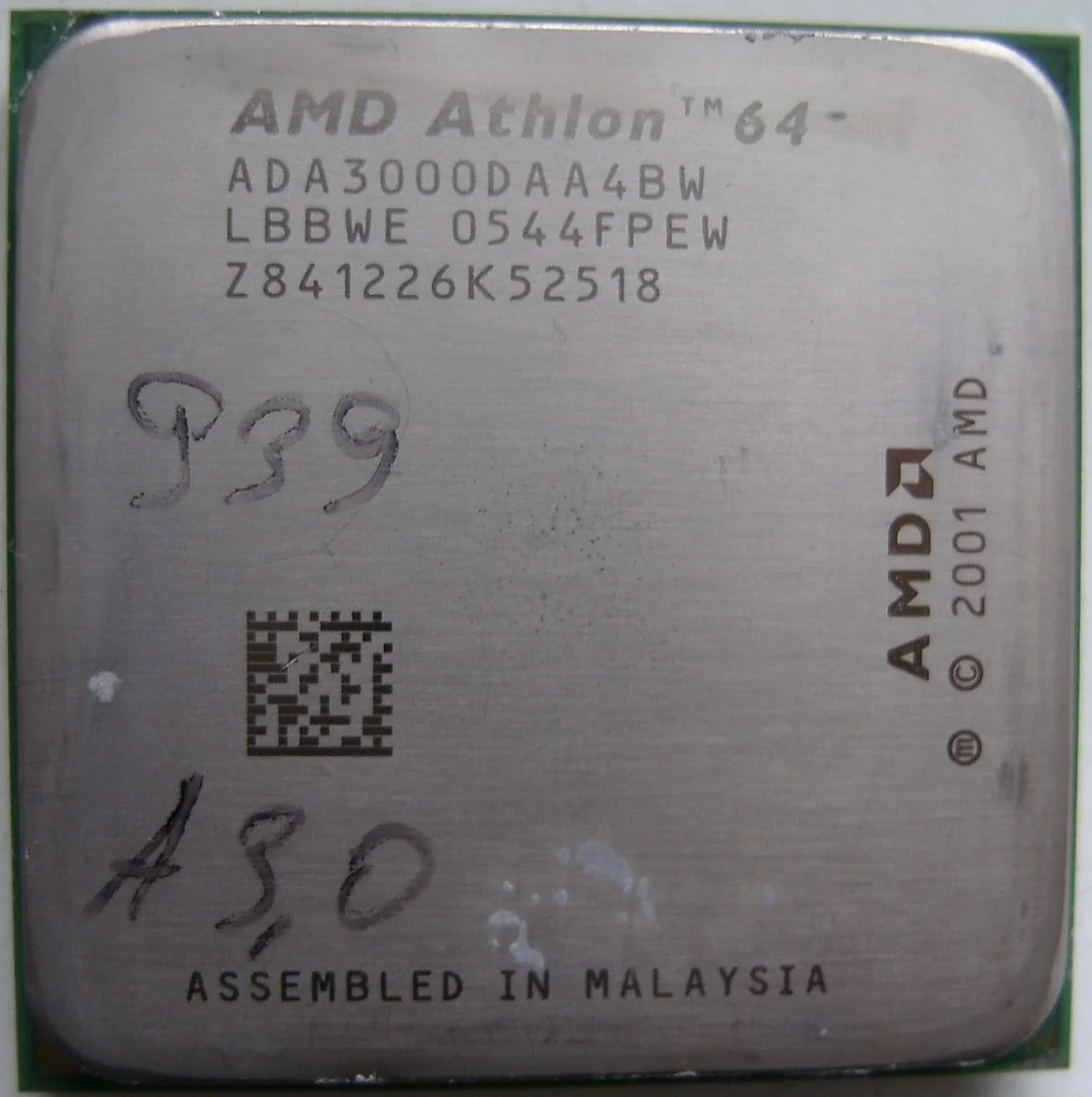
Given all this, it's safe to say that processors like the Athlon 64 and Pentium 4 are largely obsolete. Yet, many people still have them in their systems. Let's see what an old Athlon 64 can do in a 2009 context. Today's article will cover overclocking and testing the Athlon 64 3000+, the lowest-clocked representative of the nearly extinct Socket 939.
 ⤢ ВІДКРИТИ
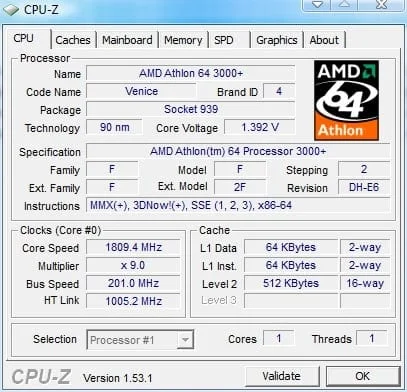
Let's look at the CPU-Z screenshot:
 ⤢ ВІДКРИТИ
Our AMD Athlon 64 3000+ sample is based on the 90nm Venice core, revision E6. The nominal core voltage is 1.392V. The chip runs at a clock speed of 1800MHz and features 512KB of L2 cache.
Test bench
Processor: Athlon 64 3000+
Cooling system: Cooler Master Hyper TX3
Motherboard: Biostar NF4UL-A9 (BIOS revision 6.00 PG)
RAM: Apacer 512MB PC3200 (2.5-3-3-8)
Graphics card: XpertVision 8500GT
Hard drive: Seagate ST340016A 40GB
Power supply: Microlab 360W
Software
Microsoft Windows 7 Home Premium 6.1.7600
CPU-Z 1.53
GPU-Z 0.3.4
CrystalMark 2004
3DMark 2001/2003/2005
nVidia ForceWare 162.22
DirectX 9c August 2009 update
CineBench 9.5
Light Ware Render Bench
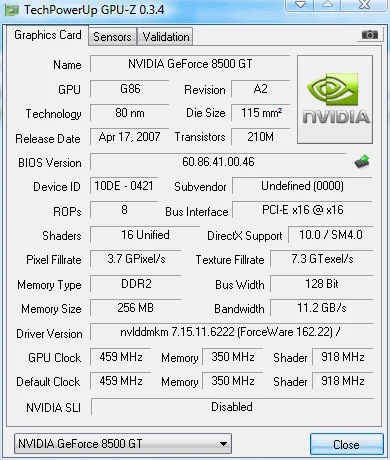
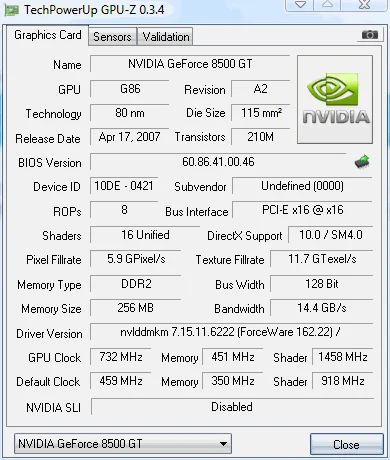
The GeForce 8500GT was chosen for a reason. I thought it would help me track performance changes by overclocking both the CPU and the graphics card. To do this, I first ran 3DMark tests with the GPU at stock speeds, then with it overclocked.
Here's the GeForce 8500GT at stock speeds:
 ⤢ ВІДКРИТИ
A bit unimpressive, right? But everything changes thanks to its excellent overclocking potential! The GeForce 8500GT overclock resulted in 732MHz for the core, 1458MHz for the shader domain, and 902MHz for the video memory:
 ⤢ ВІДКРИТИ
Overall, this graphics card should be entirely sufficient for an old processor like the Athlon 64 3000+.
Athlon 64 3000+ overclocking
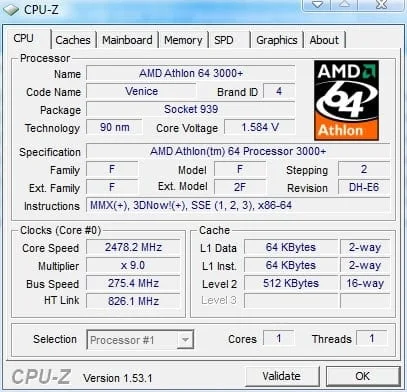
As soon as I started overclocking, I realized I had an incredibly strange and unfortunate sample. Our Athlon 64 3000+ just couldn't hit 2500MHz. This situation stumped me. Temperatures didn't exceed 50 degrees Celsius. The HT multiplier was lowered to 3x, RAM ran at 266MHz (how much lower could it go?), and the core voltage was increased from the nominal 1.4V to 1.6V, but I still couldn't push the bus past 275MHz. Extended torture of the CPU revealed it was indeed the culprit, as the motherboard comfortably passed tests at a system bus frequency of 300MHz and higher when the multiplier was reduced. Alas, I received a surprisingly bad sample. Thus, the overclocking result was a rather paltry 2478MHz:
 ⤢ ВІДКРИТИ
In any case, it's still better than no overclock at all. I consider a frequency increase of 678MHz quite acceptable. The RAM, meanwhile, operated at 378MHz DDR.
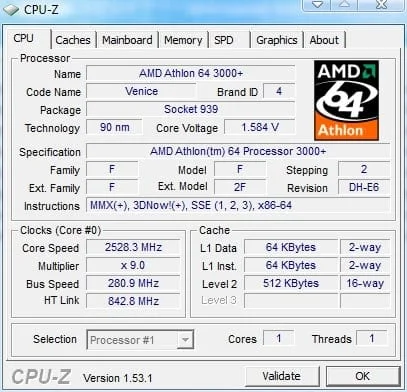
The maximum frequency at which I managed to pass CPU-Z validation was 2528MHz. However, as I mentioned, nothing came of it: when attempting to run the S&M test, the processor froze within the first minute. It's quite possible it lacked sufficient power, but I flat-out refused to raise the voltage beyond 1.6V. Due to excessively high temperatures and the motherboard's less-than-ideal power delivery system, the test hardware could have failed.
 ⤢ ВІДКРИТИ
But now it's time to move on to testing.
In 3DMark graphics benchmarks, I decided to test the chip in the following modes:
CPU at stock – GPU at stock.
CPU at stock – GPU overclocked.
CPU overclocked – GPU at stock.
CPU overclocked – GPU overclocked.
Tests
3DMark
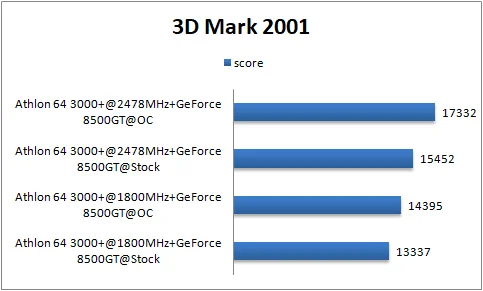
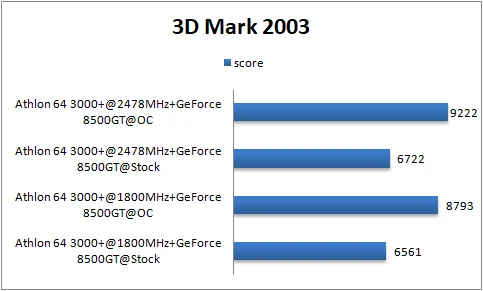
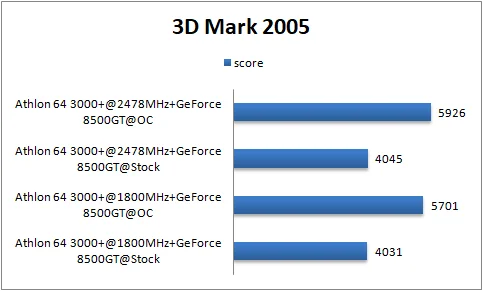
The 3DMark charts show a very interesting picture. Let's break it down in order:
 ⤢ ВІДКРИТИ
 ⤢ ВІДКРИТИ
 ⤢ ВІДКРИТИ
As we generally know, 3DMark 2001 is a very CPU-dependent test. Here, CPU overclocking yields the biggest dividends, but it's important to remember that GPU overclocking also significantly boosts scores. The most beneficial option here is to overclock both components. 3DMark 2003 suggests that the Athlon 64 3000+ CPU is perfectly adequate for the 8500GT graphics card, both at stock speeds and when overclocked to 2478MHz. However, it struggles with the overclocked GPU at stock CPU frequencies, requiring CPU overclocking to keep up. Finally, 3DMark 2005 shows virtually identical results to 2003, with the caveat that the 8500GT GPU is now critically lacking power.
Resident Evil 5
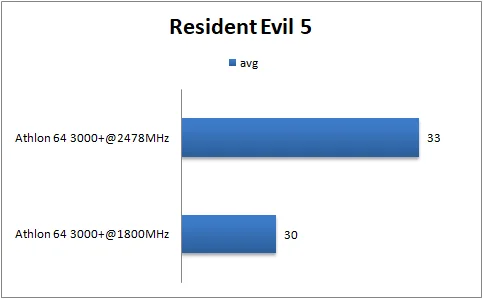
For the Resident Evil 5 test, I used the built-in benchmark. All settings were set to minimum, with a resolution of 800x600, to ensure minimal GPU dependency:
 ⤢ ВІДКРИТИ
As is well known, this game is well-optimized for dual-core processors, so a 600MHz overclock had virtually no impact on the old chip's performance. Nevertheless, if you really want to play RE5, the 30 FPS limitation won't stop you.
For comparison: with the same graphics card, an Athlon II X2 240 chip overclocked to 3600MHz delivers 38-46 frames at maximum settings (at 1024x768 resolution).
Image rendering
 ⤢ ВІДКРИТИ
 ⤢ ВІДКРИТИ
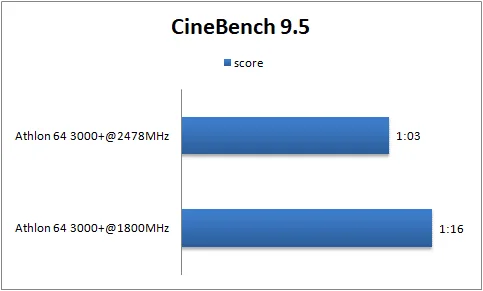
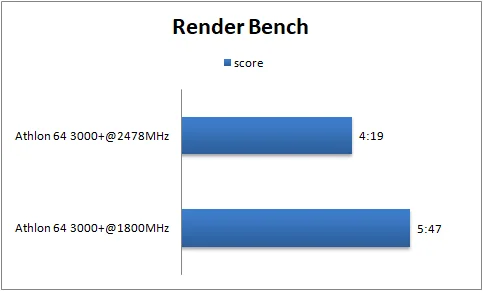
The performance increase is clearly visible! A 20% speed boost never hurts, so overclocking is more justified here.
CrystalMark 2004
 ⤢ ВІДКРИТИ
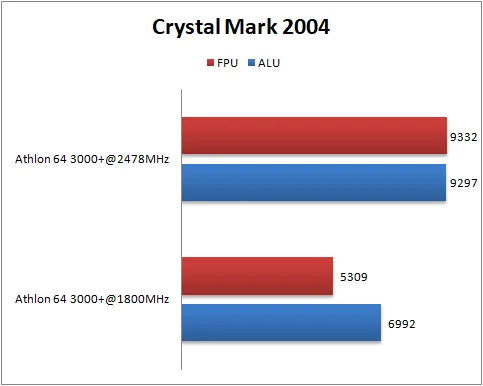
40% and 30% increases — very respectable, even excellent! Overclocking proves its worth here too.
Conclusion and summary
Despite its abysmal overclocking potential, I liked the Athlon 64 3000+: even with the voltage boosted to 1.6V, it remained quite cool. As I mentioned, using a relatively inexpensive Cooler Master heatsink kept temperatures from exceeding 48 degrees Celsius. The overclock isn't record-breaking, of course, but it's perfectly acceptable, especially since performance increased by roughly 20-30%. It wasn't a great buy in 2009. However, for anyone who already owns one, especially if it's running at stock speeds, this article should be very interesting, as it touches on important aspects like its reliance on the installed graphics card.
From this material, we can conclude that installing anything more powerful than an NVIDIA GeForce 8500GT in such a system isn't worth it.