![Retro overclocking: overclocking the AMD Athlon 64 X2 4600+ [F3, Windsor]](/_next/image?url=https%3A%2F%2Fumtale-media.s3.eu-central-1.amazonaws.com%2Fimages%2Fcontent%2F1d472903-2e96-4807-8e5a-6e3ff6d86451.webp&w=3840&q=75)
BLOGS · OVERCLOCKING
PUBLISHED
READING6 min
Retro overclocking: overclocking the AMD Athlon 64 X2 4600+ [F3, Windsor]
We test the overclocking headroom of the retro dual-core AMD Athlon 64 X2 4600+ (F3 Windsor) with and without voltage adjustments.
In this article, we'll explore the overclocking potential of the aging dual-core AMD Athlon 64 X2 4600+ processor.
Welcome to the eighth installment of our Retro Overclocking series.
The processor
Our test sample is marked ADO4600IAA5CZ. The die was manufactured in Germany and packaged in Malaysia.
Codenamed Windsor (K8 architecture), the AMD Athlon 64 X2 4600+ features a 90nm monolithic dual-core die with 512KB of L2 cache under its heat spreader.
Fortunately, our sample is an F3 revision, which is the best revision for overclocking potential and power efficiency. The older F2 revision typically runs a bit hotter.
The Athlon 64 X2 4600+ features two cores running at a stock frequency of 2400 MHz (a 12x multiplier on a 200 MHz bus, with a 1000 MHz integrated memory controller and HT bus). The chip has 512 KB of L2 cache per core, a stock voltage of 1.230V, and a modest 65W TDP.
The Athlon 64 X2 4600+ only supports DDR2 memory clocked up to 800 MHz.
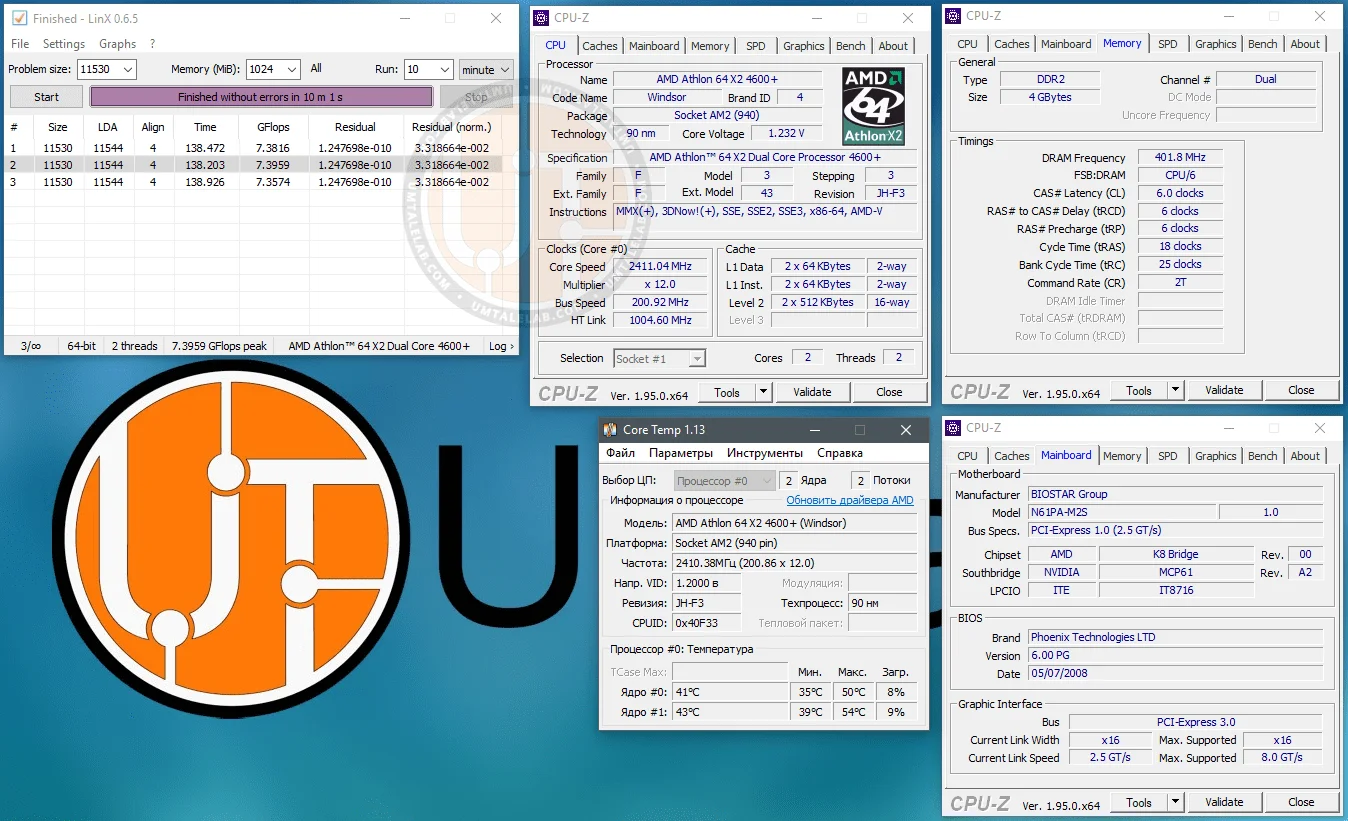 ⤢ ВІДКРИТИ
As for the downsides, the 4600+ lacks SSE4.1 and SSE4.2 instructions, which are now baseline requirements for many modern applications. This is a massive drawback, as it means the chip simply won't run certain modern apps and games.
Test setup:
CPU — Athlon 64 X2 4600+;
Cooling — Cooler Master Hyper 212 Black Edition (RR-212S-20PK-R1);
AM2 RAM — 2x 2 GB Kingston (99U5429-007.A00LF 34CC2E04) for a total of 4 GB;
AM2 motherboard — Biostar N61PA-M2S;
Graphics card — KFA2 GeForce RTX 2060 SUPER 8 GB (~1950/14000 MHz, Power Limit 112%);
SSD — KINGSTON 120GB SA400S37120G (Windows 10/Apps);
HDD — Seagate 2TB ST2000DM008-2FR102 (Games);
Power supply — Chieftec GPS-1250C.
Overclocking the Athlon 64 X2 4600+
To start off, let's see what our Athlon 64 X2 4600+ sample can do at stock CPU core, RAM, and memory controller voltages.
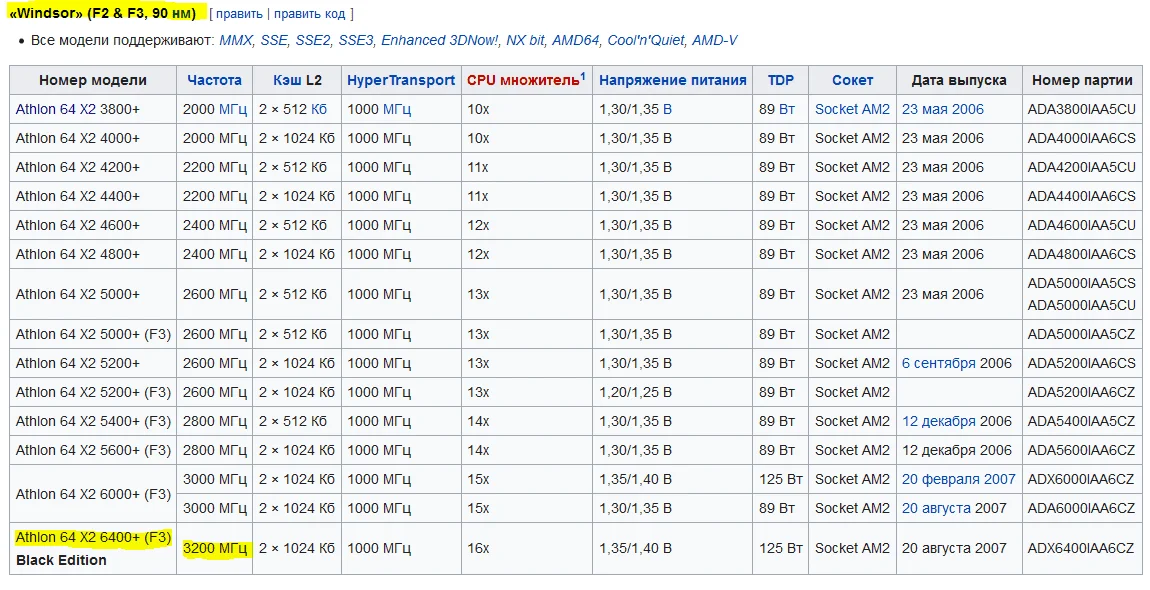
Don't worry if you aren't familiar with lithography processes or CPU generations. To find out what your CPU is theoretically capable of, just look up its core codename (Windsor, in our case) and find the flagship model based on the same architecture.
 ⤢ ВІДКРИТИ
The fastest Windsor chip is the Athlon 64 X2 6400+ Black Edition. It runs at 3200 MHz, meaning our chip could theoretically also run stably at 3.2 GHz. Let's put that to the test.
To push the 4600+ to 3200 MHz, we need to set the FSB frequency to 268 MHz and drop the RAM multiplier from DDR2-800 to DDR2-667.
After rebooting, we immediately run into a BSOD while loading Windows 10. Unfortunate, but predictable. Without a voltage bump, our Athlon 64 X2 4600+ sample just can't run stably at 3200 MHz.
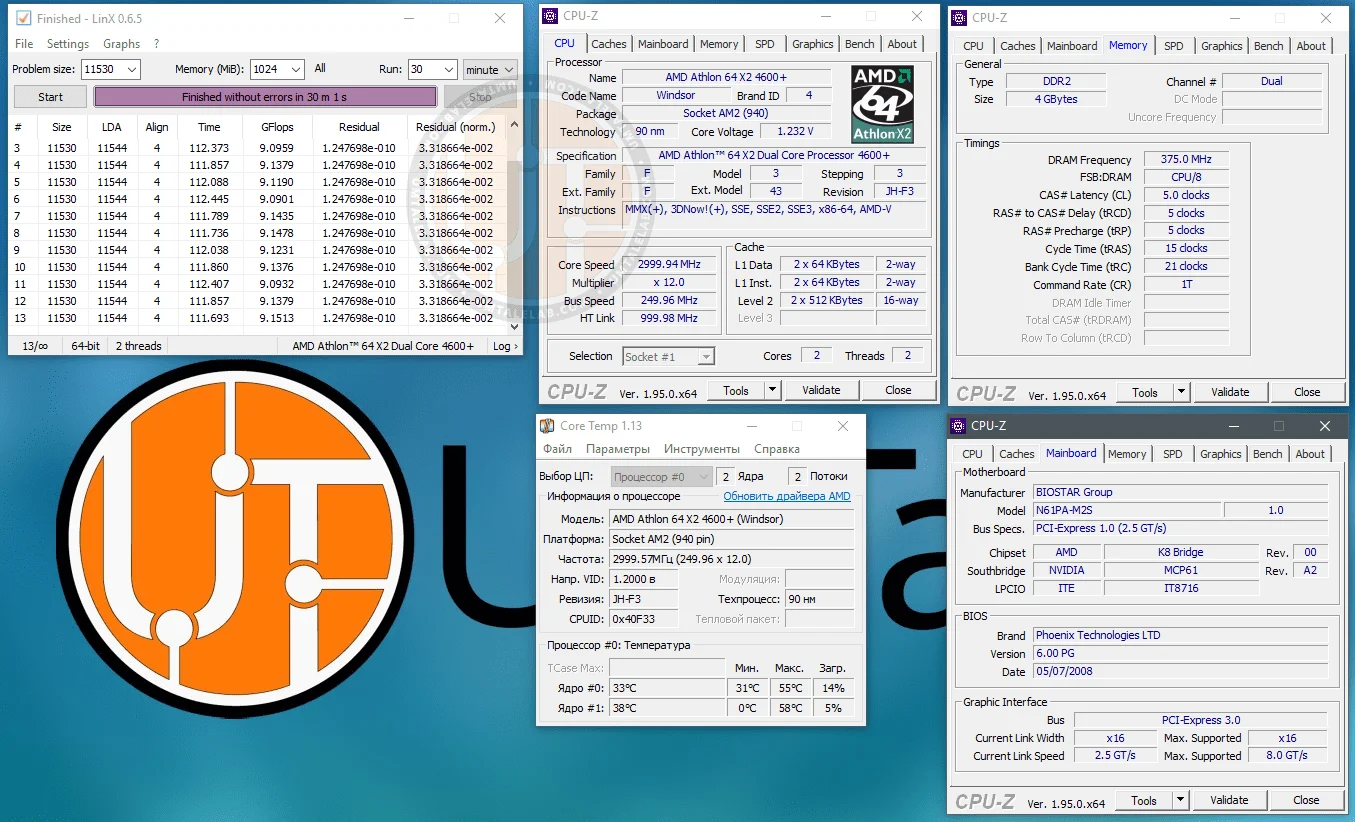
Let's lower the FSB by 5 MHz and try again. The system boots, but crashes during LinX. Dropping the FSB by another 5 MHz gets us through 5 minutes of stress testing before another freeze. It was only after lowering the FSB to 250 MHz that the chip finally passed the LinX stability test. So, without touching the voltage, we managed to push our Athlon 64 X2 4600+ to 3000 MHz:
 ⤢ ВІДКРИТИ
This matches the clock speed of the near-flagship Athlon 64 X2 6000+. This makes sense: the top-end Athlon 64 X2 6400+ Black Edition uses binned silicon, and its stock voltage of 1.400V is significantly higher than the 4600+'s.
Keep in mind that I didn't raise any of the voltages. This kind of overclocking shouldn't degrade the processor, motherboard, or memory over time. However, remember that overclocking voids your warranty. As always, any hardware modifications you make are entirely at your own risk!
BIOS settings for overclocking the Athlon 64 X2 4600+ to 3000 MHz:
Core voltage — 1.230 V (+0.000 over stock);
Bus speed — 250 MHz;
Bus multiplier — 4;
Bus voltage — 1.250 V (+0.000 over stock);
RAM multiplier in BIOS — 667 MHz (resulting in an effective memory frequency of 750 MHz after overclocking);
RAM voltage — 1.950 V (+0.000 over stock).
Now let's try raising the voltages slightly to squeeze out a few hundred more megahertz.
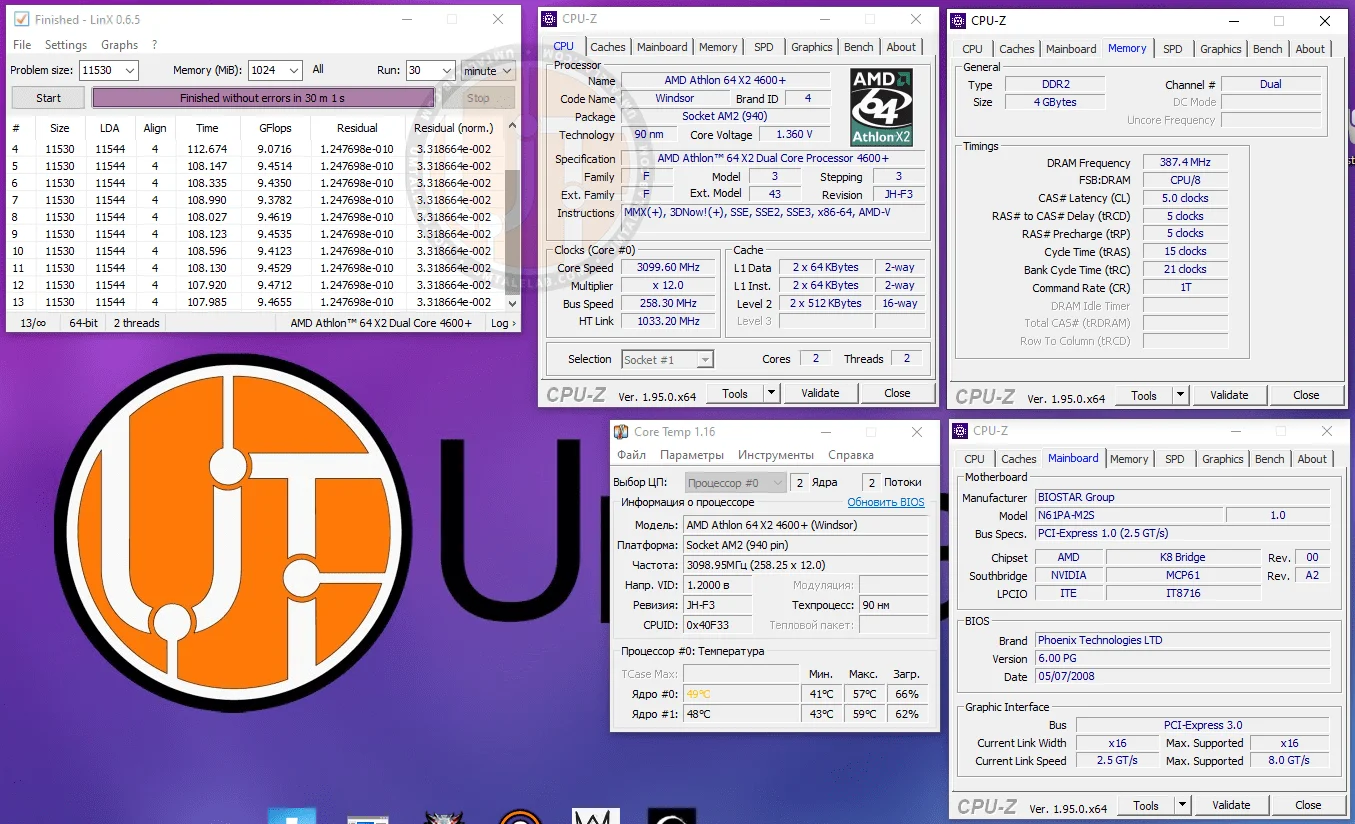
Predictably, though, the old and hot 90nm die barely responded to voltage increases. To push past the 3000 MHz mark even slightly, I had to crank the core voltage up to 1.360 V. This finally allowed the system to pass stability tests at 3100 MHz.
 ⤢ ВІДКРИТИ
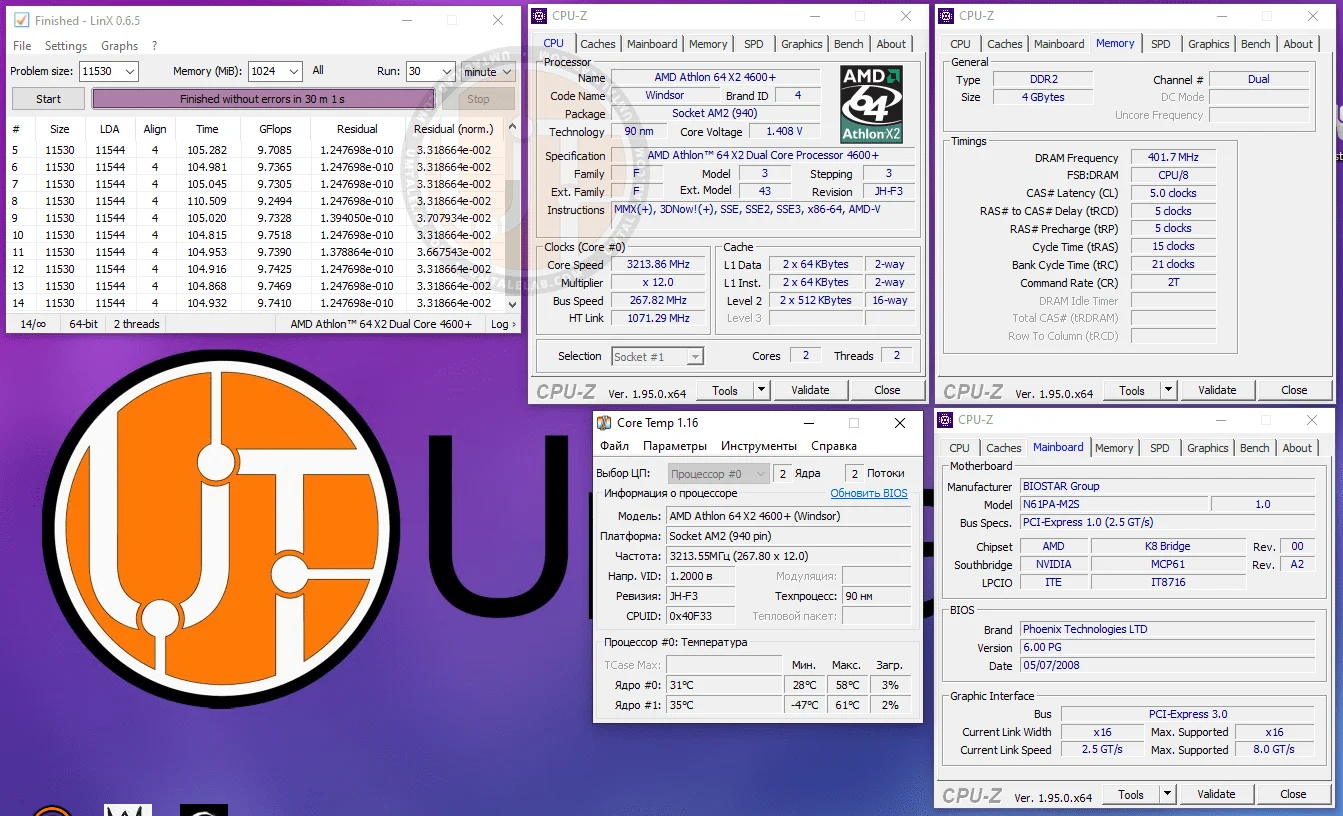
Overclocking the 4600+ further proved even less exciting. Essentially, I hit a wall right around the stock frequency and voltage of the Athlon 64 X2 6400+ Black Edition. Beyond that, the chip flat-out refused to pass stability tests at 3250–3300 MHz, even with massive voltage bumps.
Ultimately, this session topped out at 3213 MHz:
 ⤢ ВІДКРИТИ
Athlon 64 X2 4600+ BIOS settings for overclocking to 3213 MHz:
Core voltage — 1.430 V (+0.200 over stock);
Bus speed — 268 MHz;
HT multiplier — 4;
HT voltage — 1.350 V (+0.100 over stock);
Chipset voltage — 1.450 V (+0.100 over stock);
RAM multiplier in BIOS — 667 MHz (resulting in an effective memory frequency of 804 MHz after overclocking);
RAM voltage — 2.100 V (+0.200 over stock).
Reaching 3213 MHz required a massive voltage bump across the board, which dramatically increased heat and power consumption. An extra 200 MHz of headroom relative to stock voltage settings is definitely not worth the trade-off. But, of course, the choice is yours.
Thanks for reading, and see you next time!
If you found this article helpful and want to see more benchmarks on UmTale Lab, please support us on Patreon! Our main goal is to expand our hardware inventory and improve testing quality (such as upgrading our test bench to a larger SSD, or buying a capture card to prevent ShadowPlay recording from skewing benchmark results).