BLOGS · OVERCLOCKING
PUBLISHED
READING6 min
Retro overclocking: delidding and overclocking an AMD Athlon 64 X2 4800+ CPU
The experience of delidding and successfully overclocking an AMD Athlon 64 X2 4800+ CPU. Discovering the cause of overheating and boosting performance.
I recently got my hands on a dated but decent setup: an ASUS M2N-E motherboard and an AMD Athlon 64 X2 4800+ CPU. My first thought was to write a blog post about overclocking this CPU and follow up with more AM2 platform content.
This setup had other plans, though. The motherboard would power on, start initializing devices, then immediately shut down. Unfortunately, I didn't have another AM2-compatible CPU on hand at the time, so I couldn't fully test the board. And honestly, you rarely suspect the CPU first. But to my surprise, this was one of those rare cases. After checking all the voltages with a multimeter, I was a little dejected; everything seemed fine, yet the board kept shutting down after device initialization, preventing me from entering the BIOS.
Long story short, I won't bore you with my idiotic troubleshooting process. Here’s the quick rundown: After another “brilliant” idea to reflash the BIOS, I finally decided to focus on the CPU, specifically how its IHS barely got warm during the system's brief runtimes. It was time to delid the chip and inspect its internals.
A household razor blade broken in half, maximum concentration, and extreme caution were my tools. Within five minutes, the integrated heat spreader (IHS) was separated from the substrate. Unfortunately, in my haste, I didn't take a photo of what was underneath at the time, but trust me — the rock-hard, brown thermal paste looked horrifying.
This was the cause of the constant system shutdowns: the CPU was simply triggering its thermal protection to prevent high temperatures from damaging its die.
Below are photos of the cleaned CPU with new thermal paste applied to the die surface:
After replacing the thermal paste under the CPU’s IHS, the system booted up and loaded the operating system without a hitch. Even better, it passed a basic set of stress tests without any issues, which thrilled me.
Now, let’s finally move past the long introduction to the technical specifications and, of course, the overclocking itself.
The CPU
 ⤢ ВІДКРИТИ
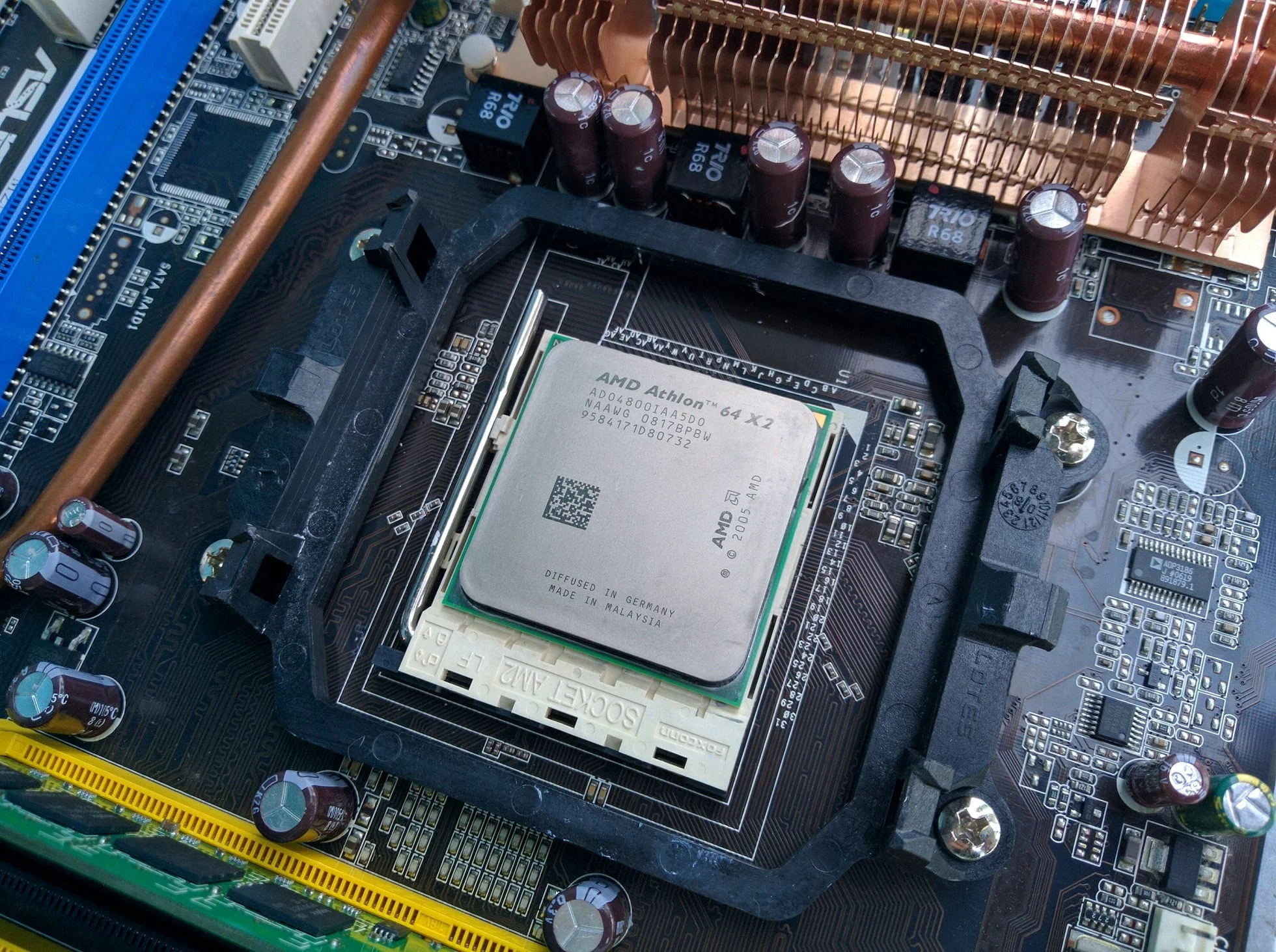
Our test sample, the Athlon 64 X2 4800+ ADO4800IAA5DO NAAWG 0817BPBW, doesn't reveal much useful information from its markings alone, besides the CPU rating and its G2 stepping.
 ⤢ ВІДКРИТИ
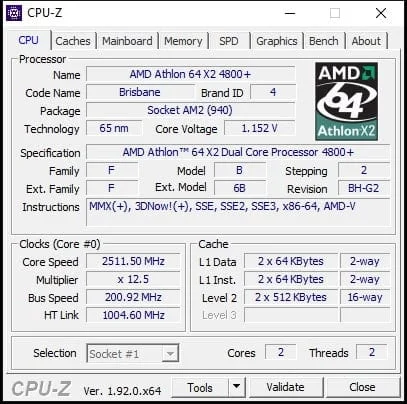
The CPU-Z utility gives us much more data. The chip has a relatively low L2 cache size per core — just 512KB. Unfortunately, for some reason, CPU-Z doesn't display the actual voltage. In our case, it's 1.300 volts, according to both the motherboard monitoring and multimeter readings. The nominal CPU frequency is 2511MHz, which comes from multiplying the 200MHz bus speed by a 12.5 multiplier.
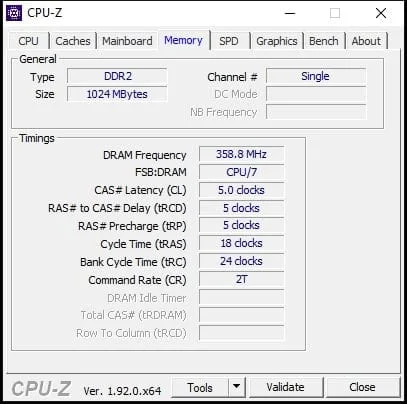
Here lies one of the less pleasant characteristics of the 65nm Brisbane core: due to fractional multipliers for the base clock, RAM can end up running at reduced frequencies. That's exactly what happened in our case. The Athlon 64 X2 4800+'s multiplier is 12.5, which results in a RAM frequency of only 716MHz, instead of the expected 800MHz:
 ⤢ ВІДКРИТИ
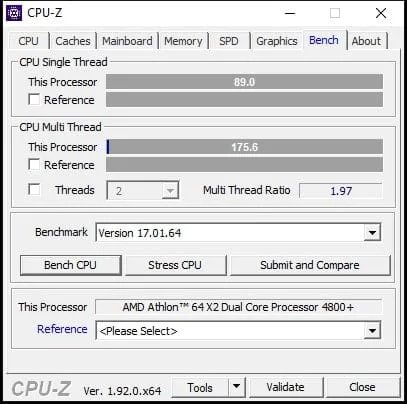
To get a sense of the CPU's baseline performance, I benchmarked it using the built-in CPU-Z benchmark at stock frequencies:
 ⤢ ВІДКРИТИ
89 points in the single-core test and 175 in multi-core. Not much to write home about. Let's see how much those numbers increase after overclocking.
Test setup
Motherboard - ASUS M2N-E
CPU - Athlon 64 X2 4800+
CPU cooler - Cooler Master Hyper 212 EVO
RAM - 1GB DDR2 SK Hynix HYMP512U64CP8-S5
Graphics card - ZOTAC GeForce GTX 760 AMP!
Storage - KINGSTON 120GB SA400S37120G
Power supply - Chieftec GPS-1250C
Operating system - Windows 10 with the latest updates as of May 2020
Overclocking
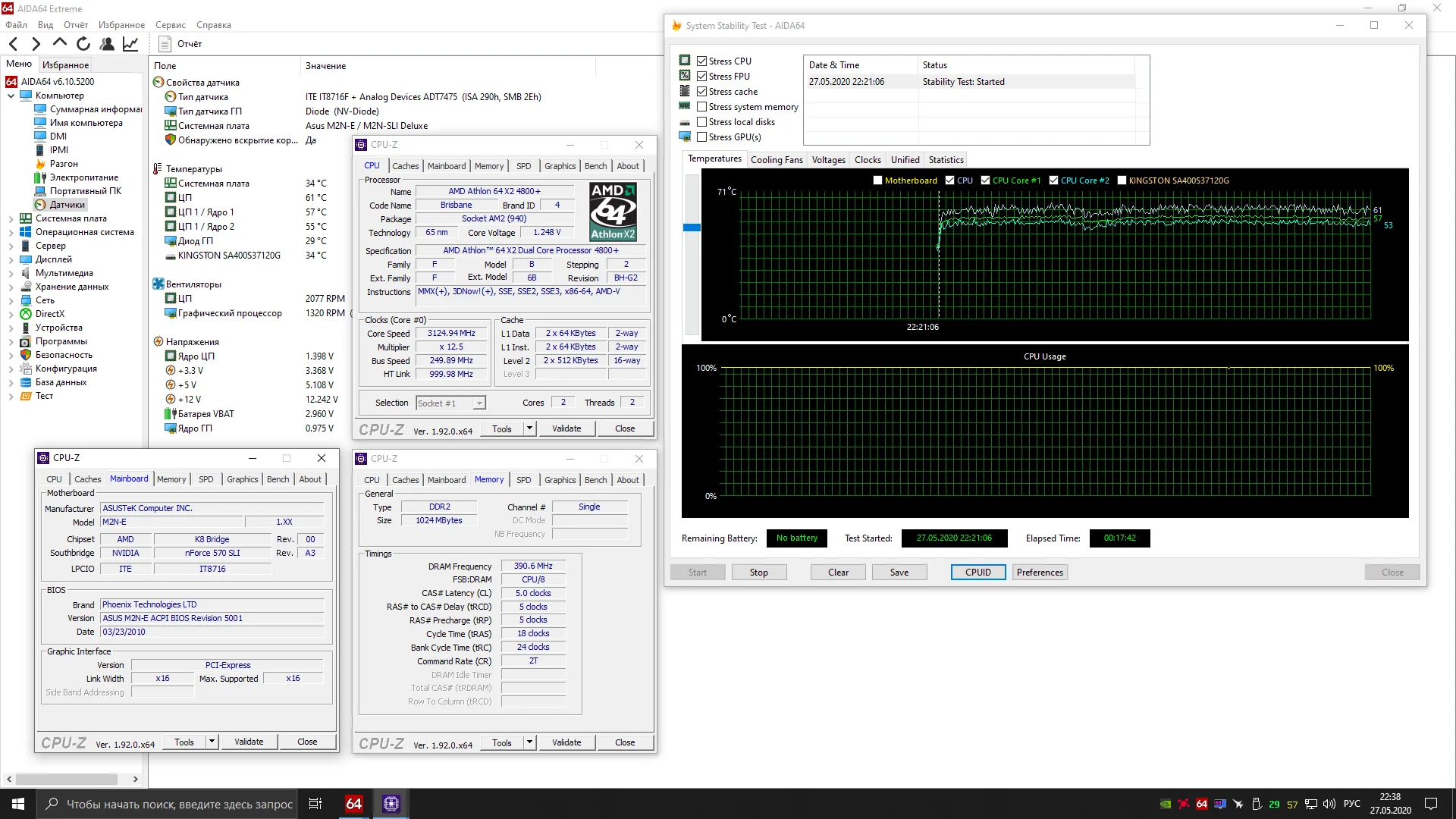
This Athlon 64 X2 4800+ overclocking effort can be split into two parts. In the first, I limited myself to a relatively low voltage of 1.400 volts and managed to hit a frequency of 3124MHz:
 ⤢ ВІДКРИТИ
For similar results, a stock cooler or a cheap aftermarket option should suffice.
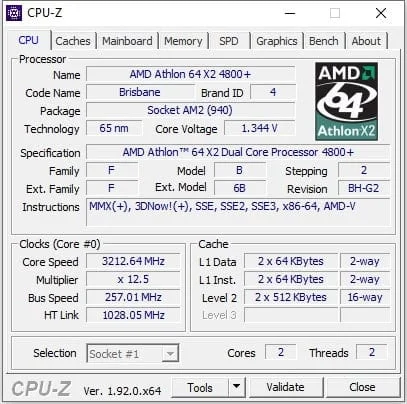
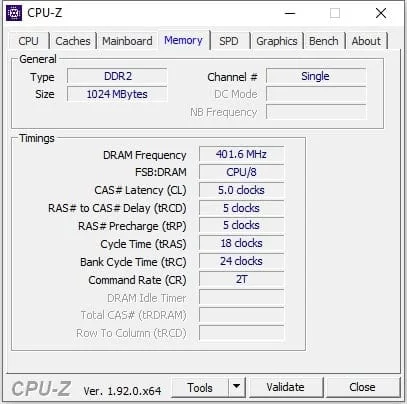
The second part involved setting the voltage to 1.500 volts and pushing just past the 3200MHz mark:
 ⤢ ВІДКРИТИ
 ⤢ ВІДКРИТИ
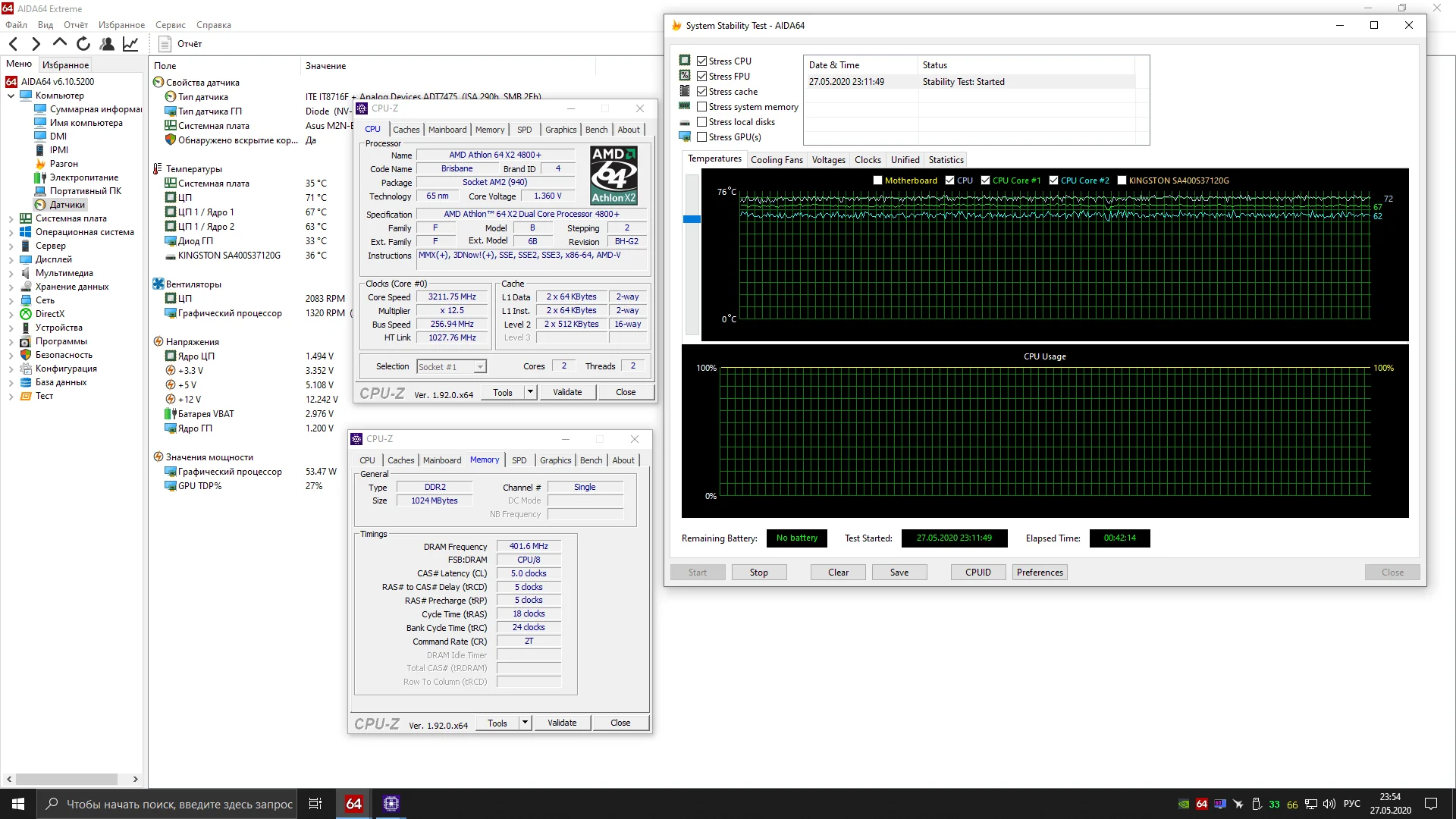
However, it's important to understand that a stock cooler won't handle the hot nature of this old dual-core chip. Even with the fairly capable CM 212 EVO, the CPU hit 73 degrees. And let me remind you, AMD's K8 generation chips are extremely sensitive to temperatures above 60 degrees. In fact, with the stock cooler, the CPU couldn't last even a minute in a stability test at 3200MHz. After crossing 80 degrees, the system automatically shut down.
Here's a screenshot of the 40-minute AIDA64 stability test:
 ⤢ ВІДКРИТИ
Additionally, below you can see the overclocking settings for the Athlon 64 X2 4800+ chip on the ASUS M2N-E motherboard:
The board can't manually increase the voltage for the CPU's integrated memory controller, and it probably does it automatically (though that's not confirmed).
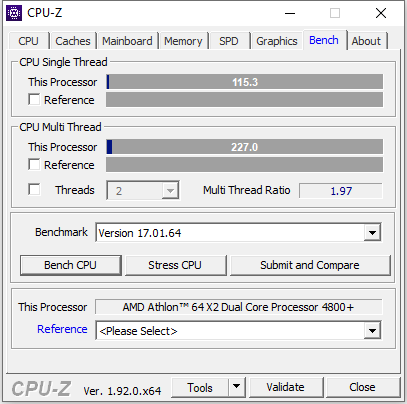
Now, let's re-test the CPU using the built-in CPU-Z benchmark:
 ⤢ ВІДКРИТИ
And then we'll compare these results with those obtained earlier at stock frequency:
In the multi-core test, the CPU speed increased by 22%! That's a significant performance boost, though completely pointless in the realities of 2020.
Conclusion
Overall, the achieved frequencies aren't groundbreaking. For instance, these clocks are standard for the Athlon 64 X2 6400+, which was built on a 90nm process. However, if we're not talking about cherry-picked CPUs, the final result is quite good, especially considering the test motherboard is not ideal for extreme overclocking.