
TESTS · VIDEOCARDS · VIDEOCARDS AMD/ATI
PUBLISHED
READING20 min
Polaris 10 in 2020: testing the Radeon RX 470 (4GB) graphics card in 15 popular games
Testing the Radeon RX 470 (4GB) in 2020. This graphics card, a hit among miners, is now widely available. We evaluate its capabilities in 15 popular games.
The Radeon RX 470 graphics card launched in mid-2016. Alongside its older sibling, the RX 480, it was poised to aggressively dominate the sub-$250 gaming graphics card segment. However, AMD's plan didn't quite pan out. Or rather, it did — the Radeon RX 400 series became a sales hit, just not with gamers, but with cryptocurrency miners.
Miners, especially those focused on Ethereum and other cryptocurrencies, particularly favored the SAPPHIRE RX 470/480 NITRO and RX 470/480 NITRO+ models. Their cooling systems were highly efficient and relatively reliable, leading to these cards being bought up by the tens, sometimes even hundreds. Consequently, once 4GB cards became less efficient for mining, an incredible number of "unpainted, undamaged, and non-mining" SAPPHIRE RX 470/480 NITRO and NITRO+ units flooded the market.
In this article, we'll try to figure out just what this "miner's abandoned toy" — the 4GB Radeon RX 470 graphics card — is still capable of.
Graphics card
As you've probably gathered from the introduction, our testing features a SAPPHIRE-manufactured graphics card, specifically the Radeon RX 470 NITRO+:
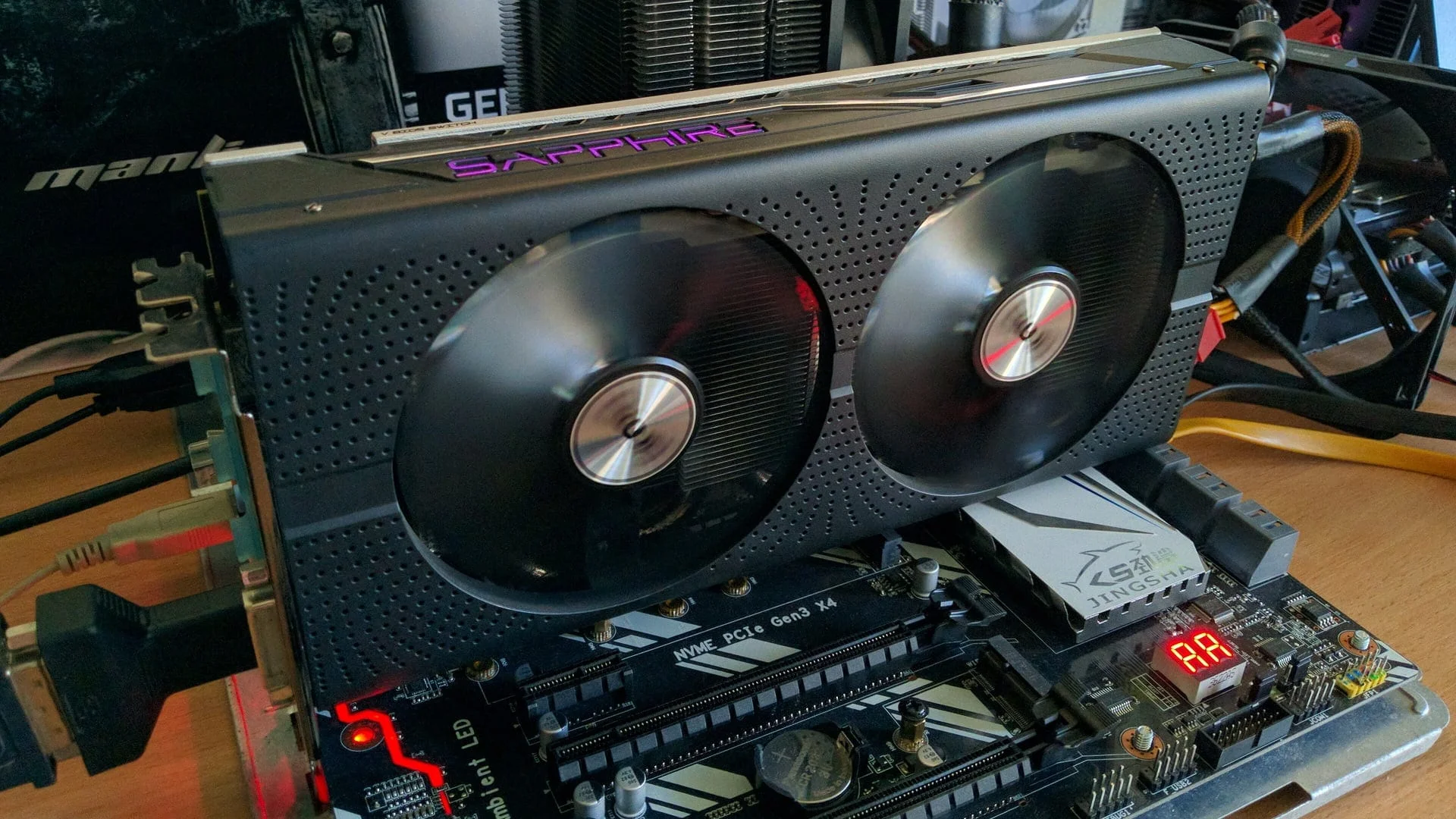 ⤢ ВІДКРИТИ
We'll briefly cover its specifications, then move on to discussing the test results.
Board, cooling, and power system
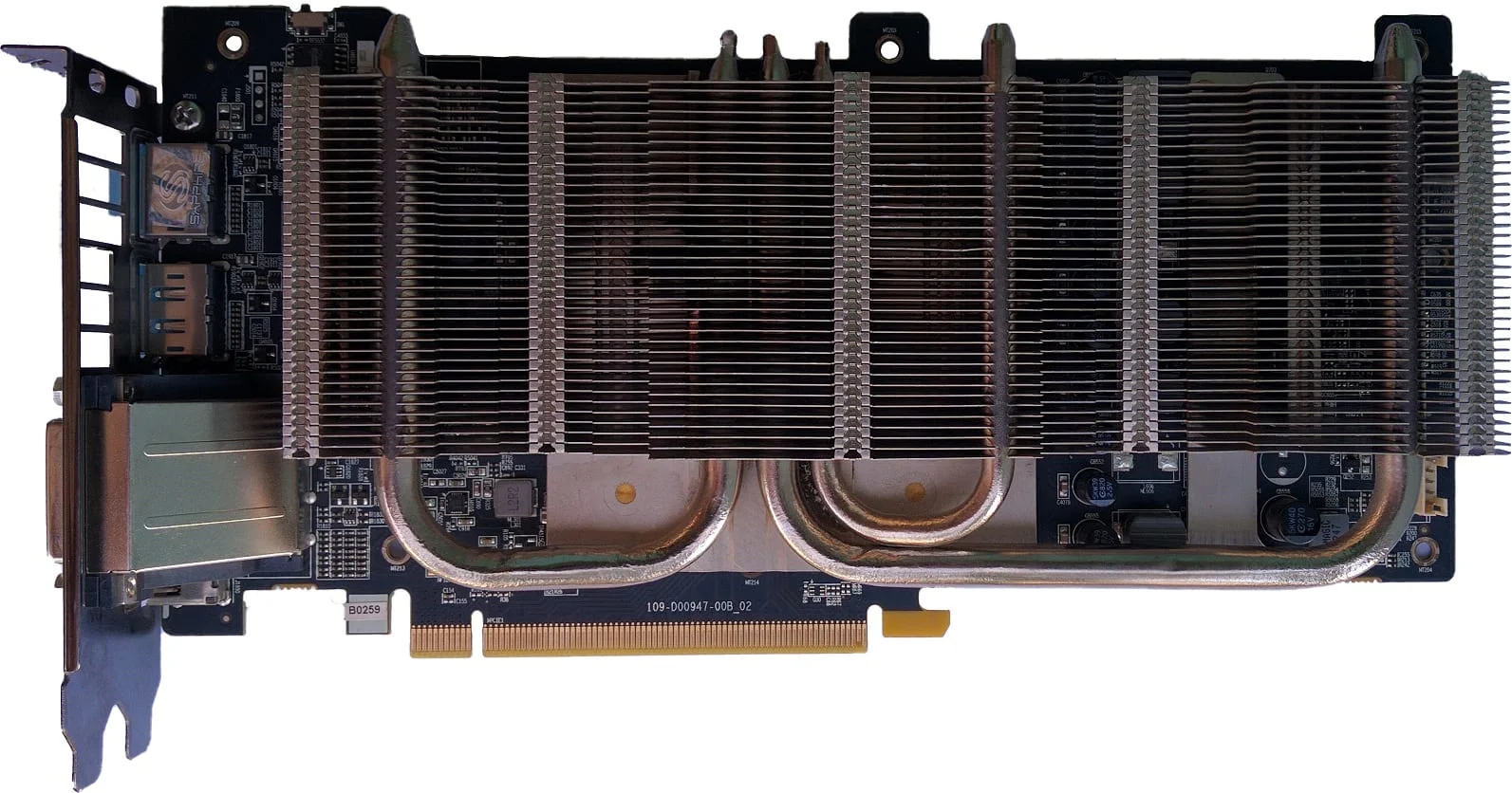 ⤢ ВІДКРИТИ
The RX 470 NITRO+'s heatsink features three copper heat pipes: one 6mm and two 8mm in diameter. Additionally, Sapphire engineers took cooling the memory chips and power delivery components seriously. The MOSFETs and GDDR5 make contact with the main heatsink's aluminum plates via silicone thermal pads:
Two proprietary 95mm fans are responsible for cooling the aforementioned heatsink:
Beyond the main heatsink and dual fans, the card's aluminum backplate also acts as a cooler for the power subsystem. Utilizing the same silicone thermal pad, it contacts the MOSFET area and quite effectively dissipates heat from the reverse side of the PCB:
The RX 470 NITRO+ graphics card features a decent, though far from top-tier, power delivery system: four phases for the GPU, one for GDDR5, and an additional PLL phase.
Voltage regulation for the GPU is handled by the familiar AMD PWM controller, the IR 3567B. The power system components include IOR 3553M MOSFETs, which power the graphics processor, and 4C10N YEFW06 for the GDDR5 video memory.
Graphics processor and memory
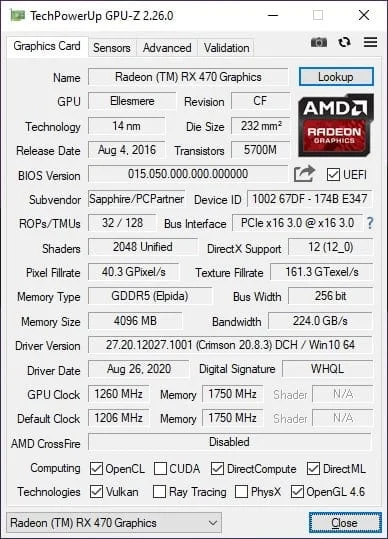
The SAPPHIRE Radeon RX 470 NITRO+ is based on the Ellesmere Pro GPU, a variant of Polaris 10. This 14nm chip features 2048 stream processors, 32 ROPs, and 128 TMUs. SAPPHIRE opted to boost the chip's clock speeds from the recommended 1206MHz to 1260MHz.
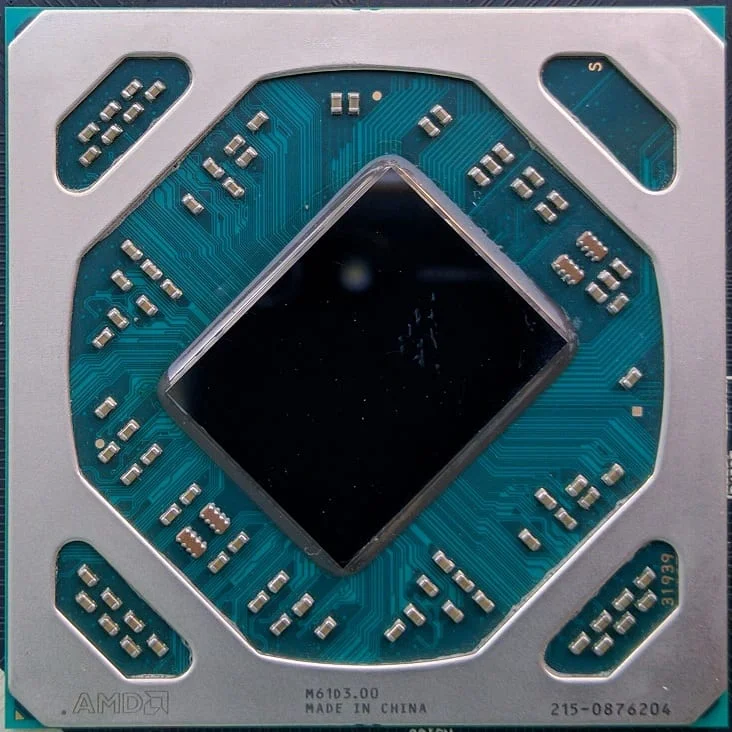 ⤢ ВІДКРИТИ
However, if you're not keen on the slightly increased power consumption from the higher GPU clock speed, a dedicated BIOS switch on the board lets RX 470 NITRO+ owners easily revert to AMD's stock frequency values with a simple flick.
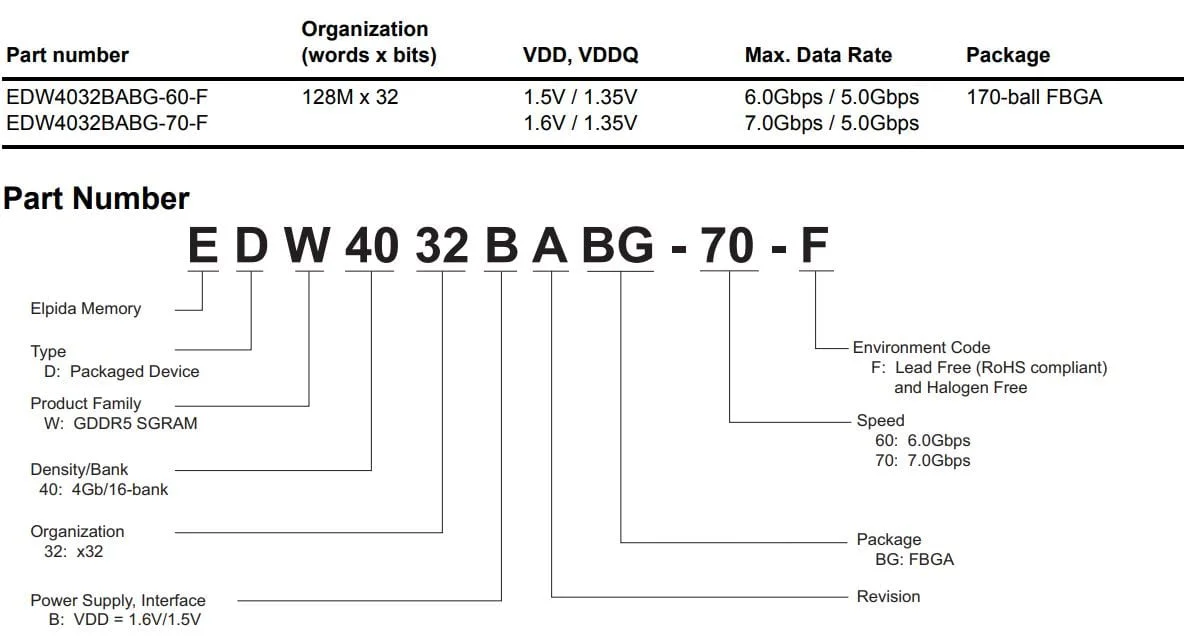
The SAPPHIRE Radeon RX 470 NITRO+ uses 4GB of GDDR5 video memory as its frame buffer. This capacity is made up of eight 4-gigabit (512-megabyte) Elpida-manufactured chips, labeled "EDW4032BABG -70-F":
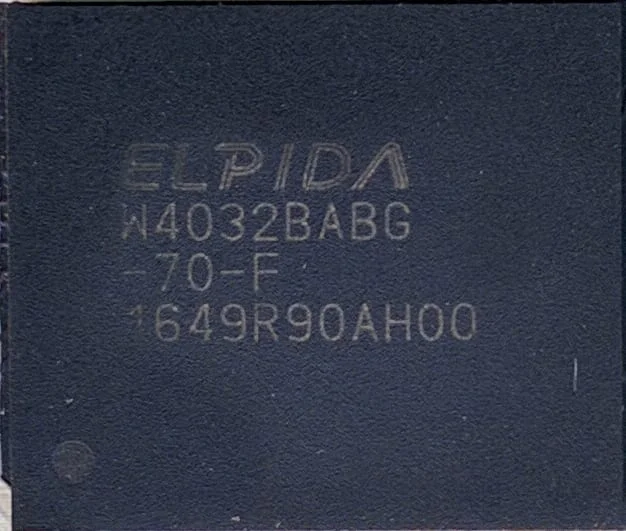 ⤢ ВІДКРИТИ
 ⤢ ВІДКРИТИ
According to the official specifications for memory chips with the "EDW4032BABG -70-F" designation, they are rated for a recommended effective frequency of 7000MHz, which is confirmed in practice. Thanks to a 256-bit bus, the total video memory bandwidth is 224GB/s.
Frankly, though, Elpida memory isn't exactly a positive trait for a graphics card. For instance, our sample couldn't even hit 8000MHz, which is a disappointingly weak result.
The GPU-Z utility confirms all the aforementioned Radeon RX 470 specifications:
 ⤢ ВІДКРИТИ
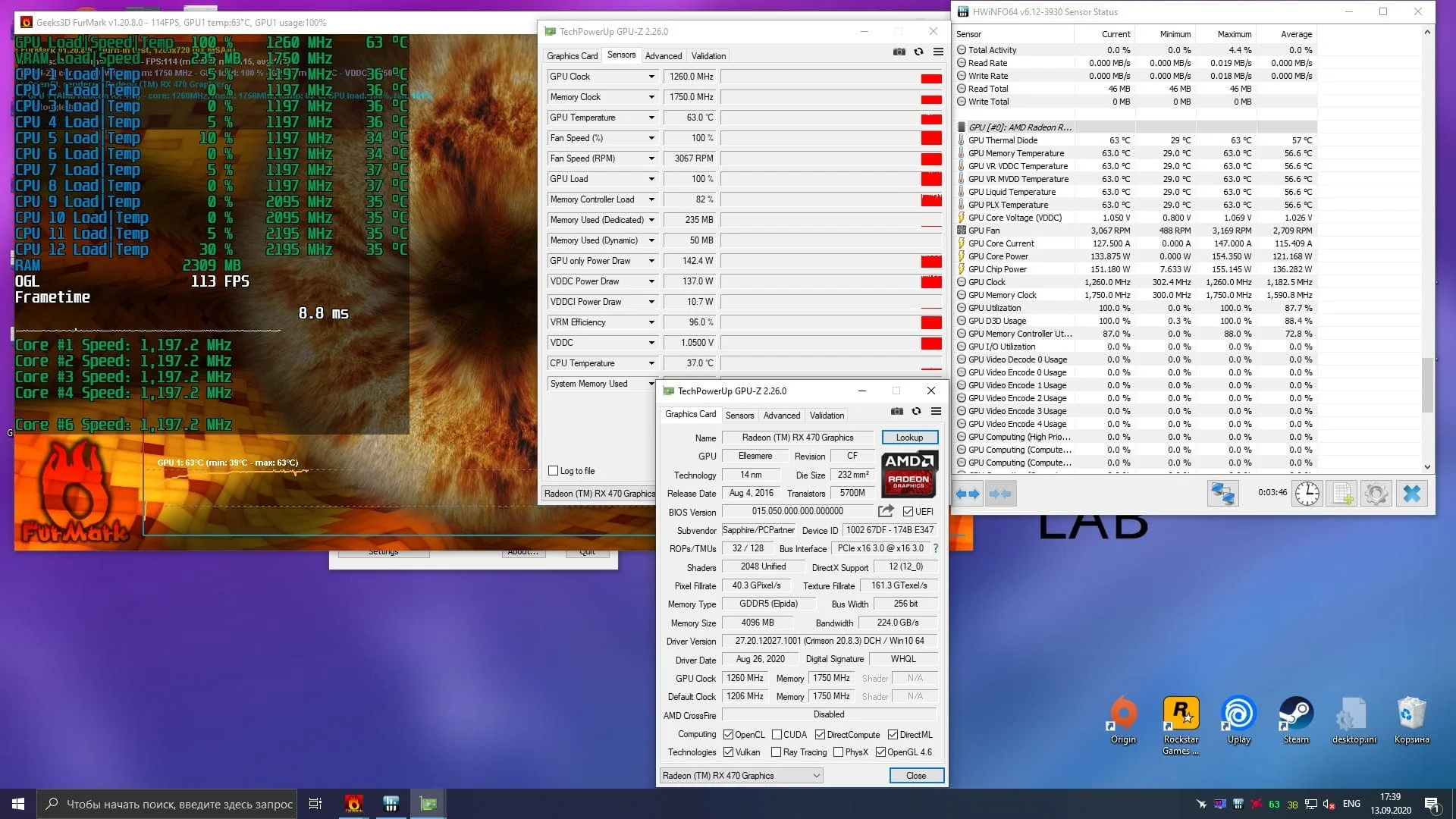
According to GPU-Z's graphs, during FurMark testing, the Sapphire RX 470 NITRO+'s power consumption can exceed 150 watts:
 ⤢ ВІДКРИТИ
The maximum recorded core voltage settled at 1.050 volts.
With the graphics card's technical specifications covered, let's move directly to testing the Sapphire RX 470 NITRO+ in games.
Test setup:
CPU — Xeon E5-2620 v3@3200MHz (unlocked Turbo Boost frequency);
Graphics card — SAPPHIRE Radeon RX 470 NITRO+ 4GB GDDR5 (stock clocks - 1260/7000MHz, Power Limit 150%);
Motherboard — Kllisre X99-D8 (AD12) with modified BIOS (Unlock Turbo Boost, and unlocked timing control);
RAM — G.SKILL DDR4@1866MHz 4 sticks F4-2400C15S-4GNT of 4GB each, total 16GB (timings 10-10-10-24);
SSD — KINGSTON 120GB SA400S37120G;
HDD — Seagate 2TB ST2000DM008-2FR102;
PSU — Chieftec GPS-1250C.
Games and graphics settings:
All games listed below were updated to the latest or most stable version.
Assassin’s Creed Odyssey:
API - DirectX 11;
Display mode - Fullscreen;
Screen resolution - 1920x1080;
Resolution modifier - 100%;
Vertical sync - Off;
Graphics preset - High;
Adaptive quality - Off;
Anti-aliasing - High;
Shadows - High;
Environment - High;
Texture detail - High;
Terrain - High;
Small object density - High;
Fog - Medium;
Water - High;
Screen space reflections - High;
Volumetric clouds - High;
Character texture detail - High;
Character - High;
Volumetric lighting - High;
Depth of field - High.
Control Ultimate Edition:
API - DirectX 12;
Display mode - Fullscreen;
Resolution - 1920×1080;
Render resolution - 1920×1080;
NVIDIA DLSS - Off;
Vertical sync - Off;
Graphics preset - Medium;
Remote environment detail - Medium;
Texture quality - Medium;
Texture filtering quality - Medium;
Shadow resolution - Medium;
Shadow filtering - Medium;
Landscape quality - Medium;
SSAO - On;
Fullscreen reflection quality - Medium;
Global reflection quality - Medium;
MSAA anti-aliasing quality - 2X;
Film Grain - On;
Blur - On;
Ray tracing - Off;
Ray tracing quality preset — High (if this option is off, all parameters included in it are also off);Reflected ray tracing — Off;
Transparent reflection tracing — Off;
Indirect diffuse lighting tracing — Off;
Contact shadow ray tracing — Off;
Debris tracing — Off;
Counter-Strike: Global Offensive:
API - DirectX 9;
Resolution - 1920×1080;
Display mode - Fullscreen;
Overall shadow quality - High;
Model and texture detail - High;
Texture streaming - On;
Effect detail - High;
Shader detail - Very High;
Boost player contrast - Off;
Multicore rendering - On;
Multisampling anti-aliasing mode - 8X MSAA;
FXAA anti-aliasing - On;
Texture filtering mode - Anisotropic 16X;
Vertical sync - Off;
Motion blur - Off;
Three monitor mode - Off.
Destiny 2:
API - DirectX 11;
Display mode - Fullscreen;
Resolution - 1920×1080;
Vertical sync - Off;
Framerate limit - Off;
Field of view - 105 degrees;
Graphics preset - Highest;
Anti-aliasing - SMAA;
SSAO - 3D;
Anisotropic texture filtering - 16X;
Texture quality - Highest;
Shadow quality - Highest;
Depth of field - High;
Environment detail distance - High;
Character detail distance - High;
Foliage detail distance - High;
Foliage shadow distance - Highest;
Light shafts - High;
Motion blur - On;
Wind gusts - On;
Render resolution - 100%
Chromatic aberration - On;
Film grain effect - On.
Far Cry 5:
API - DirectX 11;
Display mode - Fullscreen;
Resolution - 1920×1080;
Graphics preset - Maximum;
Texture filtering - Maximum;
Shadows - Maximum;
World geometry and vegetation - Maximum;
Water - High;
Terrain - High;
Volumetric fog - High;
HD Textures - Off;
Anti-aliasing - TAA;
Motion blur - Off;
Vertical sync - Off;
Field of view scale - 75 degrees;
Dynamic resolution - Off;
Resolution scale - 1 (100%).
For Honor:
API - DirectX - 11;
Display mode - Fullscreen;
Resolution - 1920×1080;
Vertical sync - Off;
Field of view - 70 degrees;
Image quality - Very High;
Texture filtering - Anisotropic 16X;
Anti-aliasing - TAA;
Image scaling - 100%;
Detail - Very High;
Texture quality - High;
Dynamic shadows - Very High;
Terrain rendering - High;
Volumetric lighting - MHBAO;
Dynamic reflections - High;
Blur effect - On;
Super-sampling anti-aliasing - Off.
Fortnite:
API - DirectX 11;
Display mode - Fullscreen;
Resolution - 1920×1080;
Frame rate limit - Unlimited;
Quality preset - Epic;
3D render resolution - 100%
Draw distance - Epic;
Shadow quality - Epic;
Anti-aliasing - Epic;
Texture quality - Epic;
Effects quality - Epic;
Post-processing quality - Epic;
Vertical sync - Off;
Motion blur - Off;
High resolution textures - Off;
Multi-threaded rendering - On;
Ray tracing - Off (if this option is off, all parameters included in it are also off);Shadows - On;
Reflections - Medium;
Ambient occlusion - On;
Global illumination - Off.
Horizon Zero Dawn (RX 470 tested on patch 1.04):
API - DirectX 12;
Display mode - Fullscreen;
Resolution - 1920×1080;
Field of view - 80 degrees;
Adaptive frame rate - Off;
Frame limit - Unlimited;
Frame scale - 100%;
Vertical sync - Off;
Configuration - Original (this effectively matches the PS4 version's quality);
Textures - Medium;
Model quality - Medium;
Anisotropic filtering - Medium;
Shadows - Medium;
Reflections - Medium;
Clouds - Medium;
Anti-aliasing - Camera;
Speed effect - On;
Ambient light occlusion - Medium.
Metro Exodus:
API - DirectX 11;
Settings preset - Normal;
Resolution - 1920×1080;
Quality configuration - Medium;
Texture filtering - Anisotropic 16X;
Speed effect - Low;
Tessellation - Full;
Advanced PhysX - Off;
Hairworks - Off;
Ray tracing - Off;
DLSS - Off;
Render resolution - 100%.
Outer Worlds:
API - DirectX 11;
Display mode - Fullscreen;
Resolution - 1920×1080;
Frame rate limit - Unlimited;
Vertical sync - Off;
Render resolution - 100%.
Motion blur - 0%;
Field of view - 75 degrees;
Graphics quality configuration - High;
Effects - High;
Draw distance - High;
Shadows - High;
Textures - High;
Visual effects - High;
Foliage - High;
Show chromatic aberration - On.
Red Dead Redemption 2:
API - Vulkan;
Resolution - 1920×1080;
Display mode - Fullscreen;
Vertical sync - Off;
Texture quality - Ultra;
Anisotropic filtering - X16;
Lighting quality - Medium;
Global illumination quality - High;
Shadow quality - High;
Far shadow quality - Medium;
SSAO occlusion - Medium;
Reflection quality - Low;
Mirror quality - High;
Water quality - High;
Volumetric effects quality - Medium;
Particle quality - Medium;
Tessellation quality - High;
TAA anti-aliasing - Medium;
FXAA anti-aliasing - Off;
MSAA anti-aliasing - Off;
Near volumetric effects resolution - Medium;
Far volumetric effects resolution - Medium;
Volumetric effects lighting quality - Medium;
High detail light rays - Off;
Particle lighting quality - Medium;
Soft shadow quality - Ultra;
Grass shadow quality - Medium;
Long shadows - On;
SSAO occlusion (fullscreen mode) - Off;
Water refraction quality - High;
Water reflection quality - High;
Water physics quality - High;
Resolution scaling - Off;
TAA anti-aliasing sharpness - Low;
Motion blur - On;
MSAA anti-aliasing for reflections - Off;
Geometry detail levels - Ultra;
Grass detail - Low;
Tree quality - Medium;
Relief texture quality - High;
Decal quality - High;
Fur quality - Medium;
Tree tessellation - Off.
Remnant: From the Ashes:
API - DirectX 11;
Screen mode - Fullscreen;
Resolution - 1920×1080;
Motion blur - On;
Vertical sync - Off;
Shadow distance - 0;
Shadow quality - High;
Anti-aliasing - High;
View distance - High;
Textures - Ultra;
Post-processing - High;
Effects - High;
Vegetation quality - High;
Frame rate limit - 0;
Minimize input lag - On;
Field of view - 1.
Tom Clancy’s The Division:
API - DirectX 11;
Screen mode - Fullscreen;
Resolution - 1920×1080;
Reduce input lag - On (slightly reduces input lag at the cost of a small performance reduction);
Graphics quality - Custom (in this game, disabling Vertical Sync switches any graphics mode to "Custom" without changing other settings);
Vertical sync - Off;
Frame limit - Off;
Shadow quality - High;
Shadow resolution - High;
Local shadow count - High;
Contact shadows Sun: Low;
Post-effect anti-aliasing - Off;
Temporal anti-aliasing - Supersampling;
Scaled resolution - 100%;
Image sharpness - 70%;
Particle quality - Medium;
Wind impact on falling snow - On;
Volumetric fog - High;
Reflection quality - Medium;
Local reflection quality - High;
Subsurface scattering - On;
Anisotropic filtering - 8X;
Parallax mapping - High;
Ambient occlusion - High;
Depth of field - Medium;
Object detail - 40%;
Streaming distance boost - 50%;
Chromatic aberration - On;
Neutral lighting - Off;
Lens flare - On;
Vignette - On.
Tom Clancy’s The Division 2:
API - DirectX 12;
Screen mode - Fullscreen;
Resolution - 1920×1080;
Reduce input lag - On (slightly reduces input lag at the cost of a small performance reduction);
Graphics quality - Custom (in this game, disabling Vertical Sync switches any graphics mode to "Custom" without changing other settings);
Vertical sync - Off;
Frame limit - Off;
Shadow quality - High;
Local shadows - High;
Local shadow resolution - High;
Contact shadows Sun: Low;
Scaled resolution - 100%;
Sharpness effect - 70%;
Particle quality - Maximum;
Volumetric fog - High;
Reflection quality - Medium;
Local reflection quality - High;
Vegetation quality - Medium;
Subsurface scattering - On;
Anisotropic filtering - 8X;
Parallax mapping - On;
Ambient occlusion - High;
Depth of field - On;
Object quality - 40%;
Streaming distance boost - 50%;
Neutral lighting - Off;
Lens flare - On;
Vignette - On.
Chromatic aberration - On;
Projected texture resolution - 512;
High resolution sky - On.
Landscape quality - High;
Anti-aliasing - Medium;
Star Wars Jedi: Fallen Order
API - DirectX 11;
Windowed mode - Fullscreen mode;
Resolution - 1920×1080;
Max FPS - 120;
Vertical sync - Off;
Dynamic resolution scaling - Off;
Graphics quality - High;
View distance - High;
Shadow quality - High;
Texture quality - High;
Visual effects - High;
Post-processing - High.
You can see more detailed graphics quality settings for the games in the RX 470 graphics card testing video at the end of this article.
Let's move on to examining the performance of the "junior" Polaris in games:
Assassin’s Creed Odyssey
 ⤢ ВІДКРИТИ
 ⤢ ВІДКРИТИ
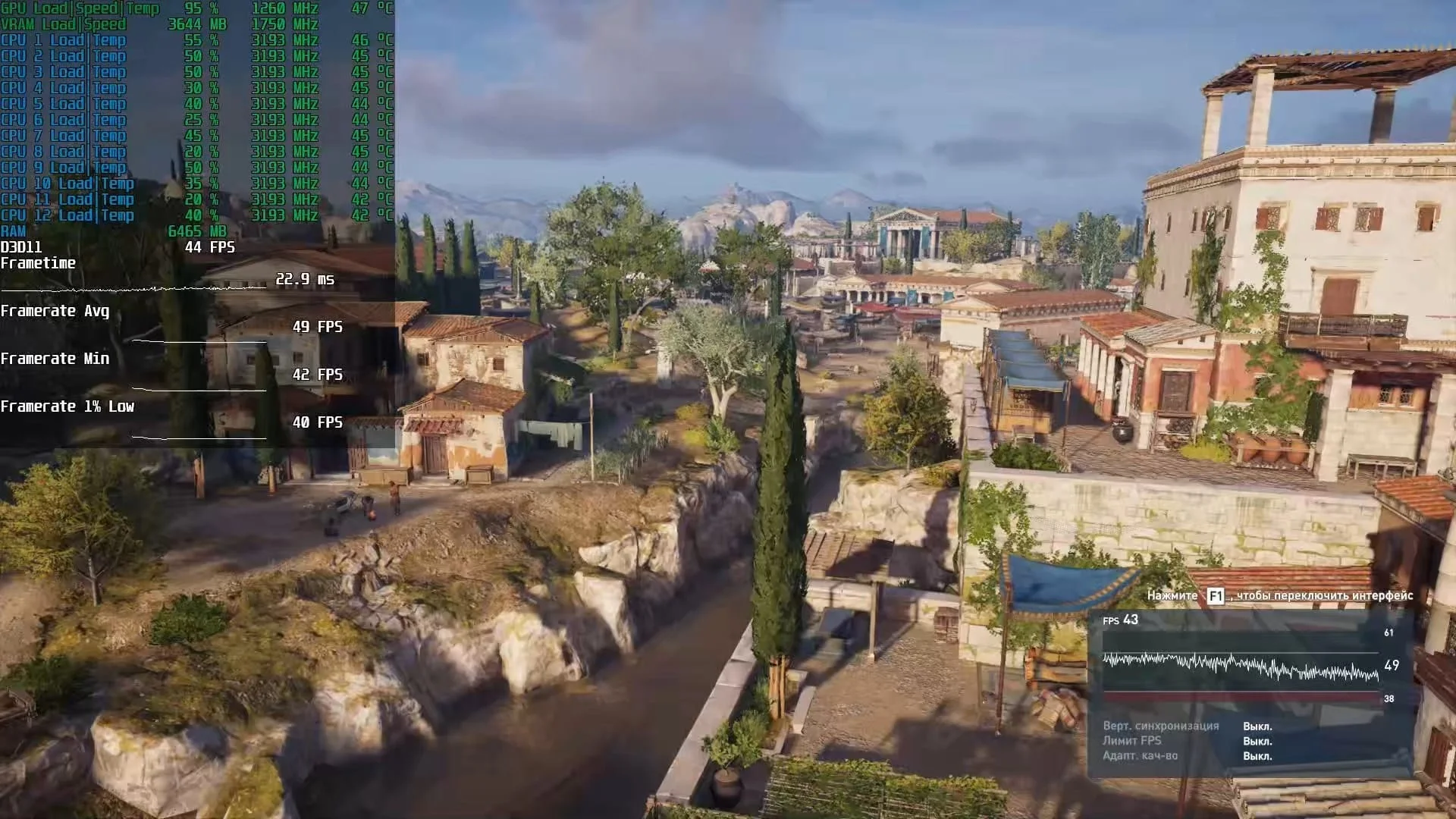
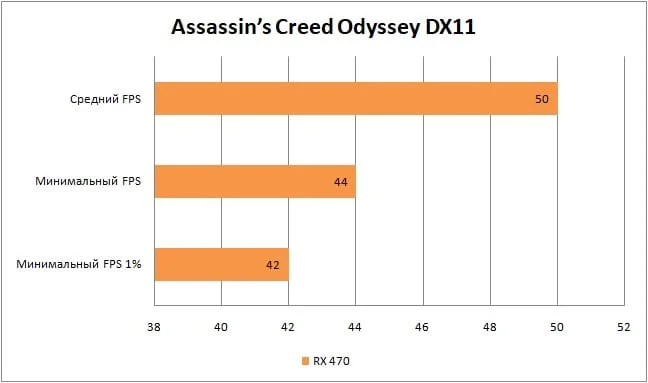
In the latest Assassin's Creed installment, we're getting a perfectly acceptable 50 frames per second at high graphics quality settings. If you need a stable 60 FPS, you'll have to either lower the graphics settings or reduce the screen resolution to 1600x900.
Control
 ⤢ ВІДКРИТИ
 ⤢ ВІДКРИТИ
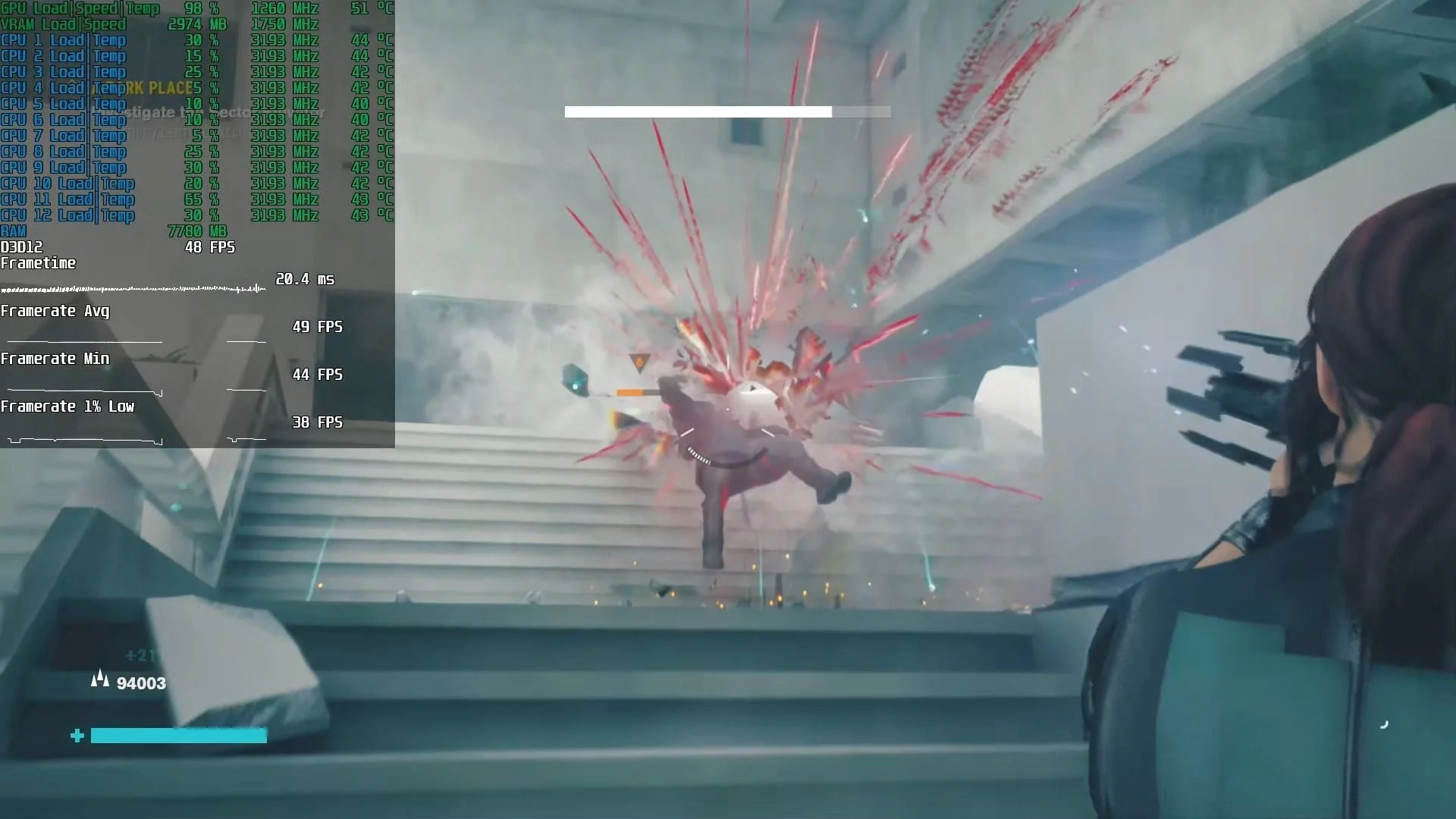
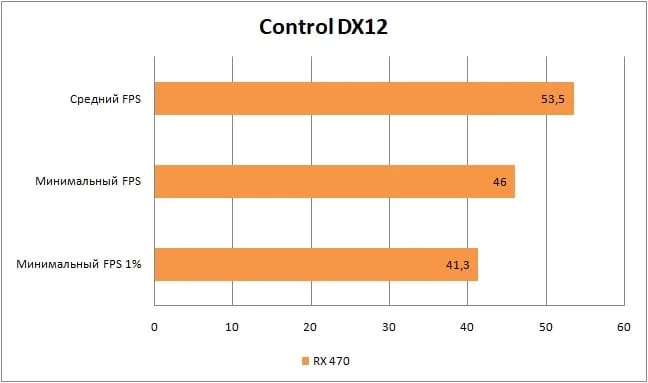
Control averages 53 FPS on medium settings. There are occasional dips to 41 frames, but they don't spoil the gaming experience at all. As I mentioned in my piece on the GTX 670, Remedy Entertainment's "Northlight" game engine is excellently optimized, and games built on it consistently deliver a positive experience: even with relatively low FPS, character and ability controls feel responsive.
CS:GO
In CS:GO, you can confidently set graphics to maximum. During our test session, even the rarest events didn't drop below 90 FPS. However, it's worth noting that in the in-game workshop benchmark, the framerate did dip significantly, hitting an utterly unacceptable 20 frames per second.
But don't take this benchmark as gospel: it generates numerous events that are practically impossible to encounter simultaneously in a single in-game situation.
Destiny 2
 ⤢ ВІДКРИТИ
 ⤢ ВІДКРИТИ
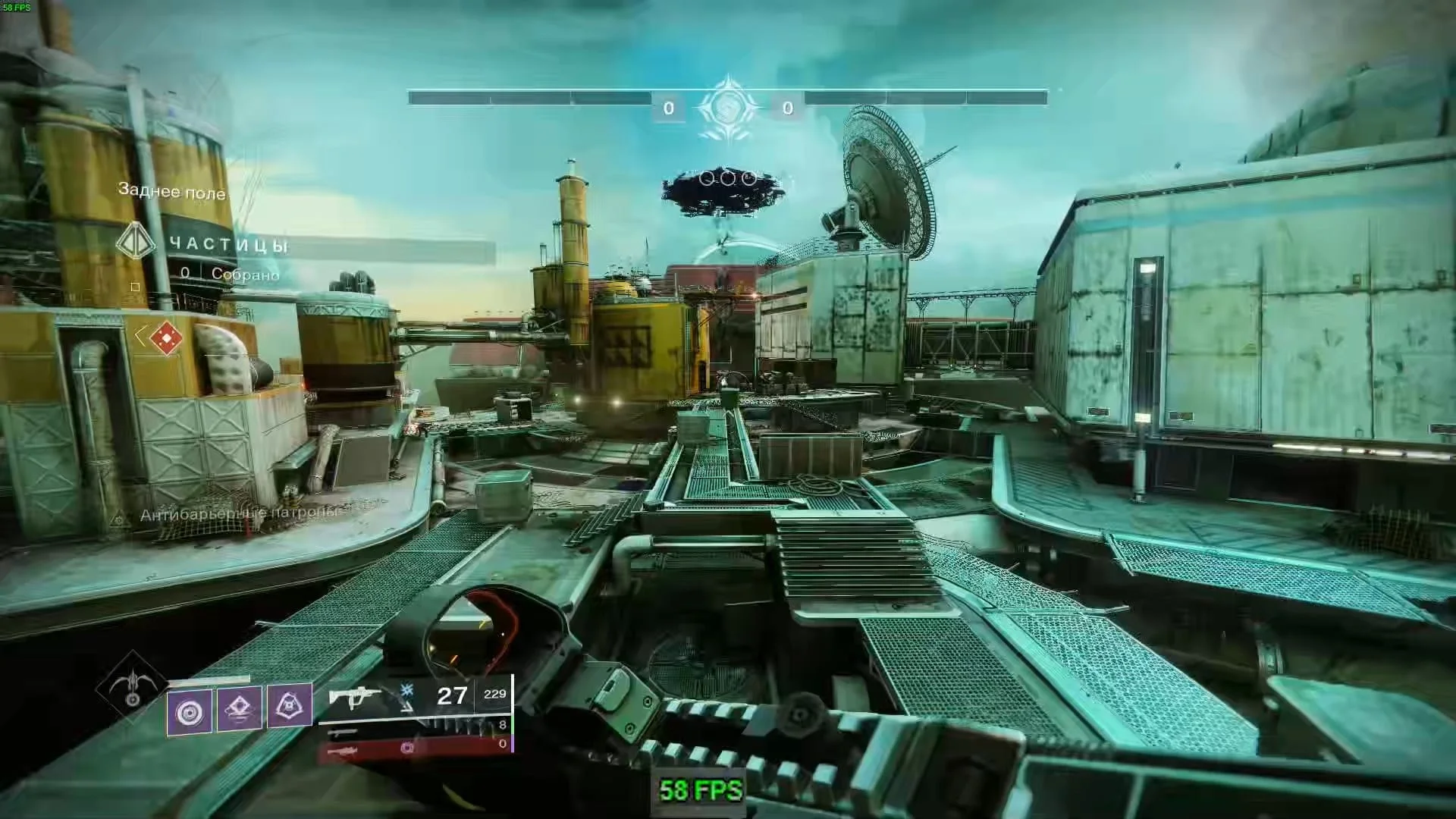
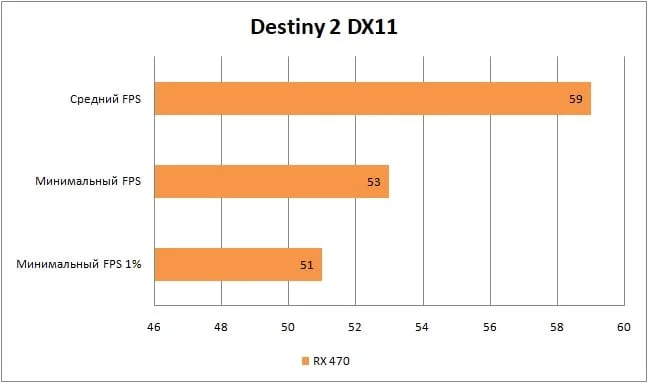
In Destiny 2, we maxed out all settings and achieved roughly the 60 FPS needed for the game. However, it's worth noting that in expansive areas (planets) like the "European Dead Zone" and "Dreaming City," the framerate can drop below 50 frames per second. If you're not satisfied with that FPS, you can lower "Environment detail distance," "Character detail distance," and "Foliage detail distance" to medium or low.
Far Cry 5
 ⤢ ВІДКРИТИ
 ⤢ ВІДКРИТИ
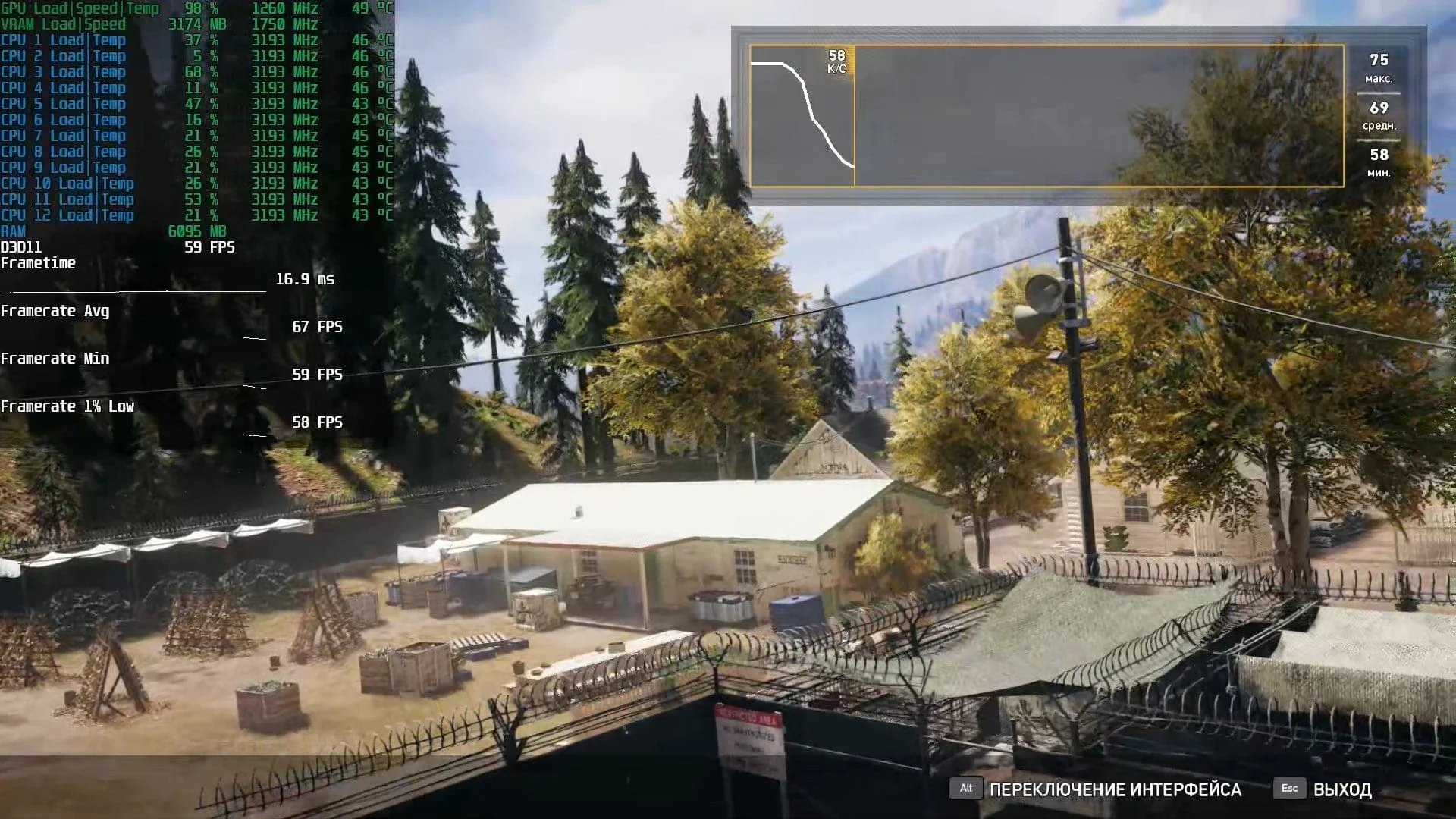
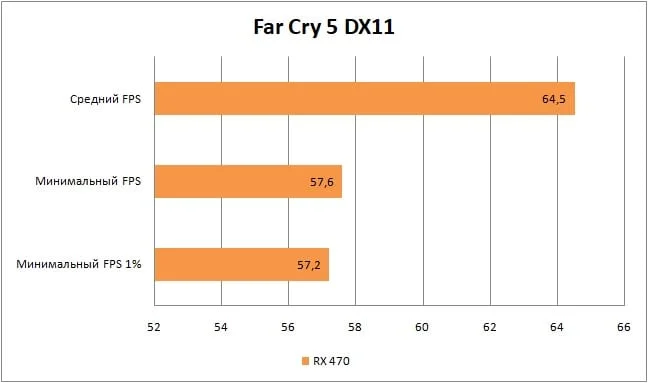
Far Cry 5 isn't much of a problem for the Radeon RX 470: with graphics settings at their highest, we averaged a coveted 60+ FPS, and even 1% lows didn't dip below 57.2 FPS!
For Honor
 ⤢ ВІДКРИТИ
 ⤢ ВІДКРИТИ
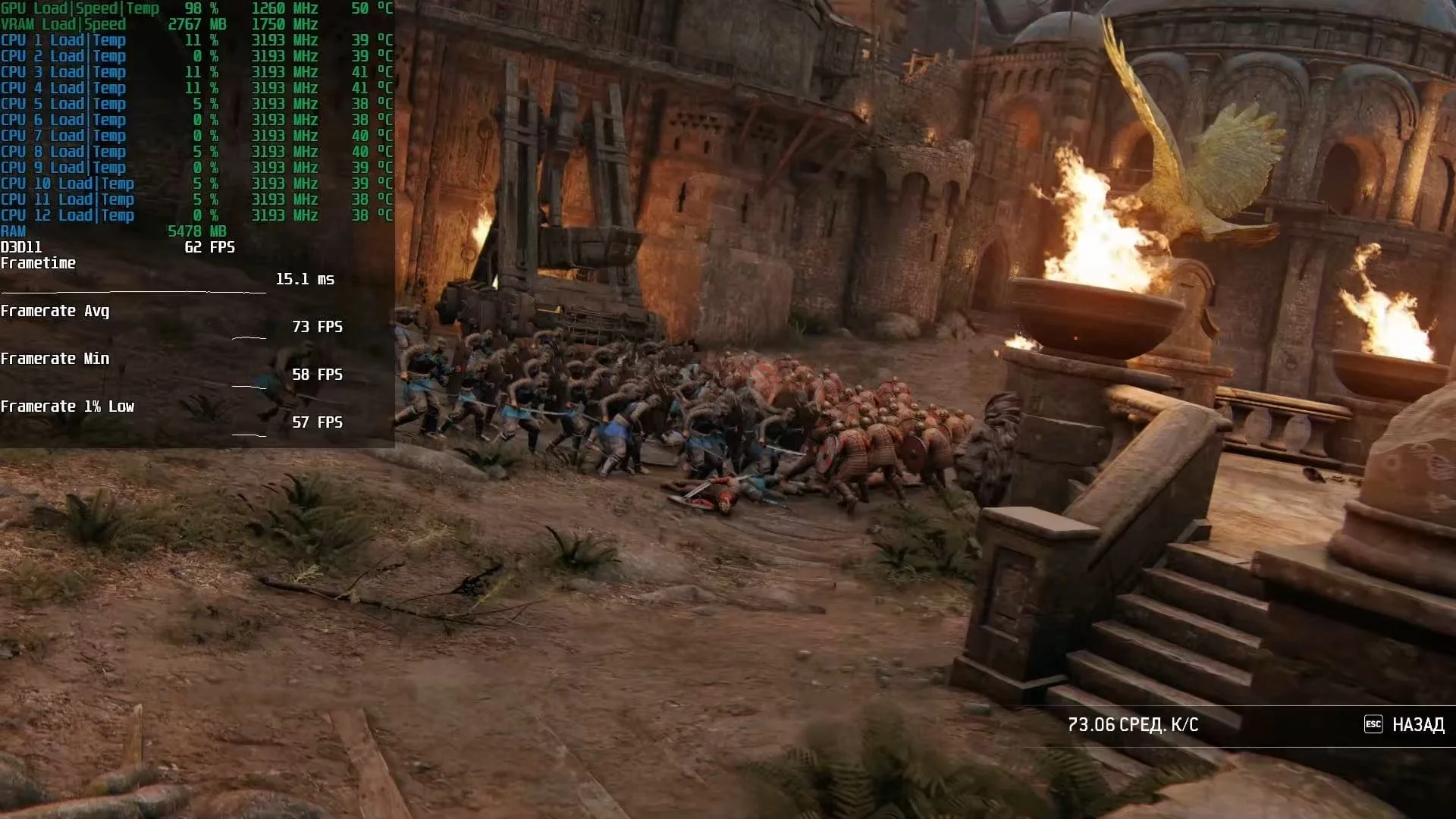
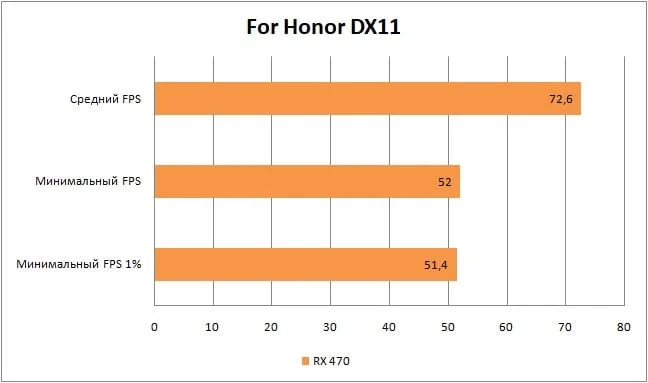
For Honor, as always, greets us with excellent optimization: on very high settings, we average 72 FPS. The minimum framerate is also at a great 52 FPS, and rare events don't drop below 51 at all — which is fantastic.
Fortnite
 ⤢ ВІДКРИТИ
 ⤢ ВІДКРИТИ
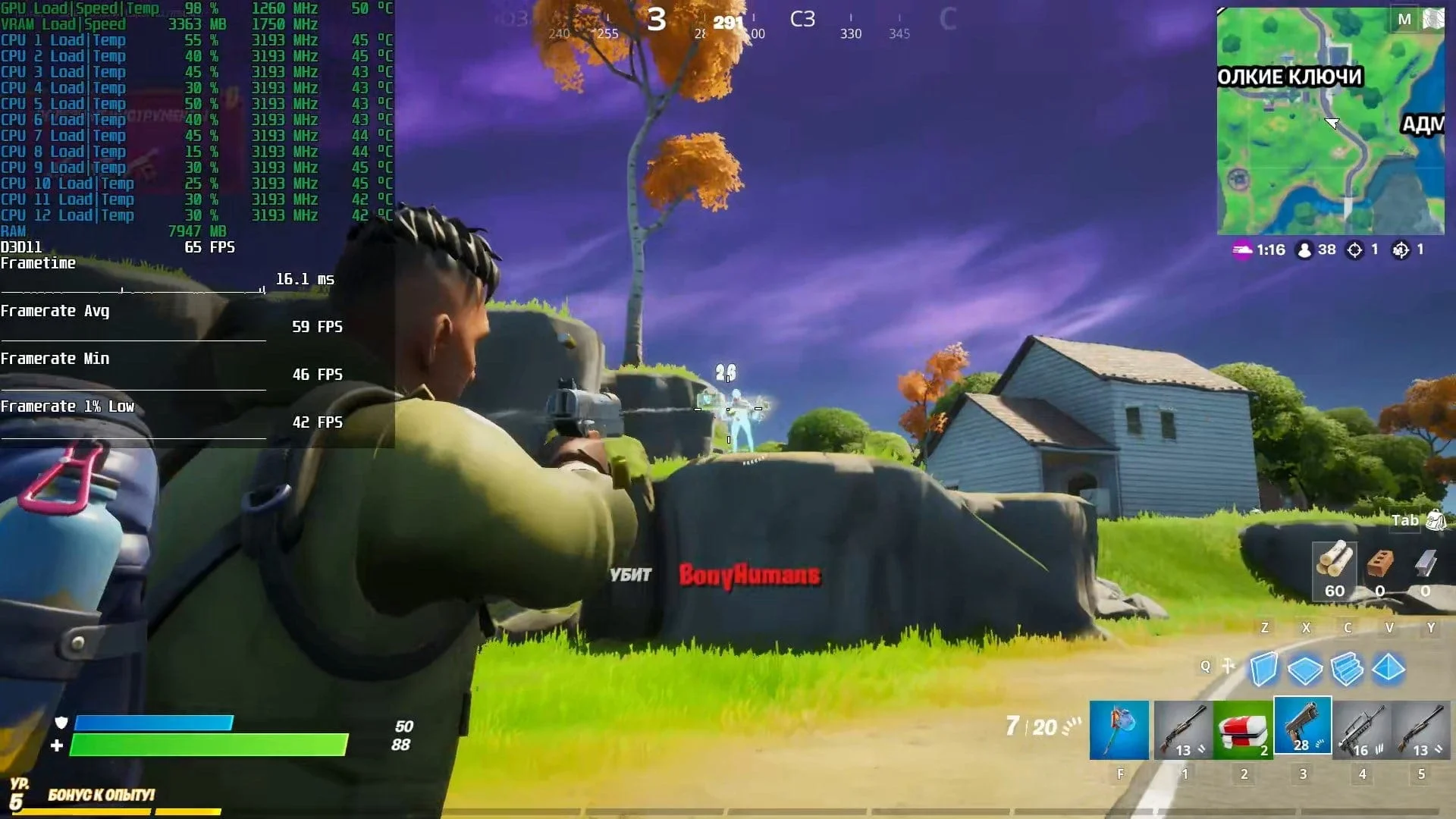
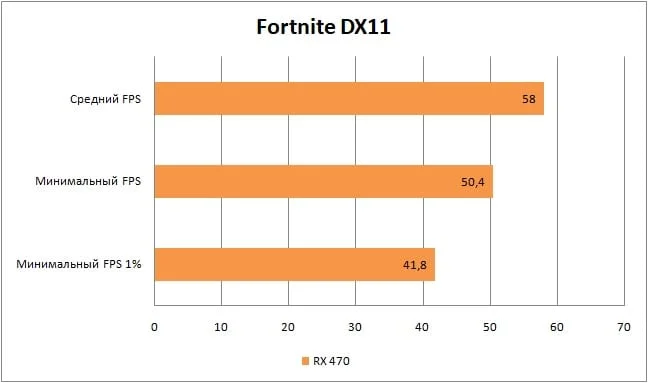
I'll reiterate that in Fortnite, there's little point in looking at the 1% low framerate metric, as it's primarily tied to data loading from the storage drive.
On Epic graphics settings, we're getting an average of 58 frames per second, which overall isn't the best result for a competitive title. However, the game doesn't look particularly appealing, so lowering graphics settings might significantly compromise the final image quality.
Horizon Zero Dawn
 ⤢ ВІДКРИТИ
 ⤢ ВІДКРИТИ
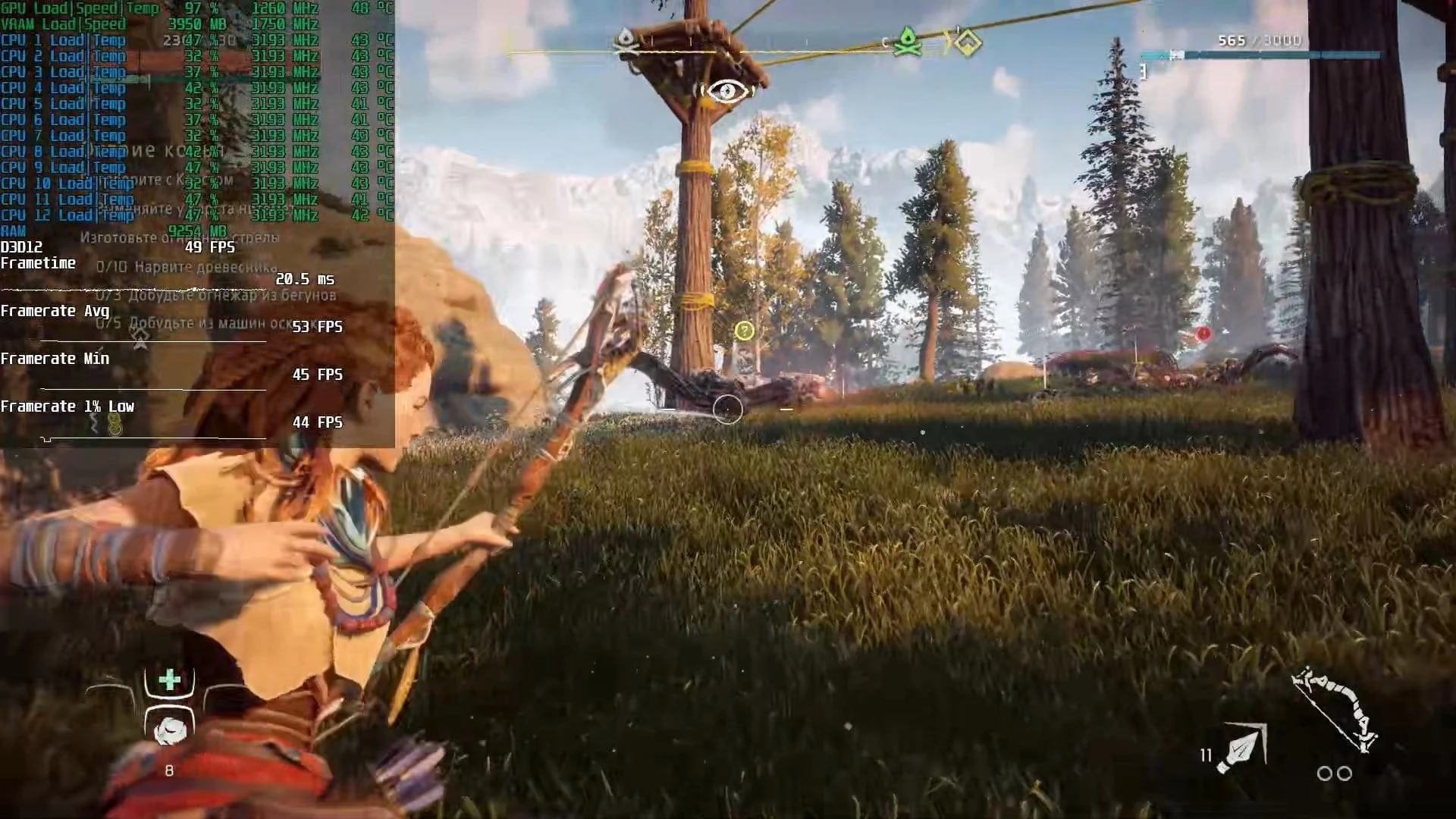
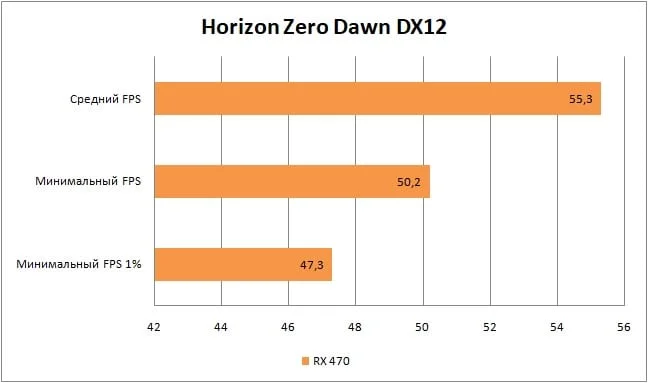
Guerrilla Games' project, Horizon Zero Dawn, quickly had us settle on the "original" graphics settings. According to our information, these parameters match the image quality on the PlayStation 4 console. And with these settings, we're getting a rather unappealing 55 frames per second. Why unappealing? It's simple:
Remember the praise I heaped on Control's engine and its smooth 53 FPS? Well, for comfortable play in Horizon Zero Dawn, 55 FPS just isn't enough. RX 470 owners will either have to lower graphics settings or put up with relatively sluggish controls.
Metro Exodus
 ⤢ ВІДКРИТИ
 ⤢ ВІДКРИТИ
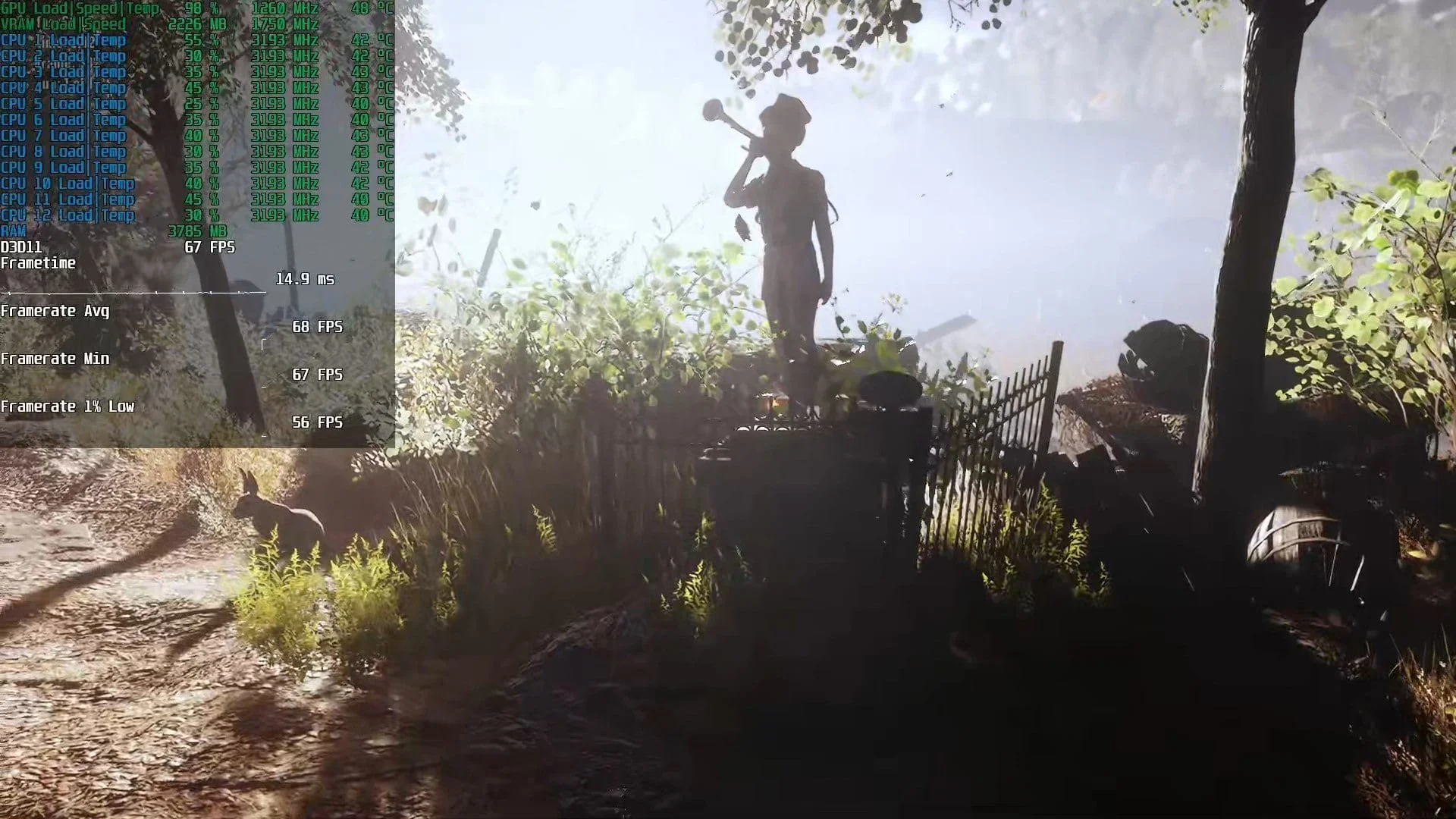
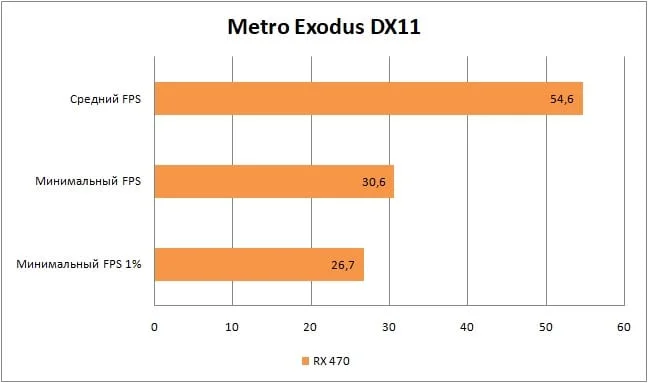
Just like Horizon Zero Dawn, Metro Exodus also runs quite reluctantly on the RX 470, showing an average of 54 frames per second and minimums of 30 FPS, bordering on unplayable.
Red Dead Redemption 2
 ⤢ ВІДКРИТИ
 ⤢ ВІДКРИТИ
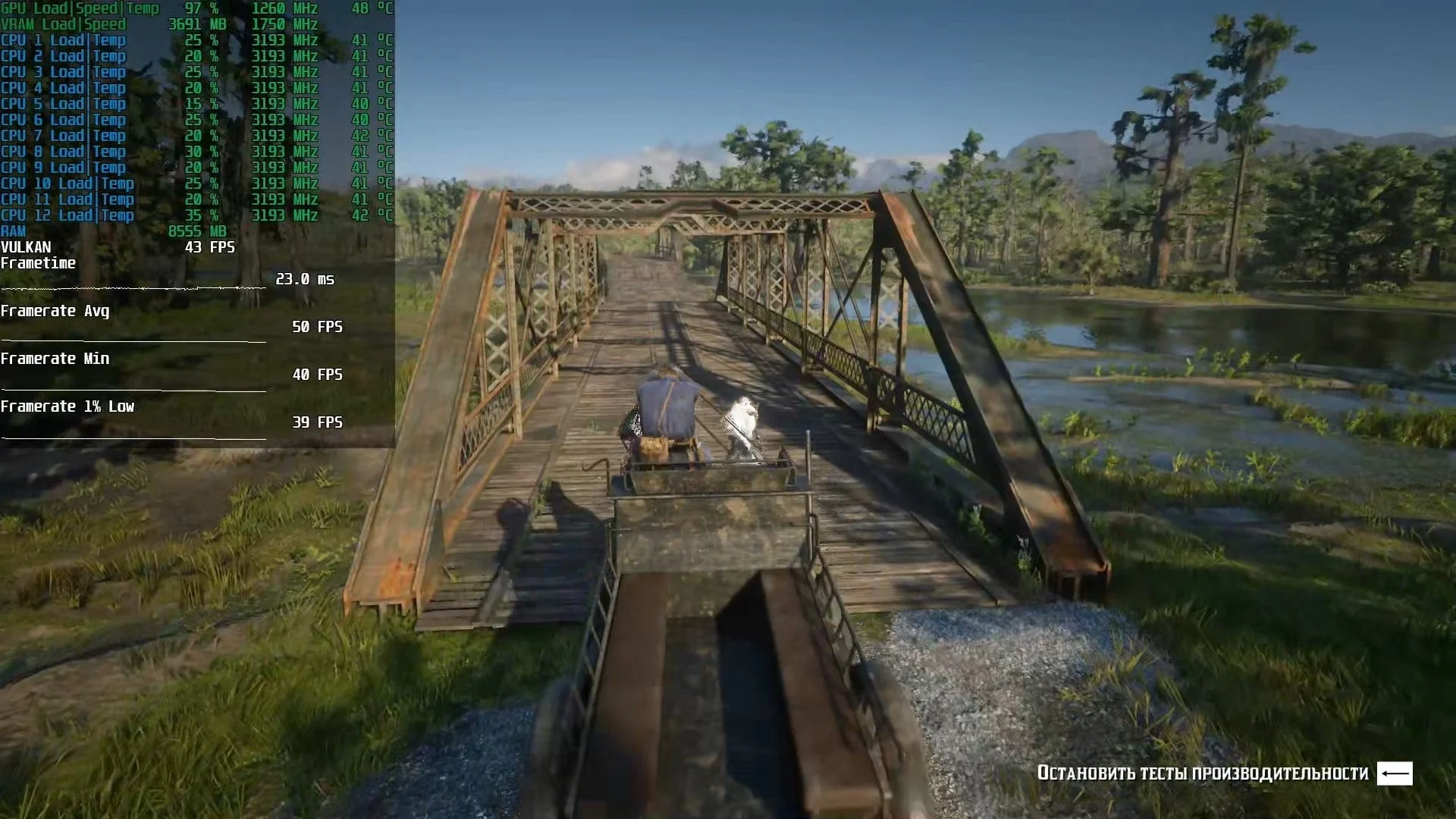
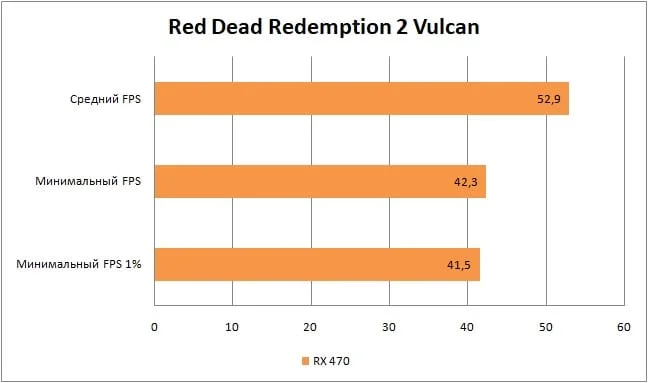
On balanced graphics settings, Red Dead Redemption 2 yields around 52 FPS. While decent, it's still best to lower some parameters further for more responsive controls.
Outer Worlds
 ⤢ ВІДКРИТИ
 ⤢ ВІДКРИТИ
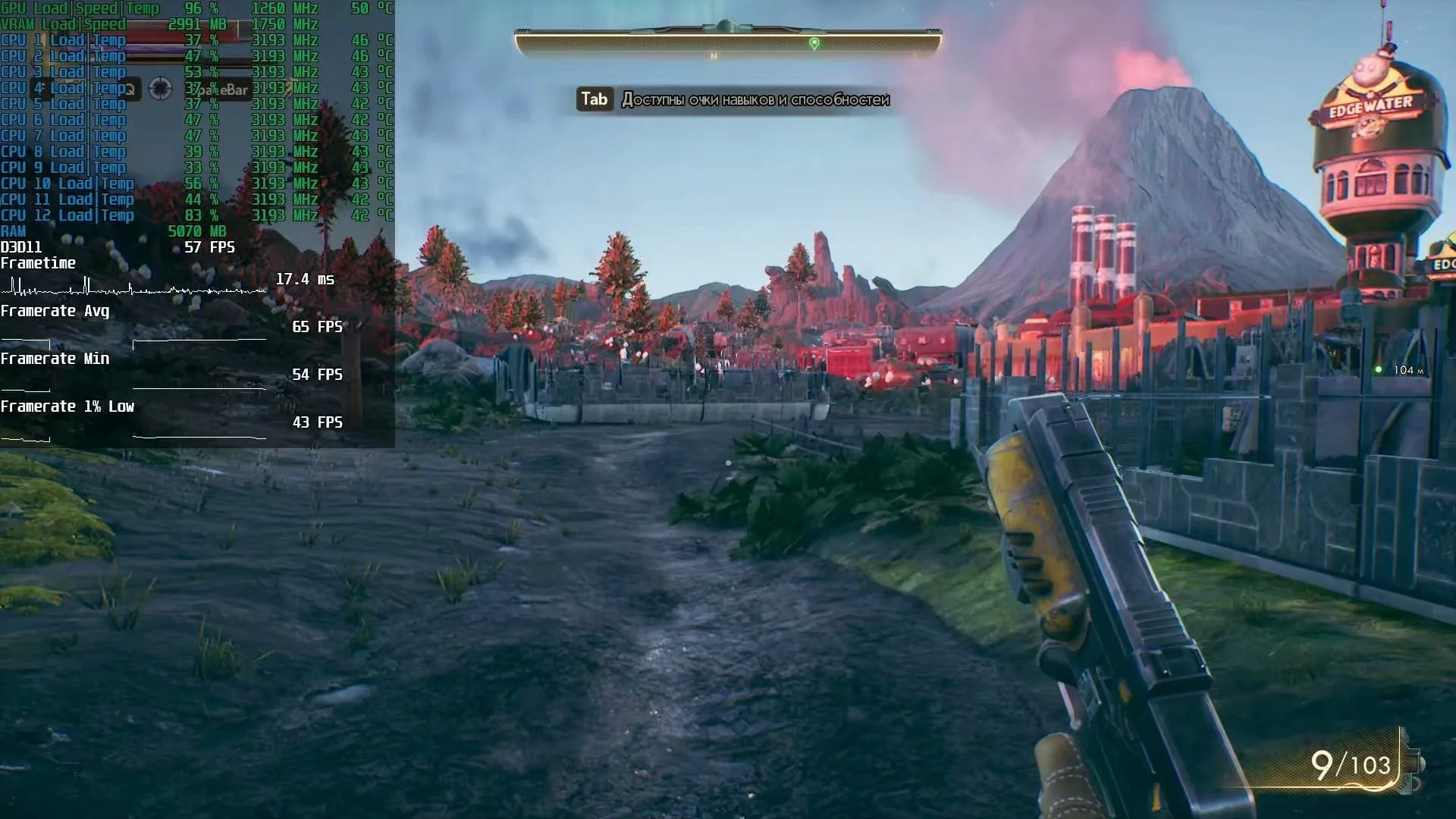
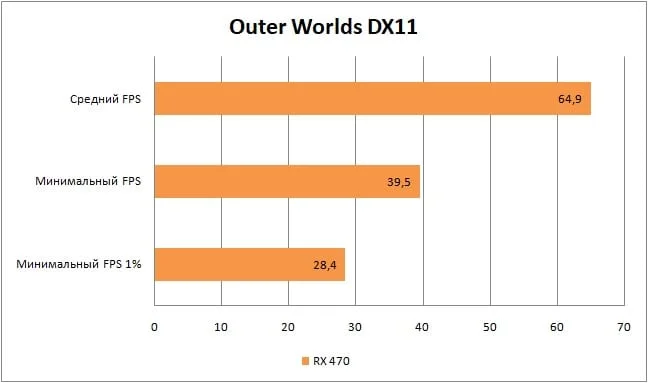
Obsidian Entertainment's creation, however, left a rather unpleasant impression. At high graphics quality settings, we average 64 FPS, but there are clearly noticeable micro-stutters that drop the framerate to 30 in some spots. This is especially evident in and around cities. It seems The Outer Worlds frequently accesses the storage drive for its data. Still, overall, it doesn't significantly hinder gameplay.
Remnant
 ⤢ ВІДКРИТИ
 ⤢ ВІДКРИТИ
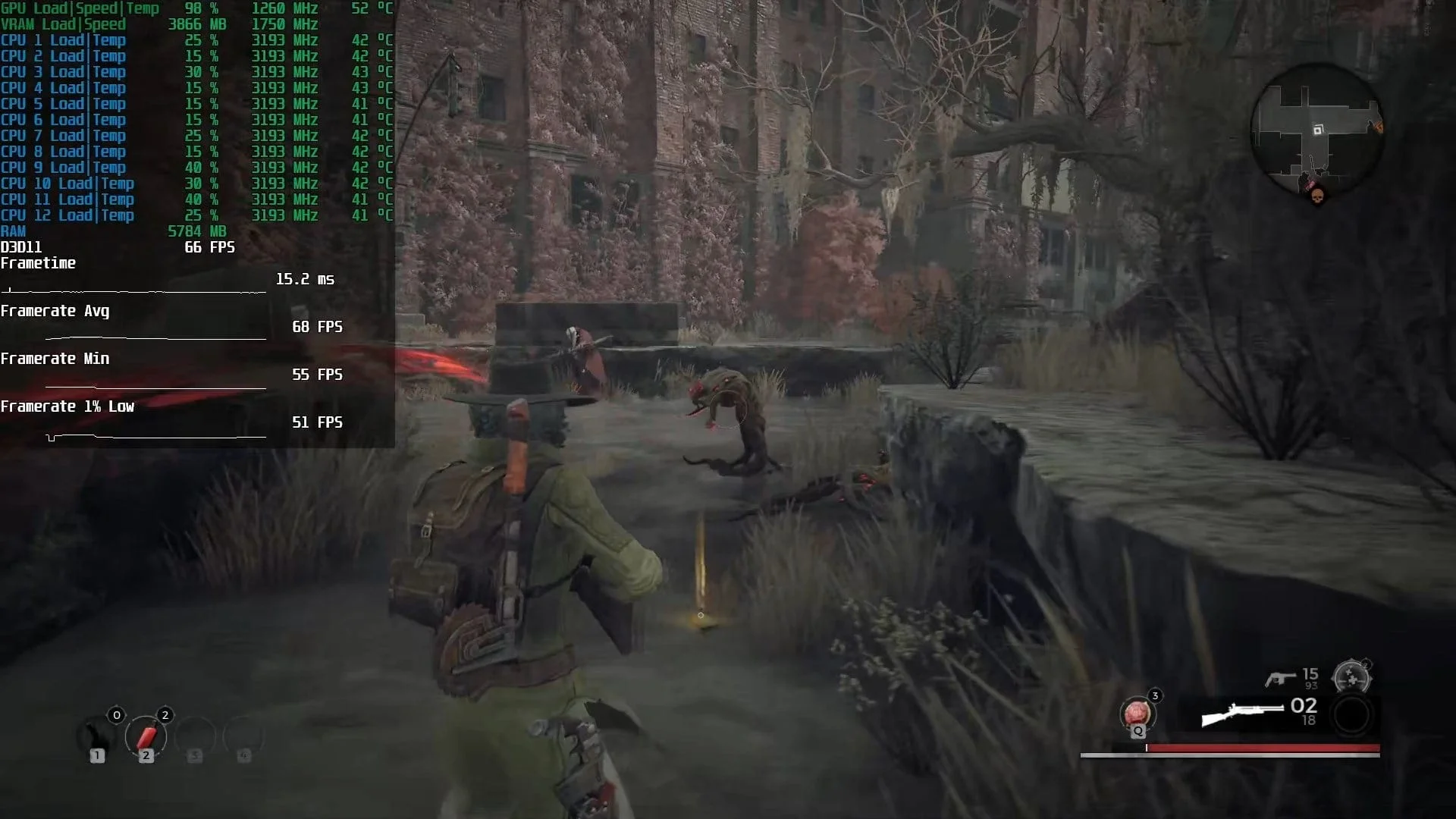
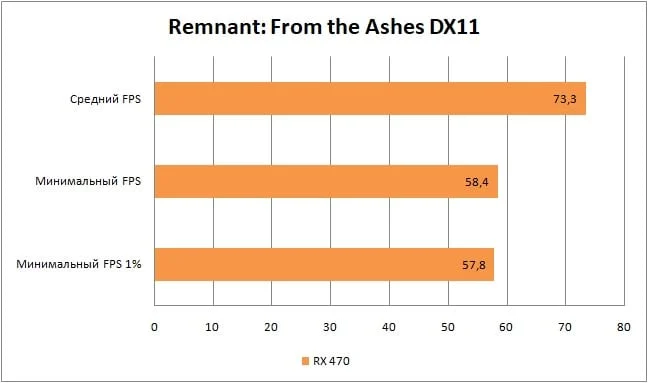
The action RPG Remnant, with its "High" graphics preset, posed no problems for the RX 470. Even during firefights with "stumps," rare events only dropped slightly below 58 frames per second. This performance is more than enough to fully immerse you in one of the best recent Soulslike projects.
The Division
 ⤢ ВІДКРИТИ
 ⤢ ВІДКРИТИ
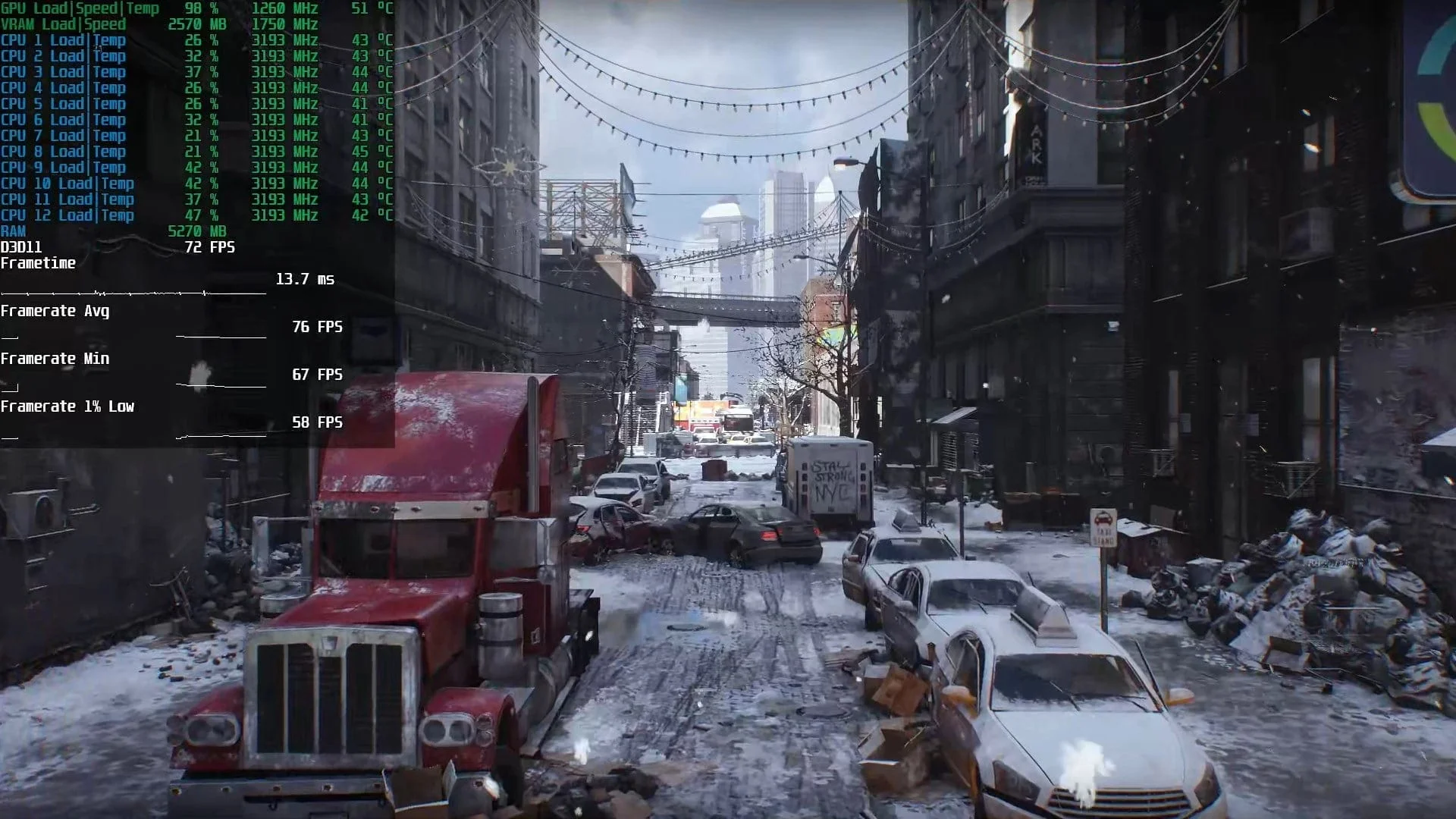
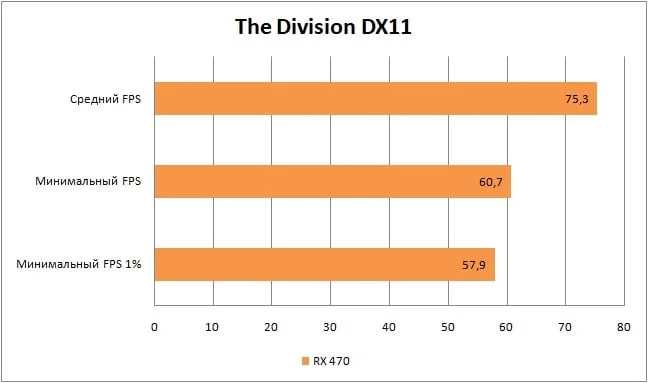
In the first installment of the MMOFPS The Division, the situation is quite positive: with high graphics quality settings, the RX 470 delivers excellent results, rendering an average of 75 FPS!
The Division 2
 ⤢ ВІДКРИТИ
 ⤢ ВІДКРИТИ
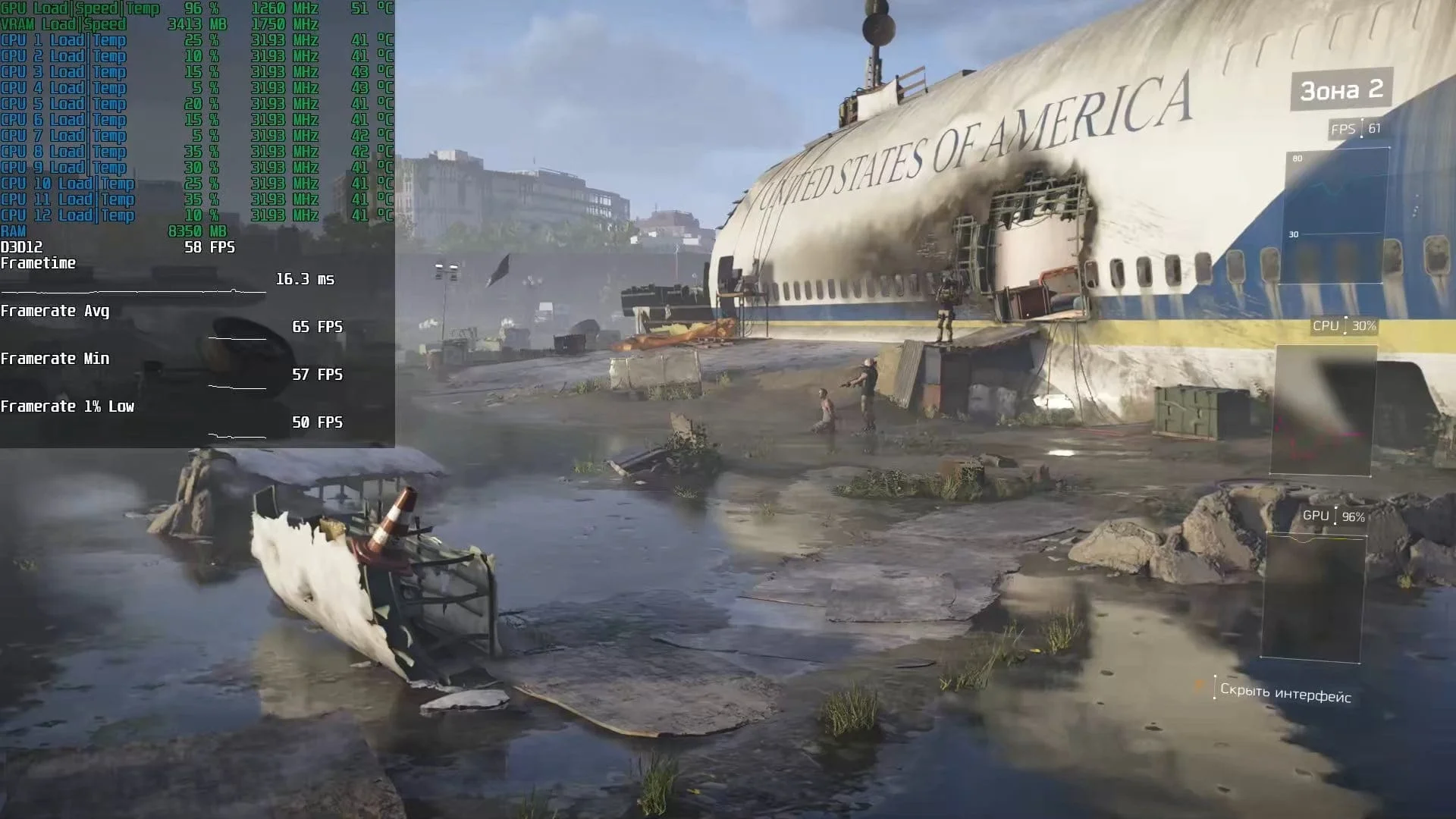
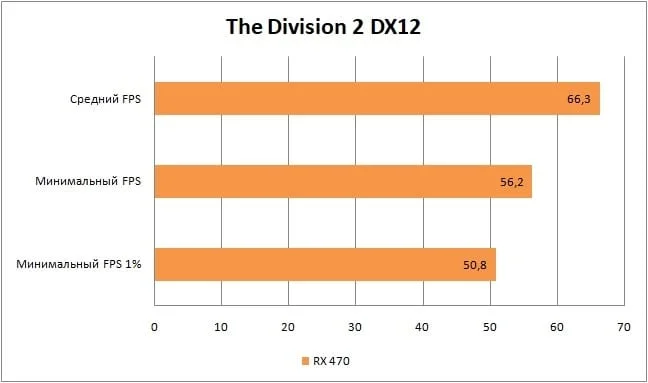
In the next installment — The Division 2 — the average framerate drops slightly to 66 FPS. Still, this is a phenomenal result, as this level of performance ensures you'll have no issues mastering either the game's PvP or PvE content!
Star Wars Jedi: Fallen Order
 ⤢ ВІДКРИТИ
 ⤢ ВІДКРИТИ
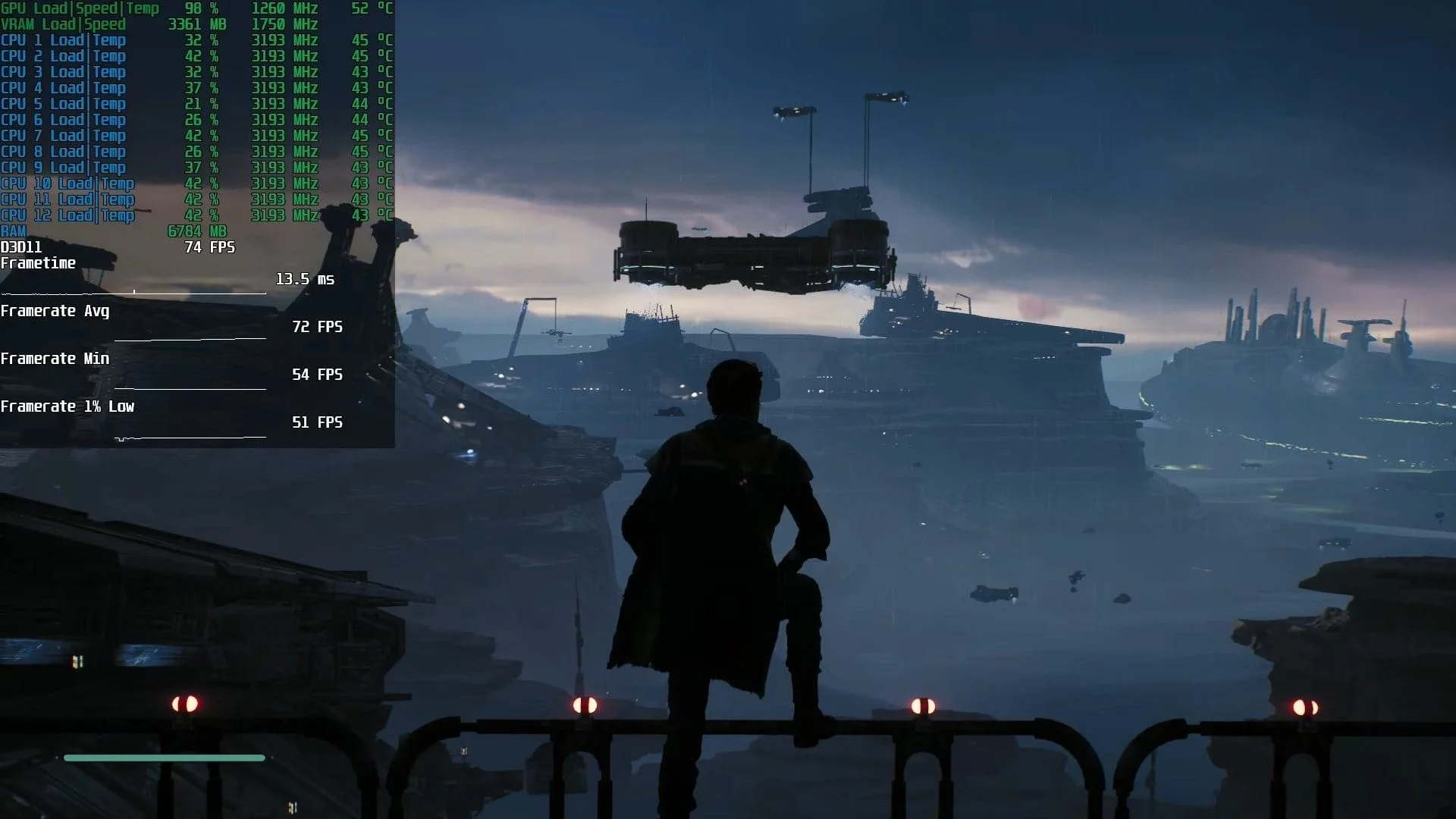
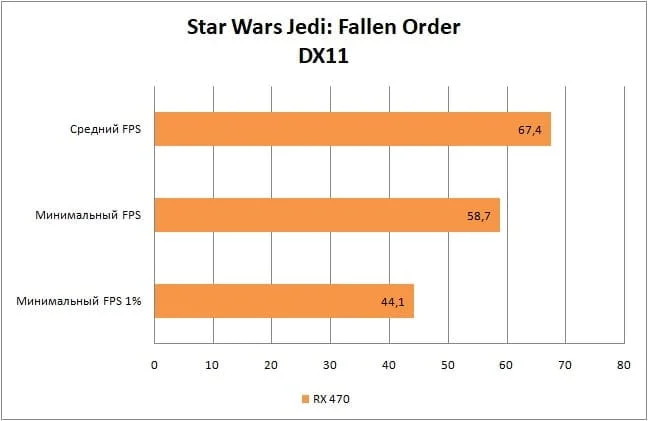
Star Wars Jedi: Fallen Order frequently experiences micro-stutters when a large number of objects load, or during scene transitions. For this reason, conducting a representative graphics card benchmark is quite challenging. Nevertheless, on the starting area, where loading is minimal, we averaged 67 FPS.
Below is a video recording of the Radeon RX 470 graphics card testing across 15 games. Keep in mind that the FPS figures for the charts above were recorded without video capture, which "eats up" some performance. Therefore, the framerate values in the video are slightly lower than those in the charts.
YouTube
By loading, you allow content from YouTube (cookies may be set).
Conclusion
The Radeon RX 470 graphics card managed to deliver comfortable framerates in almost all tested games, often with high, or even maximum, graphics quality. The only exception was Control, where the preset had to be set to medium. However, considering it's a AAA project from last year, I'll give the RX 470 credit for handling medium graphics settings in a relatively recent game.