NEWS · SOFT
PUBLISHED
READING1 min
Rufus 3.16 Beta 2 lets you bypass Windows 11's security to install it on unsupported hardware
Install Windows 11 on unsupported devices with Rufus 3.16 Beta 2. It bypasses TPM, Secure Boot, and RAM requirements (even under 8GB). Download it and select the option.
Rufus is a compact yet quite powerful solution for creating various bootable media. Most users typically use this utility to write Linux/Windows operating system images to flash drives or portable hard drives. It's entirely logical, then, that the program's developer decided to integrate methods for bypassing the highly questionable TPM protection and inflated CPU requirements directly into the utility.
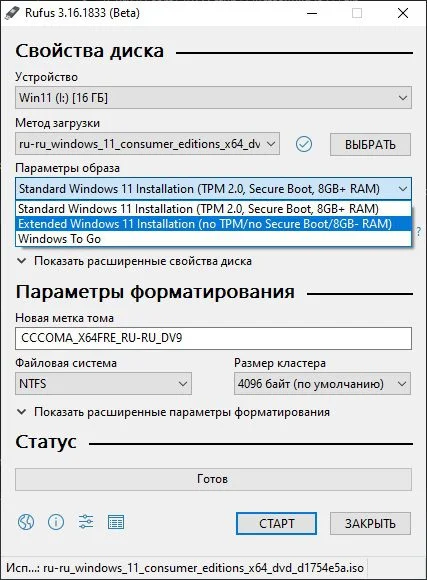
All you need to do is download the latest beta version of the utility (Rufus 3.16 Beta 2 or newer). Then, in the "Image Options" dropdown, select "Extended Windows 11 Installation (no TPM/no SecureBoot 8GB- RAM)" and write the Windows 11 image, downloaded from Microsoft's official website, to your drive.
 ⤢ ВІДКРИТИ
This method disables TPM and SecureBoot checks and also reduces the required RAM for a successful Windows 11 installation to less than 8GB.
You can download the latest beta version of the program from the official Rufus repository on GitHub.