NEWS · SOFT
PUBLISHED
READING2 min
Microsoft publishes official guide for installing Windows 11 on unsupported PCs
Microsoft provides an official method to install Windows 11 on unsupported PCs. The workaround involves a registry modification to bypass TPM 2.0 requirements, though the company warns of potential risks.
Today, Microsoft unexpectedly published a guide on its official website detailing how to bypass Windows 11 installation restrictions on incompatible PCs. To recap, the new OS requires a compatible processor (Core 8000 / Ryzen 2000) and a TPM 2.0 module to run successfully.
Here's how to install Windows 11 on an older PC:
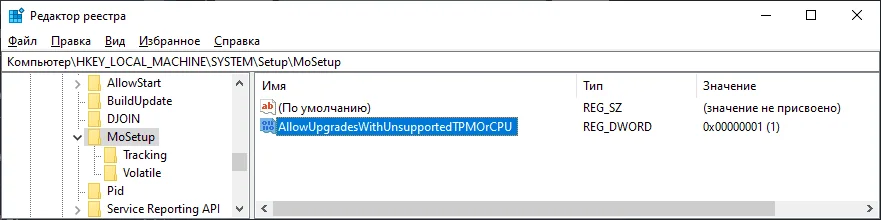
Microsoft doesn't recommend installing Windows 11 on a device that doesn't meet Windows 11's minimum system requirements. If you choose to install Windows 11 on a device that doesn't meet these requirements, and you acknowledge and understand the risks, you can create the following registry key values to bypass the check for TPM 2.0 (at least TPM 1.2 is still required) and CPU family/model. Registry Key: HKEY_LOCAL_MACHINE\SYSTEM\Setup\MoSetupName: AllowUpgradesWithUnsupportedTPMOrCPUType: REG_DWORDValue: 1Note: Serious issues may occur if you incorrectly modify the registry using the Registry Editor or another method. These issues may require reinstallation of the operating system. Microsoft cannot guarantee that these issues can be resolved. Modify the registry at your own risk.
Open the Registry Editor;
Navigate to HKEY_LOCAL_MACHINE\SYSTEM\Setup\MoSetup (If this key doesn't exist, which it might not for most users, create it);
Inside this key, create a DWORD parameter named AllowUpgradesWithUnsupportedTPMOrCPU and set its value to 1.
 ⤢ ВІДКРИТИ
However, proceed with caution! Microsoft representatives warn that any modification to the OS registry can lead to serious problems, even requiring an operating system reinstallation:
Note: Serious issues may occur if you incorrectly modify the registry using the Registry Editor or another method. These issues may require reinstallation of the operating system. Microsoft cannot guarantee that these issues can be resolved. You modify the registry at your own risk.
While the developer notes that these steps won't fully circumvent TPM requirements, they will, fortunately, lower the requirement to version 1.2. This should be ample for installing Windows 11 on most modern systems, as even some older LGA 775 motherboards support TPM 1.2.
Source: Microsoft